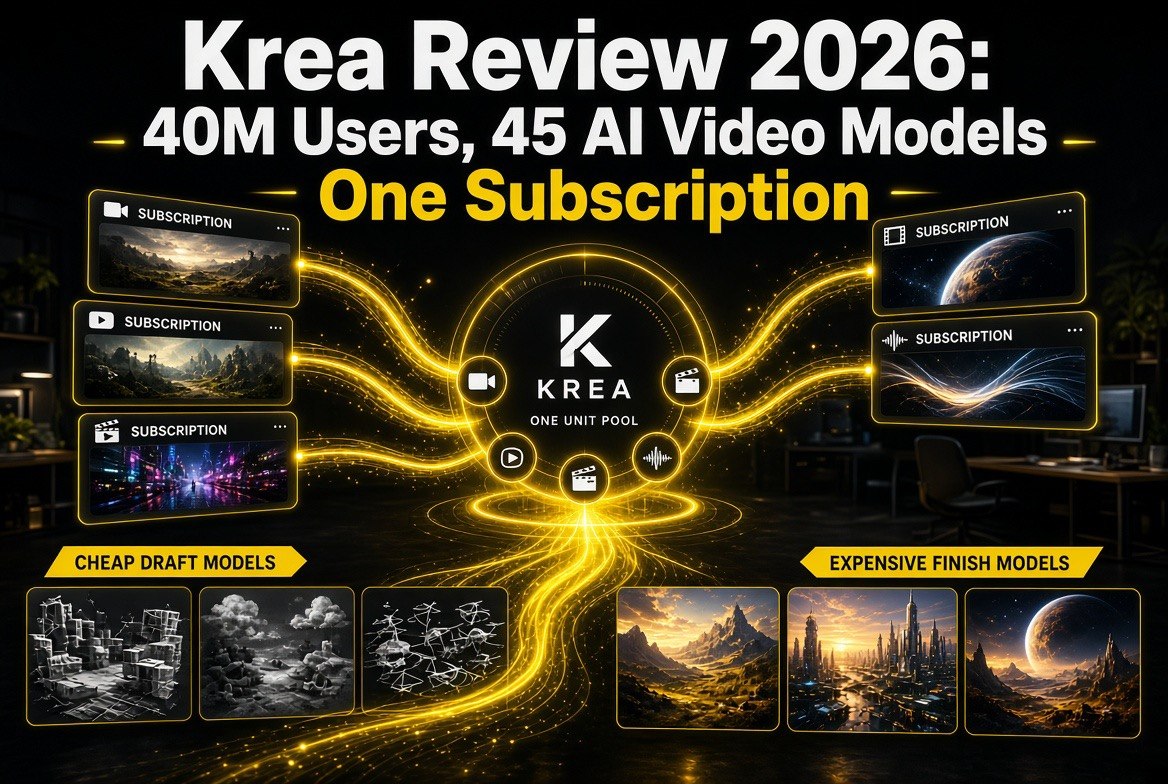
Krea Review 2026: 40M Users, 45 AI Video Models, One Subscription
Get The Faceless YouTube Blueprint — Free
The exact AI tool stack and workflow used to build a faceless YouTube channel from zero.
Krea Review 2026: 40M Users, 45 AI Video Models, One Subscription
⚡ Expert Summary: Krea now sells a single subscription that unlocks more than 45 video models — Kling 3.0, Seedance 2.5, Runway Gen-4.5, Veo 3.1, Grok Imagine 1.5, MiniMax H3, LTX-2.5, Wan 3.0 and the rest — instead of you holding separate accounts on five platforms. The Free tier gives 100 units a day, Basic is $9/month for 5,000 units, Pro is $35/month for 20,000, and Max is $105/month for 60,000, with yearly billing cutting 40% off. The number that actually matters: inside the same Pro plan, an LTX-2.5 Pro clip costs 37 of your 20,000 units while a MiniMax H3 Max clip costs 432. Same money, roughly 12x difference in how many videos you can ship — and almost nobody reads that table before subscribing.
Every solo creator eventually hits the same wall.
You watch a demo. The model is genuinely better than what you’re using. So you sign up, drop a card, and now you’re paying for a second AI video platform. Then a third model drops that beats both, and you’re paying for three. Then you’re not really a creator anymore — you’re a subscriptions manager with a video hobby, paying $150 a month across five dashboards and still not sure which one actually earned its keep.
Krea is the clearest answer to that problem anyone has shipped so far. It is one platform, one login, one allowance of compute units, and a model picker that contains the strongest video generators in the world right now — including most of the models that are otherwise sold to you as a separate $30-to-$95-a-month product. It claims 40 million subscribers, and after using the pricing page as a spreadsheet for an hour, the claim stops looking like marketing.
The interesting part is not that Krea has models. It’s how Krea charges for them. That is where the real decision lives, and it’s where most creators get quietly burned.
What Krea Actually Gives You
Start with the breadth, because breadth is the entire pitch.
The video model list runs from frontier proprietary models to the strongest open-weight releases: Kling 3.0, Kling 3.0 Turbo, Kling o3, Kling o1, Seedance 2.5, Seedance 2.0, Seedance 1.5 Pro, Runway Gen-4.5, Runway Gen-4, Runway Gen-3, Google’s Veo 3.1 family including Lite, Grok Imagine 1.5, MiniMax H3 and H3 Max, Hailuo 2.3, Wan 2.1 through Wan 3.0, Vidu Q2 and Q3, Ray 2 and Ray 3.2, LTX-2.5 Pro and Fast, LTX-2.3 22B, and more. That is not a curated handful. It is close to the entire competitive field of AI video generation sitting behind one dropdown.
That matters beyond convenience. Model quality is not a straight line — it depends on your footage. Kling handles certain motion better. Seedance has a reputation for realism. Veo is strong on physics and camera language. LTX is fast and cheap for iteration. Wan is the open-weight workhorse. If you are subscribed to one model, you make everything with that one model, including the shots it is bad at. With a model picker, you use the right tool per shot, which is how people with actual production budgets have always worked.
Around the generators, Krea has assembled a real production stack rather than a demo toy:
- Krea Agent — you brief it once, and it plans, generates, and iterates across models for you, which removes the “which model do I pick” step entirely.
- Krea Nodes and App Builder — a visual workflow editor where you wire models, prompts, and processing steps together, then save the whole thing as a reusable app you can run again or share.
- Nodes Agent — a natural-language assistant that builds and modifies those workflows for you.
- Video and image enhancement — upscaling, background removal, video style transfer, and image upscaling up to 22K on paid tiers, including Topaz Standard.
- LoRA finetuning — train a model on your own character, style, or product, up to 50 images, so your output stays visually consistent across videos.
- An MCP server — Krea exposes an MCP interface, which means AI agents and coding tools can drive it directly.
- Commercial license on every tier — including free, with bulk discounts on compute packs when you outgrow your monthly allocation.
The LoRA piece deserves a sentence of its own, because consistency is the hardest unsolved problem in AI video for creators. Anyone can generate one beautiful clip. Generating forty clips where the same presenter, product, or art style holds together is what makes a channel look professional instead of assembled. Training a LoRA on your own reference images is the mechanism that gets you there, and having it built into the same subscription as the generators saves you a whole separate toolchain.
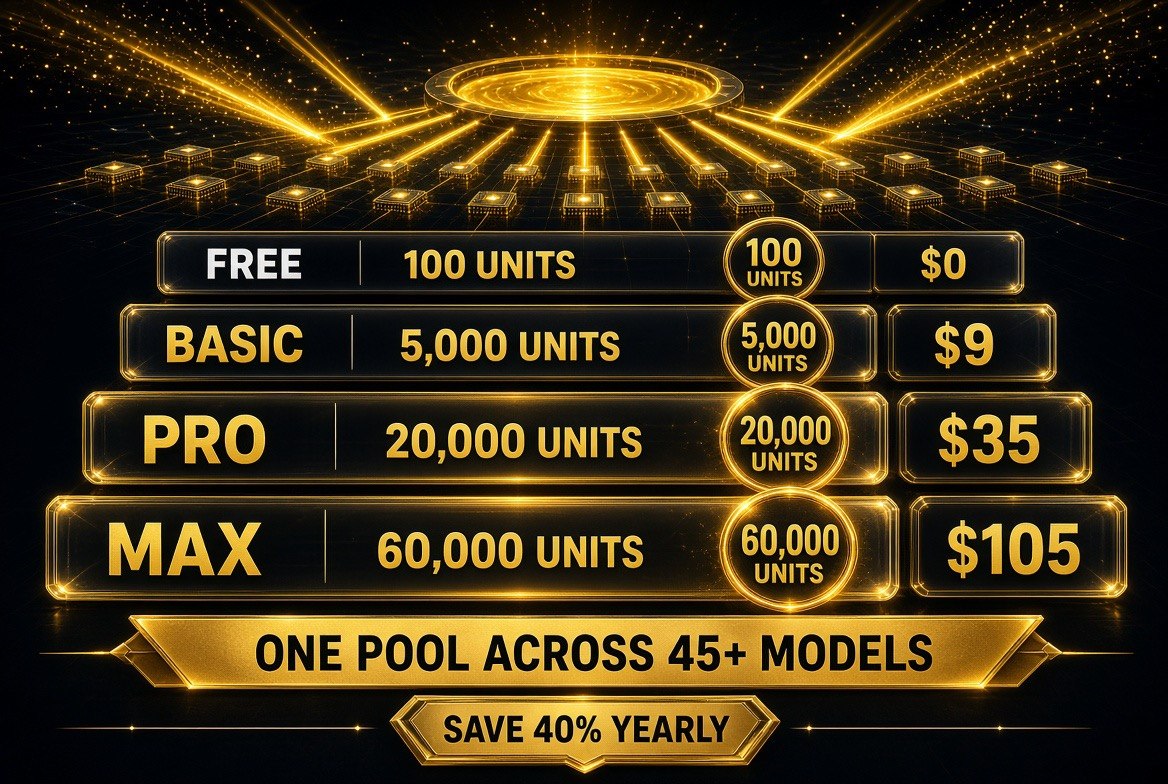
Krea’s four tiers as published. The important detail is not the plan name, it is the unit pool — every plan draws from a single pool of units that all 45+ models share, so a heavy Kling day and a light LTX day come out of the same balance. Free gives 100 units a day, Basic 5,000 units at $9 a month, Pro 20,000 at $35, and Max 60,000 at $105, with yearly billing cutting roughly 40% off every paid tier.
Krea Pricing: The Real Numbers
Here is the published pricing, straight from Krea’s live page as of tonight — including the free tier, which is unusually usable.
| Plan | Units | Monthly | Yearly (per month) | Seedance 2.0 Videos Included |
|---|---|---|---|---|
| Free | 100/day | $0 | $0 | Roughly 5 per day |
| Basic | 5,000/month | $9 | $5 | 20 |
| Pro (most popular) | 20,000/month | $35 | $21 | 83 |
| Max | 60,000/month | $105 | $63 | 250 |
Three things are worth pausing on.
First, yearly billing is a genuine 40% discount, not a rounding error. Pro drops from $35 to $21. Max drops from $105 to $63. If you know you are making video for the next twelve months — and if you run a channel, you are — paying monthly is leaving money on the table.
Second, the free tier is real work, not a teaser. One hundred units a day, every day, with access to all image models, all video models, all 3D and lipsync models, Krea Nodes, App Builder, and a commercial license. At Seedance 2.0 rates that is roughly five short videos a day for nothing. For a creator testing whether AI video belongs in their workflow at all, that is more than enough to find out before spending a dollar.
Third, the unit system is the thing you must understand — and this is where the review earns its keep.
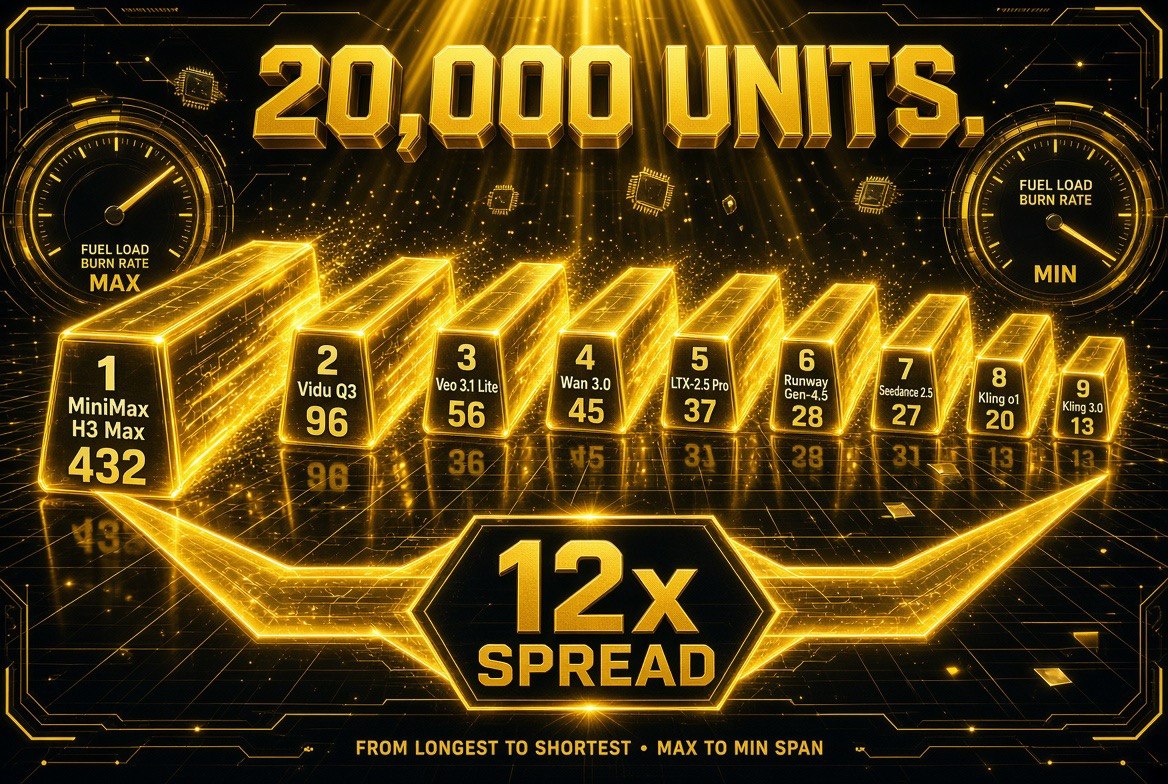
The table nobody reads before subscribing, drawn out. On the Pro plan’s 20,000 units a month, MiniMax H3 Max returns 432 finished videos while LTX-2.5 Pro returns 37 from the exact same balance — roughly a 12x spread between the cheapest and most expensive model in the pool. Your model choice moves your cost per video more than your subscription tier does, which is why the unit burn table matters more than the price list.
The Unit Burn Table Nobody Reads Before Subscribing
Krea does not price per video. It prices in compute units, and different models consume wildly different numbers of them. Krea publishes exactly how many videos each model yields on each plan, and the spread between the cheapest and most expensive model is enormous.
This is the comparison that should decide which model you reach for on a given day.
| Video Model | Videos on Basic ($9) | Videos on Pro ($35) | Videos on Max ($105) |
|---|---|---|---|
| MiniMax H3 Max | 108 | 432 | 864 |
| Vidu Q3 | 96 | 385 | 771 |
| Veo 3.1 Lite | 56 | 225 | 450 |
| Wan 3.0 | 45 | 180 | 360 |
| Hailuo 2.3 Fast | 35 | 142 | 284 |
| Runway Gen-4.5 | 28 | 112 | 225 |
| Seedance 2.5 | 27 | 109 | 219 |
| Seedance 2.0 | 20 | 83 | 166 |
| Kling o1 | 20 | 80 | 160 |
| Kling 3.0 | 13 | 53 | 107 |
| LTX-2.5 Pro | 9 | 37 | 75 |
Read the Pro column out loud and the problem becomes obvious. Your $35 buys you 432 MiniMax H3 Max videos or 37 LTX-2.5 Pro videos. Same subscription. Roughly a twelvefold difference in output volume, purely from which model you clicked.
For a creator, that has a direct workflow consequence. The professional pattern is to iterate cheap and finish expensive. Block your shot with a high-yield model — MiniMax H3 Max at 432 videos, Vidu Q3 at 385, or Veo 3.1 Lite at 225 — get the composition, timing, and camera direction right. Then spend a handful of expensive units — LTX-2.5 Pro at 37, Kling 3.0 at 53 — on the take you actually ship. Do it in the other order and you burn a month of Pro in a single afternoon of experimenting.
There is a second trap hiding in this table: newer is not cheaper, and cheaper is not worse. Wan 2.6 yields 13 videos on Basic while Wan 3.0 yields 45 — the older-numbered model is roughly three times more expensive to run, because it is a different architecture, not a different generation. Seedance 2.0 Fast yields 26 on Basic against 20 for standard Seedance 2.0, so the fast variant is both quicker and cheaper per clip. These are the details that determine whether a $9 plan lasts you a week or a month, and they are published — just not surfaced in any marketing screenshot.

The honest split. Krea collapses real friction — 45+ models, one login, one shared balance — and that is worth paying for. What it does not do is replace the three things that actually decide whether a channel works: your edit, your taste, and your script. The models get cheaper and faster every quarter, and the creators who compound are the ones using the time saved on the parts no subscription can supply.
Where Krea Wins and Where It Does Not
An honest review has to say when the platform is the wrong choice, so here it is.
Krea wins clearly if you are currently paying for two or more AI video tools, because consolidating onto one subscription at $21 a month yearly almost certainly costs less than what you are paying now while giving you strictly more models. It also wins if your output depends on visual consistency across a channel, since LoRA finetuning plus a commercial license on every tier solves a problem that would otherwise cost you a separate tool. And it wins if you want to build repeatable pipelines — Nodes and App Builder turn your workflow into a reusable app rather than a set of manual steps you redo by hand every upload.
Krea is the wrong choice if you need a deep, per-model command of one platform’s advanced features. A creator who has spent a year mastering Kling’s fine-grained controls, or who relies on a specific model’s native API for programmatic batch generation, may find the consolidated interface shallower than the specialist tool they already know. If your workflow is “one model, all day, deep settings,” consolidation buys you breadth you will not use. It is also the wrong call if you need enterprise-grade volume pricing or dedicated support, where Krea’s own Enterprise tier is the conversation rather than the self-serve plans.
The other consideration is that a unit system asks you to be a little more deliberate than a flat-rate tool. If you would rather not think about which model you pick, the Krea Agent path exists precisely for that — hand it the brief, let it choose and iterate. But the creators who get the most out of Krea are the ones who glance at the yield table once, internalize which models are cheap drafts and which are expensive finishes, and then never think about units again.
The Bottom Line for Solo Creators
AI video has been drifting in one direction for two years: more models, each one good at something different, each one wanting its own subscription. That was always going to consolidate, and Krea is the clearest example of what consolidation looks like when it is done properly — 45-plus video models, plus image, 3D, lipsync, upscaling, and LoRA training, behind one allowance that starts free and costs $21 a month yearly at the practical tier.
The practical path is straightforward. Start on the free tier and confirm that AI video actually fits your channel — you get a hundred units a day and full model access, which is more than most paid trials give you. When you outgrow it, take Pro yearly at $21 a month, because the 40% annual discount is the whole reason the plan is priced the way it is. Then read the yield table once, before your first session, and decide deliberately which models are your drafting workhorses and which two or three are reserved for finished shots.
The subscription is not the decision. The model choice inside it is. Krea’s own numbers show a twelvefold difference in output depending on which button you press — and the creators who understand that are the ones who ship daily instead of rationing credits.
Frequently Asked Questions
How much does Krea cost in 2026?
Krea has four self-serve tiers. Free gives 100 units per day at no cost with access to all image, video, 3D and lipsync models plus a commercial license. Basic is $9 per month or $5 per month billed yearly for 5,000 units. Pro is $35 per month or $21 yearly for 20,000 units, and Max is $105 per month or $63 yearly for 60,000 units. Yearly billing saves 40%.
How many AI video models does Krea include?
More than 45 video models are available under one subscription, including Kling 3.0, Kling 3.0 Turbo, Kling o3, Kling o1, Seedance 2.5, Seedance 2.0, Seedance 1.5 Pro, Runway Gen-4.5, Runway Gen-4, Veo 3.1 and Veo 3.1 Lite, Grok Imagine 1.5, MiniMax H3 and H3 Max, Hailuo 2.3, Wan 2.1 through Wan 3.0, Vidu Q2 and Q3, Ray 2 and Ray 3.2, LTX-2.5 Pro and Fast, and Flux video models.
What are Krea units and why do different models cost different amounts?
Krea charges in compute units rather than per video, and each model consumes a different number of units. On the Pro plan, MiniMax H3 Max yields 432 videos while LTX-2.5 Pro yields only 37 — roughly a twelvefold difference from the same subscription. The practical workflow is to iterate with high-yield models and reserve expensive ones for final shots, since using an expensive model for drafting can exhaust a month of units in one session.
Is the Krea free plan actually usable for creators?
Yes. The Free tier provides 100 units per day with no credit card required, and includes access to all image models, all video models, all 3D and lipsync models, real-time image generation, Krea Nodes, App Builder, the Nodes Agent, limited LoRA training on up to 50 images, image upscaling up to 2K, early access to new features, and a full commercial license. At Seedance 2.0 rates that is roughly five short videos per day at no cost.
Can Krea keep characters and styles consistent across videos?
Yes, through LoRA finetuning. Creators can train a LoRA model using up to 50 images to personalize generation with their own characters, styles, or products, then reuse it across videos so that a presenter, product, or visual identity stays consistent between uploads. This runs inside the same subscription as the video models rather than requiring a separate tool.
Should solo creators consolidate multiple AI video subscriptions into Krea?
If you currently pay for two or more AI video platforms, consolidating is usually cheaper: Pro costs $21 per month billed yearly and includes more than 45 video models plus image, 3D, lipsync, upscaling, and LoRA training. It is a weaker fit for creators who need deep advanced controls in one specific model, programmatic API access to a particular model, or enterprise volume pricing and dedicated support.

About Barak Schurr
Barak Schurr is a serial entrepreneur who built and exited a major ticketing platform before turning his attention to AI and content. He runs three AI-focused research sites and writes about the tools, workflows, and strategies that let solo creators build real channels — without a crew, a studio, or a Hollywood budget.
Email: [email protected]
More AI Video Resources