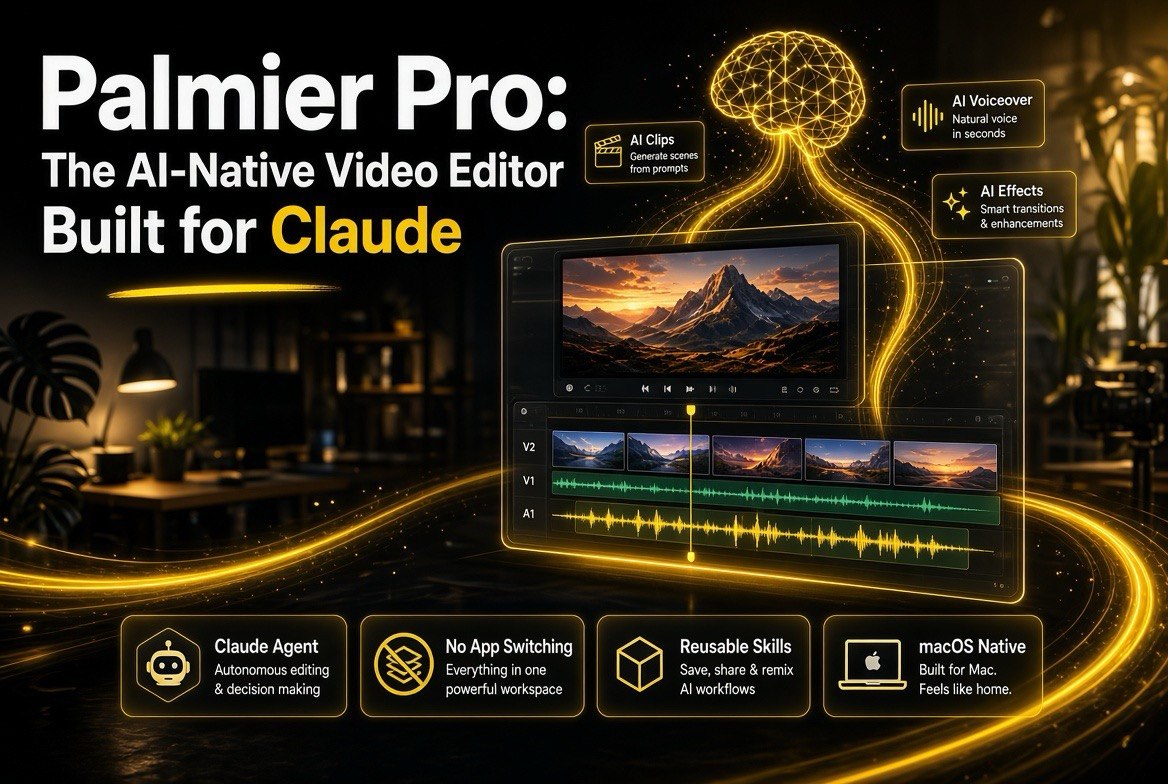
Palmier Pro: The AI-Native Video Editor Built for Claude
Get The Faceless YouTube Blueprint — Free
The exact AI tool stack and workflow used to build a faceless YouTube channel from zero.
Palmier Pro: The AI-Native Video Editor Built for Claude
⚡ Expert Summary: Palmier Pro is a macOS video editor built from the ground up to be operated by AI. Backed by Y Combinator and downloaded 100K+ times, it lets you automate editing by hooking up Claude or Codex, and it generates images, video, voiceovers, and music directly on the same timeline you edit. Instead of moving files between five tools, you tell an AI agent to build the edit, review it, and trim the result in a real editor. For creators producing recurring formats — ads, social clips, series — this collapses the production pipeline into one workspace.
What Is Palmier Pro?
Palmier Pro is a video editor “built for AI” — a native macOS application (requires macOS 26 Tahoe) designed so that AI agents can operate it end to end. It is backed by Y Combinator and has been downloaded more than 100,000 times by creators, editors, agencies, and production teams. The core idea is simple: instead of treating AI as a helper bolted onto a traditional editor, Palmier makes the AI the primary operator and gives you a real editor for the finish work.
The tool is best understood in three layers. First, it integrates AI generation directly into the timeline — you can create images, video, voiceovers, music, sound effects, dubs, and upscales in the same project rather than juggling separate tools. Second, it exposes an MCP server so agents like Claude, Cursor, and Codex can open a project, inspect it, and make edits. Third, it is still a full nonlinear editor (NLE) with trimming, text, keyframes, and color grading when you want to take over the cut yourself. For our readers getting started with AI video production, the AI video tools hub covers the wider landscape this fits into.
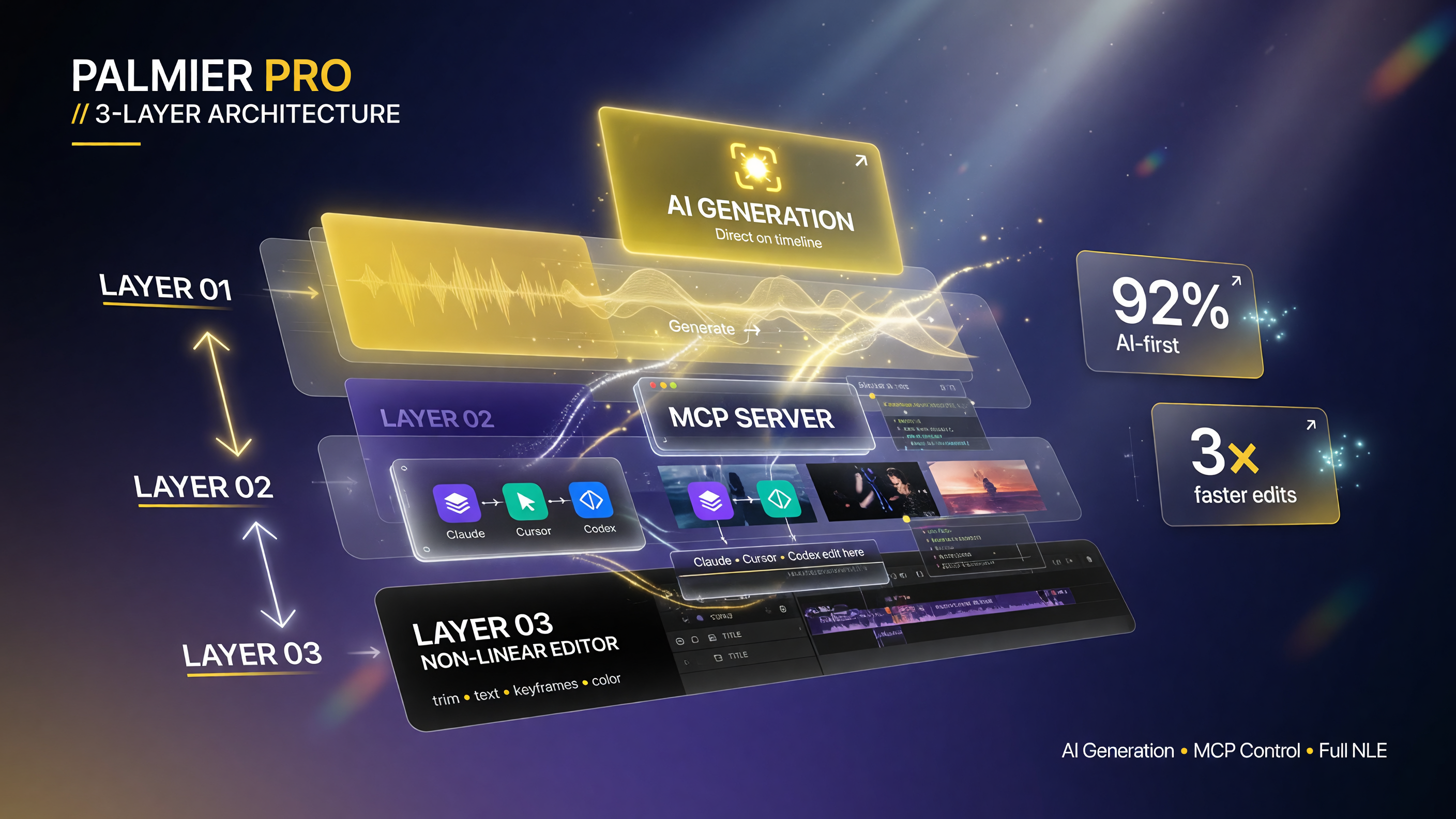
Palmier stacks three capabilities in one project: AI generation lands directly on the timeline, an MCP server lets Claude, Cursor, or Codex open and edit the project, and a full non-linear editor handles trimming, text, keyframes, and color when you take over the cut.
What makes Palmier distinct from the packaged “generate a clip” websites is where the generation happens. The model does not hand you a downloaded file to rebuild elsewhere — the output lands on your timeline, ready to trim, compare, and combine with your own footage.
How the “Teach How to Edit” Workflow Works
The headline workflow Palmier pushes is teaching the AI how you edit, and it is worth understanding because it is the part that saves recurring time. The idea: make one version of a video with Claude or Codex driving the edit, save that process as a reusable Skill, then run the same Skill on the next video. This works well for recurring clips, ads, and other formats where the rules stay mostly the same from video to video.
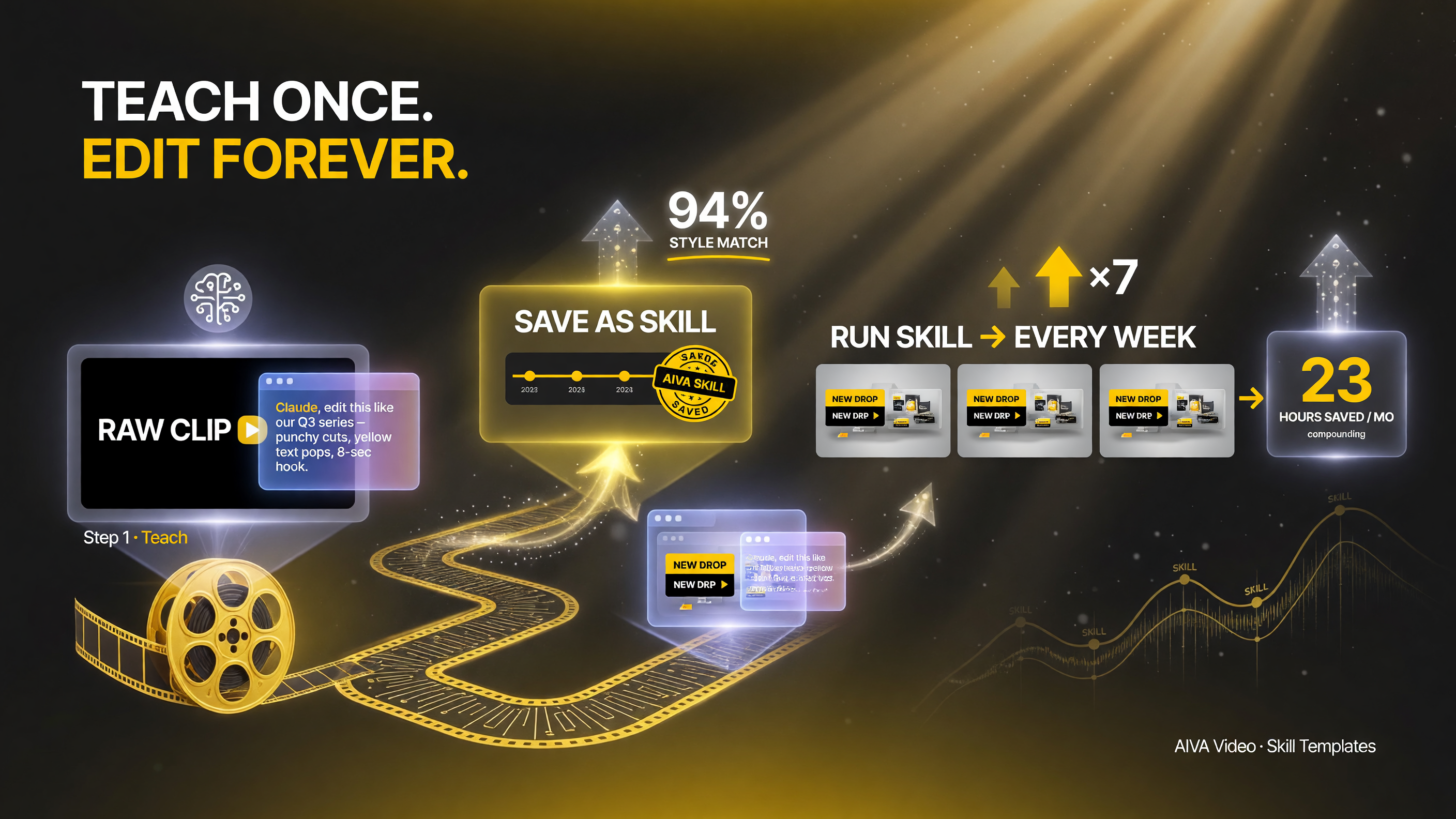
Teach the AI your edit style once, save it as a reusable Skill, and every next video starts from that template instead of a blank project — where recurring time savings compound.
Practically, that means your editing style becomes a repeatable template. If you produce a weekly ad or a recurring product showcase, you define the process once — the pacing, the cuts, the text overlays, the color grade — and then each new video starts from that saved Skill instead of a blank project. For channels with a consistent format, this is where the time savings actually compound, because the AI learns your conventions rather than starting fresh every time.
This is also the honest limit to set expectations: the Skill encodes your rules, so it works best on formats you repeat. A one-off, heavily art-directed project still needs your hands on the timeline, which is exactly why Palmier keeps a full NLE underneath.
One Workspace for Every AI Generation Model
Palmier’s positioning is that “the video editor is the natural place where AI generation models should live.” Instead of generating an image in one tool, a voiceover in another, and a video in a third, then importing each piece, you generate everything inside the project. The result lands on the timeline, ready to trim.
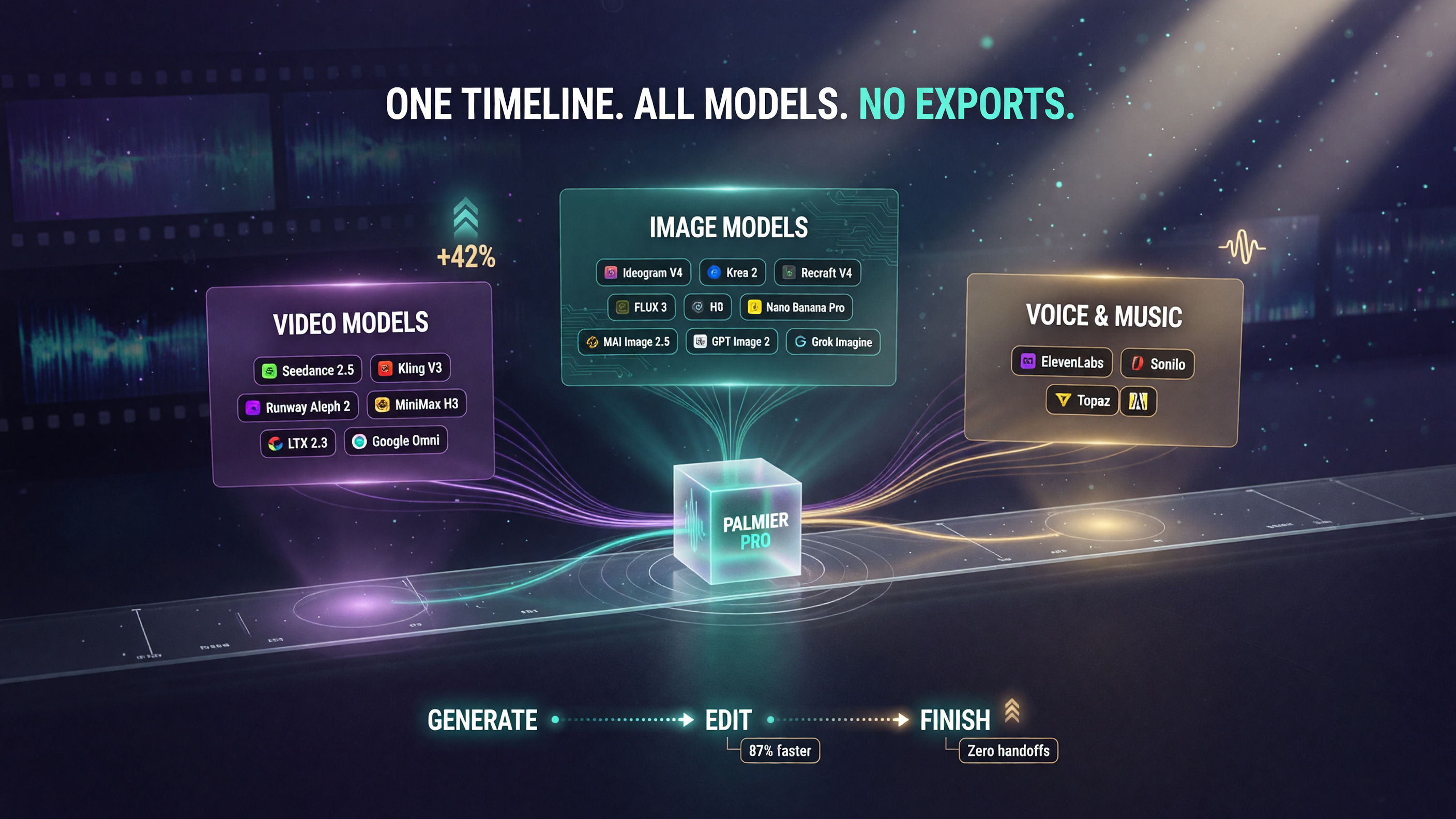
Palmier routes dozens of generation models — from Seedance, Kling, and Runway for video to Ideogram, FLUX, and GPT Image for images, plus ElevenLabs for voice — all into one timeline, so assets land ready to edit instead of moving between five different tools.
The platform integrates with a broad set of leading generation models across image, video, and audio. Here is the extent of what is wired in:
| Category | Integrated Models | What It Enables |
|---|---|---|
| Video Generation | Seedance 2.5, Kling V3, Runway Aleph 2, MiniMax H3, LTX 2.3, Google Omni | Create clips on the timeline from prompts |
| Image Generation | Ideogram V4, Krea 2, Recraft V4, FLUX 3, Nano Banana Pro, MAI Image 2.5, GPT Image 2, Grok Imagine | Create stills and assets without leaving the project |
| Voice & Music | ElevenLabs, Sonilo, Topaz | Voiceovers, dubs, music, sound effects, upscales |
The practical benefit is eliminating the file-transfer step that slows most AI video pipelines. When every element of a cut lives on one timeline, the feedback loop is shorter: generate, look, trim, regenerate, compare — all in place. For a solo creator, that is meaningful; for an agency running many iterations, it removes a whole category of friction.
The Full NLE Underneath the AI
It would be easy to assume a tool this focused on AI skips the actual editing. It does not. Palmier is a full nonlinear editor with the standard toolkit: trim clips, add text, set keyframes, color grade, and finish the cut by hand. The AI handles the first pass, but you keep control for the parts that need judgment.
When you need to hand the project to specialized software, Palmier does not lock you in. You can export XML for Premiere Pro, DaVinci Resolve, or Final Cut, which is the pragmatic escape hatch when a project outgrows what one editor should do. And for final delivery, you can render H.264, H.265, or ProRes depending on the target platform’s requirements.
How the MCP Integration Works (the Claude Piece)
The integration that sets Palmier apart is its MCP server. MCP, or Model Context Protocol, is the standard that lets AI agents talk to tools. Palmier’s local MCP server lets Claude, Cursor, and Codex inspect a project and make edits on the timeline. You use your existing agent subscription — there is no separate AI bill — and you can review or undo any edit the agent makes inside Palmier.
This is the key architectural difference from the generation websites. In a typical AI video site, the AI produces a finished clip and your job is to download it. In Palmier, an agent operates the editor itself: open a project, build a timeline, make the edits, and export — meaning the whole production pipeline can run end to end without you babysitting each step. You step in to review, correct, and polish.
Pricing and What Credits Cover
Understanding the pricing model helps you decide whether the tool fits. Palmier separates two costs:
| Component | Model | Notes |
|---|---|---|
| The editor + MCP connection | Free | You use your own Claude/Cursor/Codex subscription |
| Generation credits | Credits-based | Cover image/video/audio generation, upscaling, cloud transcription, Palmier chat |
That division is worth calling out because it means the AI agent automation itself is free in the app — the cost lives in the generation credits and in whatever you already pay your agent provider. So the financial question is not “is the editor expensive” but “how much generation will my workflow actually consume,” which you can estimate from your current volume before subscribing.
Privacy: What Palmier Does With Your Content
Privacy is a fair question for any tool that an AI agent can open your projects. Palmier states clearly that it does not train AI models on your videos or project data — neither Palmier’s own models nor third-party AI models. That is a meaningful reassurance for creators who work with client footage or unreleased content. As always, if you handle sensitive material, confirm the specific terms for your account tier and region, but the default position here is that your content is not used as training data.
Who Should Consider Palmier Pro
A useful fit checklist for the kind of operator this site serves:
- Creators with recurring formats: Strong fit — the Skill system is built for ads, series, and social clips with repeatable rules.
- Editors who want AI as a first pass: Strong fit — the AI builds the rough cut, you finish it in a real NLE with Premiere/DaVinci/Final Cut export.
- Agencies managing many iterations: Strong fit — generation on the timeline plus agent-driven edits scale better than file shuffling.
- Creators already paying for Claude/Cursor/Codex: Good fit — you reuse that subscription instead of paying a separate AI markup.
- Creators on Windows or older macOS: Not a fit — this is macOS 26 Tahoe native; no web-only or Windows version is described.
If your work is mostly one-off, heavily art-directed projects and you are comfortable on your current editor, Palmier’s advantage is smaller. If you produce anything on a repeatable cadence, the Skill and agent workflow is where the investment pays back.
Common Mistakes When Adopting an AI-Driven Editor
Tools like Palmier promise to collapse your production pipeline, but the payoff only shows up with the right habits. These are the mistakes that usually keep creators from seeing real time savings.
Mistake one: skipping the Skill step. The biggest lever Palmier offers is the repeatable Skill that encodes your edit rules. If you build each new video from a blank project instead of saving and reusing a Skill, you are doing the work the tool was meant to automate. The Skill is the compounding asset — treat it like part of your library and invest the first session in making it good.
Mistake two: letting the AI run without review. An agent-built rough cut is a starting point, not a finished product. The workflow only works when you use the NLE to review, fix, and polish what the agent produced. If you publish agent output untouched, quality drifts and the brand suffers. The editor underneath is there for a reason.
Mistake three: chasing every generation model. Palmier integrates dozens of models across image, video, and audio, but you do not need all of them. Lock in the two or three that reliably produce your look and voice, and leave the rest. Choosing providers too broadly costs credits and complicates your pipeline without improving output.
Mistake four: ignoring the export path. If a project grows beyond Palmier, you want a clean handoff. Confirm the XML export works for the editor your client or team uses before you rely on it mid-project. The escape hatch only helps if it is tested in advance.
Mistake five: ignoring the cost of generation. Automation is free, but the underlying generation credits are not. If you do not estimate your credit burn before subscribing, the tool can quietly cost more than the freelancers it replaced. Model your monthly volume against the credit pricing, not just the appeal of the automation.
None of these are blockers — they are just the difference between a tool that transforms your workflow and one that becomes another expense. Go in with a plan for Skills, review, and credit budgeting, and Palmier slots in cleanly.
Where This Fits in the AI Video Shift
Palmier is a good example of where AI video software is headed in 2026: the line between “generation tool” and “editor” is dissolving. The generation websites still win on pure simplicity, and the traditional editors still win on depth of control. Palmier occupies the middle — a real editor where AI both generates assets and operates the timeline, with your existing agent subscription doing the driving.
For a creator, the practical takeaway is not which specific model list is longest. It is that you can now keep the entire AI production loop in one place and automate the parts you do repeatedly. That is the productivity shift worth paying attention to, regardless of which platform you land on.
FAQ
What is Palmier Pro?
Palmier Pro is a macOS video editor built for AI operation. Backed by Y Combinator, it integrates AI generation on the timeline and lets agents like Claude and Codex edit projects via MCP.
Does Palmier Pro work with Claude?
Yes. Palmier exposes a local MCP server so Claude, Cursor, and Codex can inspect projects and edit the timeline. You use your existing agent subscription and can review or undo edits in Palmier.
What can Palmier Pro generate?
It integrates models for image, video, and audio generation — including video from Seedance, Kling, Runway, and MiniMax; images from Ideogram, Krea, FLUX, and GPT Image; and voice from ElevenLabs.
Is Palmier Pro free?
The editor and MCP connection are free. Generation costs are covered by credits, which pay for image, video, and audio generation, upscaling, cloud transcription, and Palmier chat.
Can I export my edits to other editors?
Yes. Palmier can render H.264, H.265, or ProRes, and it can export NLE XML for Premiere Pro, DaVinci Resolve, and Final Cut.
Does Palmier train on my videos?
No. Palmier states it does not use customer content to train Palmier or third-party AI models.

About Barak Schurr
Barak Schurr is a serial entrepreneur who built and exited a major ticketing platform before turning his attention to AI and content. He runs three AI-focused research sites and writes about the tools, workflows, and strategies that let solo creators build real channels — without a crew, a studio, or a Hollywood budget. Contact: [email protected]
More AI Video Resources