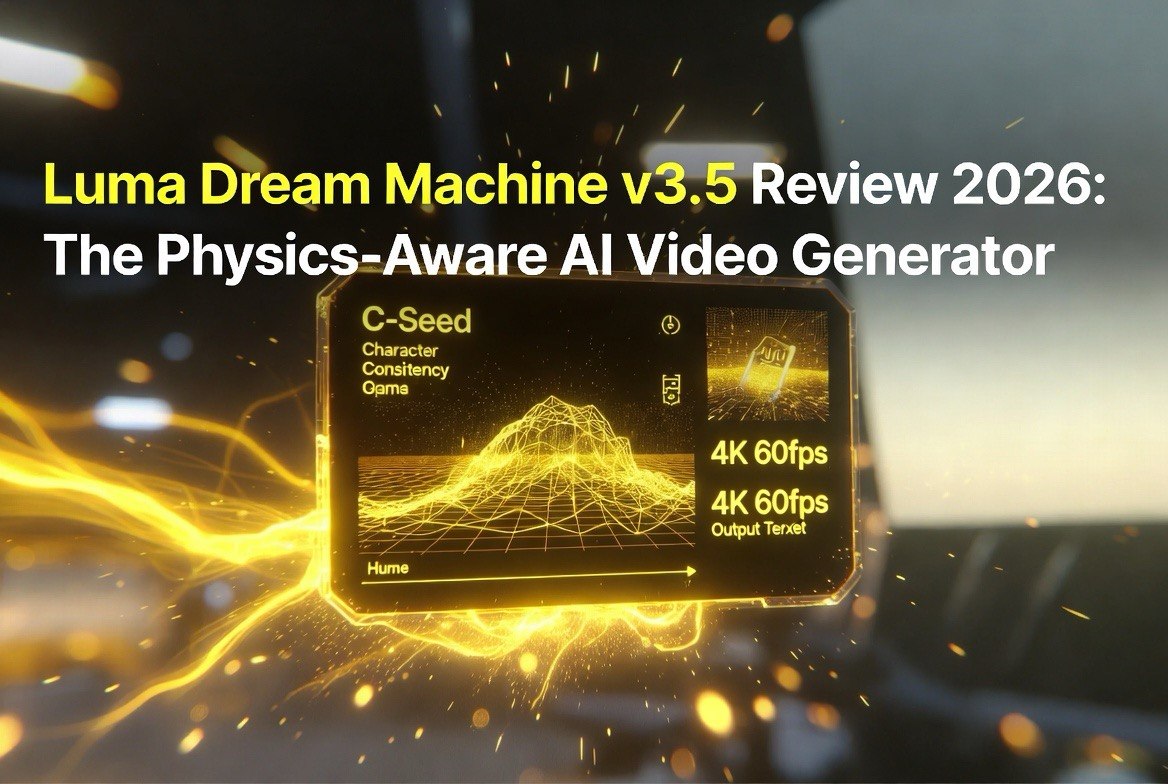
Luma Dream Machine v3.5 Review 2026: The Physics-Aware AI Video Generator
Get The Faceless YouTube Blueprint — Free
The exact AI tool stack and workflow used to build a faceless YouTube channel from zero.
Luma Dream Machine v3.5 Review 2026: The Physics-Aware AI Video Generator
⚡ Expert Summary: Luma Dream Machine v3.5 is the most physics-aware AI video generator on the market in 2026. It’s the first model that actually understands gravity, collisions, and fluid dynamics — meaning your AI-generated characters don’t float, objects don’t clip through each other, and the resulting footage looks like it was shot, not hallucinated. Combined with Character Seeds (C-Seed) for consistent characters across scenes, 4K 60fps native output, cinematic camera controls, and audio-reactive lip sync, v3.5 is production-ready for creators who need reliable, repeatable AI video at scale.
The Short Version
Luma Dream Machine v3.5 solves the biggest problem in AI video: physics that make sense. Previous AI video models — including the original Dream Machine and competitors like Runway Gen-3 and Pika 2.0 — made visually impressive clips that fell apart when you watched the physics. Objects would float, water would behave like gelatin, and characters would clip through tables.
v3.5’s World Model architecture combines hybrid Diffusion Transformers with NeRF-inspired 3D awareness to simulate real-world physics. Gravity works. Collisions register. Fluids splash and flow like they should. This matters because the difference between “cool AI demo” and “usable commercial footage” is whether the output holds up under scrutiny.
For creators, marketers, and video production teams in the United States and globally, Dream Machine v3.5 is the first AI video tool that can produce footage you’d actually use in a client deliverable without extensive manual cleanup.
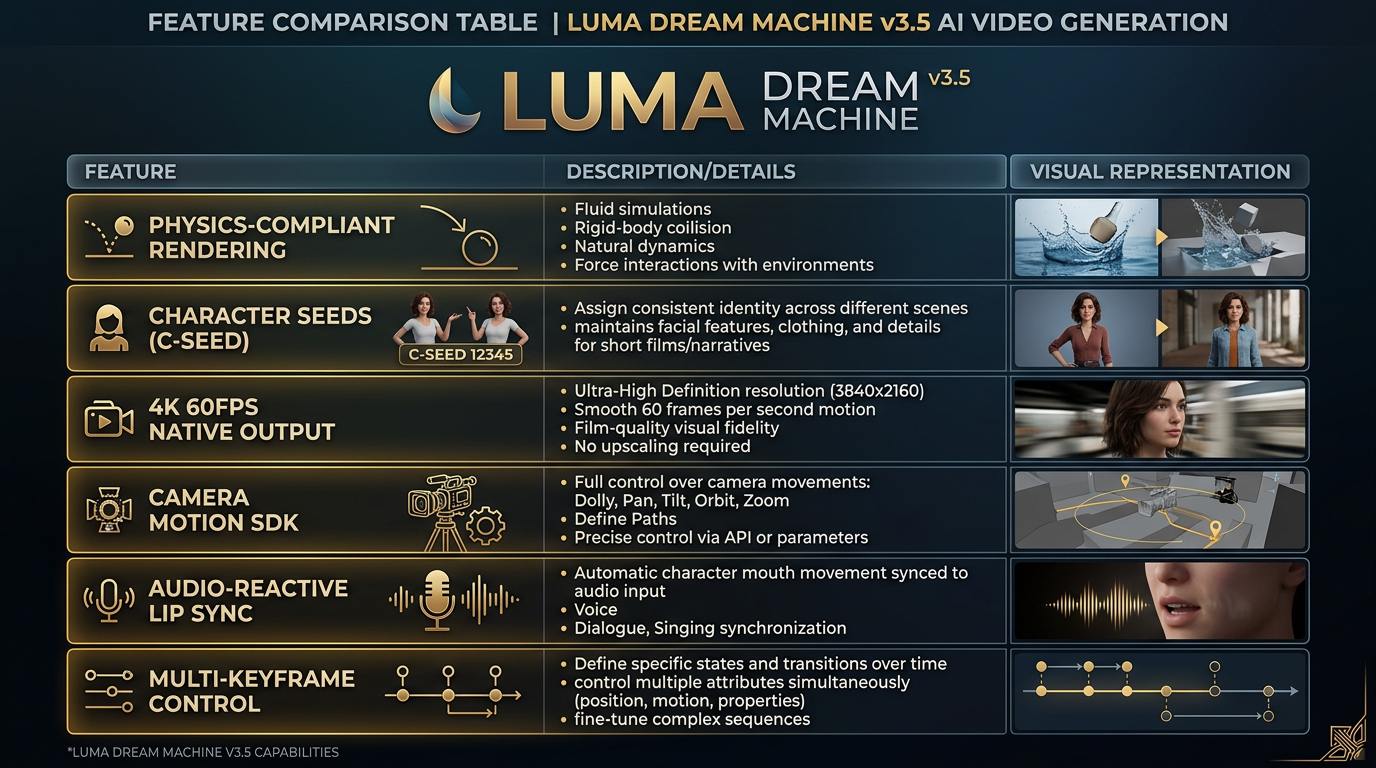
Dream Machine v3.5’s six core capabilities — physics-compliant rendering, C-Seed character consistency, 4K 60fps native output, cinematic camera controls, audio-reactive lip sync, and multi-keyframe control — make it the most production-ready AI video generator in 2026.
What’s New in v3.5
Luma AI launched the original Dream Machine in June 2024 to significant buzz, followed by v1.5, v2.0, and Ray integrations through 2025. v3.5, released in early 2026, represents the most significant architectural overhaul since the original launch. Here’s what changed:
Physics-Compliant Rendering Engine
This is the headline feature. The model now simulates gravity, rigid body collisions, fluid dynamics, and object interactions as part of the generation process — not as a post-processing pass. When you ask Dream Machine to show a ball bouncing off a wall, it actually computes the trajectory and impact physics. Water pours, splashes, and flows. Fabric drapes and folds.
No other consumer-accessible AI video model does this at the same fidelity. Runway Gen-3 Alpha and Pika 2.0 have improved physics over their predecessors, but they still rely on diffusion models that approximate physics rather than simulating it. v3.5’s World Model is genuinely different in approach.
In practical terms: if you’re creating product shots for ecommerce, scenes with moving water or fabric, or any footage where objects interact, v3.5 saves hours of manual compositing and physics simulation work.
Character Seeds (C-Seed)
Consistent characters across different scenes and camera angles is one of the hardest problems in AI video. Without C-Seed, a character generated in one clip might look completely different in the next — different face, different clothing, different proportions. C-Seed solves this by attaching a unique identifier to a character’s visual identity, which the model preserves across generations.
Think of it like a character rig in 3D animation, but generated entirely from a reference image or prompt. You define the character once, and v3.5 maintains consistency across multiple clips, camera angles, and environments. For narrative storytelling, brand mascots, or any scenario requiring a character to appear in multiple shots, this is a massive workflow improvement.
4K 60fps Native Output
Dream Machine v3.5 generates video natively at 4K resolution and 60 frames per second. This is significant because most AI video tools either upscale from lower resolutions or generate at 24-30fps and interpolate. Native 4K 60fps means the model is processing all that detail during generation, resulting in sharper, smoother footage with better temporal consistency.
Plus, it supports H.266 (Versatile Video Coding) for efficient file sizes at high resolution — a practical consideration when you’re working with 4K clips in a production pipeline.
Camera Motion SDK and Controls
Precise camera movement is controlled through both UI sliders and code-based vectors. You can set truck, dolly, pan, tilt, roll, orbit, and pedestal moves with fine-grained control over speed and trajectory. The camera path system lets you define complex multi-segment moves that the model executes during generation.
This matters because bad camera movement is one of the quickest ways to make AI-generated video look amateur. v3.5’s camera controls are more precise than any competitor’s — comparable to what you’d expect from a real camera operator with a gimbal.
Audio-Reactive Lip Sync and Dialogue
Upload a script or audio file, and Dream Machine v3.5 generates dialogue with synchronized mouth movements. The model handles multiple speakers, emotional delivery, and varying speech patterns. This works with both generated voices and uploaded voiceovers, making it viable for talking-head content, testimonial videos, and character monologues.
Multi-Keyframe Control
Define up to 16 keyframes for motion, effects, and scene transitions. The model interpolates smoothly between keyframes, giving you frame-level control over timing and movement. This integrates with the Ray workflow system, which adds Modify Video V2, relighting, product swaps, and reframing across aspect ratios.
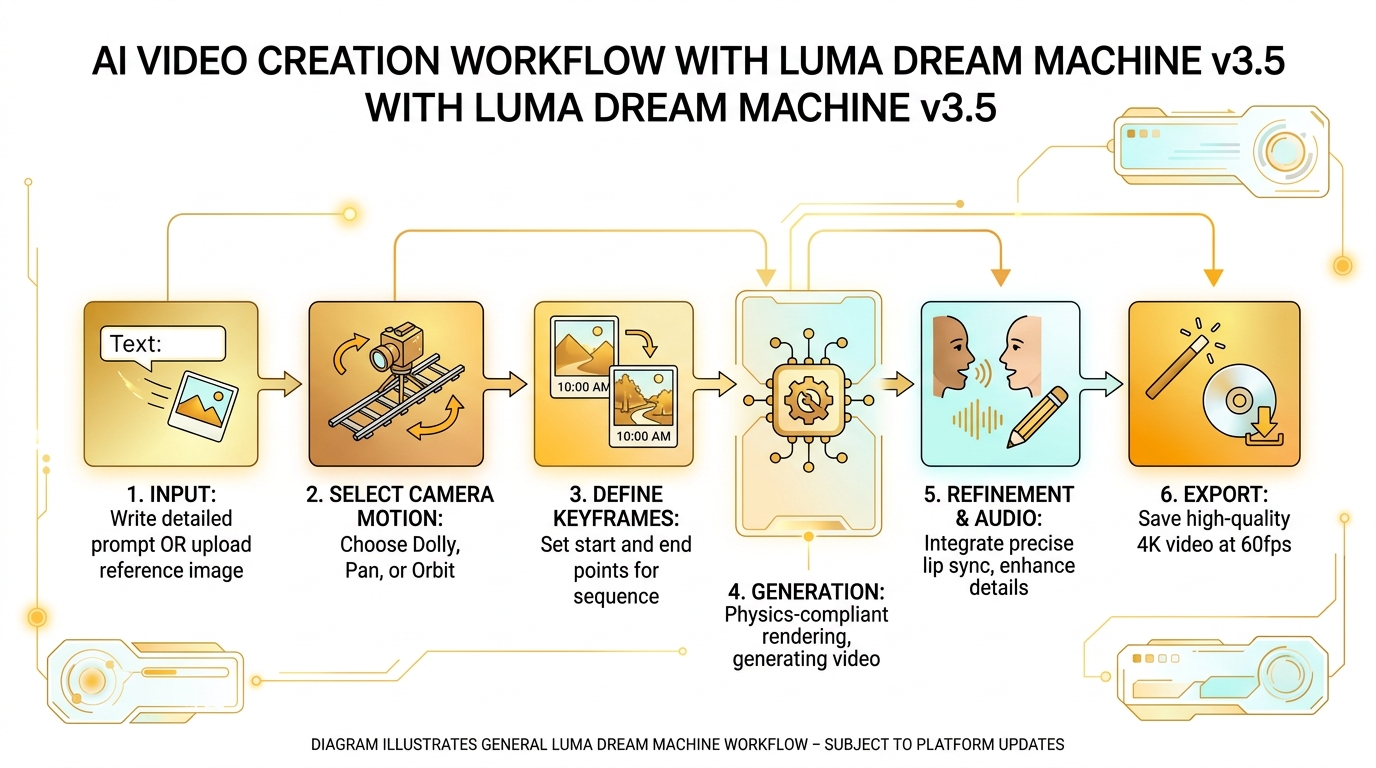
The Dream Machine v3.5 workflow — start from a text prompt or reference image, configure camera motion and keyframes, generate with physics rendering, refine with lip sync, and export at 4K 60fps for production use.
Where It Excels
Product and Commercial Video
If you’re creating marketing content for brands, v3.5 is the best AI video tool for product shots. The physics rendering means products behave realistically — a wine bottle pours correctly, fabric in a clothing shot drapes naturally, and a car driving looks like a car driving, not a toy on a string. The C-Seed system also means you can shoot a brand mascot or product personality across multiple scenes without the character drifting.
Short-Form Narrative Content
For creators who need consistent characters in short narrative clips (30 seconds to 2 minutes), v3.5 is uniquely capable. The combination of C-Seed character consistency, multi-keyframe control, and physics rendering means you can tell a coherent visual story without the character changing appearance between scenes.
AI-Generated Testimonials and Talking Heads
The audio-reactive lip sync makes v3.5 viable for generated spokesperson content. Upload a script, generate a character, and the model handles both the visual and the lip sync. For A/B testing ad creatives, this is a significant time saver over traditional video production.
Where It Falls Short
Render Times at 4K
4K 60fps generation takes significantly longer than 1080p. Expect 15-30 minutes per clip depending on complexity and server load. For quick turnaround social media content, you’ll want to generate at 1080p and only render 4K for hero content.
Price
Free tier is limited and watermarked. The Pro plan at $35/month is reasonable for individual creators, but enterprise pricing adds up quickly when you’re generating dozens of clips per project for a client. For comparison, Runway’s Pro plan is $30/month but lacks v3.5’s physics and C-Seed capabilities — so you’re paying a premium for genuinely superior output.
Text Rendering and Fine Details
Like virtually all AI video models in 2026, v3.5 still struggles with on-screen text rendering and fine hand details in extreme close-ups. If your video requires legible text overlays that aren’t added in post, or extreme close-ups of hands manipulating small objects, you’ll need to work around these limitations.
Pricing
| Plan | Free | Pro ($35/mo) | Enterprise |
|---|---|---|---|
| Resolution | 720p | 4K | 4K+ |
| Generations | 30/mo (watermarked) | Unlimited (no watermark) | Unlimited + API |
| Speed | Standard queue | Priority generation | Dedicated compute |
| Commercial use | ❌ | ✅ | ✅ Custom terms |
| C-Seed support | ❌ | ✅ | ✅ Priority support |
| Best for | Testing the platform | Creators, agencies | Studios, large teams |
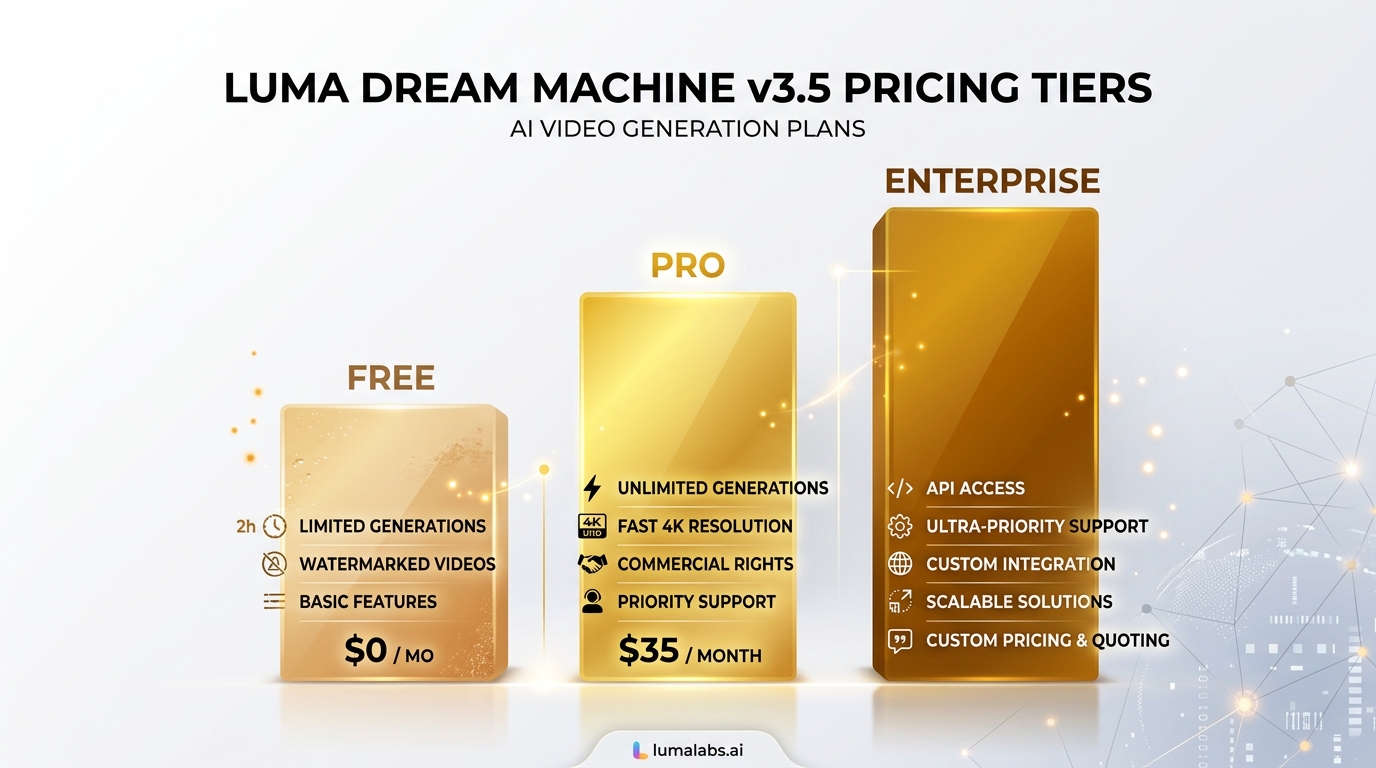
Dream Machine v3.5 pricing tiers — Free for testing (720p, watermarked), Pro at $35/month for serious creators (4K, unlimited, C-Seed), and Enterprise with API access and dedicated compute for studios.
The Competition
Dream Machine v3.5’s main competitors in the AI video space as of mid-2026:
- Runway Gen-3 Alpha ($30/mo): Better for stylized and artistic video, but lacks physics-compliant rendering and C-Seed character consistency. Better motion brush controls for specific object movements.
- Pika 2.0 ($15/mo): Cheaper and faster, with excellent social media format support, but lower maximum quality and no native 4K output. Physics are approximated rather than simulated.
- Kling 1.6 ($20/mo): Strong competitor from China with good physics and 1080p output, but no C-Seed character system and inconsistent availability for US users.
- Sora (OpenAI) ($200/mo Pro): Superior text understanding and prompt adherence, but dramatically more expensive and still limited availability for most users as of mid-2026.
For most creators in the United States, Dream Machine v3.5 at $35/month offers the best balance of production quality, feature depth, and reliability. Runway is better for artistic work, Pika is better for social content speed, but nothing else at this price point delivers physics-compliant, 4K-native video with character consistency.
The Verdict
Luma Dream Machine v3.5 is the most technically impressive AI video generator available to individual creators and small studios in 2026. The physics-compliant rendering is a genuine breakthrough — it’s the first time AI-generated video behaves like it was shot in the real world rather than hallucinated by a diffusion model.
It’s not cheap at $35/month, and the render times at 4K require patience, but for anyone producing professional-quality video content — product demos, brand films, narrative shorts, marketing assets — Dream Machine v3.5 saves enough time in the editing room to justify the subscription many times over.
Who should buy it: Video creators and marketing teams producing client-ready commercial content who need reliable character consistency, realistic physics, and 4K output without the cost of traditional production.
Who should skip it: Casual social media creators who need fast turnaround at lower resolutions (Pika is better and cheaper for that) and anyone who primarily needs artistic, stylized video (Runway Gen-3 Alpha is still king there).
Frequently Asked Questions
Is Luma Dream Machine v3.5 better than Runway Gen-3?
For physics-rendered, 4K-native, character-consistent video, yes — Dream Machine v3.5 is better. Runway Gen-3 is still superior for artistic and stylized video with strong motion brush controls. The choice depends on your use case: physics realism and character consistency (Dream Machine) vs creative style and motion control (Runway).
How much does Luma Dream Machine v3.5 cost?
Dream Machine v3.5 has a Free tier (30 generations/month, 720p, watermarked), a Pro plan at $35/month (unlimited generations, 4K, no watermark, C-Seed support), and Enterprise pricing for studios and teams with API access and dedicated compute.
Does Dream Machine v3.5 support 4K video?
Yes, Dream Machine v3.5 generates native 4K video at 60fps on the Pro plan. It also supports H.266 (Versatile Video Coding) for efficient file sizes at high resolution. Render times at 4K are longer — expect 15-30 minutes per clip depending on complexity.
Can Dream Machine v3.5 keep characters consistent between scenes?
Yes, through the C-Seed (Character Seed) system. You assign a unique seed to a character’s visual identity, and Dream Machine v3.5 maintains that appearance across different scenes, angles, and environments. This solves one of the hardest consistency problems in AI video generation.
What is the Luma Ray workflow system?
Ray is Luma’s advanced video workflow tool that integrates with Dream Machine. It adds Modify Video V2 (transforming existing footage while preserving lighting and performance), relighting, product swaps, reframing across aspect ratios, and support for up to 16 keyframes. Ray workflows are accessible through the same Luma Labs platform.
Does Dream Machine v3.5 have lip sync?
Yes, Dream Machine v3.5 has audio-reactive lip sync. You can upload a script or audio file, and the model generates synchronized mouth movements for the character. It handles multiple speakers, emotional delivery, and works with both generated voices and uploaded voiceovers.
Is Luma Dream Machine free to use?
Dream Machine v3.5 offers a Free tier with 30 generations per month at 720p resolution with watermarks. This is suitable for testing the platform and learning the workflow. For commercial use and 4K output, the Pro plan at $35/month is required.

About Barak Schurr
Barak Schurr is a serial entrepreneur who built and exited a major ticketing platform before turning his attention to AI and content. He runs three AI-focused research sites and writes about the tools, workflows, and strategies that let solo creators build real channels — without a crew, a studio, or a Hollywood budget. Contact: [email protected]
More AI Video Resources