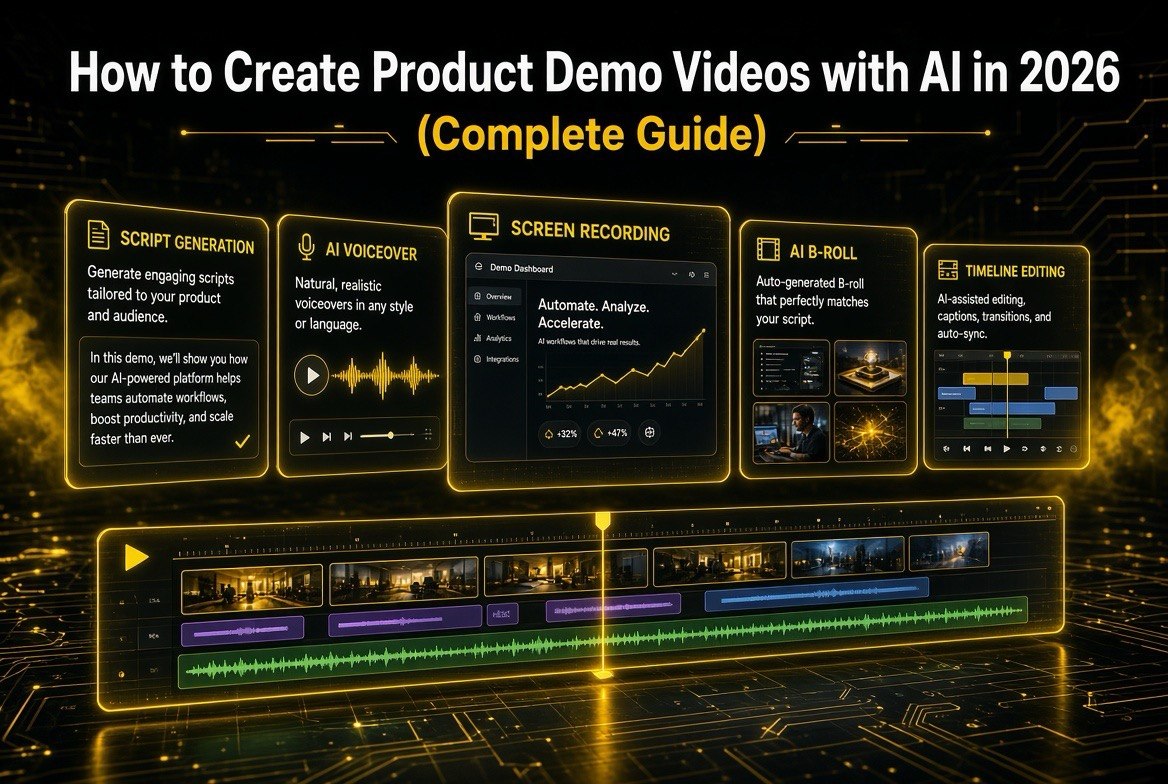
How to Create Product Demo Videos with AI in 2026 (Complete Guide)
Get The Faceless YouTube Blueprint — Free
The exact AI tool stack and workflow used to build a faceless YouTube channel from zero.
How to Create Product Demo Videos with AI in 2026 (Complete Guide)
If you sell software, a gadget, or a training program, the single highest-ROI piece of content you can create is a product demo video. It shows the thing working, removes purchase risk, and tells the story your landing page can’t. In 2026, artificial intelligence has collapsed the cost and skill barrier to making one. You no longer need a videographer, an actor, or a script writer on payroll — you can do the whole pipeline yourself with AI tools that write, voice, animate, and edit.
This guide is the complete, step-by-step playbook I would hand any business owner, marketer, or solo founder who wants a product demo that actually sells. I’ll show you the exact tools, the exact order of operations, the exact script framework, and the mistakes that quietly kill most AI-made demos — plus how to avoid them.
Why Product Demo Videos Matter So Much Right Now (and Why AI Changes Everything)
Let’s start with the numbers, because they explain why this is worth your afternoon. Research from Wyzowl’s annual video marketing report — the most-cited ongoing study in this space — consistently finds that over 90% of marketers say video helps them generate leads, and that a majority of consumers say they’d rather watch a short video than read text about a product. When that video is a demo, it does double duty: it educates and it converts. A demo doesn’t just describe value — it proves it in motion.
The pre-AI reality was brutal for most small teams. A single custom demo video from an agency routinely ran $5,000 to $15,000 and took four to six weeks of revision cycles. You had to write a brief, pay a scriptwriter, rent a voice actor or schedule an on-camera presenter, film screen recordings, pay an editor, and hope the result matched your vision. That’s why most small businesses had exactly zero demo videos — it wasn’t worth the money or the calendar.
AI changed the math in three concrete ways:
- Scripting is instant. An AI like ChatGPT or Claude drafts your talking points, hook, and call-to-action in minutes, and you edit rather than start from a blank page.
- Voiceover is cheap and human-sounding. ElevenLabs and similar tools produce natural, emotional narration for a few dollars a month — no studio, no retakes.
- Footage is generated, not filmed. AI video models can produce b-roll, product-style shots, backgrounds, and even synthetic presenters — so you’re not limited to ugly screen recordings.
Put those together and a demo that used to cost five figures and six weeks now costs under $100 and a single focused workday. That’s the opportunity. The rest of this guide shows you exactly how to capture it.
What You’ll Need Before You Start
You don’t need a fancy toolkit. Here’s the baseline — most of this you likely already have, and the AI parts are cheap enough to trial:
| Component | What You Need | Approx. Cost |
|---|---|---|
| Product access | A working login to your product (or clean screenshots/recordings of it) | Free (you have it) |
| AI script tool | ChatGPT, Claude, or Gemini for drafting and structuring | $0–$20/mo |
| AI voiceover | ElevenLabs (or Descript’s AI voices) | ~$5–22/mo |
| AI video/editor | Screen recorder + an AI editing tool (Descript, Runway, or Canva) | $0–$30/mo |
| 20–60 minutes of product | Time to record your screen walking through the key flow | One sitting |
That’s the whole kit. If you already pay for any AI productivity stack, you probably have 80% of this covered. The beauty of the modern workflow is that you can start lean and upgrade tools only if a specific step bottlenecks you.
The 7-Step Workflow to Create a Product Demo Video with AI
Here is the proven order I use. Don’t skip steps — each one feeds the next, and jumping ahead is the most common reason AI demos come out generic.
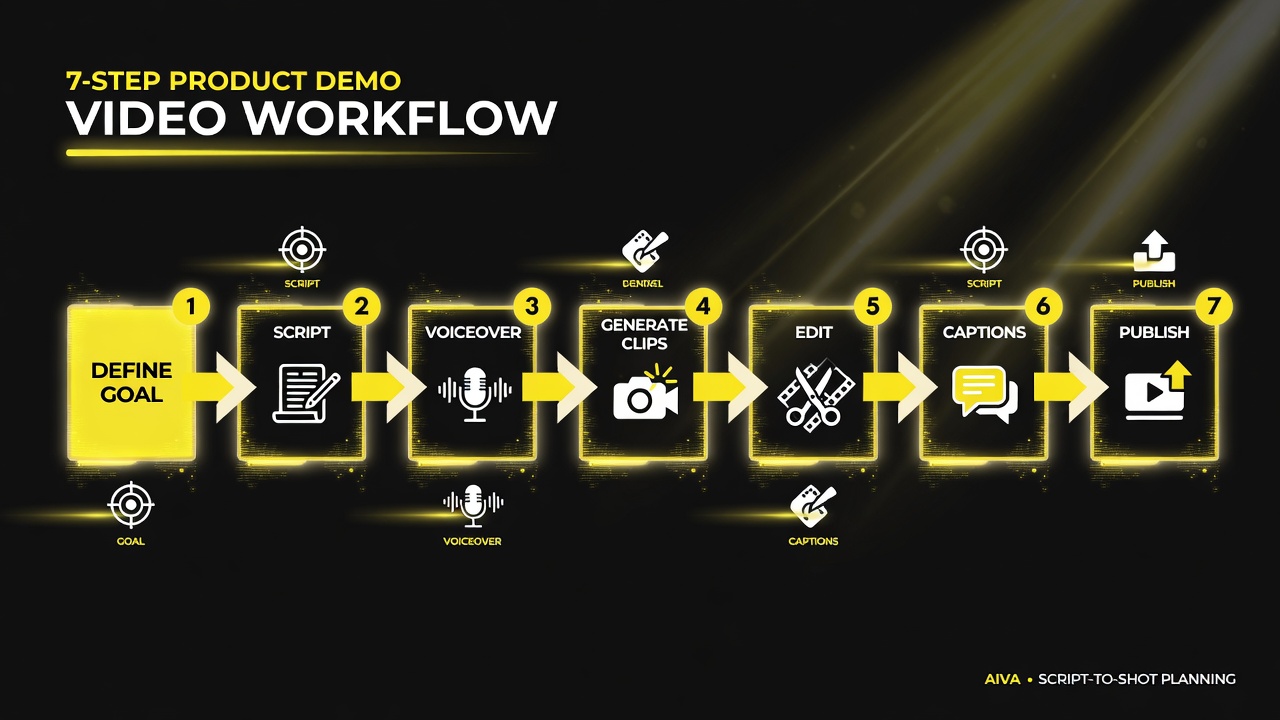
The 7-step script-to-shot flow runs top to bottom: lock one goal, script it like a hook, get clean AI voiceover, build clips, edit tight, then ship and iterate.
Step 1 — Define the Single Goal of Your Demo
Before you script a single line, decide what this one video is for. A demo that tries to show everything shows nothing. Pick one primary job:
- Onboarding assist — helps a new user complete their first task (reduces support tickets).
- Feature showcase — highlights a flagship feature to prospects who are comparing competitors.
- Objection killer — directly answers the #1 hesitation (“Is it actually easy to set up?”)
- Sales enablement — a short asset your sales team sends before or after a call.
Write that goal in one sentence and pin it above your editor. Every clip, every line of narration, and every visual must serve it. When I coach teams on this, I tell them: if a segment doesn’t advance the single goal, cut it — even if it’s a feature you’re proud of.
Step 2 — Script It Like a Hook, Not a Manual
The biggest mistake in demo videos is starting with “Welcome to our product…” Nobody cares yet. Your demo runs on a proven structure that mirrors how short-form video holds attention:
- Hook (0–5 seconds): Name the problem or payoff instantly. “Setting up invoicing just became a 2-minute task.”
- Stakes (next 10 seconds): Make the cost of ignoring it feel real — a time sink, lost sales, confusion.
- Proof (the body): Show the product solving the problem step by step, exactly as a user would experience it.
- Payoff (last 10 seconds): Restate the outcome and give one clear call to action (“Start your free trial at [URL]”).
Give this structure to an AI script tool with a prompt like: “Write a 75-second product demo script for [product] for [audience]. Use this structure: hook, stakes, proof, payoff. Plain language, no jargon, active voice. End with a clear call to action.” Then read it aloud and tighten what sounds robotic. The AI gets you 80% there; your ear does the final 20%.
Step 3 — Generate a Clean AI Voiceover
Once the script is locked, it’s time for your narrator. For most demos a professional, neutral American English voice works best across a US audience. ElevenLabs is the current gold standard for naturalness — generate a few takes and pick the most human one. Descript is a strong alternative that also edits video, so you can keep narration and timeline in one place.
Practical tips that make AI voiceovers pass as human:
- Break your script into short paragraphs — AI reads short lines with better pacing than walls of text.
- Use punctuation to control rhythm: periods for pauses, commas for flow, and avoid excessive exclamation marks.
- Generate 2–3 variants and A/B the one that sounds least “announcer-y.”
- Run the final take through a light normalizer so volume sits consistently with your music and sounds.
Keep your raw voiceover file handy — you’ll drop it into the editor in Step 5 and it becomes the backbone your clips snap to.
Step 4 — Build AI Video Clips That Match Your Product
Now the fun part: the visuals. You have two kinds of footage to combine:
- Real screen recordings — capture the actual product in action. This is non-negotiable for credibility on the core flow. Use a clean browser profile, a tidy desktop, and record at a decent resolution. OBS Studio (free) is the reliable choice.
- AI-generated b-roll and backgrounds — use an AI video model (Runway, Pika, or the generation tools inside Canva/Descript) for supporting shots: a laptop on a desk, an abstract “data moving fast” visual, or a clean product-style close-up that you don’t have footage for. This fills gaps and keeps a 60-second demo visually varied instead of a monotone screen capture.
The rule: show the real product for the “proof” section, and use AI visuals for transitions, atmosphere, and emphasis. If the whole video is AI-generated slop, you’ll lose trust; if it’s all raw screen recording, you’ll lose attention. Balance is everything.
Step 5 — Edit on an AI-Assisted Timeline
Editing is where the workflow either shines or stalls. Modern tools handle the tedious parts automatically:
- Auto-sync — drop in your voiceover and your screen recording, and Descript-style tools align them and generate a transcript you can edit like a doc.
- Text-based cutting — delete filler words (“um,” long pauses) by deleting them in the transcript; the video follows.
- Reordering — move clips by dragging transcript paragraphs, not hunting timeline tracks.
- B-roll suggestions — some editors suggest where to cut away from the screen.
Your goal in this pass: a tight 60–90 seconds where the voiceover, the product footage, and the b-roll all reinforce the single goal. Cut ruthlessly to the hook/proof/payoff structure from Step 2.
Step 6 — Add Captions, Branding, and Polish
This step is not optional — most viewers watch on mute, especially on social and mobile. Auto-generated captions, burned into the video, are the single highest-impact polish item you can add. Beyond captions:
- On-screen callouts — little labels that point at the exact button you’re describing (“Create Invoice,” “Sync with QuickBooks”). These make demos feel professional and guide the eye.
- Brand colors and a logo sting — a 1-second intro/outro with your logo keeps it on-brand.
- Background music at low volume — a soft bed under the narration, ducked so it never fights the voice.
- A progress-friendly thumbnail for wherever it’s posted.
Export at 1080p (or at least 720p), in the aspect ratio you need — 16:9 for YouTube and your site, 9:16 for Reels/Shorts/TikTok if you plan to crop.
Step 7 — Publish, Watch the Data, Iterate
A demo video is a hypothesis, not a finished artifact. Publish it on your product page, your YouTube channel, and wherever your audience lives, then watch the numbers. The three metrics that matter most:
- Watch-through rate — if people drop in the first 5 seconds, your hook is weak. Rewrite it.
- Click-through on your CTA — if views are high but clicks are low, the payoff isn’t converting. Tighten the offer.
- Questions in comments/support — what people ask after watching tells you what to add in v2.
Most teams learn more from one published demo than from a month of planning. Ship it, measure, improve. The tools make iteration nearly free — that’s the real superpower of the AI workflow.
A Ready-to-Use Checklist (Print This)
Tick through this before you call a demo done. Missing any box drops the video’s ability to convert:
- [ ] Single goal written in one sentence (Step 1)
- [ ] Script follows hook → stakes → proof → payoff (Step 2)
- [ ] Hook states the problem or payoff within the first 5 seconds
- [ ] Voiceover generated, clean, and at consistent volume (Step 3)
- [ ] Real screen recording captured for the core flow (Step 4)
- [ ] At least 2–3 AI b-roll shots to break up the screen (Step 4)
- [ ] Timeline edited to 60–90 seconds, auto-synced to voiceover (Step 5)
- [ ] Captions burned in (mute-friendly) (Step 6)
- [ ] On-screen callouts label the key buttons/fields (Step 6)
- [ ] Brand colors + logo sting, low background music (Step 6)
- [ ] One clear call to action at the end (Step 2/7)
- [ ] Exported 1080p, correct aspect ratio for each platform (Step 6)
- [ ] Live on product page + relevant channels (Step 7)
- [ ] Plan to check watch-through, CTA clicks, and comments in 2 weeks (Step 7)
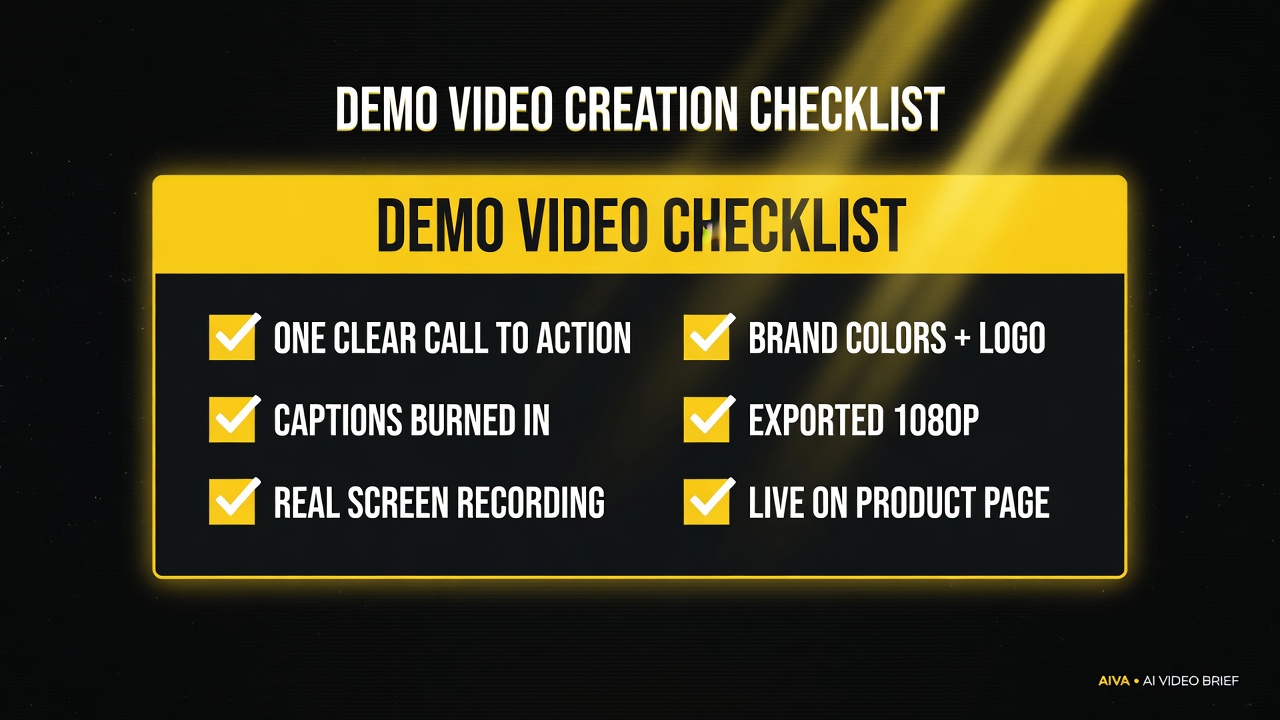
Work this checklist before calling a demo done – missing any box measurably drops the video’s ability to convert.
Tool Comparison: Choosing Your AI Demo Stack
You don’t need everything on the market — you need one pick per job. Here’s a side-by-side of the strongest current options per stage, so you can assemble a lean stack instead of subscribing to six tools.
| Job | Best Pick (2026) | Strong Alternative | Why It Wins |
|---|---|---|---|
| Scripting | ChatGPT / Claude | Gemini | Best at structured, brand-informed drafts you can edit in minutes |
| Voiceover | ElevenLabs | Descript AI Voices | Most natural, most controllable pacing and tone |
| Screen capture | OBS Studio | Loom | Free, reliable, high resolution for clean product footage |
| AI b-roll | Runway | Pika / Canva | High-quality short clips that blend with real footage |
| Editing | Descript | Canva / CapCut | Text-based cutting + auto-sync = fastest path to a tight cut |
If you want the absolute leanest stack, start with ChatGPT (script) + ElevenLabs (voice) + OBS (capture) + Descript (everything else) — four tools, roughly $30–50/month total, covering the entire pipeline. Add Runway only when you specifically want AI-generated b-roll that free editors can’t make.
Common Mistakes That Kill AI Product Demos (and How to Avoid Them)
I’ve seen the same failures repeat across teams, so here are the ones to dodge up front:
- Starting with “Welcome to…” — you lose the first 5 seconds, which is where attention lives. Open with the problem or the payoff.
- Showing everything — a 6-minute feature tour converts worse than a 75-second focused demo. One goal, one video.
- Robot-sounding narration — if the voice reads like a late-night infomercial, regenerate it. Naturalness is table stakes in 2026.
- No captions — the majority of viewers are on mute. Captions aren’t a nice-to-have; they’re the default playback mode.
- No visible CTA — a demo that doesn’t ask for the next step leaks its value. End with one clear action.
- All AI, no real product — a demo with zero real screen footage loses trust instantly. Always anchor the proof section in the actual product.
Each of these is an easy fix once you know it’s there — which is exactly why this list is worth scanning against your cut before you publish.
Frequently Asked Questions
How long should a product demo video be?
For most products, 60 to 90 seconds is the sweet spot. It’s long enough to show the core flow and the payoff, and short enough to respect a prospect’s attention span — especially on social and mobile where most demos get watched. If you have deep functionality to cover, make one short “highlights” demo plus separate feature-specific videos rather than one long tour.
Can I really make a professional demo video with only AI tools?
Yes — for the script, voiceover, b-roll, and editing. The one place AI can’t fully replace you is capturing the actual product screen: you still record the real flow so viewers trust the proof. Keep AI for the supporting elements and your raw product footage for the core, and the result looks fully professional.
How much does an AI-made product demo video cost?
A complete demo typically costs $30 to $60 in tool subscriptions for the month, most of which you’d have anyway or can cancel after shipping the video. Compare that to the $5,000–$15,000 an agency used to charge for a single custom demo with weeks of revision loops. Time drops from weeks to about one focused workday.
Do I need a voice actor or on-camera talent?
No. AI voiceover tools like ElevenLabs produce natural, human-sounding narration in multiple styles and languages. For 90% of product demos, an AI voice is indistinguishable from a freelance narrator and costs a fraction of the price. This removes the single biggest scheduling and budget headache from the old workflow.
What’s the best format: real screen recording or AI-generated video?
Use both. Record the real product for the proof section (credibility), and use AI-generated visuals for b-roll, transitions, and atmosphere (variety and polish). A demo that’s all raw screen recording feels monotonous; one that’s all AI feels fake. The blend is what reads as professional.
How do I measure whether my demo video is working?
Watch three numbers: watch-through rate (are people dropping in the first 5 seconds?), CTA click-through (is the payoff converting?), and support/comments questions (what’s missing?). Use those to iterate — the AI workflow makes v2 nearly free, so treat the first demo as a learning launch, not a final artifact.
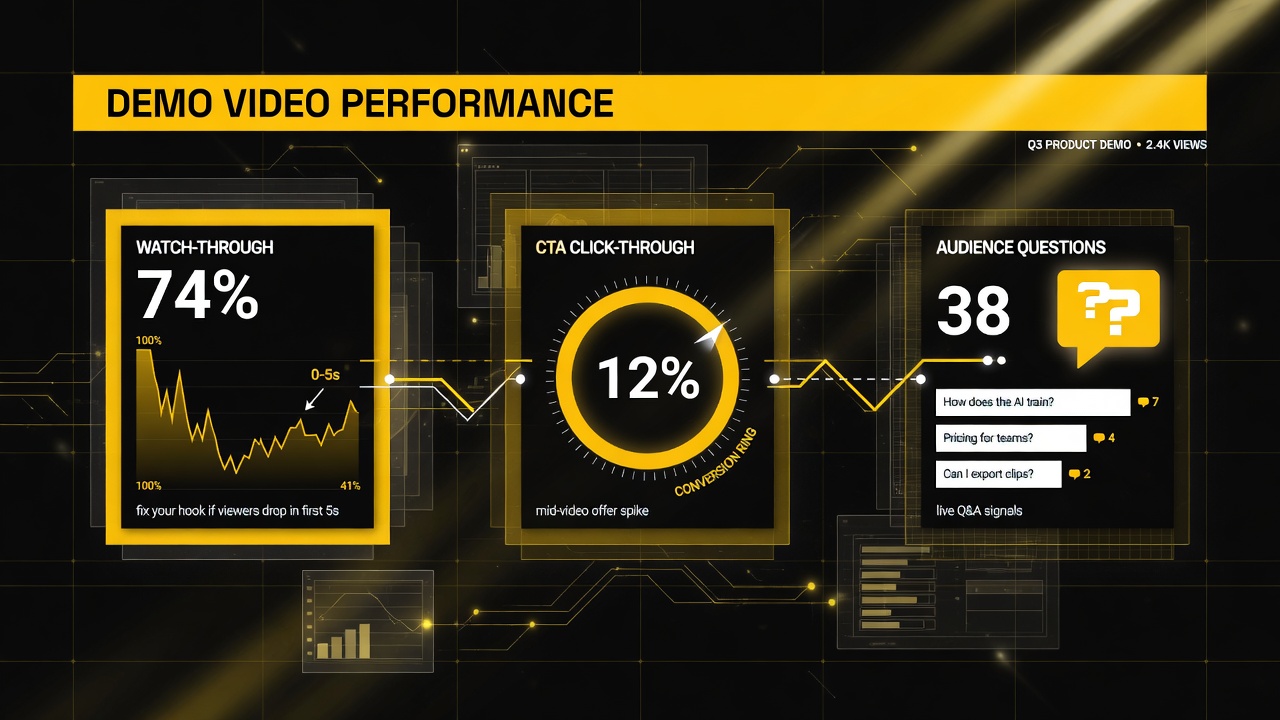
Judge a demo by three numbers: watch-through (early drop-off), CTA click-through (conversion), and audience questions (what to build into v2).

About Barak Schurr
Barak Schurr is a serial entrepreneur who built and exited a major ticketing platform before turning his attention to AI and content. He runs three AI-focused research sites and writes about the tools, workflows, and strategies that let solo creators build real channels — without a crew, a studio, or a Hollywood budget. Contact: [email protected]
More AI Video Resources