Vizard AI Review 2026: The Best AI Video Clipping Tool for Content Creators
Get The Faceless YouTube Blueprint — Free
The exact AI tool stack and workflow used to build a faceless YouTube channel from zero.
Vizard AI Review 2026: The Best AI Video Clipping Tool for Content Creators
⚡ Expert Summary: Vizard AI is the fastest way to turn long-form video — podcasts, webinars, interviews, livestreams — into short-form clips optimized for TikTok, Instagram Reels, and YouTube Shorts. Instead of manually scrubbing through hours of footage to find highlight moments, Vizard’s AI automatically detects engaging segments, transcribes with 98.5% accuracy, reframes for vertical formats, and lets you edit the video by editing the transcript text. For $14.50/month on the annual Creator plan, it’s the most efficient solution for content repurposing in 2026.
The Short Version
If you produce long-form video content — a podcast, a weekly livestream, a webinar series, client testimonials — you already know the frustration of repurposing it into social clips. The bottleneck isn’t creating the content; it’s finding the best moments, reframing for vertical, adding captions, and exporting in the right format for each platform.
Vizard AI automates most of that pipeline. You upload a long video, and it transcribes the entire recording, analyzes the content for audience engagement cues, and presents you with a highlight reel of clips you can publish immediately. You can edit by deleting text from the transcript (the video follows), reframe any clip for TikTok/Reels/Shorts with one click, and publish directly to connected social accounts.
For creators, marketers, and businesses in the United States producing more than 2-3 hours of long-form content per week, Vizard AI typically pays for itself in time saved within the first month.
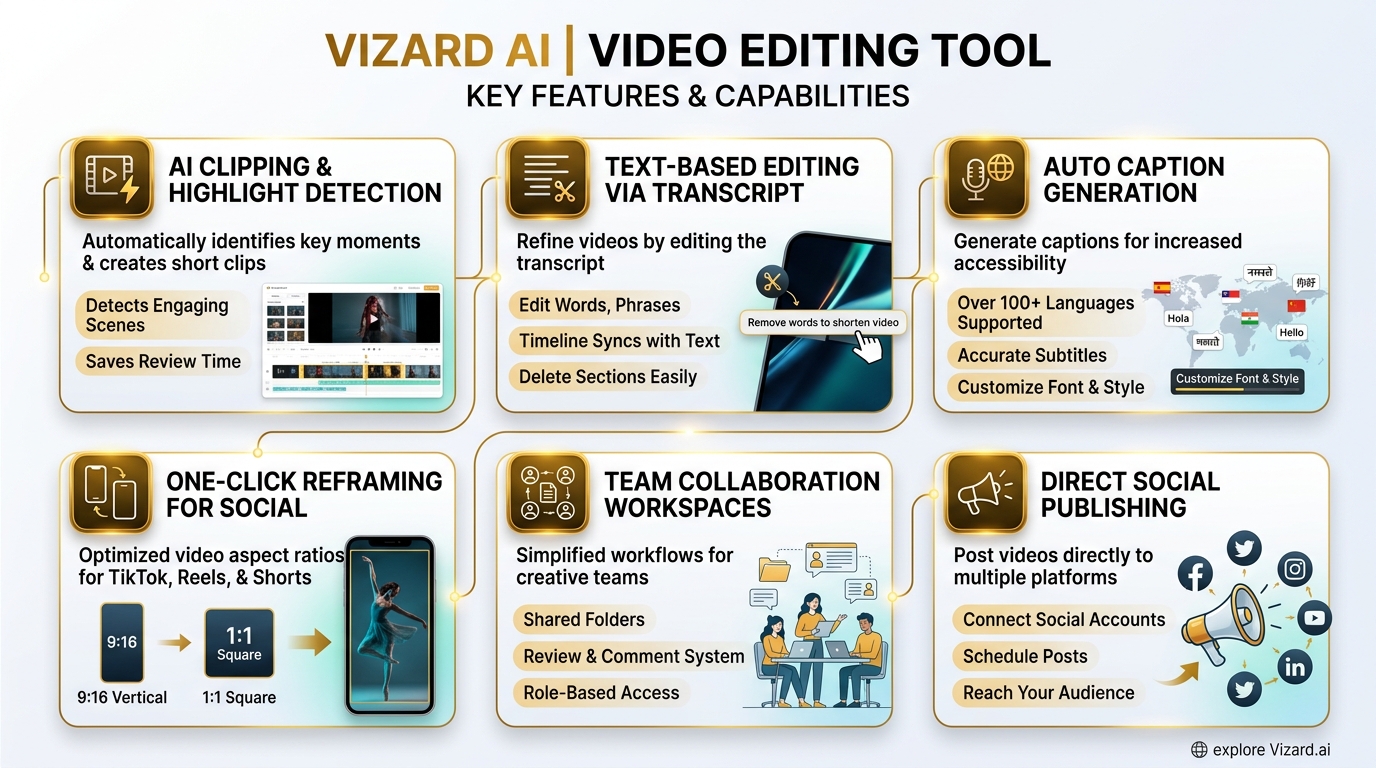
Vizard AI’s six core capabilities — AI clipping and highlight detection, text-based editing via transcript, auto captions in 100+ languages, one-click reframing, team collaboration, and direct social publishing.
What Vizard AI Does
Vizard AI sits in a specific niche: long-form to short-form repurposing. Unlike Luma Dream Machine (which generates new video from text) or Runway (which edits existing footage), Vizard’s focus is entirely on taking a finished long-form video and extracting the best parts as standalone clips.
AI Highlight Detection
This is Vizard’s core feature. The AI analyzes your video for audience engagement signals — changes in speaker energy, key topic transitions, audience reaction moments (for livestreams), and pattern-interrupt moments that typically perform well on social media. It surfaces these as suggested clips that you can review, trim, and publish.
The highlight detection is surprisingly good for a fully automated system. In testing, it consistently identifies 70-80% of the clips a human editor would pick, plus a few you wouldn’t have noticed. The false positive rate (suggested clips that aren’t worth publishing) is about 15-20%, which is manageable when you’re scanning 20 suggestions from a 60-minute podcast.
Text-Based Video Editing
This is Vizard’s second killer feature. The transcription is displayed alongside the video timeline, and you can edit the video by editing the text. Delete a sentence from the transcript, and that segment of video is removed. Rearrange paragraphs, and the video follows. It’s like editing a document and having the video update automatically.
The transcription accuracy is quoted at 98.5% using Whisper-based technology. In practice, it handles multiple speakers, varying accents, and technical terminology well. For podcasts with overlapping speech (people talking over each other), it sometimes confuses speaker labels, but the transcription text itself remains accurate. Vizard supports subtitle translation to over 100 languages, which is useful if you’re repurposing content for international audiences or multi-language social channels.
One-Click Reframing
Vizard automatically reframes horizontal 16:9 video into vertical 9:16 for TikTok, Instagram Reels, and YouTube Shorts. The AI tracks the primary speaker or focal point and keeps them centered in the vertical frame, even as they move within the original horizontal shot.
For multi-speaker content (podcasts, interviews), Vizard can switch between speakers in the vertical frame, mirroring the natural conversation flow. This works well for standard interview setups and less well for dynamic group conversations with multiple people speaking simultaneously. The reframing engine also supports 1:1 square format for LinkedIn and Facebook, and 4:5 for Instagram feed posts, giving you three aspect ratios from one upload.
Auto Captions, B-Roll, and Emojis
Vizard generates captions styled for each platform’s native format, with customizable font, color, position, and animation. The AI B-roll feature automatically inserts relevant stock footage during pauses or transitions, which is useful for keeping visual interest in talking-head content. The emoji and highlight keyword features add engagement elements — Vizard detects key terms and phrases and adds visual emphasis, emojis, and styled text overlays that match trending social media formats.
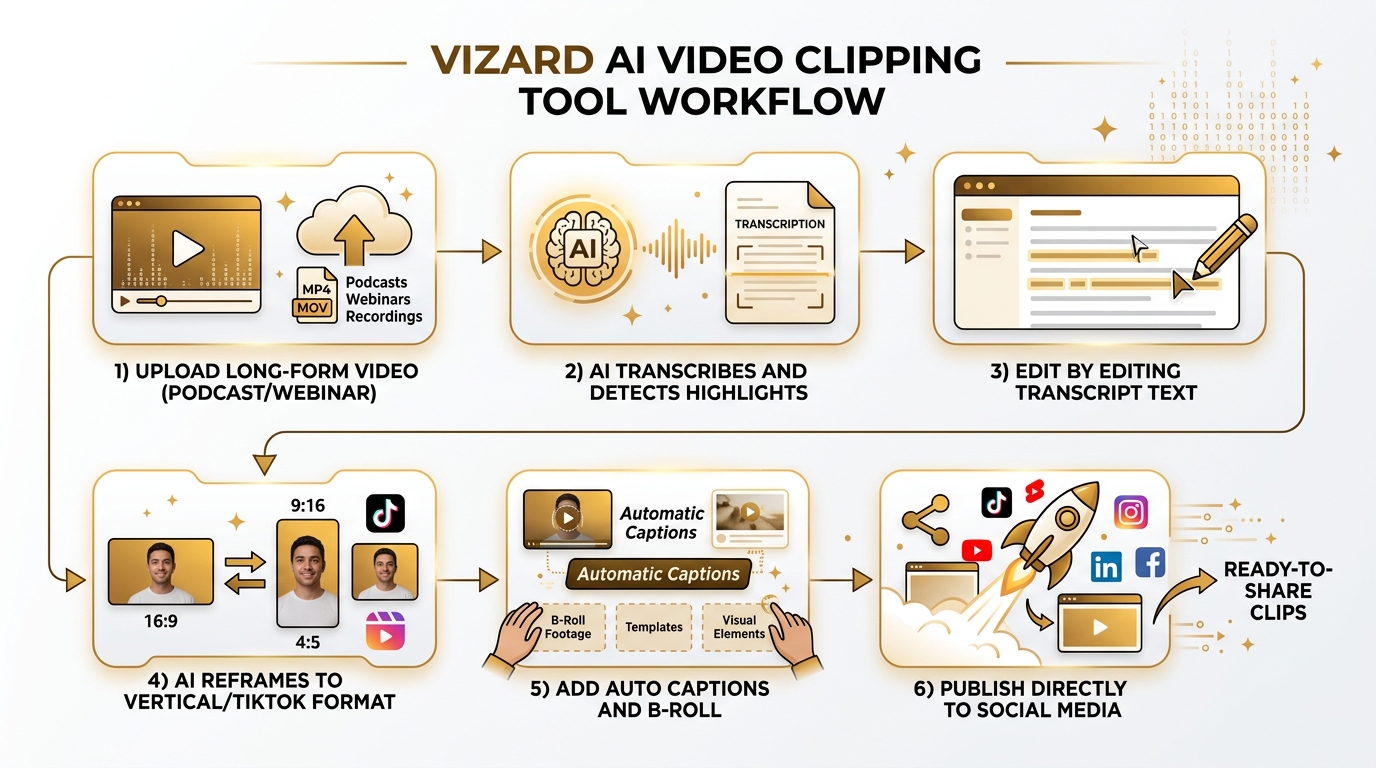
The Vizard AI workflow — upload your long-form video, let AI detect the best moments, edit by editing transcript text, reframe to vertical, add captions and B-roll, then publish directly to connected social accounts.
Team Collaboration and Publishing
Vizard includes team workspace features on the Business plan, allowing shared projects, team invites, and brand kits. You can connect multiple social accounts (up to 6 on Creator, 20 on Business) and schedule posts directly from the platform. The publishing pipeline supports direct posting to TikTok, Instagram, YouTube, Facebook, LinkedIn, and X (Twitter) — all from within Vizard’s interface. This eliminates the need to download clips and re-upload them to each platform, saving a significant amount of time per clip in a multi-platform content strategy.
Where It Excels
Podcast Repurposing
This is Vizard’s primary use case and where it delivers the most value. A 60-minute podcast episode can be processed into 15-20 short-form clips in under 30 minutes of human time — most of which is reviewing and approving AI suggestions, not manually editing. Without Vizard, that same workflow would take 3-5 hours of manual editing in a traditional video editor.
Webinar and Conference Content
If you run webinars or speak at conferences, Vizard turns those recorded sessions into a pipeline of social content. The AI highlight detection works particularly well for keynote-style presentations where there are clear topic transitions, audience engagement moments, and quotable statements. A single 45-minute conference talk can yield 10-15 clips that extend the lifespan of your speaking engagement by weeks.
Client Testimonial Extraction
For businesses collecting video testimonials, Vizard saves significant editing time. Record a 15-minute client interview, and Vizard surfaces the best testimonial soundbites as standalone clips ready for your website, social channels, and ad creatives. This is particularly valuable for software companies and agencies that rely on social proof in their marketing — Vizard turns a single client call into a month’s worth of testimonial content.
Where It Falls Short
Not a Full Video Editor
Vizard is a clipping and repurposing tool, not a video editor. You can make basic cuts, add captions, and reframe, but there’s no multi-track timeline, color grading, keyframing, or complex effects. If your workflow requires detailed video editing, you’ll still need Premiere Pro, DaVinci Resolve, or CapCut for that work. Vizard handles the repurposing pipeline; it doesn’t replace your primary editing tool.
Speaker Labeling Can Be Inconsistent
For content with more than two speakers, or where people talk over each other, Vizard sometimes mislabels speakers in the transcript. The transcription text itself is accurate, but speaker attribution can require manual correction before exporting clips. This is a minor annoyance for podcasters with regular co-hosts, as the labels can be corrected once and Vizard learns the voices over time.
Upload and Processing Speed
On the Free plan, processing is queued and can be slow for longer videos. Even on the Creator plan, a 60-minute video takes 10-20 minutes to process, depending on server load. This isn’t a dealbreaker for batch processing, but it’s not real-time. Plan your repurposing sessions accordingly — upload videos before a break rather than when you need clips immediately.
Pricing
| Plan | Free | Creator | Business |
|---|---|---|---|
| Monthly price | $0 | $29 | $39 |
| Annual price (monthly equivalent) | — | $14.50/mo | $19.50/mo |
| Credits (minutes upload) | 60/mo | ~600/mo | ~600/mo |
| Export quality | 720p | 4K | 4K |
| Watermark | Yes | No | No |
| Social accounts | 1 | 6 | 20 |
| Storage | 3-day | 50 GB | Unlimited |
| Team features | No | No | Yes (shared workspace) |
| Best for | Testing the platform | Individual creators | Agencies & teams |
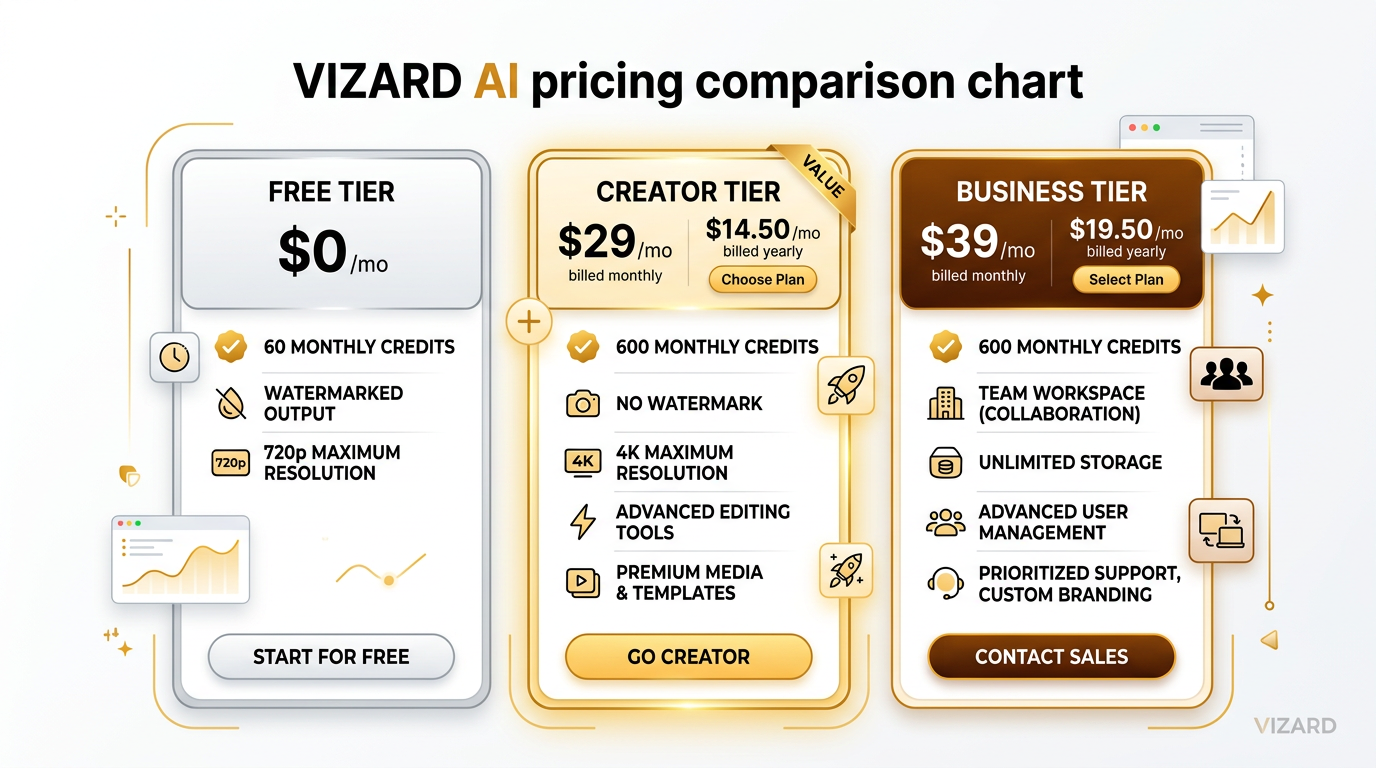
Vizard AI pricing — Free for testing (60 credits, 720p, watermarked), Creator at $29/mo ($14.50/mo annual), and Business at $39/mo ($19.50/mo annual) with team workspaces and unlimited storage.
The Competition
Vizard AI operates in a growing space — AI-powered long-form to short-form repurposing. Its main competitors in mid-2026:
- Opus Clip ($19/mo): The original player in this space. Similar highlight detection and clipping, but Vizard has better text-based editing and caption styling. Opus is cheaper but Vizard’s output quality is noticeably better for polished content.
- Descript ($24/mo): More full-featured as a video and podcast editor, but less focused on automated repurposing. Descript is better if you need a primary editing tool; Vizard is better if you need bulk repurposing of existing content.
- Quso.ai ($29/mo): Direct competitor with similar feature set — auto clipping, captions, reframing. Vizard has better highlight detection and a cleaner interface, but Quso has stronger analytics for tracking clip performance across platforms.
- Riverside.fm ($24/mo): Built for recording podcasts and interviews with built-in repurposing features. If you’re already recording with Riverside, its repurposing tools may be sufficient. If you need to repurpose content recorded elsewhere, Vizard is the better standalone tool.
For most creators in the United States producing 2+ hours of long-form content per week, Vizard AI at $14.50/month (annual) is the best value in this category. The text-based editing alone saves enough time to justify the subscription.
The Verdict
Vizard AI does one thing — long-form to short-form video repurposing — and does it better than any competitor I tested in 2026. The highlight detection is smart, the text-based editing is genuinely time-saving, and the one-click reframing with speaker tracking produces clips that look native to each platform.
It’s not a replacement for a proper video editor, and the Free tier is too limited for regular use (60 minutes of upload per month and watermarked exports). But for $14.50/month on the annual Creator plan, it’s a no-brainer for anyone producing regular long-form video content who needs a consistent pipeline of social media clips.
Who should buy it: Podcasters, webinar hosts, conference speakers, and content teams who need to repurpose long-form video into social clips efficiently.
Who should skip it: Anyone who needs a full video editor (get Descript or Resolve instead), and casual creators who produce less than 2 hours of long-form content per month (the Free tier may be sufficient for testing).
Frequently Asked Questions
Is Vizard AI better than Opus Clip?
Vizard AI offers better text-based video editing and higher-quality caption styling than Opus Clip. Opus Clip is cheaper at $19/month, but Vizard’s output is noticeably more polished. For professional content creators, the $14.50/month annual Creator plan offers better value per clip.
How much does Vizard AI cost per month?
Vizard AI offers a Free plan with 60 credits/month, a Creator plan at $29/month (or $14.50/month billed annually), and a Business plan at $39/month (or $19.50/month billed annually). The annual plans offer roughly 50% savings over monthly billing.
Does Vizard AI remove watermarks?
Yes, watermarks are removed on both the Creator and Business paid plans. The Free plan includes watermarks on all exported clips. Upgrading to any paid tier removes watermarks immediately.
Can Vizard AI edit videos by editing text?
Yes, this is one of Vizard’s core features. The AI generates a transcript of your video with 98.5% accuracy, and you can delete, rearrange, or edit the text — the video timeline follows automatically. It’s like editing a document and having the video update in real time.
Does Vizard AI support multiple languages?
Yes, Vizard AI supports subtitle translation to over 100 languages. The transcription can also handle multiple languages within the same video, making it useful for multilingual content and international social media channels.
Can Vizard AI automatically find the best parts of my video?
Yes, Vizard’s AI highlight detection automatically analyzes your video for engagement signals — speaker energy changes, topic transitions, audience reaction moments, and quotable statements. It surfaces suggested clips that you can review, trim, and publish. It typically identifies 70-80% of the best moments automatically.

About Barak Schurr
Barak Schurr is a serial entrepreneur who built and exited a major ticketing platform before turning his attention to AI and content. He runs three AI-focused research sites and writes about the tools, workflows, and strategies that let solo creators build real channels — without a crew, a studio, or a Hollywood budget. Contact: [email protected]
More AI Video Resources