Asset Lab Review 2026: The $49 Desktop Studio That Shows the Price Before You Render
Get The Faceless YouTube Blueprint — Free
The exact AI tool stack and workflow used to build a faceless YouTube channel from zero.
Asset Lab Review 2026: The $49 Desktop Studio That Shows the Price Before You Render
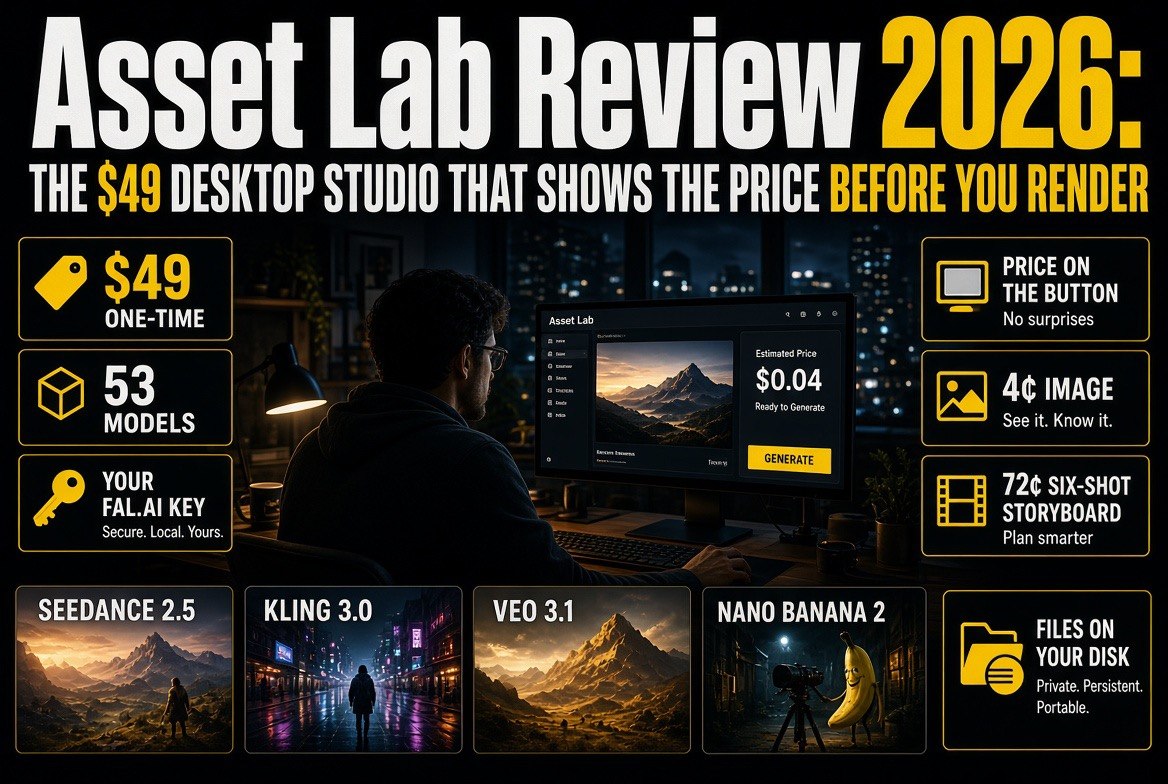
⚡ Expert Summary: Asset Lab is a $49 one-time desktop studio for Mac and Linux that runs Seedance 2.5, Kling 3.0, Veo 3.1, Nano Banana 2 and 50 more models on your own Fal.ai key. No subscription, no expiring credits, no markup — and the exact render price sits on the Generate button before you click it. A six-shot storyboard costs about 72 cents to plan and draw; a Nano Banana 2 image runs roughly 4 cents.
Asset Lab is a direct answer to that. Built by Coastal Creative Lab in Pismo Beach, California, it is a $49 desktop application for Mac and Linux that does not sell you models at all. It connects to your own Fal.ai API key, sends your prompt straight to the model host, and bills the render at raw cost. The app itself is a one-time purchase. There is no account, no subscription, and no minimum spend.
For an American creator running a YouTube channel solo, that is a structurally different deal from the rent-a-model tools that dominate the market. Whether it is a better deal depends on how you work. Here is the honest breakdown.
What Asset Lab Actually Is
If you have ever paid for a year of an AI video subscription and used it hard for three weeks, you already know what is wrong with the category. Most tools rent you a model behind a monthly paywall, hide the real cost inside credits, and charge whether the renders were any good or not — a pricing model that punishes exactly the behavior good creators have.
Asset Lab is not a video generator. It is a studio that fronts 53 third-party models through a single interface, then gets out of the way. Most tools bundle a model, a subscription, and a credit system into one product, and you cannot see what a render costs because the cost hides inside a credit priced to protect a margin. Asset Lab removes all three layers: no credit system, no bundled model, no middleman. Your key talks to Fal.ai directly, and the price you pay is the price Fal publishes.
The app covers the full production line rather than a single step:
- Cast — save a character or location with a reference photo, and it stays consistent across every shot you generate.
- Storyboard — Director plans the shot list from your cast and draws a cinematic still for each shot before you commit to video.
- Shoot — each approved frame opens its own shot on the video model you pick, across 30 video models.
- Sound — 172 voices, six music models, sound effects, and a scorer that writes music to the pacing of a cut you have already made.
- Cut — transitions, fades, a music-and-voice mixer, and renders exported to your own disk.
There are two editions, both $49: the standalone studio, and AssetLab Resolve, which docks the same toolset beside a DaVinci Resolve timeline. If you already own one, the other costs $19 to add. That is a sensible structure — you are buying a way of working, not a tier.
The Feature That Actually Changes Behavior
The headline feature is not a model. It is the number on the button.
Every generation button in Asset Lab shows the exact estimated cost before you press it, and the sidebar keeps a running monthly total. That sounds like a minor UI decision. It is not. Hidden pricing is what lets subscription tools get away with charging for iteration. When the price of a test render is visible — four cents for an image, sixty cents for a video clip — the entire creative decision changes. You stop saving prompts “for later” and you start actually testing the idea.
The storyboard workflow leans into this deliberately. Director plans the shots for about two cents, then draws a still for each one at roughly twelve cents a frame. A six-shot board lands under a dollar. You look at six proposals, delete the three that are wrong, and only then pay for video. For a creator used to burning 40 credits to discover a concept does not work, that is the whole argument for the app in one workflow.
| What you actually pay for | Typical listed rate |
|---|---|
| Asset Lab licence (one-time, unlimited machines) | $49 once |
| Cross-grade to the other edition | $19 once |
| Storyboard plan per board | ≈ 2 cents |
| Storyboard still per frame | ≈ 12 cents |
| Nano Banana 2 image, 2K | ≈ 4 cents |
| Wan 3.0 clip, 5s at 720p | ≈ 50 cents |
| 150-word voiceover (Inworld) | under 1 cent |
| Six-shot storyboard, planned and drawn | under $1 |
Read that bottom section again. The reason this matters for a solo channel is that the fixed cost of a video idea collapses to cents. The expensive part of a video used to be finding out whether the idea worked. Asset Lab makes that part cheap and keeps the expensive part — final renders — under your direct control.
One caveat worth stating plainly: those rates are Fal.ai’s published raw prices, re-verified by the vendor at each release, and actual spend varies by model and settings. Your bill depends entirely on how much you generate. A creator who renders 200 clips a month will not save money relative to a flat subscription — they will just see exactly where the money went, which is a different and arguably more useful thing.
Asset Lab vs the Subscription Model: An Honest Comparison
This is where the decision actually gets made, and it does not have a universal answer. The right choice depends on how many renders you do in a month and how much you value predictability.
| Factor | Asset Lab | Subscription AI video tools |
|---|---|---|
| Upfront cost | $49 once | $0 to $30+ per month, forever |
| Model choice | 53 models across image, video and audio | Whatever the vendor ships, usually one or two |
| Cost visibility | Exact price on the button before every render | Credits, opaque and repriced at will |
| Where your files live | Your disk; library survives link expiry | Vendor cloud, tied to the account |
| Platform | Mac and Linux; Windows by request | Browser, so any platform |
| Best for | High-iteration creators who test a lot | Occasional users who want one flat bill |
| Main friction | You must set up and fund a Fal.ai key | You never know the true cost per render |
The honest read: if you generate a handful of videos a month and want one predictable charge, a subscription is still the simpler product. If you iterate constantly — thumbnails, B-roll, test shots, character tests — Asset Lab’s model is dramatically cheaper, because you stop paying a subscription rate for work that costs a few cents at the source.
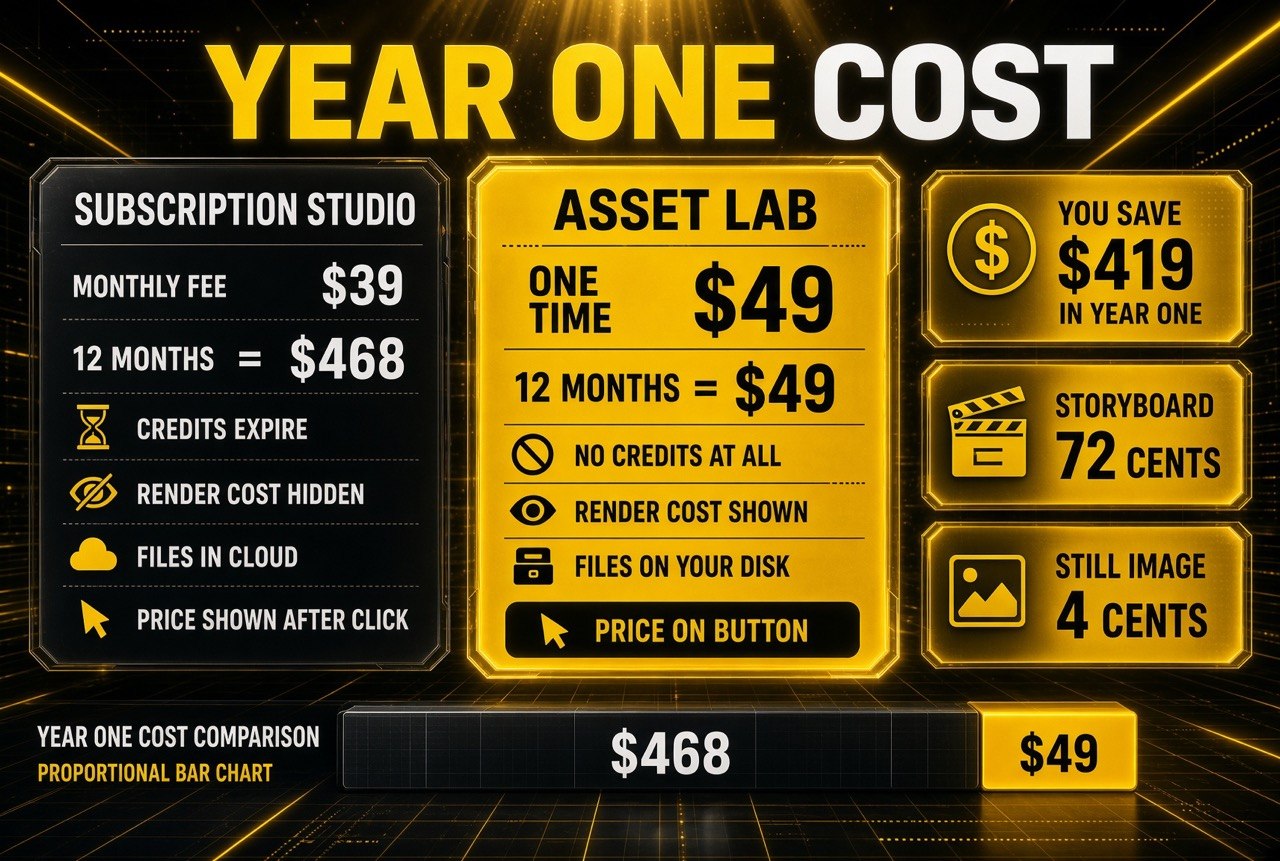
Year one cost, side by side: 12 months of a $39 subscription studio comes to $468, against $49 once for Asset Lab. Per-render pricing at 4 cents for a still image is why the savings gap keeps widening past month two.
What I Would Want Before Buying
A working Windows build. The site says a Windows build is available by request, which means Mac and Linux users are the supported path today. If your editing rig is a PC, confirm availability directly before you buy. This is the single biggest gap in the product’s coverage.
Comfort with an API key. Setup is genuinely short — install the app, click one button to open Fal, create a key with admin scope, paste it in. But you are funding a prepaid Fal balance and topping it up as you go. Creators who dislike metered billing will find the mental overhead real, even though the totals are lower.
Clarity on updates. The licence includes model-catalogue and feature updates for the life of the product — you pay $49 once and get upgrades and model updates for good, with no renewal and no expiry date. That removes the one soft spot in the pricing: the newest frontier models landing on Fal stay available to you without a second payment.
The training side is handled better than most: the vendor publishes a free narrated video course that walks through the real interface, plus a Setup Guide and full manual as PDFs included with the licence, and a free demo containing sixteen sample renders so you can inspect output quality before paying anything.
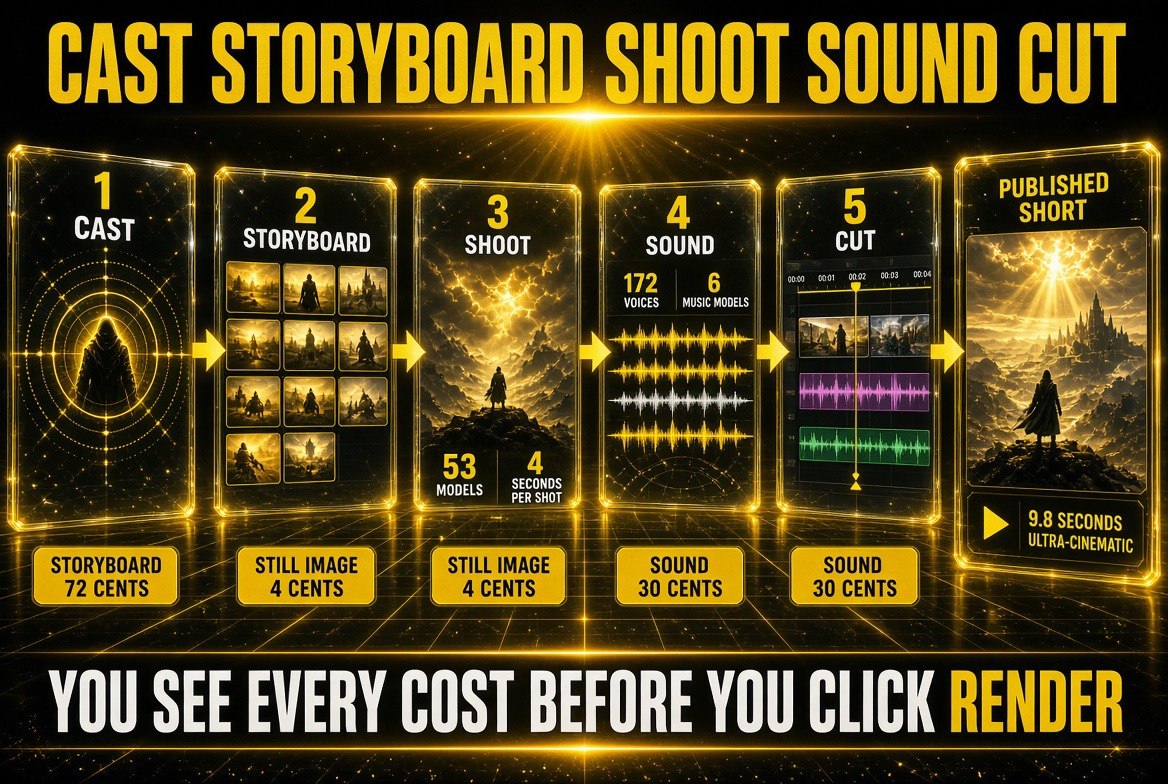
The pipeline in order: Cast, Storyboard, Shoot, Sound, Cut. Every stage shows its per-unit cost up front, which is why you can price a finished short before committing a single render.
How to Decide in Ten Minutes
Do not evaluate this on feature lists. Evaluate it on your own render history.
- Count your last 30 days of generations. If you produced more than about 40 image or video renders, the metered model almost certainly wins on cost.
- Check your platform. Mac or Linux and you are set. Windows, ask first.
- Download the free demo. It is the full application with sixteen sample renders and live prices on every tab. No account, no timer. It simply will not generate until you unlock it.
- Run the storyboard maths. Price a six-shot board at roughly 72 cents. If your current tool charges more than that to sketch an idea, the comparison is already over.
- Buy once, or skip it. There is no trial trap and no auto-renewal — the failure mode here is not a recurring charge, it is paying $49 for an app you did not need.
That last point is the fairest thing about the product. The worst outcome is a one-time $49, not a subscription quietly renewing while you forget about it.
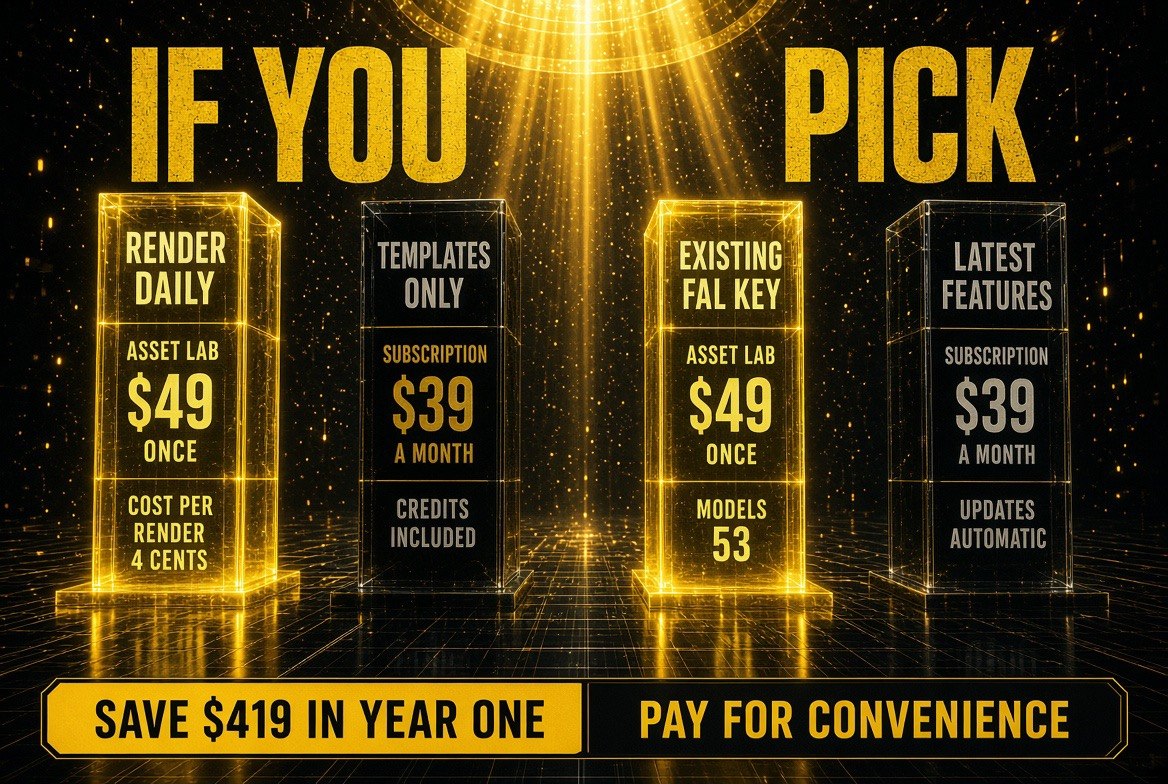
The ten-minute decision in one grid: buy once if you render daily or already hold a Fal.ai key, subscribe if you mainly want ready-made templates and hands-off updates.
The Bigger Shift This Represents
Asset Lab is a small company with a $49 app, so it would be easy to file this under niche tools and move on. That would miss the point.
The pricing model is the story. As frontier video models get cheaper — and they are getting cheaper fast — the value in AI video is migrating away from whoever owns the model and toward whoever removes friction around it. If a render costs four cents at the source, a subscription priced to hide that fact becomes hard to justify, especially for the solo creator who has no procurement department to absorb the waste.
Adobe added AI generation into Premiere Pro. Runway, Kling and Veo keep shipping stronger models. What none of them sell is a single app that fronts all of them, keeps your key, shows you the price and stores the files on your own machine. Asset Lab’s bet is that a meaningful slice of creators care more about cost control and model access than about brand loyalty to any one model maker.
I cannot verify that bet by using the app myself — this write-up is based on the vendor’s published documentation and the live site, not hands-on renders. Treat the specific figures as vendor-published rates, and the workflow descriptions as the vendor’s own account. What is verifiable is the structure: $49 once, your own Fal.ai key, exact prices on the buttons, files on your disk. That structure is genuinely different from everything else in this category right now.
For a solo creator testing ideas constantly, that is worth ten minutes with the free demo. For anyone rendering a few clips a month, a subscription is still fine — and now you know exactly why.

About Barak Schurr
Barak Schurr is a serial entrepreneur who built and exited a major ticketing platform before turning his attention to AI and content. He runs three AI-focused research sites and writes about the tools, workflows, and strategies that let solo creators build real channels — without a crew, a studio, or a Hollywood budget.
Email: [email protected]
More AI Video Resources