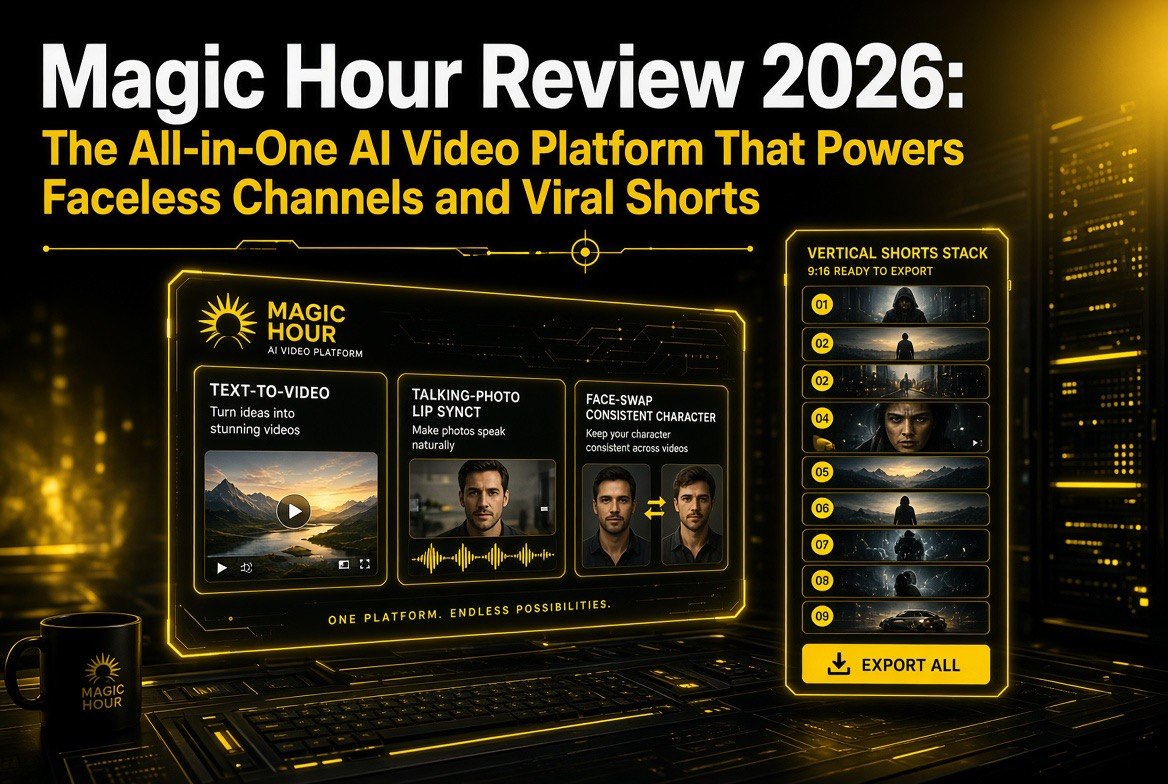
Magic Hour Review 2026: The All-in-One AI Video Platform That Powers Faceless Channels and Viral Shorts
Get The Faceless YouTube Blueprint — Free
The exact AI tool stack and workflow used to build a faceless YouTube channel from zero.
Magic Hour Review 2026: The All-in-One AI Video Platform That Powers Faceless Channels and Viral Shorts
⚡ Expert Summary: Magic Hour (magichour.ai) is a Y Combinator-backed, browser-based all-in-one AI creative platform that puts more than 100 generation tools behind one login and one credit system. Instead of paying separately for a video generator, a face-swap tool, a lip-sync app, and a UGC-ad builder, you get them all in one place, with frontier models like Kling 3.0 and Veo 3 behind the scenes. It is not the single most powerful video model money can buy — specialized tools still edge it out on extreme realism — but it is arguably the most efficient short-form production suite available to a solo creator in 2026, which is exactly why faceless-channel operators and social marketers keep reaching for it. Pricing starts free, with the Creator plan at about $12 a month billed annually, and credits never expire, so it is a low-risk way to replace a stack of separate subscriptions. This review covers what it actually does, how it fits a faceless or short-form workflow, whether the credit math works, and where it falls short.
Here is a problem almost every solo creator hits in 2026: making a YouTube Short, a Reel, or a TikTok that looks good now requires five or six different tools. You generate a visual in one app, animate it in a second, lip-sync or face-swap in a third, add captions in a fourth, and export in a fifth. Each one is a separate subscription, a separate login, a separate learning curve, and a separate $15-to-$40 a month that quietly disappears into your cost of doing business. Before long you are running a software portfolio, not a channel.
Magic Hour is built to collapse that pile into one tool. It is a Y Combinator-backed (Winter 2024) browser-based platform that aggregates over a hundred AI tools and several of the best frontier models — including Kling 3.0, Veo 3, LTX, Seedance, and Wan — behind a single interface and a single credit pool. You do not juggle providers or track which subscription covers which task. You pick the tool that does the job, spend credits, and export a platform-ready vertical video. For creators running faceless channels, viral shorts machines, or marketing engines that test dozens of hooks a week, that consolidation is the entire value proposition, and it is a genuinely useful one.
This review is written for the solo creator, the small-studio editor, and the marketer who wants to produce short-form video consistently without hiring a crew or maintaining a bloated software stack. I cover exactly what Magic Hour does, the workflow it replaces, the pricing and credit math in plain numbers, who it is genuinely great for, and the honest limitations you should weigh before you subscribe.
What Magic Hour Actually Is
Magic Hour describes itself as an all-in-one AI creative platform for video, image, and audio, and unlike a lot of “all-in-one” claims, this one mostly holds up. The core of the product is a large library of individual AI tools — more than one hundred of them — each focused on a specific generation or editing task, all sharing the same credit balance and interface.
The clever part is that Magic Hour does not train its own models. It licenses and routes work to several top-tier models depending on the task, which is why you can pick “Kling” for one clip or “Veo” for another without managing three subscriptions. You get the benefit of the frontier model arms race through a single neutral interface. The tool chooses the best fit, or you override it when you have a preference, and the credits are spent consistently either way.
Because it lives in the browser, there is nothing to install, no render farm to babysit, and it runs on a basic laptop or even a tablet about as well as it runs on a desktop. Parallel generation — firing off several variations of a hook at once — is supported, which is a big deal for anyone who tests content the way a marketer should. You can produce five versions of an opener, glance at them, and double down on the one that pops without five times the effort.
The Core Toolset — What You Will Actually Use
Magic Hour is broad, but in practice most creators live in a handful of its tools. These are the ones that matter most for short-form and faceless work.
Text-to-video and image-to-video. This is the engine room. You type a prompt and get a generated clip, or you feed it a static image and it animates it. Duration depends on the model, but many support clips up to around 60 seconds. Native 9:16 vertical output is built in, so you are not cropping a landscape video into a short and losing half the frame. For faceless storytelling, hypnotic “satisfying” visuals, product animations, or B-roll, this covers a huge share of what a channel needs on its own.
Talking photo and lip sync. This is one of the sleeper tools for faceless channels. You take a single static image — an AI-generated portrait, a stock photo, or an avatar — and Magic Hour turns it into a talking video that syncs to a voiceover or audio track. That gives you a consistent “presenter” or narrator who never needs to appear on camera, which is exactly the formula many highly successful faceless and faceless-adjacent channels run. Pair it with a voice tool and you have a repeatable, low-effort talking-head pipeline without ever switching on a camera.
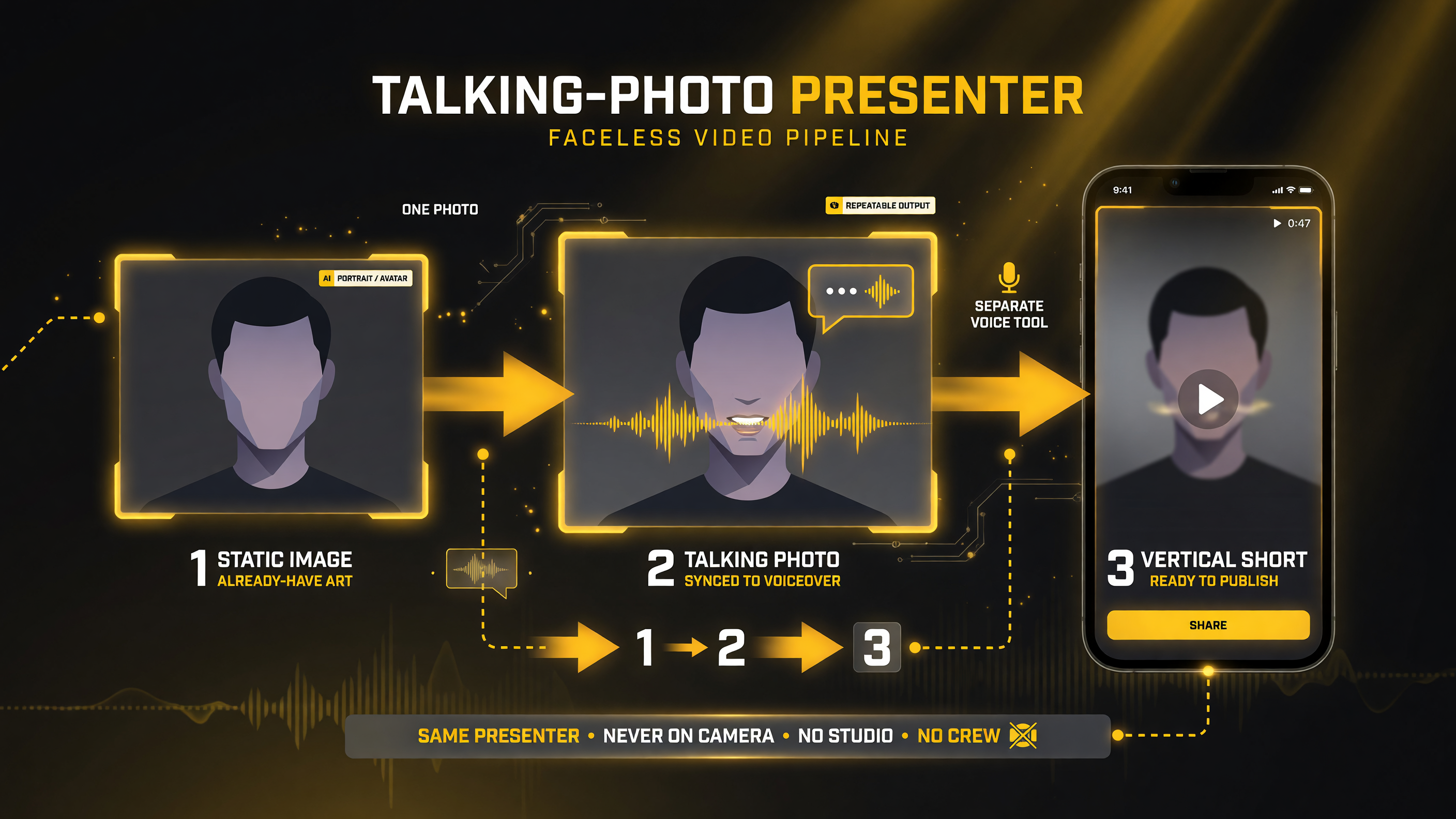
This is the pipeline behind many successful faceless channels: one static image becomes a talking presenter synced to a voiceover, then a finished vertical short — repeatable, low-effort, and no camera ever required. Pair the talking-photo tool with a separate voice tool and a single creator can publish commentary-style shorts at volume with a recurring character who is always available.
Face swap. You can replace faces on existing footage or on AI-generated clips, keeping the motion and expressions while swapping in a consistent character or brand face. It supports importing from a YouTube URL and multi-face swaps. For brands or channels that want a recognizable recurring character without casting an actor, this is powerful. It is also, fairly, the kind of tool that demands responsible use — more on that in the limitations section.
AI UGC ad generator and templates. This is the biggest productized feature and the one marketers specifically seek out. Magic Hour ships a library of thousands of templates tuned for things like YouTube Shorts, and an AI UGC (user-generated-content) generator that lets you create realistic-looking “someone filmed this on their phone” style ad variations quickly. Instead of hiring a creator to film ten hooks, you generate variations and test. Marketing teams, including well-known brands, use this heavily because it collapses what used to be a week of production into an afternoon.
Supporting tools. Around those core generators sit the rest of the practical toolkit: a prompt-based video editor that can add, remove, or replace elements in a clip; a subtitle generator; animation tools; voice generation and cloning; and video-to-video style transfers. For the solo operator building an actual channel, that means captions and voiceovers do not require bolting on two more subscriptions either.
The Workflow It Replaces — and Why It Matters
To understand Magic Hour’s real value, it helps to see the alternative stack it replaces. Before products like this, a creator producing a faceless or short-form video at pace might run something like the setup in the table below — and that is before counting the subscription bloat and the context-switching cost of moving files between five apps.
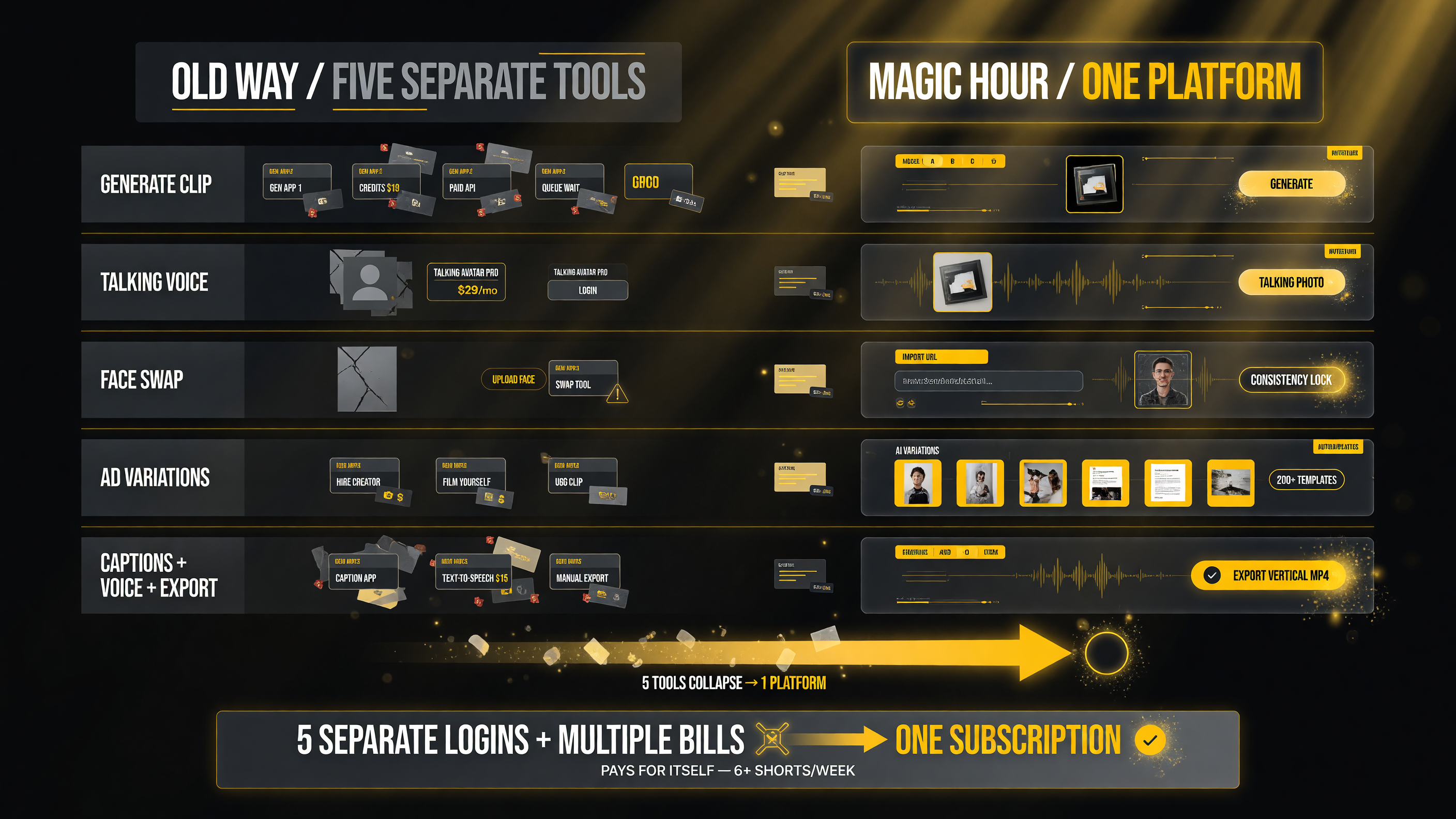
Look at the left column and count the separate accounts, subscriptions, and credit systems a solo creator used to juggle to produce AI shorts; now compare it with the right column where the same jobs happen inside a single platform. For someone publishing several shorts a week, that consolidation alone can cover the cost of the tool before speed or output quality even enter the conversation.
| Task | Old Way (Separate Tools) | Magic Hour (One Platform) |
|---|---|---|
| Generate video clip | Runway, Kling, or Veo (separate account + credits each) | Model picker inside Magic Hour |
| Talking narrator / lip sync | HeyGen or similar (another subscription) | Talking photo tool |
| Face swap / character consistency | DeepSwap or dedicated face-swap app | Face swap tool (incl. YouTube URL import) |
| UGC-style ad variations | Hire creators or film yourself | AI UGC generator + 1,000s of templates |
| Captions, voice, export | CapCut + ElevenLabs + export juggling | Built in, export vertical MP4 |
Now count the logins and the monthly bills in the left three rows and compare them to a single Magic Hour subscription. That is the pitch in one glance. For the solo creator producing multiple shorts a week, the consolidation alone can pay for the tool, before you even factor in the speed from parallel generation.
Pricing and the Credit Math
Magic Hour runs on a credit system, and this is where you need to pay attention, because the value is entirely in whether the credits fit how you actually work.
Here is the good news on the model itself: credits never expire and roll over indefinitely, and every paid plan includes access to the full toolset rather than gating features behind tiers. The plans differ in credit volume, maximum resolution, upload limits, concurrency, and priority — not in which tools you are allowed to touch. Annual billing saves roughly a third or more compared to paying monthly. The current plans look like this. See the full live pricing and credit tiers here.
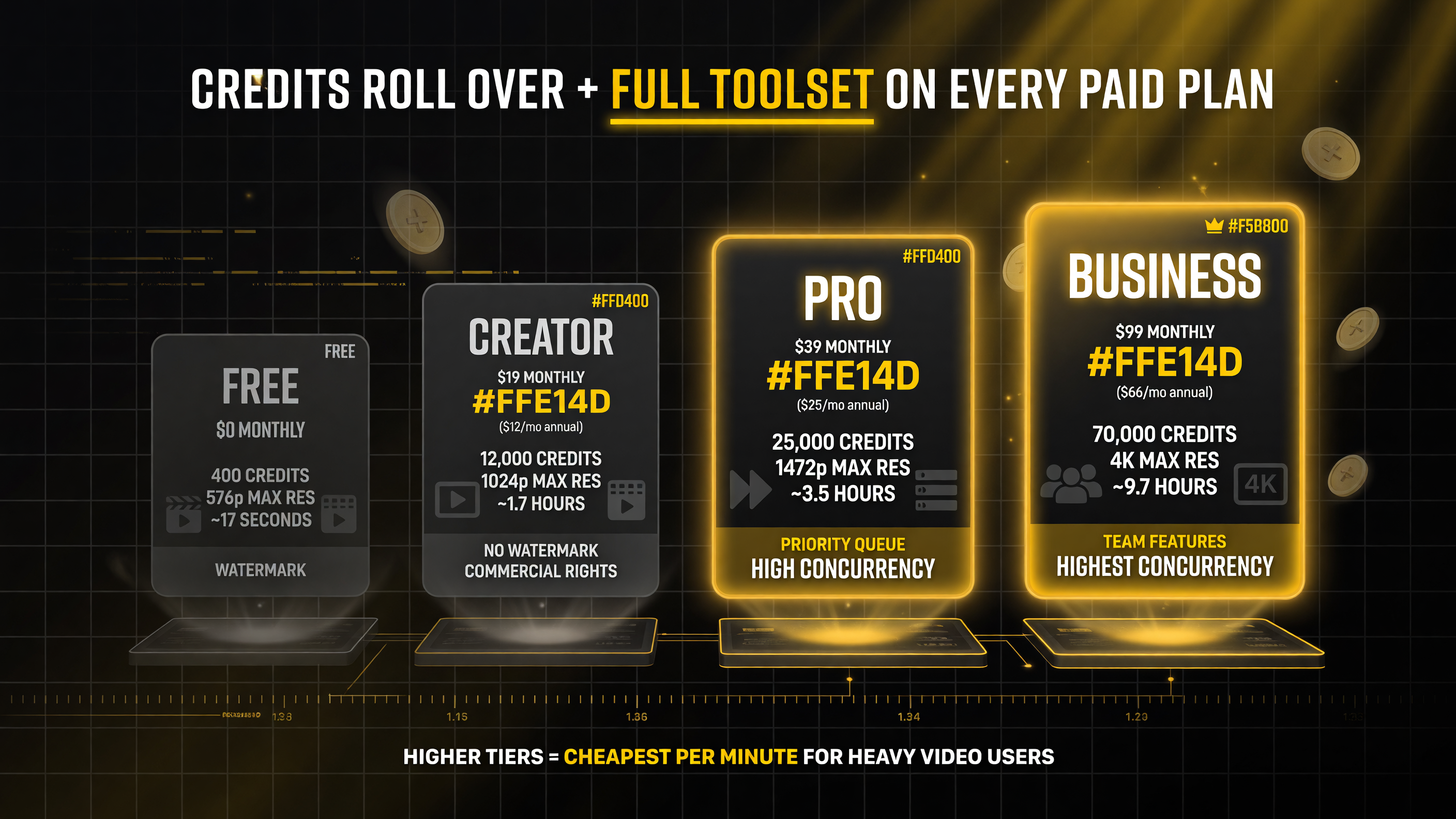
Read the four plans left to right: the free tier proves the full toolset, then each paid tier mainly buys more credits, higher resolution, and longer output rather than unlocked tools. For anyone publishing shorts several times a week, the value sits in the Pro and Business rows, because video generation burns credits far faster than images and heavy users outgrow the small plans.
| Plan | Monthly Price | Annual Price | Credits (per month) / Res | Rough Output |
|---|---|---|---|---|
| Free | $0 | $0 | 400 credits, up to 576px | ~17 seconds of video; watermark |
| Creator | ~$19 | ~$12/mo ($144/yr) | 12,000/mo, up to 1024px | ~1.7 hrs video per year (annual); no watermark, commercial rights |
| Pro | ~$39 | ~$25/mo ($300/yr) | 25,000/mo, up to 1472px | ~3.5 hrs video per year (annual); priority queue |
| Business | ~$99 | ~$66/mo ($792/yr) | 70,000/mo, up to 4K | ~9.7 hrs video per year (annual); team features |
Hour figures are annual allowances on yearly subscriptions, not monthly output. Actual runtime varies by model, resolution, duration and settings.
Before you pick a tier, understand the real-world tradeoffs. Video generation burns credits far faster than image generation, and the number of credits a single clip costs depends on the model you choose, the length, and the resolution. Heavy video users routinely find the lower tiers insufficient and either buy one-time credit packs or move up a level, so budget honestly rather than assuming plan output maps one-to-one to your needs. The “roughly X hours” figures above are helpful ballparks, but your mix of tools, models, and output settings is what actually determines your burn rate.
Who Magic Hour Is Genuinely Great For
After weighing the workflow and the pricing, the honest assessment is that Magic Hour is not for everyone — but for a specific group of creators it is close to ideal. The fit comes down to whether the consolidation and iteration speed are worth more to you than peak quality in any single tool.
Faceless and short-form channel operators. This is the sweet spot. Everything a faceless channel needs — producing clips, generating a talking presenter from a photo, captions, voice, consistent characters, vertical export — lives in one place, and the parallel generation means you can test hooks fast. If you run a channel that posts several shorts a week, Magic Hour removes the operational friction that usually kills small operators’ consistency.
Marketers and small teams testing UGC-style ads. The AI UGC generator and template library are the strongest productized parts of the platform. If your job is producing and testing multiple ad variations across TikTok and Instagram without a production budget, the ability to spin up realistic variations in an afternoon is a genuine leap over the old workflow of hiring creators and hoping a hook lands.
Solo creators who value speed and breadth over pixel-perfect realism. If you need exceptional output in niche cases, a specialized tool will beat Magic Hour. But if you need good-to-great output across many short-form use cases every single week, the all-in-one efficiency usually wins. This is the classic “Canva of AI video” tradeoff, and for most short-form work the balance lands in Magic Hour’s favor.
Where Magic Hour Falls Short — Honest Limitations
No review is useful without the part where the vendor is not winning, and Magic Hour has real caveats that legitimately matter depending on your use case.
Quality ceiling on complex scenes. Magic Hour’s outputs are genuinely good for social and UGC work, but they do not consistently match the very top-end realism of the most specialized frontier access for complex, high-fidelity scenes. If your entire business is photorealistic cinematic work destined for a 4K portfolio, a purpose-built tool is still the better call. Magic Hour is optimized for breadth and speed, not for being the single most impressive video model in the world.
The free tier is a tester, not a production plan. Four hundred credits and topped-out 576-pixel resolution with watermarks means you can validate the workflow but not ship polished work without paying. That is fine — the product is honest that free is a trial — but do not expect to run a real channel on the free plan.
Video burns credits fast. This is the single most common source of sticker shock. A couple of hours of serious video generation a month will push you past the Creator plan’s allocation, and users frequently end up buying add-on credit packs or moving to Pro. Budget for your real video volume, not the marketing example, and you will not be surprised.
Responsible-use questions on face tools. Face swap and realistic talking-photo generation are powerful, and like all tools of this kind they carry genuine potential for misuse — creating convincing videos of real people without consent, or generating deceptive content. If you use these features, you have an obligation to use them transparently and ethically, and platforms increasingly enforce disclosure rules around AI-generated content regardless of the tool that made it. Treat that as a real consideration, not boilerplate.
It is not a channel manager. Magic Hour handles generation and editing extremely well, but it does not script your content, schedule your uploads, or run your channel end to end. If you want a fully autonomous faceless-channel pipeline — one that writes, produces, and posts on autopilot — Magic Hour is one strong piece of that machine, not the whole machine. You will still pair it with planning and distribution tools.
The Bottom Line — Who Should Buy Magic Hour?
Magic Hour is one of the more genuinely useful “all-in-one” AI video products to reach creators in 2026, and its value is real because it solves a real, recurring problem: the fragmentation of the short-form production stack. For a solo creator or small team producing short-form or faceless video at any kind of volume, replacing five subscriptions and five separate workflows with one fast, browser-based platform with non-expiring credits is a compelling offer, especially at roughly $12 a month on the annual Creator plan and about $25 on annual Pro.
It is not the tool to choose if your priority is pushing a single model to its absolute visual limit, and it will not run your channel for you. But if your job is to produce consistent, good-looking, platform-ready shorts and ads week after week without a crew or a bloated tool stack, Magic Hour earns a serious look. The free tier is enough to test the exact workflow that matters to you before you spend a cent — which is exactly how a smart operator should evaluate it.
Frequently Asked Questions
What is Magic Hour?
Magic Hour (magichour.ai) is a Y Combinator-backed, browser-based all-in-one AI creative platform for generating and editing video, images, and audio. It aggregates more than 100 AI tools and several top frontier models, including Kling 3.0 and Veo 3, behind a single interface and credit system, with native 9:16 vertical output for shorts and reels.
Is Magic Hour good for faceless YouTube channels?
Yes. Magic Hour is well suited to faceless and short-form work because it combines the core production steps in one place — text-to-video, image-to-video, talking photos and lip sync, face swap, AI UGC ads, captions, and voice generation — and supports parallel generation so you can test multiple hooks quickly and export platform-ready vertical video.
How much does Magic Hour cost?
Magic Hour offers a free plan with 400 starter credits (about 17 seconds of video, up to 576px, with watermarks). Paid plans start at roughly $19 a month monthly or about $12 a month billed annually for the Creator tier, ~$39/$25 for Pro, and ~$99/$66 for Business, with annual billing saving about a third. Credits never expire and roll over.
Does Magic Hour work better than a single dedicated model like Veo?
Magic Hour can access models like Kling 3.0 and Veo 3 through its library, so you get those models’ capability through one interface for supported tasks. But it is not designed to out-perform a single specialized model on extreme realism in complex scenes; its strength is breadth, speed, and consolidation for short-form and UGC work rather than absolute peak quality.
What are the downsides of Magic Hour?
The main limitations are that video generation consumes credits quickly (heavy users often need add-on packs or a higher tier), the free plan is restrictive with watermarks and low resolution, complex high-fidelity scenes may not match the most specialized tools, and it does not script, schedule, or manage your channel on its own.
Do I need a separate account for each AI model in Magic Hour?
No. That is one of the platform’s main advantages. Magic Hour gives you access to multiple frontier models through a single account and a single credit pool, so you are not managing separate subscriptions or logins for each generator.

About Barak Schurr
Barak Schurr is a serial entrepreneur who built and exited a major ticketing platform before turning his attention to AI and content. He runs three AI-focused research sites and writes about the tools, workflows, and strategies that let solo creators build real channels — without a crew, a studio, or a Hollywood budget.
Email: [email protected]
More AI Video Resources