Shotstack: The Cloud Video API That Automates Your Faceless YouTube Channel
Get The Faceless YouTube Blueprint — Free
The exact AI tool stack and workflow used to build a faceless YouTube channel from zero.
Shotstack: The Cloud Video API That Automates Your Faceless YouTube Channel
You publish on autopilot, but you’re still the bottleneck. You write the script, record or clone the voiceover, hunt for b-roll, drop it on a timeline, export, resize for Shorts, and pray the pacing works. Every video on your faceless channel costs you hours of manual editing — and every hour you spend in an editor is an hour you’re not scaling to a second, third, or tenth channel.
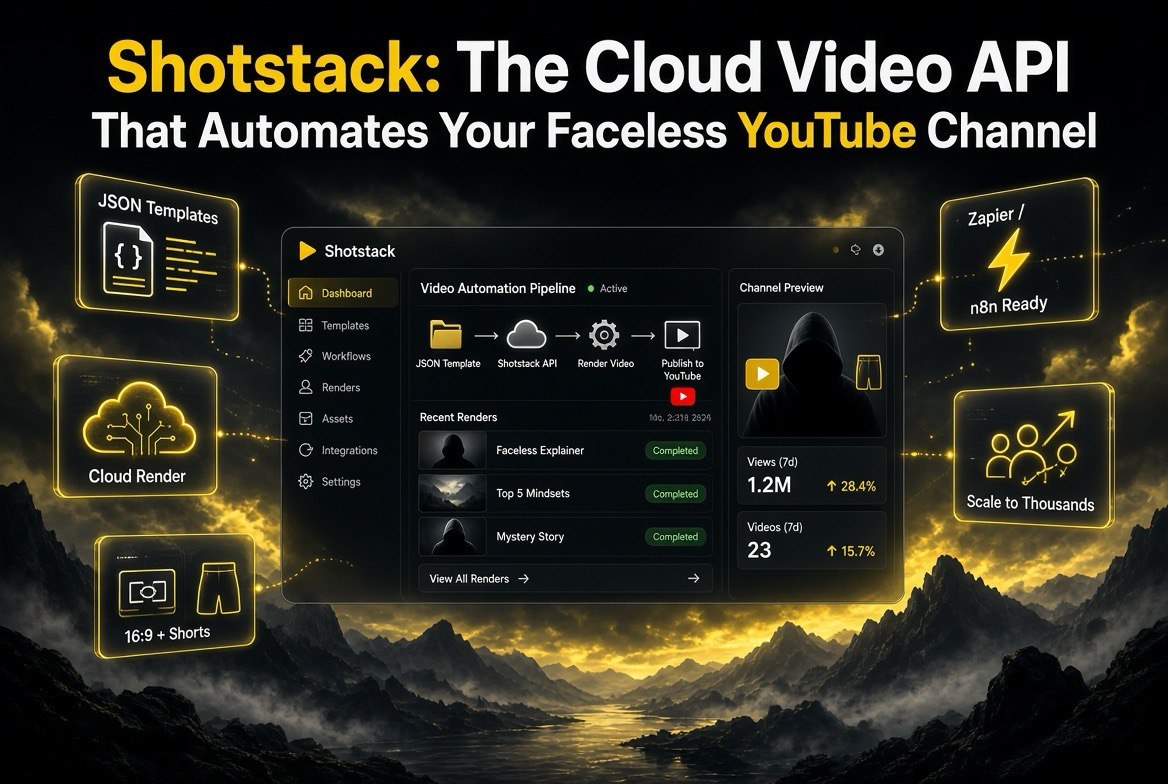
That’s the exact problem Shotstack is built to remove. It’s not another timeline editor with a fresh coat of AI paint. It’s a cloud video editing API — you describe the video in code or a template, and Shotstack renders it on a server, on autopilot, at scale. The video editor is a UI you never open. Your channel becomes a pipeline: data in, finished video out, on a schedule you set and forget.
This review is for US-based creators running faceless or automated YouTube channels — the people who want to publish 5, 10, or 30 videos a week without hiring a team or capping out in an editor. I’ll break down exactly how Shotstack works, what it costs, where it beats the UI editors, and the one honest caveat that decides whether it’s right for you.
What Shotstack Actually Is
Shotstack is a programmable video creation platform. Instead of dragging clips onto a timeline, you send a JSON recipe — or build a reusable template in its browser-based Studio — and the API renders the finished video on their servers. Over 20,000 businesses and developers across 119 countries use it, including brands that need truly industrial volume like Spotify, which generates thousands of videos per day for its partners experience, and IKEA, which used personalized video messages during the pandemic to connect with family members at scale.
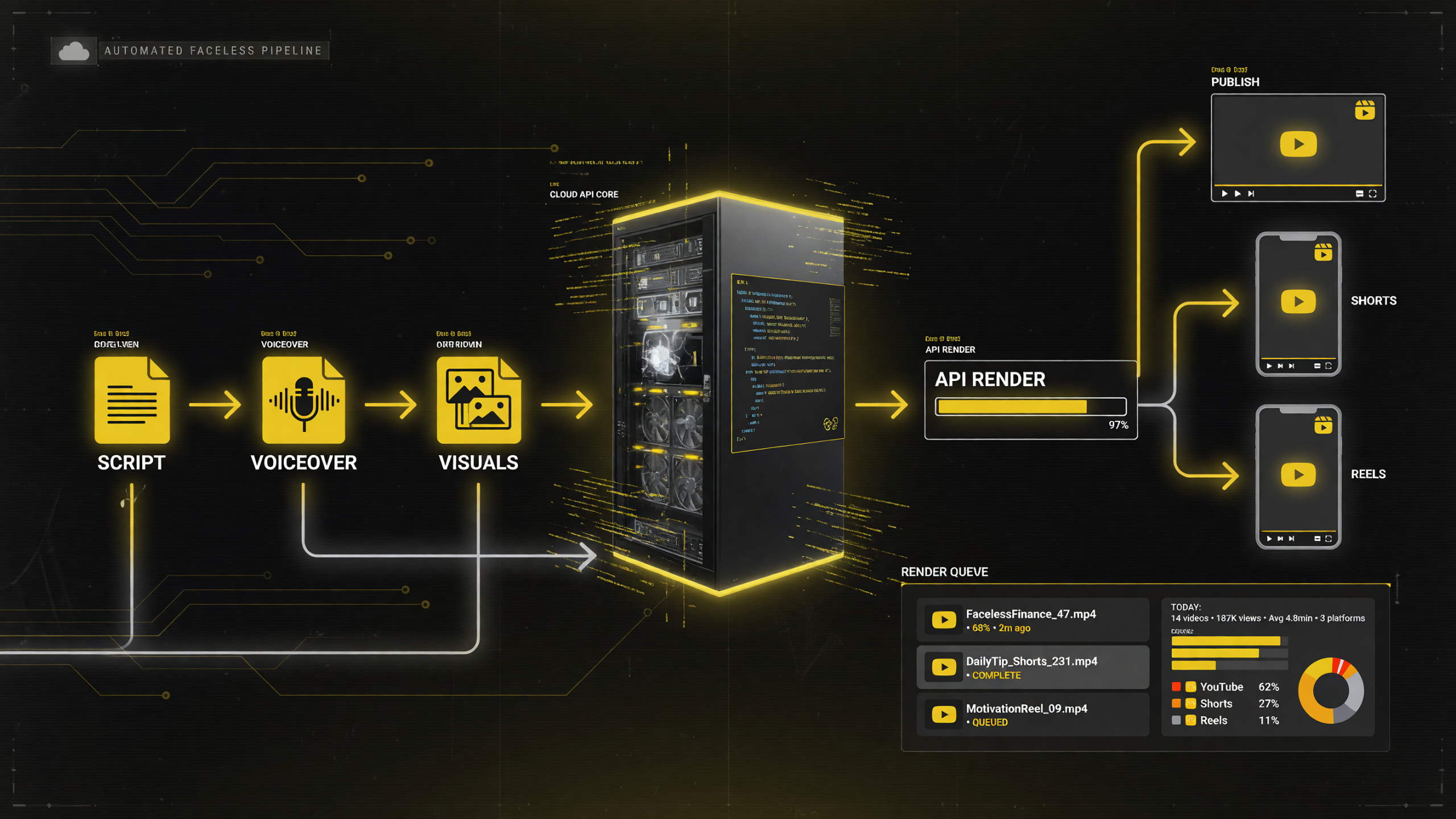
Shotstack swaps the timeline editor for an API call: a script, voiceover, and visuals flow into a cloud render engine and come back as publish-ready YouTube, Shorts, and Reels video — the same pipeline Spotify and IKEA run at industrial volume.
That last point deserves a beat, because it tells you who this tool is really for. A channel publishing a few videos a week doesn’t need Spotify-scale render throughput. But when you’re automating a faceless channel and your goal is volume without headcount, you’re reaching for exactly the same muscles these enterprises use — template-driven output, programmatic control, and a render pipeline that never sleeps. If Shotstack handles Spotify’s partners team and IKEA’s Holiday outreach, it can handle your daily upload schedule without breaking a sweat. The infrastructure is overbuilt in the best way, which means your operation has room to grow into it.
For your faceless channel, that means the entire editing step is replaceable by a call to an API. You can feed it data — a script, a voiceover file, a list of stills, timestamps for subtitles — and it returns a rendered, publish-ready video. No render queue. No timeline. No manual export.
The platform splits into two main products:
- Video Editing API — JSON-based programmatic video creation, template rendering, and scale automation.
- Video Editor SDK — a white-label, embeddable editor you can drop inside your own app, branded with your logo and colors, if you’re building a product for customers.
For a solo creator or a small automation operation, the API is where the magic happens. This is the angle that sets Shotstack apart from every editor review I’ve written before — this isn’t another tool competing with CapCut or Descript on features; it competes on whether you should be editing at all.
How Faceless Creators Use It
The typical Shotstack-powered faceless pipeline looks like this, and it’s the same shape whether you run a finance facts channel, a storytelling channel, or a product-explainer operation:
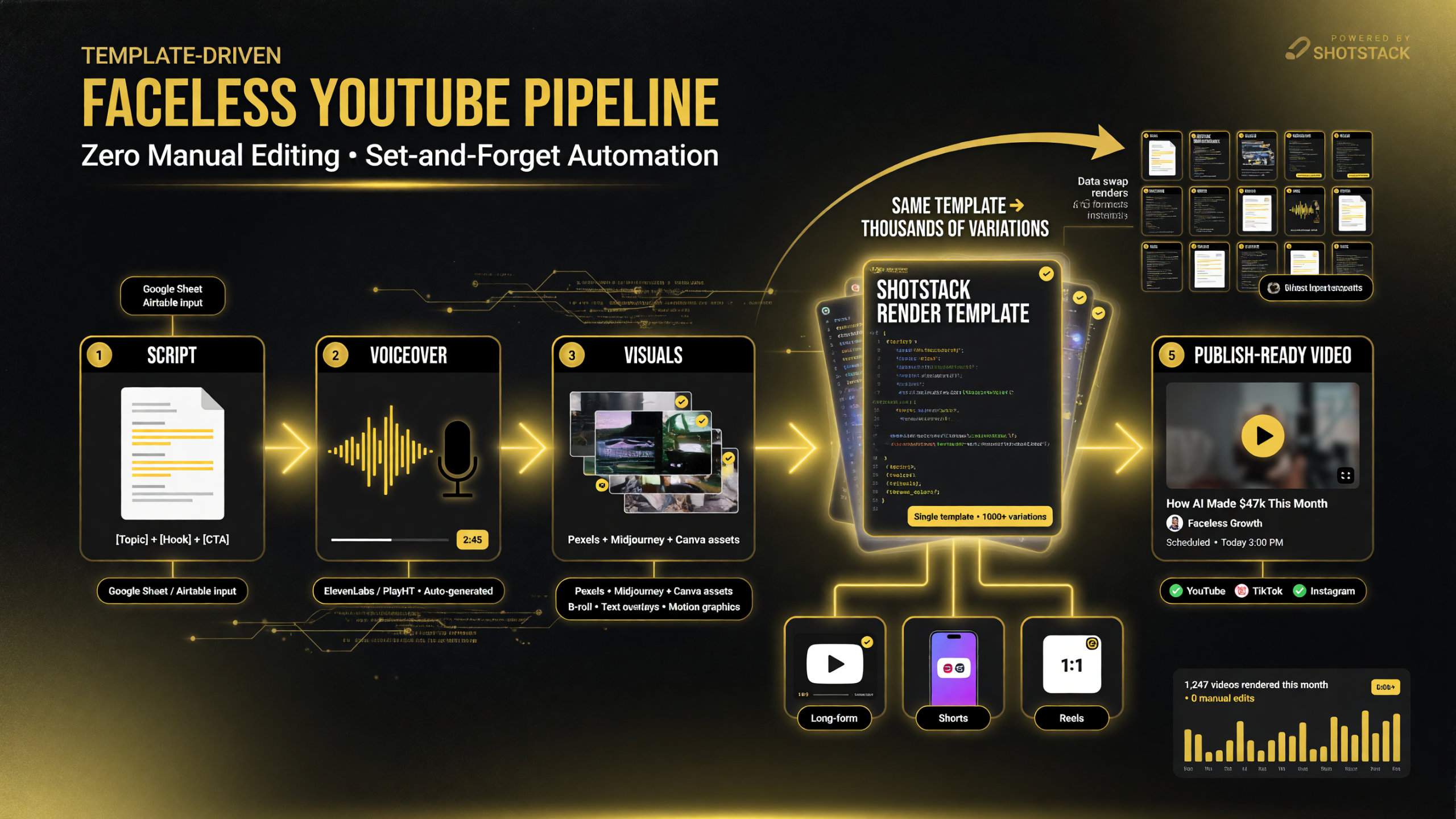
One Shotstack render template replaces the manual editor: script, voiceover, and visuals go in, and publish-ready video comes out for YouTube, Shorts, and Reels — with zero hands-on editing per variation.
- Script — An AI model (like Gemini) writes the script and topic data.
- Voiceover — ElevenLabs or another TTS clones or generates the narration.
- Visuals — Stock images, AI-generated stills, or short clips are pulled in programmatically.
- Assembly — All of it is fed into a Shotstack template with merge fields for the headline, subtitles, and timing.
- Render & publish — The API renders the video (16:9 for YouTube, 9:16 for Shorts, square for Instagram) and hands it to your publishing pipeline.
The power of the template system is the part most people underestimate. You design a video once — in code or in Studio — saving it as a template with a template ID. Then you render thousands of variations by swapping in new data: different headlines, different images, different voiceovers. Each render is a complete, on-brand video. You never rebuild the edit.
This is genuinely different from the way the UI editors (Descript, VEED, CapCut, OpusClip) work. Those tools give you a better editing session. Shotstack removes the editing session entirely for repetitive formats. And because the render happens on their cloud servers, you’re not tying up your own machine either — no waiting on a local export that freezes your laptop while you’re trying to prep the next video. You fire off an API call, move on to the next task, and the finished file comes back to you. That decoupling of the render from your workstation is a quiet but real quality-of-life win for anyone running multiple channels from one machine.
Honest Cost Breakdown
Shotstack uses a credit system where 1 credit = 1 minute of rendered video, billed to the second. Images cost a fraction of a credit (roughly 10 images per credit). Pricing as of mid-2026:
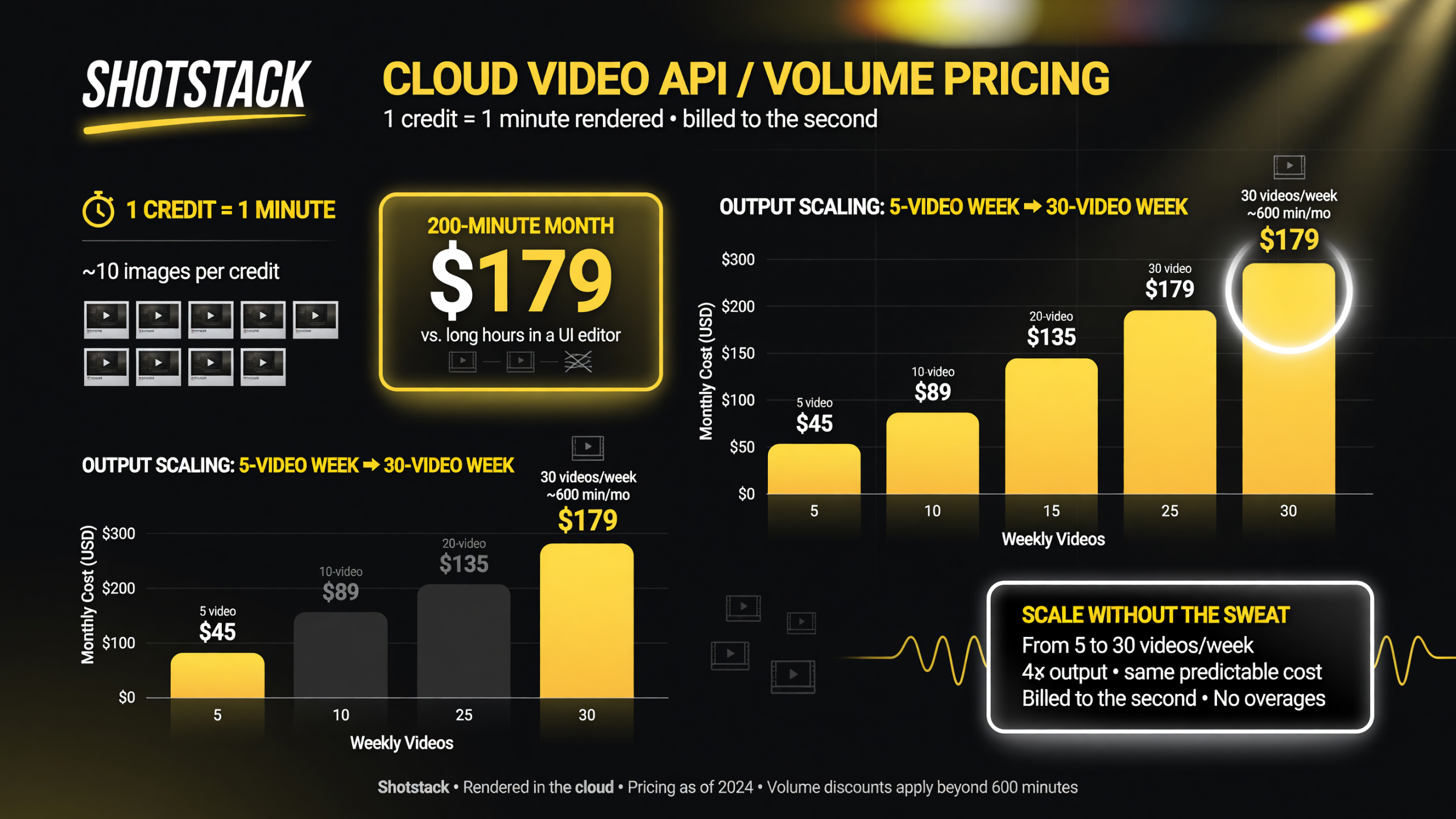
Shotstack bills by the minute rendered — a 200-minute month runs about 79, roughly 10 images per credit, so automating a 5 to 30 video-per-week calendar scales with credits instead of editor hours.
| Plan | Cost | What You Get | Best For |
|---|---|---|---|
| Free Starter | $0 | 10 credits (valid 30 days), sandbox environment (watermarked) | Testing the API, learning templates |
| Pay-As-You-Go | ~$0.30/min ($75 one-time for 250 credits) | 10 credits (valid 30 days), no monthly commitment, credits valid 1 year | Irregular volume, testing before committing |
| Subscription | ~$0.20/min ($39/month for 200 credits) | Rollover up to 3x monthly allowance, Director AI editing, team management, multi-user | Active faceless channels publishing daily |
| Enterprise | Custom (from 50,000 min/year) | Best rates, 4K, tailored support, advanced features | Agencies and large-scale operations |
All plans support 1080p (4K on enterprise), renders up to 3 hours, fast rendering, and Make/Zapier/n8n integrations. AI-generated assets are billed separately even in the sandbox.
Let me put those numbers in context. If you publish one 8-minute video per day, that’s roughly 240 minutes a month. On the subscription plan at $0.20/min with 200 credits, you’d cover most of it for $39/month, with overage at a 30% premium. That’s the cost of a decent coffee habit per week — and it replaces dozens of hours of manual editing.
Shotstack vs. The UI Editors You Already Know
Here’s the comparison that matters for your decision. This is where the honest trade-offs live:
| Factor | Shotstack (API) | Descript / VEED / CapCut (UI) |
|---|---|---|
| How you edit | Code or template, no timeline | Visual timeline, drag and drop |
| Learning curve | Steep — you need to grasp JSON and templates | Shallow — anyone can learn in an hour |
| Scale | Unlimited — render hundreds per day programmatically | Capped — one video at a time through the UI |
| Multi-format output | Yes — one template renders 16:9, 9:16, square | Partial — manual resize or separate session |
| Workflow | Fully automated pipeline | Manual per-video session |
| Best fit | Faceless / high-volume / automated channels | Hands-on creators who want direct control |
The short version: if you love editing and want to touch every frame, a UI editor is the right tool. If you hate editing and want videos to just exist on a schedule, Shotstack replaces the editing step entirely for repeatable formats.
Why It Slays for Faceless Channels Specifically
Faceless channels have a structural advantage that Shotstack is tailor-made for: they’re format-driven. Every video follows the same skeleton — hook, story or facts, payoff, call to action. The content changes, but the edit doesn’t need to. That’s precisely the problem a template system solves.
Here’s what that unlocks in practice:
- Schedule you set once, forever. Wire Shotstack to a scheduler (or n8n/Zapier/Make), and your channel publishes on a calendar without you touching an editor again.
- One template, every format. Design a template once and render YouTube 16:9, Shorts 9:16, and Instagram square from the same source — no manual reframing, no double editing.
- Data-driven personalization. Merge fields like
{{HEADLINE}}or{{TEXT}}let you pull headlines and stats straight from a spreadsheet or API. For niches like “daily market facts” or “history shorts,” that means a near-infinite variation engine. - Cost scales, headcount doesn’t. Many creators report sub-$1 per short video at volume. You can 5x your output without adding a single hire.
There’s even a documented community pattern for this exact workflow — creators combining an AI writer (Gemini), a TTS voice (ElevenLabs), an image generator (like Leonardo.ai), and Shotstack into a fully automated faceless video n8n pipeline. The pieces are proven; you’re assembling them into your own media company. You don’t need to be an engineer to wire that chain together either — visual automation tools like Make and Zapier connect Shotstack to your other apps with point-and-click triggers, so the whole pipeline can run on a schedule even if you never write a line of custom code. The technical ceiling is up to you; the floor is surprisingly approachable.
The Honest Caveat: It’s Not for Everyone
I don’t do fake enthusiasm. Shotstack has a real catch, and you need to hear it before you commit.
The learning curve is real. You’re not adding a feature — you’re changing how you work. You’ll spend your first sessions getting comfortable with the template structure or writing JSON. If you’re not comfortable thinking in data structures, or you just want to open an editor and click, this will frustrate you. The free 10-credit sandbox exists precisely so you can find out whether the mental shift clicks before you spend a dollar.
It’s built for repetition, not one-offs. If every video you make is a bespoke, creative edit, Shotstack’s magic evaporates. Its value is proportional to how repeatable your format is. A storytelling channel with a fixed structure gets huge value. A channel where every video is a completely different kind of production? You’ll fight the system.
Setup takes effort up front. The first video is slower to produce with Shotstack than with a UI editor, because you’re building a template instead of doing a one-off edit. The payoff is the next 100 videos. If you’re publishing 2 videos a month, that payoff may never come. If you’re publishing 30, it’s transformational.
So the honest framing is: Shotstack is not the easiest tool — it’s the highest-leverage tool for the creator who treats their channel like a media business that should scale without them manually editing every asset.
Getting Started
If the profile fits — you run a format-driven faceless channel and your bottleneck is editing time — here’s the fastest path to a verdict:
- Sign up free at shotstack.io for the sandbox (10 credits, no credit card, watermarked output).
- Grab a Studio template from the gallery and render it to see the flow.
- Make one small change — swap the headline, change an image — and render a second version to feel the template power.
- Wire one real video through your script + voiceover + visuals pipeline end to end.
- Judge it on video #3 or #10, not #1 — the whole point is that the first one is the expensive one.
That’s the whole test. If automating a repetitive format genuinely excites you, Shotstack is one of the strongest tools in the faceless space in 2026. If you’d rather keep your hands on every edit, you now know exactly why it’s not for you — with no money wasted finding out.
| Question | Short Answer |
|---|---|
| Is Shotstack free to try? | Yes — 10 free credits, sandbox, no credit card, watermarked output. |
| Do I need to be a developer? | Not a software engineer, but you need comfort with templates/JSON and data structures. |
| Can it render Shorts and YouTube from one template? | Yes — one template outputs 16:9, 9:16, and square formats. |
| What does a minute of video cost? | About $0.20–$0.30 per rendered minute depending on plan. |
| Is it only for faceless channels? | No — it’s for any high-volume or automated video, but faceless is the sweet spot. |

About Barak Schurr
Barak Schurr is a serial entrepreneur who built and exited a major ticketing platform before turning his attention to AI and content. He runs three AI-focused research sites and writes about the tools, workflows, and strategies that let solo creators build real channels — without a crew, a studio, or a Hollywood budget. Contact: [email protected]