Google Watermark Toggle: Clean AI Video Without Losing Proof
Get The Faceless YouTube Blueprint — Free
The exact AI tool stack and workflow used to build a faceless YouTube channel from zero.
Google Watermark Toggle: Clean AI Video Without Losing Proof
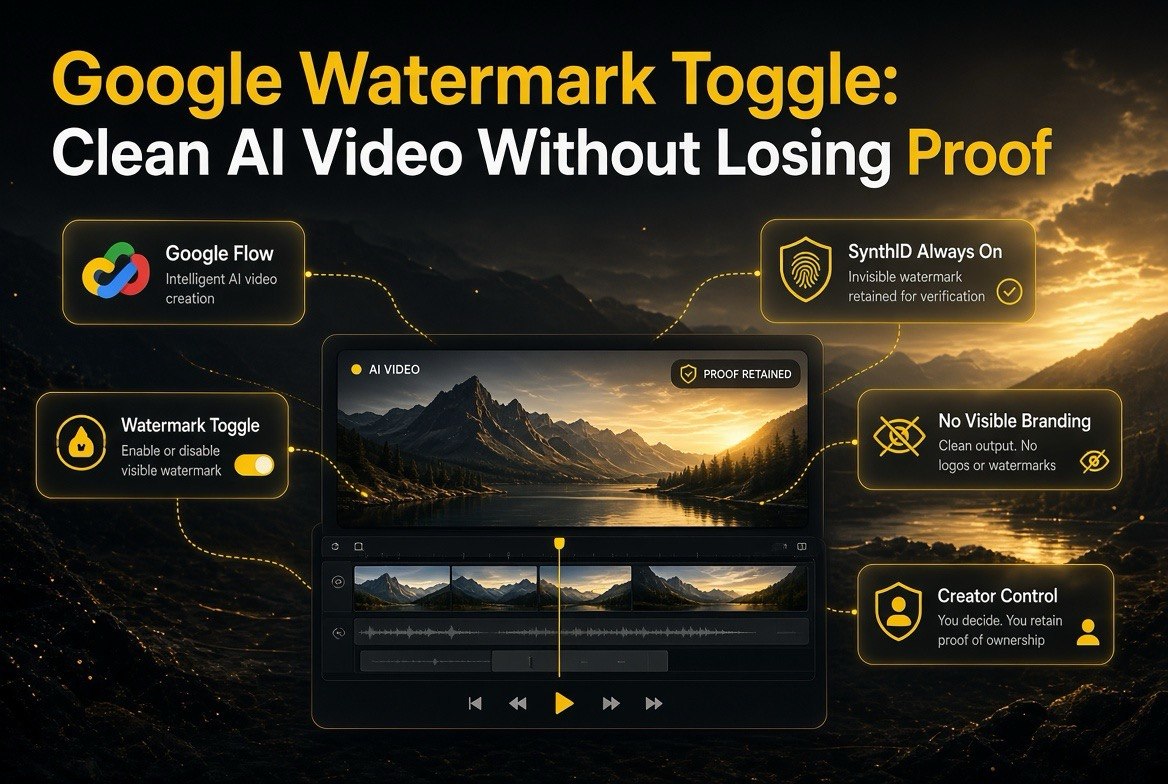
Quick answer: Google now lets creators turn off the visible “Made with Veo” watermark on AI-generated videos — but the invisible SynthID watermark stays permanently on. The toggle is available in the Gemini app and Google’s Flow video editor under Settings > Media Watermark (with Search support coming soon). Here is the key trade-off for creators: you can deliver clean, unbranded clips for client work and paid projects, while Google keeps an invisible, metadata-backed provenance stamp that survives cropping, compression, and edits. Free tiers keep the visible mark by default; paid tiers like Flow Ultra can remove it while SynthID remains.
If you generate video with AI, you have probably exported a clip and stared at the corner. The “Made with Veo” watermark sits on the frame — fine for a personal edit, a problem when the client wants a clean deliverable, a brand wants an unbranded asset, or you want to post something that does not scream “AI tool used.” For working creators, that visible stamp has been a genuine friction point.
Google just moved to address it. In an update reported by TechCrunch on August 14, 2026, Google began letting users remove the visible watermark from its AI-generated output. The caveat, and the part that matters for understanding what is actually happening, is that this is a controlled change: the visible mark becomes optional, but the invisible SynthID watermark does not.
What the Google Watermark Toggle Actually Does
There are two separate watermarks at play, and the update changes the handling of only one of them.
The visible watermark is the obvious corner label — the “Made with Veo” or similar stamp that tells anyone watching that a clip was AI-generated. This is the one you can now toggle off. It is available in the Gemini app and Google’s Flow video editor, under a Media Watermark setting, with Search integration expected soon.
The invisible SynthID watermark is a different thing entirely. It is embedded directly into the video’s pixels and frames, designed to survive cropping, compression, and many edits, and it cannot be disabled. Google builds provenance tools on top of it in Gemini, Search, and Chrome so AI-generated content can still be verified even after the visible mark is gone.
| Watermark Type | What It Looks Like | Can Creators Remove It? |
|---|---|---|
| Visible watermark | Corner “Made with Veo” label you can see | Yes — toggle off (paid/eligible tiers) |
| Invisible SynthID watermark | Embedded in pixels; invisible to the viewer | No — always on, cannot be disabled |
| Provenance metadata (C2PA) | File-level record of origin | Retained for verification |
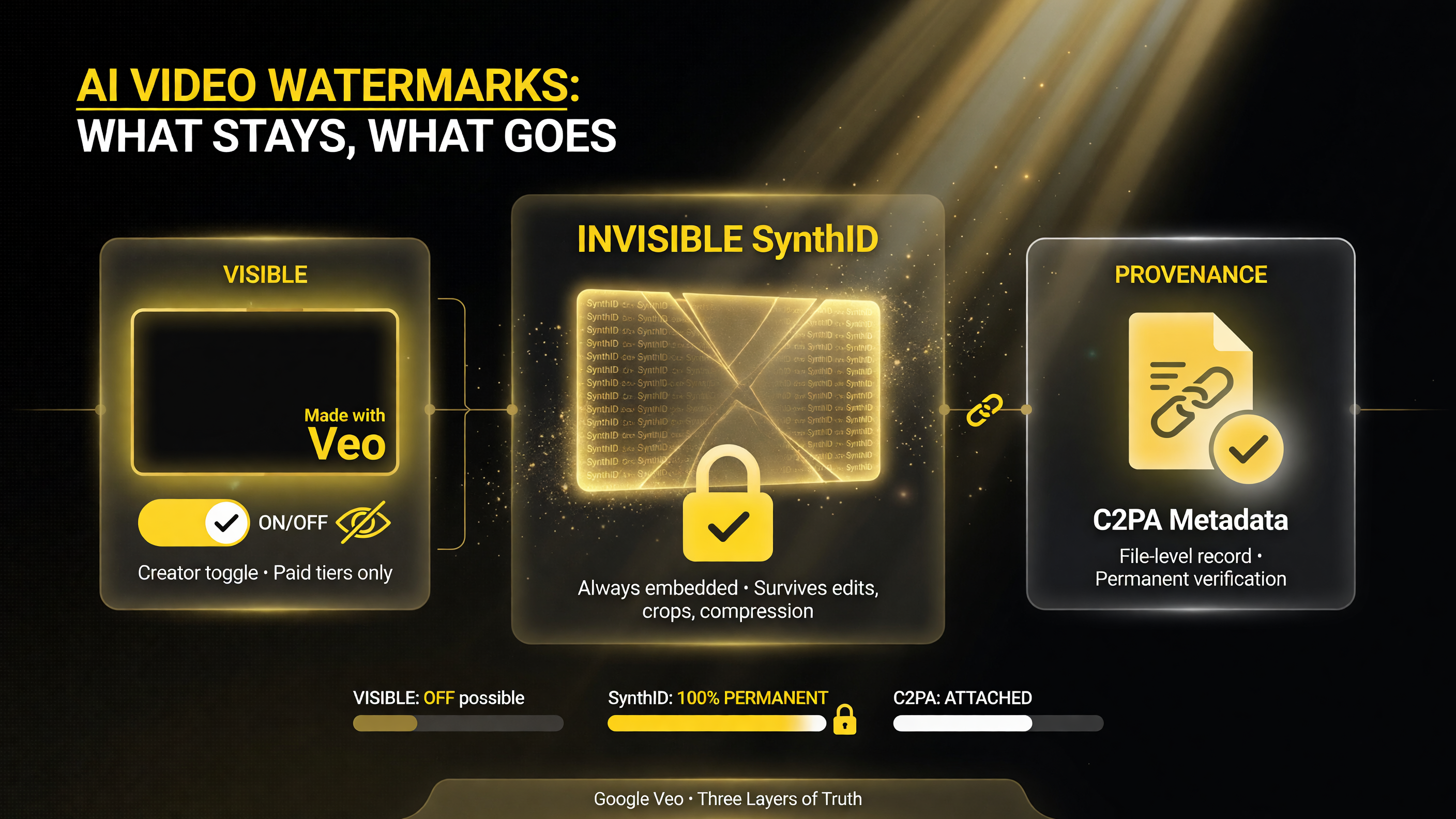
Google’s three watermark layers at work: the visible ‘Made with Veo’ label (removable on paid tiers), the invisible SynthID watermark (always embedded), and C2PA provenance metadata (retained for verification).
Who Gets to Remove the Visible Watermark
Not every user gets the toggle at the same level. Google is rolling it out selectively, with the cleanest access going to paid and professional users:
- Flow Ultra subscribers can turn the visible watermark off, with SynthID remaining in place.
- Free tiers and standard Gemini access keep the visible mark by default.
- Professional/integrated use cases — for example, paid plans in tools like Renderforest that embed Veo — often deliver watermark-free visible output while retaining SynthID.
In practical terms, the visible-watermark toggle is being positioned as a feature of paid, professional creation — the creators who need clean deliverables. The invisible SynthID watermark, by contrast, applies universally and cannot be switched off at any tier.
Why Google Is Making This Change
On its face, removing a watermark seems like the opposite of what a safety-conscious AI company does — and it is worth understanding the reasoning, because it explains why the invisible watermark exists at all.
Google is balancing two competing pressures. On one side, creators doing client work, brand assets, and professional commissions need clean, unbranded output. A visible watermark is a dealbreaker for a lot of that work, and forcing it on professional creators pushes them to other tools. Keeping the visible mark mandatory effectively taxes the exact users Google wants to keep on Veo. So Google loosened the visible requirement to retain that professional segment.
On the other side, Google still wants it to be possible to verify that a clip is AI-generated. Removing the visible watermark entirely would erase the transparency that regulators, platforms, and consumers increasingly demand. The resolution is the two-layer system: let professional creators have clean output, but keep an invisible, robust stamp that survives edits and shows up in verification tools. The visible label becomes optional as a product decision; the invisible provenance becomes the non-negotiable safety layer.
What This Means for Your Workflow
For a working AI video creator, the practical implications are direct and useful.
Clean deliverables for paid work. If you generate client video with Veo, the visible watermark has been a citation issue that forced awkward explanations or manual cropping. With the toggle, eligible accounts can export clean clips on a professional tier, which makes Veo a more viable tool for reach-agency and brand work.
Provenance still travels with the clip. The invisible SynthID watermark means your clean export is still verifiable as AI-generated. That is not a gotcha against you — it is a protection. If a client or platform ever needs to confirm a clip is authentic or untampered, the invisible stamp and C2PA metadata provide proof that survives cropping and compression. For creators worried about their work being misattributed or edited, that durability is an advantage, not a limitation.
Tier choice matters. If watermark-free output is important to your business, the toggle is a reason to be on a paid tier like Flow Ultra rather than free access. If you only generate casual or personal content, the visible mark is likely a minor annoyance and the free tier is fine.

The paid-versus-free trade-off across creator scenarios: paid tiers give clean, unbranded exports with invisible SynthID and C2PA intact, while free tiers carry a visible watermark that signals AI-generated content.
Visible vs Invisible Watermark: The Creator Trade-Off
Here is the decision in plain terms, side by side.
| Creator Scenario | Visible Watermark Off (paid) | Visible Watermark On (free) |
|---|---|---|
| Client / commercial deliverables | Clean exports; professional-ready | Visible stamp may not meet client specs |
| Social media posting | Unbranded content, cleaner look | Watermark signals AI-generated clearly |
| Verification / authenticity proof | Invisible SynthID + C2PA still verify | Visible + invisible double signal |
| Net for professionals | Clean output, provenance intact | Simple but branded output |
How SynthID and C2PA Work Together
To understand why removing a visible watermark is not a transparency loophole, it helps to see the two technologies Google is using in tandem: SynthID and C2PA metadata.
SynthID is the watermark layer. It embeds a pattern directly into the pixels and frames of generated video, designed to be robust against the things people actually do to clips — cropping the edges, compressing the file, re-encoding, and layering on filters. Because it lives in the visual data itself rather than in the corners, it cannot simply be cut away the way a visible label can. Google’s verification tools in Gemini, Search, and Chrome can detect it and report that content is AI-generated, even after the visible mark is gone.
C2PA (Coalition for Content Provenance and Authenticity) is the metadata layer. It is a file-level record that travels with the content, noting where it came from and how it was handled. When a Veo clip is exported, C2PA metadata is written into the file, and that record can be read by any C2PA-compliant tool to verify provenance. It is the same standard being pushed across the industry by camera makers, platforms, and other AI companies.
The two layers do different jobs. C2PA is about the file’s documented history — read it and you know this was AI-generated and when. SynthID is about the content’s enduring identity — even if someone strips the metadata, the pixels still betray AI origin. Together they mean a “clean” export from Google’s perspective is not anonymous; it is simply a version whose visible label was traded for machine-readable proof.

Two-track watermarking in action: the invisible SynthID pixel watermark and C2PA provenance metadata run together, giving creators a clean viewer experience while keeping permanent AI-origin proof intact.
Why the Industry Is Converging on Two-Track Watermarking
The Google toggle is not an outlier — it is part of a broader industry pattern worth recognizing so you can predict where this is headed.
Across the AI video market, the trajectory is the same. OpenAI has built provenance into its own image and video generation. Runway, Kling, and the major cloud providers have all added visible and/or metadata watermarking to their outputs. Regulators are pushing in the same direction: the EU AI Act’s Article 50, which took effect in August 2026, legally requires clear labeling of AI-generated content, and that regulation applies to providers and deployers of AI systems across the bloc. Platforms like YouTube and Meta have separately rolled out AI-content labels and likeness protections. The direction of travel is unambiguous: AI video is moving toward mandatory provenance.
But the visible-mark message from Google is equally deliberate: mandatory provenance does not have to mean on-screen branding for every frame. The industry is converging on a two-track model. On the surface, professional creators get clean, deliverable output. Underneath, invisible, durable watermarking preserves verifiability. Google is effectively betting that the market reward for allowing clean professional output — keeping creators on Veo — is worth giving up the visible stamp, precisely because the invisible layer keeps the safety and transparency bargain intact.
For a working creator, that convergence is good news. It means you can design your workflow around clean output without worrying that you are bypassing transparency, and it means the provenance standards you learn now — SynthID, C2PA, platform labels — are the ones the whole industry is standardizing on rather than something proprietary you will have to relearn.
What You Should Do as a Creator
Translated into action, the Google watermark toggle and the broader provenance shift suggest a handful of concrete steps for any AI video creator:
- Choose your tier by your output needs. If you deliver client-ready, unbranded work, a paid tier that allows the visible-watermark toggle is worth the cost. If your content is casual or channel-branded, stick with the free tier and keep the visible mark.
- Never strip provenance to deceive. Removing a visible watermark is fine when you legitimately created the clip and want a clean deliverable. Stripping or falsifying provenance to misrepresent AI content as human-made (or someone else’s) is a different matter, and it is both a terms-of-service violation and increasingly a legal one. Keep the metadata intact.
- Stay on top of platform disclosure rules. The visible watermark on Google output and the invisible SynthID stamp are only part of the picture. Platforms like YouTube, Instagram, and TikTok have their own AI-content labeling requirements, and those sit alongside the watermark question. A clip can be watermark-clean yet still require a platform-level AI disclosure when you post it.
- Audit your exports. Before you deliver a clip, verify what provenance it carries — check that the SynthID stamp and C2PA metadata are present and correct. A professional deliverable should be both clean on the surface and verifiable underneath; that combination is exactly what clients and platforms increasingly expect.
If you are deciding which watermark approach to design around, this site’s AI video tools coverage tracks how Veo, Runway, Sora, and the rest handle provenance and labeling as the rules keep evolving. For most creators, the guidance is straightforward: use whichever tier matches your output needs, keep the provenance metadata intact, and follow the platform disclosure rules that now apply to AI-generated video.
The Bigger Picture: Watermarking Is Becoming the Norm
The Google toggle is one piece of a larger shift across the AI video industry — and it is worth seeing the pattern rather than treating this as an isolated Google feature.
In the same window, platforms and regulators have been pushing hard on AI provenance. The EU AI Act’s Article 50 went live in August 2026, requiring clear labeling of AI-generated content, and major platforms like YouTube have rolled out AI content labels and likeness protections. Meanwhile, competitors including OpenAI and others have been investing in provenance systems of their own, with SynthID championed by Google and open source.
What is emerging is a two-track system: visible labeling for everyday transparency and invisible, durable watermarking for professional and safety use. The fact that Google lets paid creators remove the visible mark while keeping the invisible one is a signal that the industry is converging on this model — clean, professional output on the surface, cryptographic-style provenance underneath. As a creator, the practical takeaway is to treat provenance not as a burden but as a feature of your workflow, and to align your tool choice (free vs paid tier) with whether you need clean, client-ready output.
If you are deciding which watermark approach to design around, this site’s AI video tools coverage tracks how Veo, Runway, Sora, and the rest handle provenance and labeling as the rules keep evolving. For most creators, the guidance is straightforward: use whichever tier matches your output needs, keep the provenance metadata intact, and follow the platform disclosure rules that now apply to AI-generated video.
Frequently Asked Questions
Can I remove the visible Google AI watermark from Veo videos?
Yes, on eligible paid tiers. Google now lets creators turn off the visible “Made with Veo” watermark in the Gemini app and Flow video editor under Settings > Media Watermark, with Search support coming soon. Flow Ultra subscribers and certain professional integrations can remove the visible mark.
Does the invisible SynthID watermark ever come off?
No. The invisible SynthID watermark is embedded directly into the video’s pixels and frames, is designed to survive cropping, compression, and many edits, and cannot be disabled at any tier. It remains as Google’s provenance layer even when the visible watermark is removed.
Who gets the Google visible-watermark toggle?
The toggle is rolling out selectively, with cleanest access for paid/pro users. Flow Ultra subscribers can remove the visible watermark; free tiers and standard Gemini access keep it by default; professional integrations like paid Renderforest/Veo plans often provide watermark-free visible output while retaining SynthID.
Why would Google let creators remove the watermark?
To balance creative control with transparency. Professional creators doing client and brand work need clean, unbranded deliverables, so Google makes the visible mark optional for paid tiers. But it keeps the invisible SynthID watermark and C2PA metadata always-on so AI-generated content can still be verified and tracked.
Should I care about provenance when I remove the visible watermark?
Yes — and it works in your favor. Even with the visible mark off, the invisible SynthID watermark and metadata mean your clip is still verifiable as AI-generated and protected against tampering/misattribution. Keeping provenance intact also helps you comply with platform disclosure rules that now apply to AI video.

About Barak Schurr
Barak Schurr is a serial entrepreneur who built and exited a major ticketing platform before turning his attention to AI and content. He runs three AI-focused research sites and writes about the tools, workflows, and strategies that let solo creators build real channels — without a crew, a studio, or a Hollywood budget. Contact: [email protected]
More AI Resources for Your Business