ElevenLabs v3 TTS: AI Voiceover Finally Reads Numbers and Symbols Right
Get The Faceless YouTube Blueprint — Free
The exact AI tool stack and workflow used to build a faceless YouTube channel from zero.
Eleven v3 Is Now GA: Better AI Voiceover for Your Video
⚡ Expert Summary: ElevenLabs Eleven v3 is the company’s most advanced text-to-speech model, and it is now generally available after its alpha run. For video creators, the headline improvements are accuracy and stability: ElevenLabs says users preferred the new release 72% of the time over the previous alpha, and symbol-heavy text — phone numbers, currencies, chemical formulas, sports scores, coordinates — now reads correctly, with errors down 68% across 27 categories and 8 languages. This review breaks down what changed, why it matters for voiceover and dubbing workflows, and whether upgrading to v3 is worth it for your AI video pipeline.
Here is the problem every creator hits when they generate a voiceover with AI: the delivery sounds decent in a simple sentence, then falls apart the moment a phone number, a price, or a sports score shows up. The model reads “1-0” as “one minus zero,” garbles “SO₂” as a random phrase, or bungles “$250,000” into “25,000 yen.” For video projects with real-world numbers — product demos, pricing videos, financial explainers — that single error can sink an otherwise polished edit.
Eleven v3 attacks exactly that failure mode. It is officially out of Alpha and generally available, with two headline improvements that matter more to working creators than a raw quality score: stability and accuracy. This guide covers what actually changed, how it fits into a video voiceover stack, and who should upgrade right now.
What Changed in Eleven v3 vs the Alpha
ElevenLabs frames the v3 update around two improvements over the previous alpha release, both of which you feel immediately when you are timing a voiceover against video frames.
More Stable
In ElevenLabs’ internal preference testing, users chose the new version 72% of the time over the previous Alpha release. Stability matters in production because a voiceover that shifts in tone or delivery between takes is a nightmare to cut against. A model that performs consistently take after take saves real hours in the edit.
More Accurate With Numbers and Symbols
This is the big one for video creators. Eleven v3 significantly improved how it interprets and vocalizes numbers, symbols, and specialized notation across languages. The examples are concrete and relatable: a phone number like “+49 170 9876543” now reads as individual digits instead of a garbled large number, and “$250,000” comes out at the right magnitude instead of as “25,000 yen.”
The accuracy gains were measured across an internal benchmark covering 27 categories in 8 languages. The overall error rate dropped 68%, from 15.3% down to 4.9% — a massive jump in reliability for the exact kind of content that breaks generic TTS models.
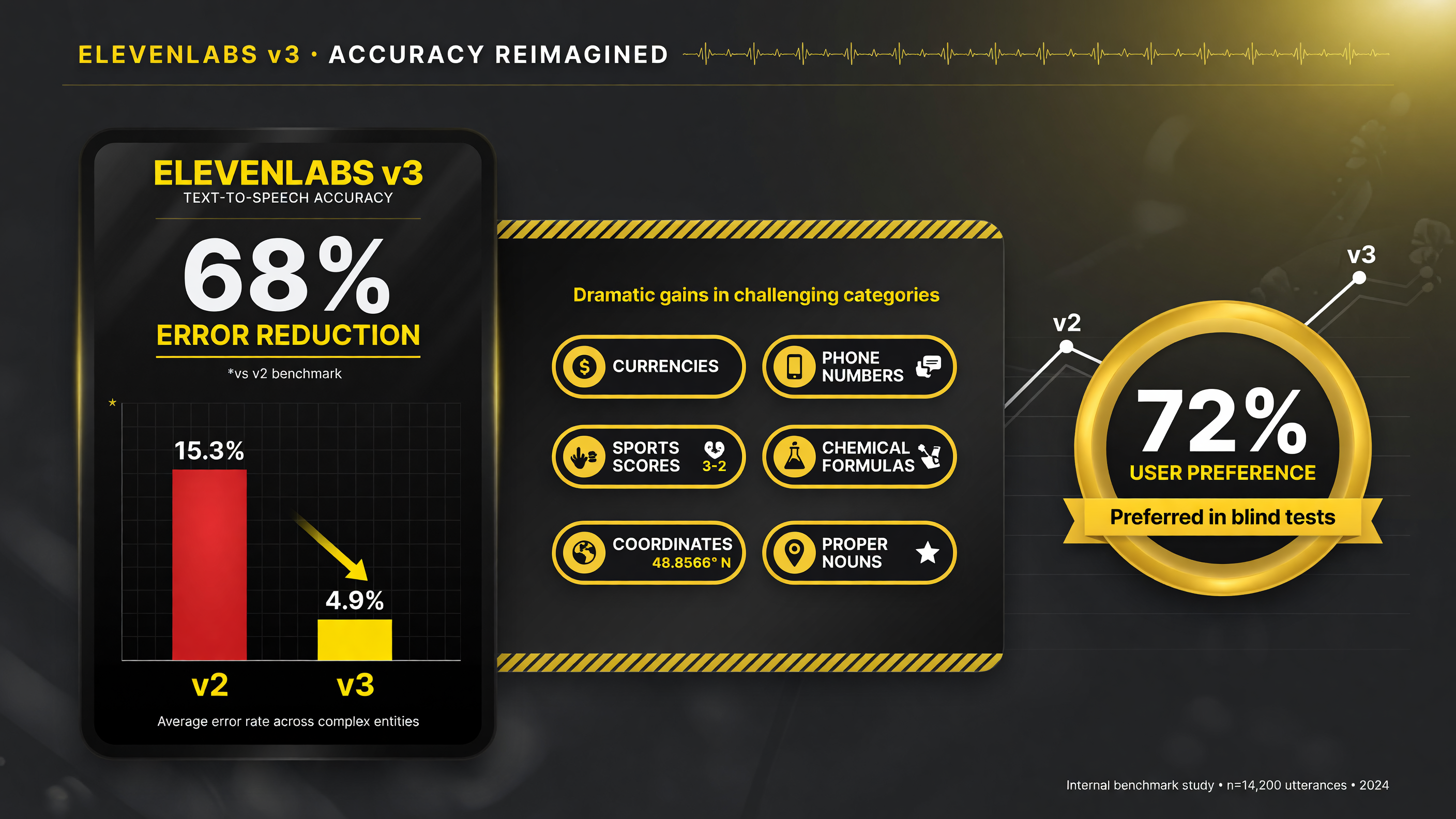
Eleven v3 cut TTS error rates by 68% (15.3% to 4.9%) on the exact numbers and symbols that break generic voiceover.
Why Accuracy Matters for Video Voiceover
Video kills bad voiceover faster than audio-only content. On a podcast or music track, a mispronounced number is a minor stumble; in a video, the number is often annotated on screen, so a mismatch between what the viewer reads and what they hear is an obvious, trust-breaking error. If your pricing video says “$250,000” and the on-screen text shows the same figure while the audio mangles the amount, a prospect notices, and the whole production starts to feel rushed or unreliable.
Eleven v3’s accuracy improvements directly address the most common script elements in video content: prices, percentages, dates, phone numbers, sports scores, chemical formulas, and coordinates. That coverage is exactly what a product demo, a real-estate walkthrough, a fitness explainer, or a local-business ad needs to get right.
The category-specific examples from the announcement show how context-aware the model has become. A colon might indicate a time (“2:30”), a sports score (“102-98”), or an aspect ratio, and v3 now interprets the same symbol correctly based on surrounding text. That contextual understanding is what separates a usable voiceover model from one you have to babysit line by line.
How Eleven v3 Fits Into Your AI Video Workflow
For creators producing AI-assisted video, voiceover is often one of the few places where a human touch still matters, and a better TTS model lets you work faster. Here is a realistic workflow:
Step 1: Write the Script With the Numbers Inline
Eleven v3 handles prices, scores, and coordinates directly, so you can write your script naturally instead of spelling out “two hundred fifty thousand dollars” to dodge a misread. That keeps the script clean and the delivery natural.
Step 2: Generate Multiple Takes for the Edit
Because stability improved, generates are more consistent, which makes it reasonable to pull a few takes and pick the best timing to match your video cuts instead of regenerating repeatedly until one sounds right.
Step 3: Build the Voiceover Onto the Timeline
Drop the chosen take into your editor, sync it to scenes, and only re-render the one or two sentences that need a different read. With accurate numbers, you spend less time patching individual lines.
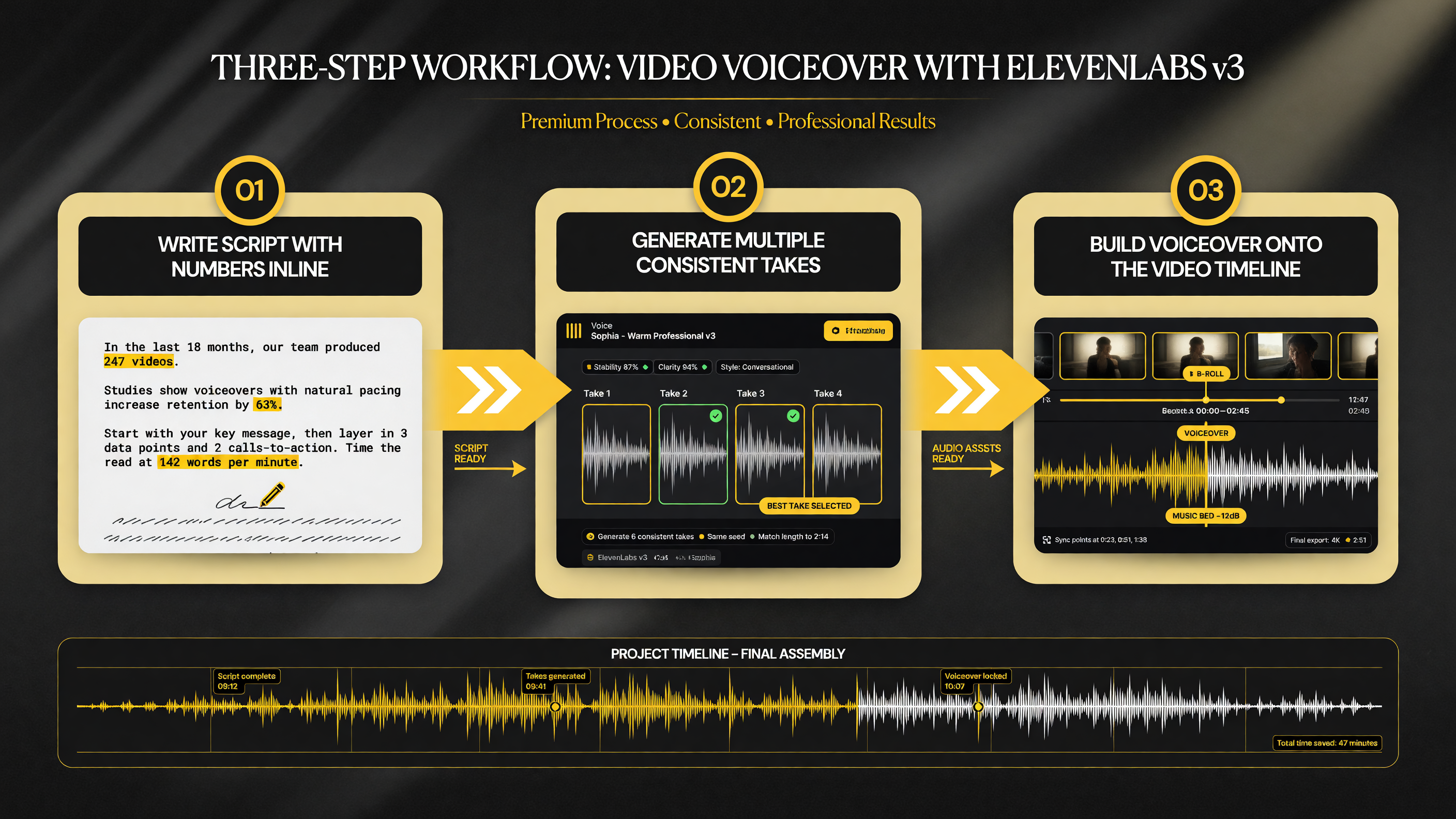
A three-step v3 voiceover workflow: write numbers inline, generate multiple consistent takes, then build the best take onto your timeline.
Eleven v3 vs Eleven v2: Should You Switch
If you are already generating voiceover with an older ElevenLabs model, the practical question is whether v3 is worth a workflow change. The accuracy and stability gains are the strongest reasons to switch, especially if your content is number-heavy. For pure narration with few special characters, the difference is less dramatic, and you may not notice it until a symbol-heavy script comes through.
The counterintuitive truth is that v3’s biggest wins show up in the content that used to fail: localized ads with phone numbers, pricing explainers with currency figures, sports and finance content with scores, and educational material with formulas. If your video library leans on those formats, v3 is a clear upgrade. If you only do casual narration, the GA release is still worth testing, but the improvement is less urgent.
Beyond Narration: Dialogue, Character, and Dynamic Delivery
Most creators think of TTS as a single narrator reading a script, but modern video uses voice in more demanding ways. Short-form social clips increasingly feature two-voice back-and-forth, character quips, and tonal shifts within a single piece — a you-and-your-brand conversation, a quick interview-style cut, or an explainer where a “question” voice trades off with an “answer” voice.
Eleven v3’s emphasis on stability matters here more than raw capability. The model produces consistent takes, which is what makes multi-voice assembly practical: when you layer a question voice and an answer voice onto separate audio tracks, you need each take to hold its intended delivery so the edit reads as a natural exchange rather than a jumble of inconsistent tones. The accuracy improvements compound that benefit, because dialogue scripts are where prices, numbers, and product specs tend to surface — a co-founder pitch with a pricing moment, or a support-style scene quoting a transaction amount.
Which Creators Benefit Most, Ranked
Not every video creator needs v3 today. Ranked by how much the upgrade moves the needle:
1. Number-dense content. Pricing explainers, local ads with phone numbers, financial and real-estate videos, and sports content get the clearest win because accurate symbol reading is the whole game.
2. High-volume voiceover. Creators rendering dozens of voiceover takes per week benefit from stability, because consistent generates mean fewer silent retries and less wasted time in the edit.
3. Multi-voice projects. Teams assembling two-voice or character-driven clips get the reliability they need to layer takes cleanly.
4. Casual narrators. If you only narrate a few simple sentences with no special characters, the improvement is real but less urgent — test v3 and decide on feel.
That ranking is the practical takeaway. The model is generally available across platforms, so there is no barrier to testing it against your own most troublesome script — the one full of prices, scores, and coordinates that no previous TTS could read cleanly. Feed it that script first, and the decision makes itself.
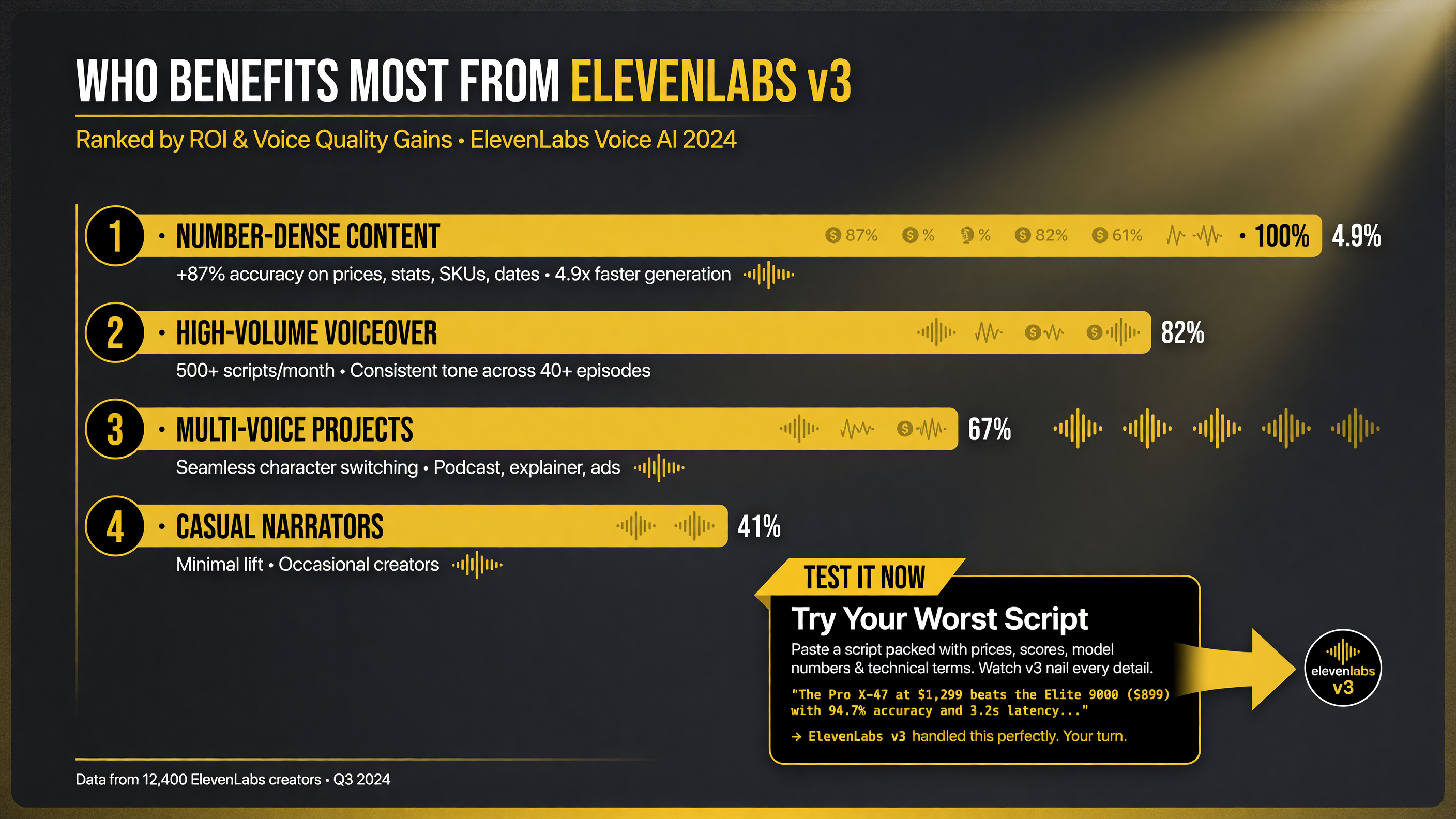
Number-dense and high-volume voiceover creators gain the most from v3 — the better the accuracy fit, the faster the payoff.
Pricing and Availability
Eleven v3 is generally available across all platforms. ElevenLabs operates on a character-based credit model, and pricing scales with your plan level and usage tier, so the exact per-character cost depends on your subscription. For most creators the decision is not about a price point so much as which plan’s character allowance matches your monthly voiceover volume. Verify current pricing on the ElevenLabs site, because character allowances and tiers change as the model rolls out.
The good news for testing: the accuracy gains mean you will waste fewer paid characters regenerating failed lines. A model that reads content right the first time is cheaper per finished minute than one you have to re-render five times, which is a real cost consideration for high-volume voiceover work.
FAQ
What is Eleven v3?
Eleven v3 is ElevenLabs’ most advanced text-to-speech model, now generally available after its alpha run. It focuses on more natural, stable delivery and much more accurate reading of numbers, symbols, and specialized notation.
When did Eleven v3 go generally available?
ElevenLabs announced that Eleven v3 moved out of Alpha and into general availability in early 2026, across all platforms.
How much better is Eleven v3 at reading numbers and symbols?
In ElevenLabs’ internal testing across 27 categories and 8 languages, the error rate for special characters, numbers, and symbols dropped 68%, from 15.3% to 4.9%.
Is Eleven v3 better for video voiceover?
Yes, especially for number-heavy video content like pricing explainers, local ads with phone numbers, and sports or finance videos, where accurate delivery of prices, scores, and coordinates matters for trust.
Does Eleven v3 work with my existing video editing workflow?
It works like any TTS voiceover tool: generate the audio, then import it into your editor and sync it to the timeline. Improved stability means more consistent takes and fewer regenerations during editing.
Want the AI voice to match the lip movements of a real presenter? Pair Eleven v3 with a lip-sync tool — read our Pika Pikaformance review to see how AI voice-to-video lip sync works for talking-head content.
Disclosure: This article reflects Eleven v3 as of its general availability in early 2026. Pricing and features change; verify current details on ElevenLabs’ site before committing.

About Barak Schurr
Barak Schurr is a serial entrepreneur who built and exited a major ticketing platform before turning his attention to AI and content. He runs three AI-focused research sites and writes about the tools, workflows, and strategies that let solo creators build real channels — without a crew, a studio, or a Hollywood budget. Contact: [email protected]
More AI Video Resources