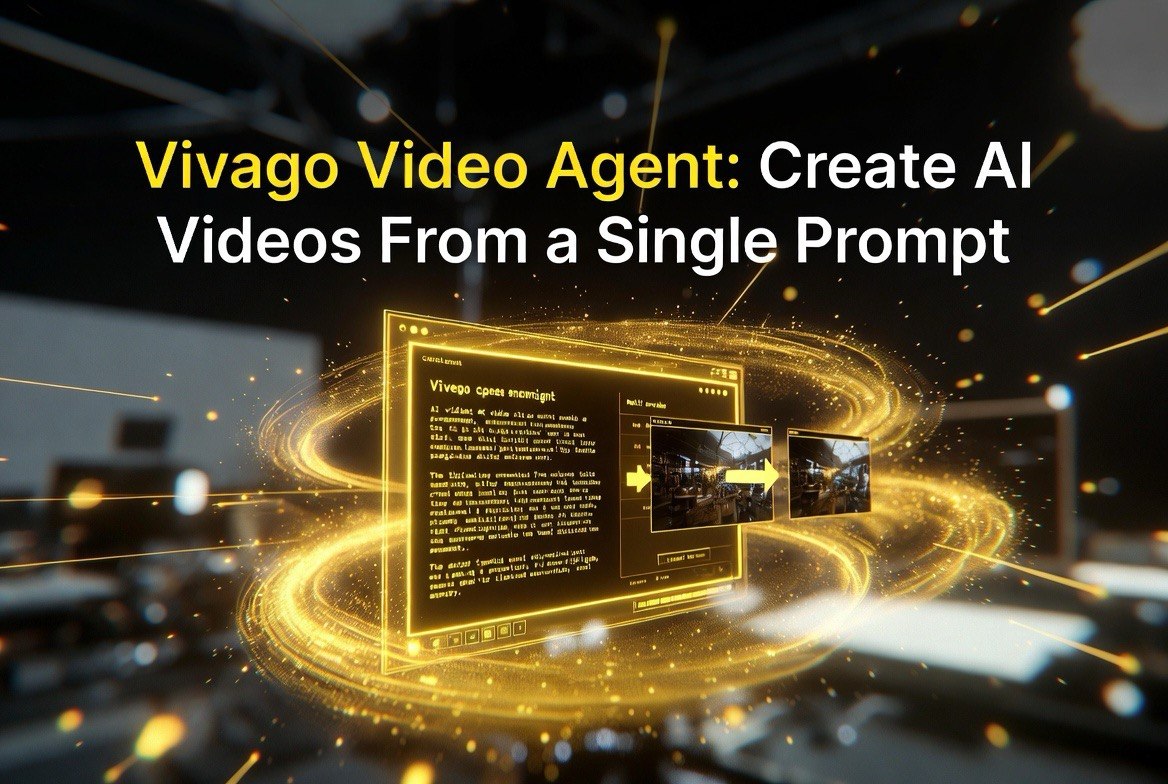
Vivago Video Agent: Create AI Videos From a Single Prompt
Get The Faceless YouTube Blueprint — Free
The exact AI tool stack and workflow used to build a faceless YouTube channel from zero.
Vivago Video Agent: Create AI Videos From a Single Prompt
⚡ Expert Summary: Vivago just released Video Agent, an AI tool that turns a single text prompt into a finished video — with the agent handling shot planning, 4K output, and cinematic styling automatically. It’s currently in beta and available to users in North America and the EU. For creators and editors, the appeal is speed: instead of writing prompts, generating clips, and stitching them together by hand, you describe the scene once and the agent produces a polished final render. This guide breaks down how Video Agent works, where it genuinely saves time, how it compares to other AI video tools, and the honest limitations you should know before you trust it with a real project.
What Vivago Video Agent Actually Does
Most AI video tools work in pieces: you write a prompt, the model generates a short clip, then you either edit it yourself or feed that clip into another model to expand it. Vivago Video Agent collapses that workflow into a single step. You give it a scene description — the subject, the setting, the action, the mood — and the agent plans the shot, generates the footage, and outputs a finished render in up to 4K resolution.
The “agent” framing matters. It’s not a single text-to-video generation; it’s an automated pipeline that makes creative decisions along the way. The tool interprets your prompt, decides on framing and composition, generates the visuals, and assembles the result. For a creator who wants a usable video without babysitting a multi-step process, that’s the core value proposition.
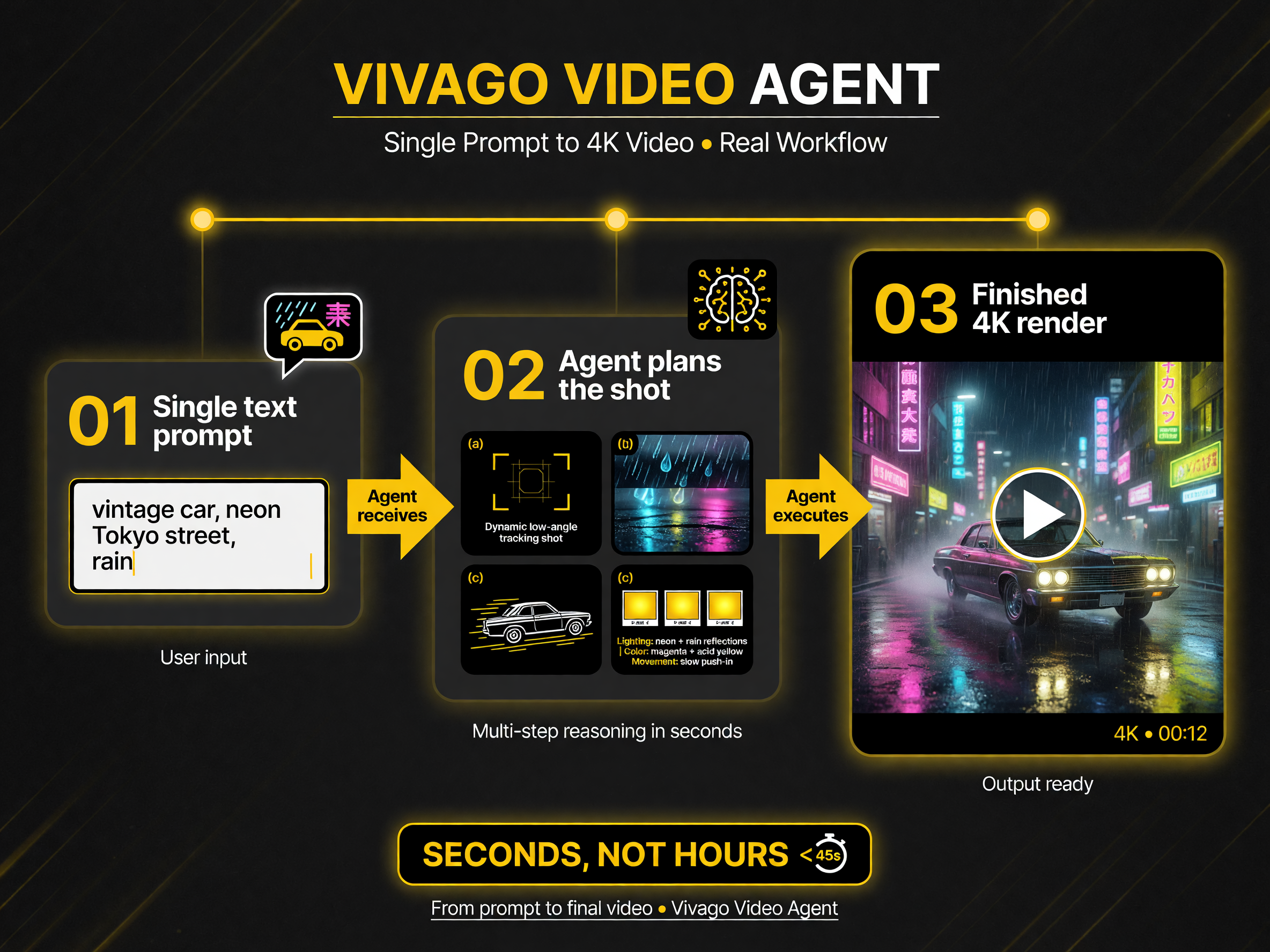
How Vivago Video Agent turns one prompt into a planned, assembled 4K render in seconds rather than hours.
The Setup: How to Start Editing
Getting started is straightforward. You sign up for Vivago, access the Video Agent feature, and enter a detailed prompt describing the shot you want. The more specific your description — subject, environment, camera movement, lighting, mood — the closer the output matches your intent. Once you submit the prompt, the agent works through its pipeline and delivers a rendered video you can review, regenerate, or download.
Being in beta carries real caveats. The tool is available to users in North America and the EU, which means anyone outside those regions can’t access it yet. Beta status also means features can change, quality can vary, and the processing pipeline may still be fine-tuned. If you’re on the fence, treat it as a tool to evaluate, not yet a guaranteed part of your production stack.
Where Video Agent Saves You Real Time
The honest case for Video Agent isn’t that it produces better footage than a human editor — it’s that it produces footage you can actually use without the multi-tool grind. There are three workflows where that time saving shows up most clearly.
1. Short-form content at volume
If you produce daily videos for social channels, the bottleneck is rarely the camera — it’s the time spent generating and assembling clips. A single-prompt agent that outputs a finished render lets you iterate on ideas quickly: describe ten scene concepts, get ten finished drafts, and pick the winners instead of hand-assembling each one.
2. Concept visualization before you commit
For editors and agencies, Video Agent is a fast way to visualize a concept before spending money on a real shoot. You can mock up a scene, a camera move, or a brand’s visual style in minutes, show the client, and refine the direction before production begins. That’s a genuine cost saver, because it de-risks the expensive part of the process.
3. Backgrounds and B-roll
Some of the most tedious AI video work is generating usable backgrounds and B-roll — shots that fill time and context without stealing focus. An agent that can produce clean, cinematic fill footage on demand means less time hunting through stock libraries and more time on the stuff that actually matters.
4K Output: What It Buys You
Resolution is one of the biggest practical differentiators in AI video. A 4K render gives you headroom that 1080p doesn’t: you can crop, reframe, and zoom into the frame without the image falling apart. For creators who publish across platforms with different aspect ratios, or editors who need to punch into a scene, that flexibility is worth having.
The trade-off is cost and speed. Higher-resolution generation typically means longer render times and higher processing cost. If your output is primarily vertical social clips destined for a phone screen, 4K is often redundant — 1080p is plenty. But if any of your work ends up on a large display or needs reframing flexibility, the 4K option is the reason to use Video Agent over a cheaper 1080p-only tool.
How Vivago Stacks Up Against the Field
Vivago Video Agent competes in a crowded space that includes established names and newer entrants. The comparison below keeps it honest and practical.
| Tool | Best For | Resolution | Key Differentiator |
|---|---|---|---|
| Vivago Video Agent | Single-prompt finished videos | Up to 4K | Agent plans and assembles the full shot |
| Sora (OpenAI) | High-quality short clips | Up to 1080p | Strong text-to-video quality |
| Runway | Editors and post-workflows | Up to 4K | Deep editing tools, control |
| Kling AI | Accessible, fast clips | Up to 1080p | Ease of use, cost |
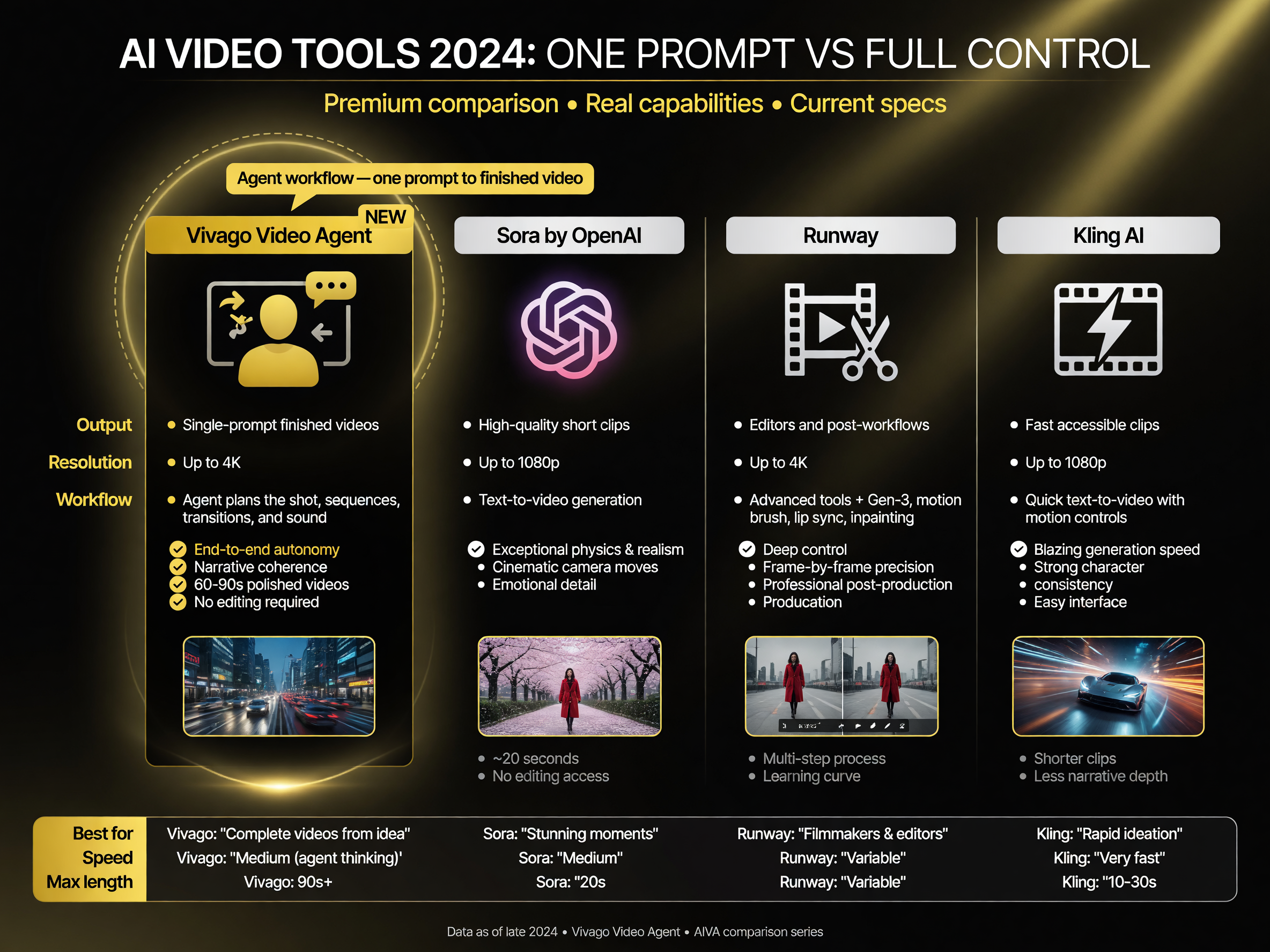
Vivago Video Agent vs Sora, Runway, and Kling — the agent-workflow difference across resolution and use case.
The pattern: Vivago’s angle is the agent workflow — getting a finished video from one prompt — rather than raw clip quality alone. If your bottleneck is assembly time and you need 4K output, the agent model is the differentiator worth testing.
Honest Limitations to Know Before You Rely on It
No AI video tool is a magic wand, and Video Agent is no exception. There are four limitations that matter for real production work.
1. Beta availability is region-locked
The tool is currently limited to North America and the EU. If you’re outside those regions, you can’t use it yet, regardless of how good the output is.
2. You trade control for speed
An agent that makes creative decisions automatically is convenient, but it’s also deciding on your behalf. If you need precise, repeatable control over a shot — the exact framing, the exact motion — a single-prompt agent can feel too autonomous. You’ll still reach for manual tools for those projects.
3. Quality is inconsistent in beta
Generative video quality varies across generations. The same prompt can produce a strong render one time and a weaker one the next. Plan to regenerate and re-roll, which means the “one prompt, one video” framing oversells the reality of iterative work.
4. Cost scales with resolution and time
Higher resolution and longer videos cost more and take longer to render. The 4K output is a feature, but every time you use it, you’re paying for that flexibility. Budget accordingly if your workflow leans heavily on top-tier resolution.
Pricing Reality Check
Exactly how much Video Agent costs depends on your plan and usage, and with a beta product the pricing can shift. The practical advice is to expect the standard AI-video trade-off: you pay more for higher resolution and longer duration, and a subscription typically gives you a monthly credit allotment rather than unlimited generation.
Before you commit, run the math on your actual volume. A creator generating a handful of short clips a week will have very different costs than an agency rendering long 4K pieces daily. Match the plan to the workload, not the other way around.
Use It When You Need Speed, Not When You Need Control
Vivago Video Agent earns its keep in the workflows where speed is the bottleneck: high-volume short-form content, quick concept visualization, and on-demand B-roll. It’s less suited to precise, repeatable control work where an autonomous agent gets in the way. Understand that split, and you’ll know exactly when to reach for it — and when to keep it on the shelf.
A Realistic Prompt That Gets a Better Render
The single biggest lever on output quality is the prompt itself. A vague description produces a generic render; a specific one produces something you can actually use. The difference isn’t magic — it’s the level of concrete detail you give the agent to work from.
A weak prompt reads like “a car driving through a city at night.” The agent has to fill in every decision: what car, what city, what weather, how fast, what mood. The result is a roll of the dice. A strong prompt removes the ambiguity: “A black vintage 1967 Ford Mustang driving slowly down a rain-slicked neon-lit street in downtown Tokyo at midnight, light rain, the camera tracking alongside at bumper height, shallow depth of field with the neon signs blurred in the background, moody film-noir atmosphere, cinematic teal-and-orange grade.”
Notice what the specific version does: it fixes the subject, the setting, the lighting, the camera movement, the depth of field, and the color grade. Each of those decisions is one less the agent has to guess, and each one moves the output closer to what you pictured. When you’re testing the tool, the single best use of your time is learning to write prompts with that level of specificity.
There’s also a practical workflow here worth building: keep a library of prompt fragments you reuse. A modifier pack for “rainy night exterior,” a lighting pack for “soft golden-hour interior,” a camera pack for “slow push-in on subject.” When a project needs a look you’ve done before, you assemble the prompt from proven fragments instead of starting from a blank box every time. It sounds small, but it’s the difference between consistent output and constant re-rolling.
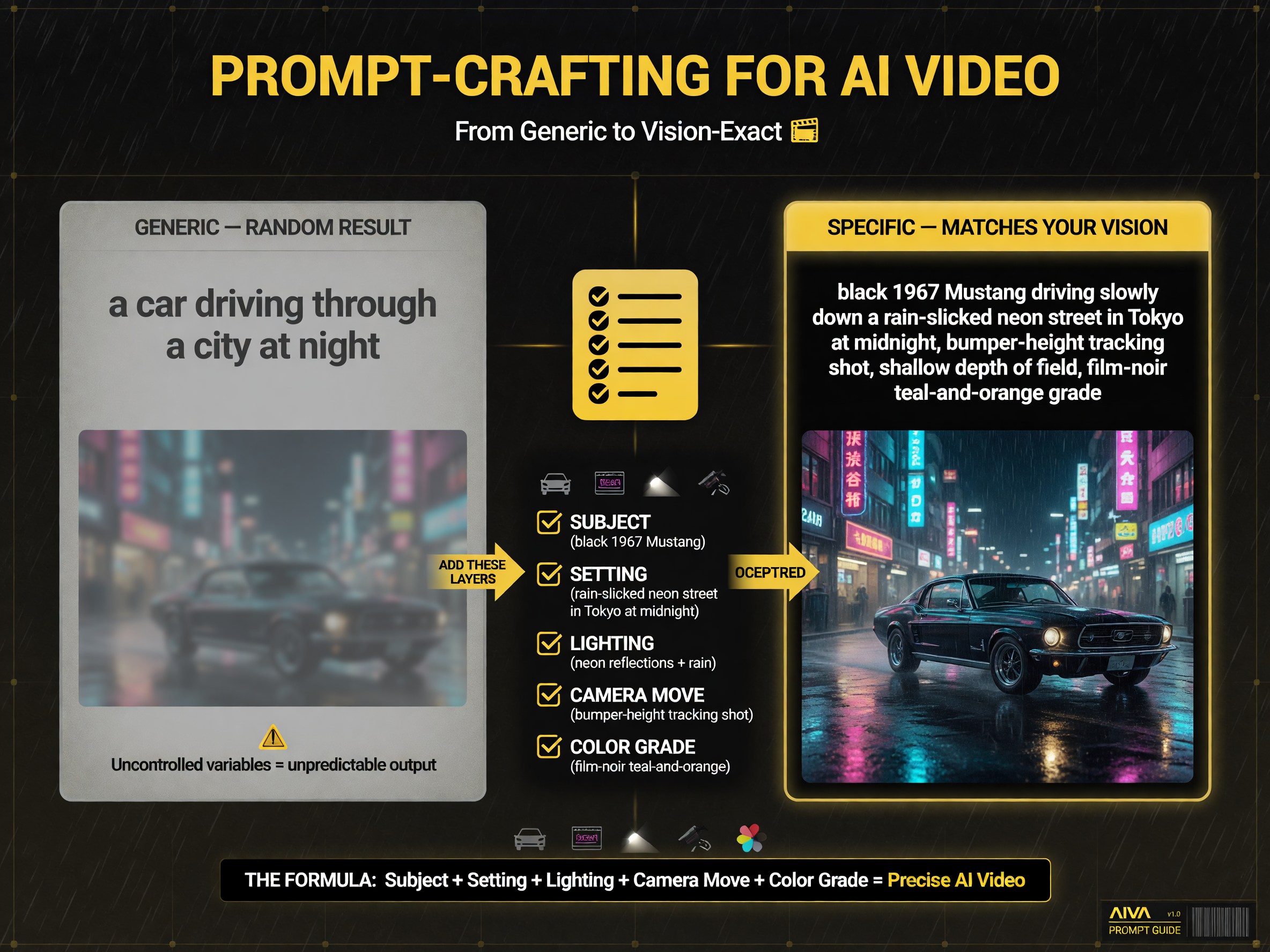
Generic prompts roll the dice; specific prompts with subject, setting, lighting, camera, and grade reproduce your vision.
Who Should Actually Use It Right Now
Because the tool is in beta, not everyone should build their production pipeline around it yet. The smart users right now are the ones who can absorb beta risk and benefit from speed today.
Social media managers producing high-volume short-form content are the clearest fit — they need volume and iteration speed, and a beta that occasionally produces a weak render is manageable when you’re generating ten drafts anyway. Individual creators testing looks and styles before a bigger production fit too, because visualization is exactly where the speed pays off. Agencies should approach it more cautiously: use it for pre-production concepting and B-roll, but don’t commit client deliverables to a beta pipeline until the tool stabilizes.
The inverse is equally important. If you need pixel-perfect repeatable output, shot-by-shot control, or guaranteed availability, a region-locked beta is not your production tool. Keep it as a complementary tool in the workflow — great for speed and exploration, not yet the thing you stake a deadline on.
Final Verdict
Vivago Video Agent is a real signal of where AI video is heading: away from clip-generation and toward finished-piece generation. For volume creators and editors who need speed and 4K headroom, it’s a tool worth evaluating now, with the understanding that beta means compromises. Learn to write specific prompts, keep your expectations calibrated on consistency, and treat it as a speed layer on top of your existing workflow rather than a replacement for your judgment. That’s the honest way to use it — and the way to actually get value from it today.
FAQ: Vivago Video Agent
Vivago Video Agent is a genuine step in the direction the AI video space is heading — from generating clips to generating the finished piece. For volume creators and editors who need speed and 4K headroom, it’s a tool worth evaluating in beta. Just keep the control trade-off and the regional lock in mind before you build a production workflow around it.

About Barak Schurr
Barak Schurr is a serial entrepreneur who built and exited a major ticketing platform before turning his attention to AI and content. He runs three AI-focused research sites and writes about the tools, workflows, and strategies that let solo creators build real channels — without a crew, a studio, or a Hollywood budget. Contact: [email protected]