How to Automate Short-Form Video Production With AI in 2026
Get The Faceless YouTube Blueprint — Free
The exact AI tool stack and workflow used to build a faceless YouTube channel from zero.
How to Automate Short-Form Video Production With AI in 2026
⚡ Expert Summary: You can automate short-form video production in a single afternoon using a 7-step AI workflow: brief and strategy, script generation, storyboarding, clip generation, assembly and captions, localization, and publishing. A solo creator in the US can turn one long-form recording into a week of vertical Shorts, Reels, and TikTok clips. Expect roughly 60-80% production cost savings and a drop from multi-day edits to a few hours per video, with AI handling the grunt work and you directing the taste.
Why Short-Form Automation Is a Must in 2026
Short-form video is no longer optional for US creators and businesses. YouTube Shorts alone reaches over two billion logged-in users a month with more than 70 billion daily views, and short-form content pulls about 2.5 times the engagement of long-form. Yet most creators abandon it because producing daily vertical clips by hand is exhausting. That is exactly the problem AI solves in 2026.
Adoption is already widespread. According to industry data, 63% of video marketers now use AI tools for creation and editing, up from 51% the prior year, and roughly 83% of YouTube creators report using AI somewhere in their workflow. The tools have matured past gimmicks: text-to-video, agentic editing, auto-captions, and AI dubbing now let one person run a faceless channel that publishes multiple times a day.
The economics are compelling. A 60-second marketing video that traditionally took about 13 days to produce can now be assembled in roughly 27 minutes with the right AI stack, and production costs drop by an estimated 60-80%. This article walks you through the exact workflow so you can build that pipeline for yourself.
Before we get into the steps, one mindset shift matters. Automation does not mean zero-touch: it means the machine handles the repetitive, high-volume work while you keep control of the creative direction and the quality bar. The creators who win with AI short-form in 2026 are not the ones who generate the most clips; they are the ones who build a repeatable system, measure what works, and keep refining the taste layer that AI cannot yet own.
What You Need Before You Start
Before you automate anything, decide your output. Pick one platform to dominate first — YouTube Shorts, TikTok, or Instagram Reels — and one content format, such as faceless narration, talking-head clips, or repurposed long-form. Define the audience, the objective, and the ideal length, which for short-form is typically 15 to 60 seconds. A narrow starting point beats a broad, messy one.
You also need a rough tool stack. You do not need every AI video tool on the market; you need one tool per stage. A typical 2026 stack is a script generator, a text-to-video or clip-generator, a vertical editor with auto-captions, and a repurposing tool that turns long-form into clips. Start free, test, and upgrade only the stage that is your bottleneck.
Set expectations before you invest time. Your first automated clips will not be your best. The goal of the first week is not virality; it is to get the pipeline running so you have consistent output you can measure. Once the system is stable, every improvement you make — a stronger hook, a better caption style, a faster render loop — compounds across every future clip you publish.
Finally, create a simple content calendar. Even automated production benefits from a plan. Block out the formats for the week, the hooks you want to test, and the times you will publish. This prevents the most common failure of AI pipelines: generating hundreds of clips with no clear idea of what to post, when, or for whom.
The 7-Step AI Short-Form Workflow
Here is the complete pipeline, end to end. Follow these steps in order, and you will go from raw idea to published vertical clip in hours instead of days.
Step 1: Brief and Strategy
Set the hook, the message, and the style before generating anything. Use AI to research your niche, analyze what is performing for competitors, and generate angle variations. Many agentic tools now produce a full content plan from a single brief. Keep a human hard-stop here: you decide the angle, the AI proposes the variations.
Step 2: Script Generation
Generate the narration script and on-screen text. AI script tools can produce 5 to 10 variations of a 30-second hook in seconds. Look for options with strong opening lines, because the first three seconds decide whether a viewer stays. Pick the best variation, then tighten it by hand — a natural, specific hook beats generic hype every time.
Step 3: Pre-Visualization and Storyboarding
Before you spend credits on final clips, generate a storyboard or mood board for approval. AI can turn your script into shot-by-shot scene descriptions and reference frames. This catches style and continuity problems early, when they cost a prompt instead of a re-render. It also keeps every clip in the same visual language instead of a jarring mix.
Step 4: Clip and Voiceover Generation
Generate the visuals and audio. Route each shot to the right model: cinematic text-to-video for hero shots, faster models for B-roll and iteration, and avatar tools for talking heads. Generate the voiceover first — an AI voice or a cloned voice — so lip-sync and pacing line up with the visuals. Match the aspect ratio to your platform, which is 9:16 vertical for Shorts, TikTok, and Reels.
For narration, pick a voice that fits your brand and clone it once so every clip sounds consistent. Avoid using a different voice in every video, which fragments your identity and makes a channel feel generic. Generate the audio track first, lock the pacing, then build the visuals around it. This order prevents the most common mismatch: beautiful visuals with a voiceover that does not fit the timing or the energy of the scene.
For consistency, re-use the same seeds, reference images, and character avatars across shots in a single video and across videos in a series. This is the difference between a channel that looks like one creator and a channel that looks like a random clip generator.
Step 5: Assembly, Editing, and Captions
Assemble the clips in a vertical editor and add auto-captions, which appear in roughly 85% of AI-produced videos because they directly lift watch time and accessibility. Add transitions, B-roll, and color. Vertical editors like CapCut excel here with trending templates and TikTok-native pacing. Trim ruthlessly — a tight 20-second clip out-performs a padded 45-second one.
When you edit, keep the hook in the first frame or the first spoken line. Test a few different hooks for the same clip and track which ones hold viewers past the three-second mark. Small pacing changes — a faster cut here, a pause there — often matter more than the underlying footage. This is where the human eye still beats the machine, so do not fully automate this stage away.
Step 6: Localization and Multi-Format Export
Turn one master into many versions. AI dubbing and translation let you localize the same clip into other languages at near-zero marginal cost, and text-swap tools rebuild hooks for different regions. Export a vertical, captioned master for each platform from a single source file instead of re-editing per platform.
Step 7: Publishing and Repurposing
Publish to your platform and build a repurposing loop. Tools like OpusClip convert long-form recordings into multiple Shorts automatically, so a single weekly podcast or YouTube video becomes a week of short-form output. The full loop — from brief to multi-platform publish — typically takes one person a single afternoon.
Consistency beats volume in the algorithm. Posting one strong clip daily outperforms five weak ones once a week. Use a scheduling tool so the clips publish on a regular cadence, and keep the repurposing loop running in the background while you move on to the next batch. Over a month, this compounding cadence is what turns a pipeline into an audience.

The whole pipeline at a glance: seven steps take a raw idea to a finished vertical clip — and with the right AI stack a 60-second marketing video drops from about 13 days to under 30 minutes.
A Complete Sample Workflow Table
| Step | What AI Does | Your Job |
|---|---|---|
| 1. Brief & strategy | Research, competitor analysis, angle variations | Set the objective and final angle |
| 2. Script | Generate 5-10 hook variations | Pick and tighten the best script |
| 3. Storyboard | Shot-by-shot scenes and reference frames | Approve style and continuity |
| 4. Generate | Text-to-video, voiceover, lip-sync | Route shots to the right model |
| 5. Edit & captions | Auto-captions, transitions, B-roll, color | Trim and pace the final cut |
| 6. Localize | Dubbing, translation, text swaps | Review localized versions |
| 7. Publish | Repurposing long-form to clips | Schedule and track performance |
Choosing the Right Tools for Each Stage
Your toolkit should match your format. For a faceless narration channel, pair a strong script tool with a text-to-video and a vertical editor with captions. For repurposing an existing long-form channel, start with a clipping tool and add auto-captions. For talking-head content, use avatar or voice-cloning tools to keep consistency across episodes.
You do not need the most expensive tier at every stage. Start free, measure where you spend the most time, and upgrade only that stage. Most creators find the bottleneck is either clip generation quality or editing time, and those are the two stages worth paying for.
Map your format to specific tool roles. A faceless channel typically wants one script tool, one narration or voice tool, one text-to-video model, and one responsive vertical editor. A repurposing channel wants a clipping tool, an auto-caption tool, and a scheduling app. A talking-head or avatar channel wants a consistent avatar model plus a high-quality voice. Each format has a different spending priority, so do not copy another creator’s stack blindly.
Keep your toolbox lean. Every tool you add is a new prompt style to learn, a new credit system to track, and a new failure point. The winning move in 2026 is usually to consolidate into fewer tools with overlapping features rather than to buy one specialist for every micro-task. Single-tool workflows also make your pipeline easier to hand off or automate further later.
If you are producing faceless narration, our ElevenLabs vs Descript guide covers which voice tool to pick for that part of the pipeline, and you can browse more in the AI video tools category.
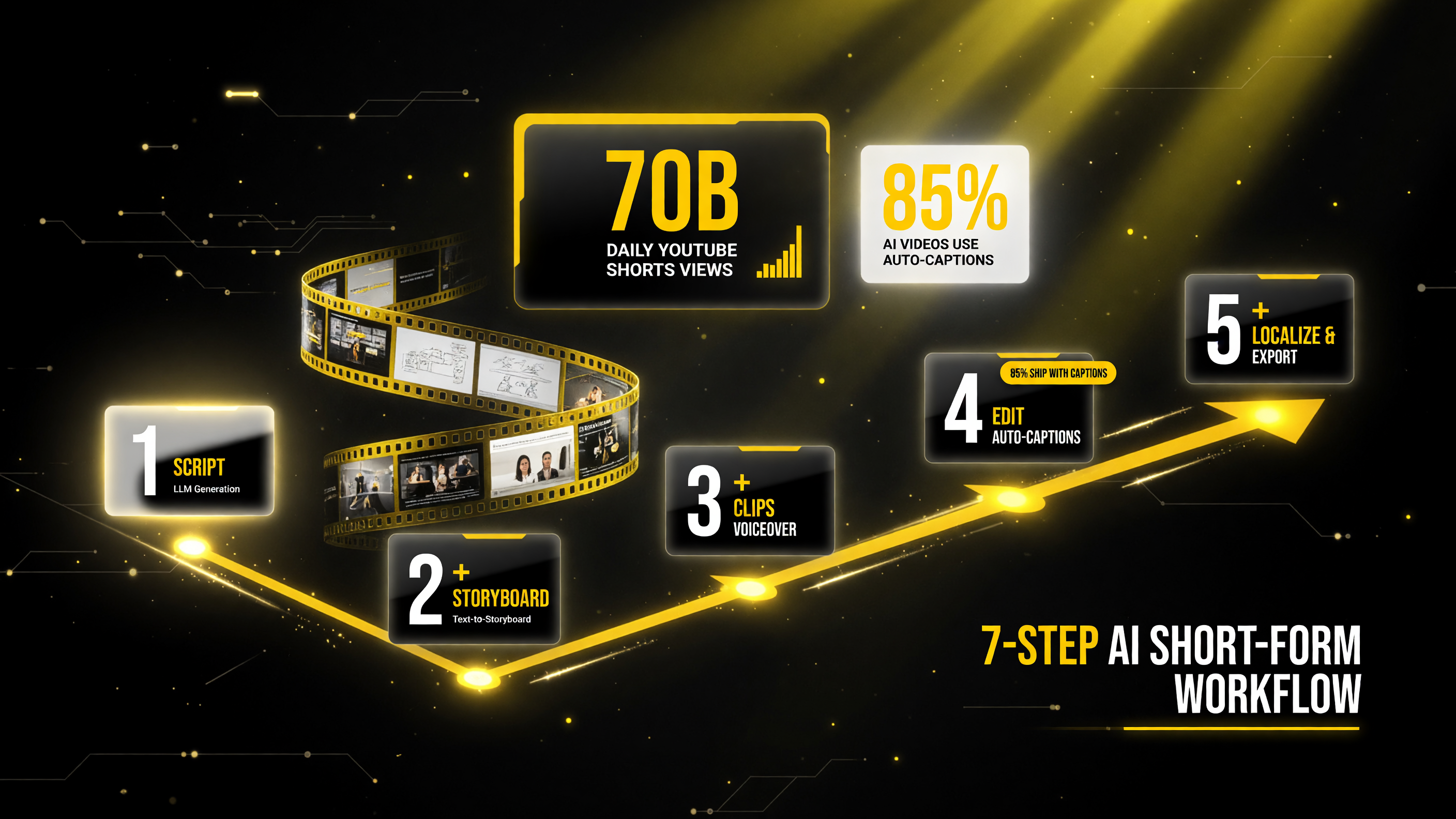
Pick the right tool for each stage: an LLM writes the script and hooks, a text-to-storyboard tool plans the shots, a generator produces clips and voiceover, an editor lays it out with auto-captions, and an exporter handles localization and every aspect ratio — 85% of AI videos ship with auto-captions and Shorts now draw 70B views a day.
Batch Production: The Real Time-Saver
The biggest productivity win in AI short-form is not faster single clips; it is batching. Instead of producing one video start to finish, run the same step across many videos before moving to the next step. Write ten scripts in one session, generate ten voiceovers in one batch, render ten sets of clips, then assemble them all on the same editing afternoon.
This approach has two advantages. First, it reduces context-switching, which is where most creator time actually disappears. Second, it lets you reuse a single approved style and a single set of settings across a whole batch, so all ten clips look and sound consistent. Batch production is the difference between struggling to post daily and comfortably publishing a backlog.
Combine batching with a content calendar. Reserve one day for scripts, one for generation, and one for editing each week. Many full-time AI creators produce a week’s worth of short-form in a single focused day, then spend the rest of the week on distribution, engagement, and format experiments.
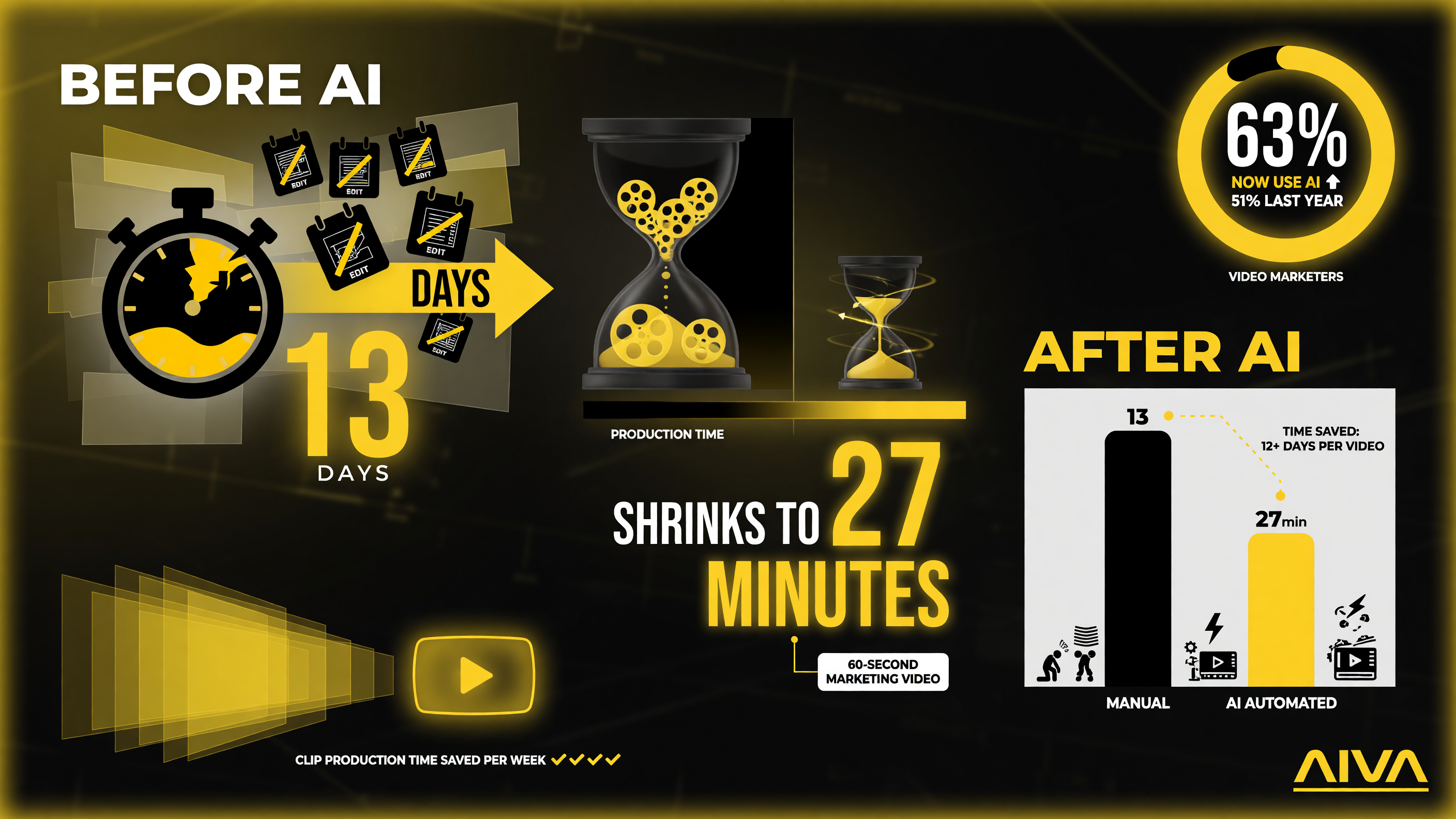
Production time is the real lever: the same 60-second clip that used to eat roughly two weeks now runs in about half an hour, and 63% of video marketers already build clips with AI tools vs 51% a year earlier.
Common Pitfalls and How to Avoid Them
Inconsistent visual style. If your clips look disjointed, force consistency by reusing the same seeds, references, and character avatars across shots. A defined storyboard before generation fixes most of this.
Ignoring platform labeling rules. TikTok has already labeled more than 1.3 billion AI-generated videos, and platforms increasingly require AI disclosure. Disclose AI content where required — it protects you and builds trust with a US audience that has grown skeptical of deceptive content.
Firing every clip in parallel. Do not generate all clips at once before approving the first. Approve a hero shot, lock the style, then batch the rest. This saves credits and rework.
Posting without a hook. A viewer decides in the first three seconds. Every clip needs a clear hook in the opening line or visual. If your opening is slow, the algorithm sees it in your completion rate and stops recommending the clip.
Treating AI output as publish-ready. AI is an accelerator, not a replacement for judgment. You still direct the strategy, the taste, and the quality bar. Human oversight is also what keeps your content defensible on originality and copyright.
Scaling before you have a repeatable format. The temptation is to ramp up to ten clips a day immediately. Instead, find one format that holds viewers, then multiply it. A channel with a single proven, repeatable clip style grows faster than one that burns credits testing a dozen new formats every week.
Neglecting audio. Many creators obsess over visuals and post clips with muddy or lifeless audio. For short-form, clean voiceover and a subtle music bed are as important as the picture. Preview your clips on a phone speaker — that is how most of your audience will hear them.
Measurement and Iteration
Automation does not end at publishing. Track completion rate, watch time, and saves for every clip, and feed that data back into your brief. The tools that try to tell you the “right” answer change every few weeks, so your own performance data is the most reliable signal. Double down on the formats, hooks, and lengths that your US audience actually finishes, and let underperforming angles die quickly.
Start with a two-week experiment: publish one automated clip a day, log what works, and only expand once you see a repeatable pattern. This keeps your time invested in content that moves the needle rather than an ever-growing backlog of half-watched videos.
FAQ
How long does it take to make an AI short-form video in 2026?
With an automated workflow, a completed vertical clip typically takes one person a few hours, and some single clips can be produced in about 30 minutes. A full brief-to-publish loop for a batch of clips can be finished in a single afternoon.
Is AI short-form content allowed on YouTube and TikTok?
Yes, AI-generated content is allowed, but platforms increasingly require disclosure. TikTok has labeled more than 1.3 billion AI-generated videos, and disclosure rules continue to tighten in 2026. Always check the current policy for each platform before publishing.
Do I need expensive tools to automate short-form video?
No. Most AI video tools have free tiers, and a lean stack of one script tool, one generator, and one vertical editor is enough to start. Upgrade only the stage where you spend the most time.
Can I create a faceless YouTube channel fully with AI?
Yes. A faceless channel combines AI script generation, AI voiceover, text-to-video, and auto-captions. Many creators run such channels profitably, publishing multiple times a week with minimal manual work, though human direction of angles and taste is still essential.
What is the fastest way to repurpose long-form video into Shorts?
A repurposing tool like OpusClip converts long-form recordings into multiple Shorts automatically, and auto-caption tools rebuild the vertical version. This is the fastest way to generate a week of short-form content from one long video.
How much does AI short-form production cost compared to traditional production?
AI-assisted production typically cuts costs by an estimated 60-80%. Traditional short-form can cost $1,500 to $5,000 per video, while AI-assisted production often lands between roughly $300 and $1,200 depending on the tool stack and usage.

About Barak Schurr
Barak Schurr is a serial entrepreneur who built and exited a major ticketing platform before turning his attention to AI and content. He runs three AI-focused research sites and writes about the tools, workflows, and strategies that let solo creators build real channels — without a crew, a studio, or a Hollywood budget. Contact: [email protected]
More AI Video Resources