Kling API 3.0: What It Costs and How Developers Can Use It
Get The Faceless YouTube Blueprint — Free
The exact AI tool stack and workflow used to build a faceless YouTube channel from zero.
Kling API 3.0: What the New Video API Costs and How Developers Can Use It
⚡ Expert Summary: Kuaishou’s Kling API 3.0 brings pay-per-second pricing (list price one unit = $0.14), prepaid packages with volume discounts around 10% at 30,000+ units, and roughly 20 concurrent video jobs per account. For developers and automation builders, that breaks AI video generation out of single-shot apps and into pipelines — you can now generate, edit, and deliver video programmatically at a predictable per-second cost.
For most of the past two years, AI video generation happened inside a web app. You typed a prompt, waited, downloaded a clip, and uploaded it somewhere else. That works fine for a creator making a handful of videos a week. It collapses completely when you need one hundred videos, generated on a schedule, dropped into a product or a client workflow.
That is the gap Kling’s developer API is built to close. Kuaishou — the Chinese tech company behind the Kling model family — offers the Kling video generation models programmatically, and the 3.0 generation of that API formalized a pricing model developers can actually plan around: units, per-second costs, prepaid packages, and concurrency limits. This is a genuinely different conversation from “which AI video generator is best?” It’s a “how do I build video generation into my product and what does it cost me at scale?” conversation.
Why the API Matters More Than the App
The consumer Kling app is famous for producing smooth, cinematic text-to-video and image-to-video clips with strong motion quality. The API is not that. It’s the same underlying model family, but exposed as a programmatic service: you send a request with your prompt (and optionally a subject or start image), you get back a video file or a URL, and you pay based on how much compute the generation consumes.
That distinction matters for three reasons. First, the API removes the human from the loop for volume work — batch generation becomes a background job instead of a manual task. Second, it makes per-video cost predictable, which is the difference between a tool and a product you can bill for. Third, it opens the door to automation: video can be produced on a drip schedule, in response to events, or inside a larger content pipeline that your team already runs.
If you run a video tool, an agency, or an internal content operation, the API is the difference between “we use AI video” and “we have an AI video engine plugged into our stack.” For US-based agencies, SaaS teams, and content studios, getting per-second pricing and bulk discounts right is the difference between a feature that scales and one that silently bleeds money.
Kling API 3.0 Pricing, Explained Simply
The 3.0 API moved to a units-based system, which can look confusing at first. Here’s the plain-English version.
Units. One unit is the base billing quantity, and at list price one unit equals $0.14. When you generate a video, the cost is expressed in units, which converts to dollars at that rate. You don’t buy fractions of videos; you buy compute, measured in units.
Prepaid packages. You buy units in prepaid packages. Those packages are valid for 180 days from purchase, and units do not roll over if you don’t use them. That 180-day window is the single most important thing to get right before you commit money — if your usage is bursty, a 180-day expiry can push you to waste prepaid balance.
Volume discounts. The more units you buy in a single package, the cheaper each unit gets. Larger packages (in the tens of thousands of units and up) earn roughly a 10% discount off list price, so heavy users can meaningfully cut their per-video cost by buying in bulk.
Concurrency. Accounts are limited in how many video jobs can run at the same time, on the order of 20 concurrent video generations. If your pipeline needs to fire off hundreds of videos at once, you’ll hit the concurrency ceiling and need to queue work — build that into your architecture from day one rather than discovering it mid-launch.
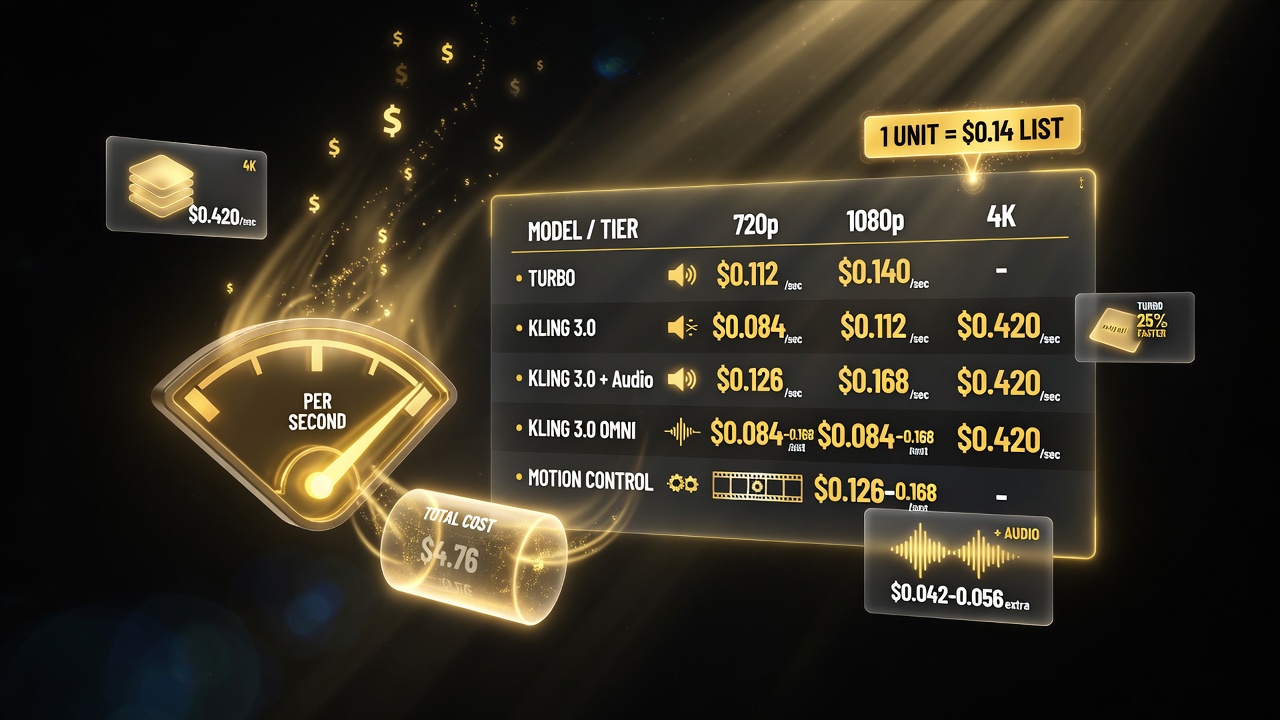
Kling API 3.0 bills per second of video: Turbo 720p with audio runs $0.112/s, while standard 4K jumps to $0.42/s — the range that drives your real unit economics.
Per-Second Pricing by Model and Resolution
Kling API 3.0’s cost is largely driven by a per-second rate, which varies by model variant, resolution, and whether the output includes audio. Here’s the reference pricing at list (in US dollars per second of generated video):
| Model / Tier | Audio | 720p ($/s) | 1080p ($/s) | 4K ($/s) |
|---|---|---|---|---|
| Kling 3.0 Turbo | With audio | $0.112 | $0.140 | — |
| Kling 3.0 | No audio | $0.084 | $0.112 | $0.420 |
| Kling 3.0 | With audio | $0.126 | $0.168 | $0.420 |
| Kling 3.0 Omni | Various | $0.084–$0.168 | $0.084–$0.168 | $0.420 |
| Motion control | — | $0.126–$0.168 | $0.126–$0.168 | — |
Read that table as a few clear signals. Turbo is your cheapest tier and your fastest path to a good clip, and its price floats with resolution. Standard Kling 3.0 without audio is the budget floor at 720p ($0.084/s), but jumps to $0.42/s at 4K — a 5x jump you should only sign off on when output truly needs 4K. Audio adds a noticeable premium at every tier, so if your use case doesn’t need generated audio, leaving it off keeps costs down. Motion control, which lets you steer camera and subject movement, sits in the mid-range and is the right tool when you need deliberate choreography rather than freeform generation.
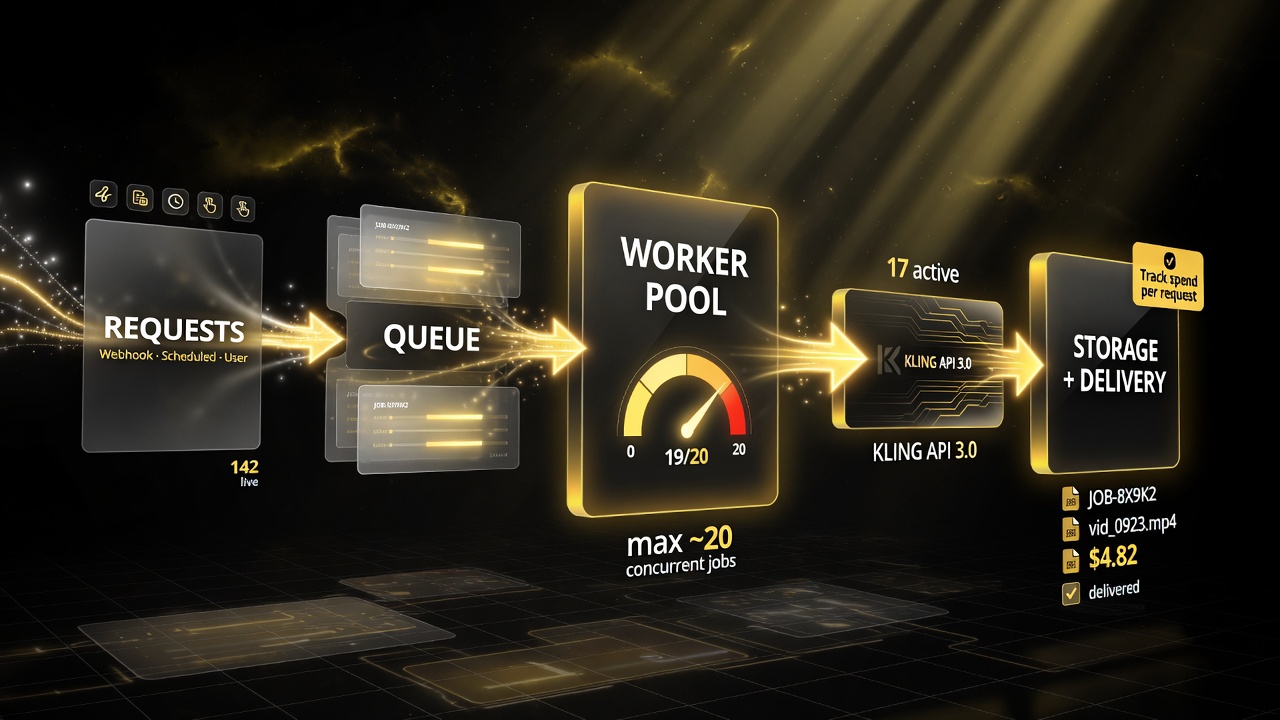
Route generation requests through a queue and a bounded worker pool so your pipeline stays under the roughly 20-concurrent-job ceiling instead of getting throttled.
Build a Per-Video Cost Model Before You Build Product
The biggest mistake teams make with API video is shipping first and computing unit economics later. You can avoid that with a small spreadsheet before you write a line of integration code.
Start with your average clip length. A typical social clip runs 5 to 10 seconds. At Kling 3.0 1080p with audio ($0.168/s), a 10-second clip costs about $1.68. At Turbo 720p with audio ($0.112/s), that same 10-second clip costs about $1.12. Now multiply by your volume: ten thousand clips a month at $1.12 is $11,200 a month in generation cost alone. That number is the real conversation about whether an API video feature is viable.
That per-clip figure is also where volume discounts bite in a good way. If you’re a high-volume operator, buying prepaid units at roughly 10% off turns that $11,200 into about $10,080 — real savings, but only if you actually consume within the 180-day window. The discount only pays off if your usage is high and steady, not spiky.
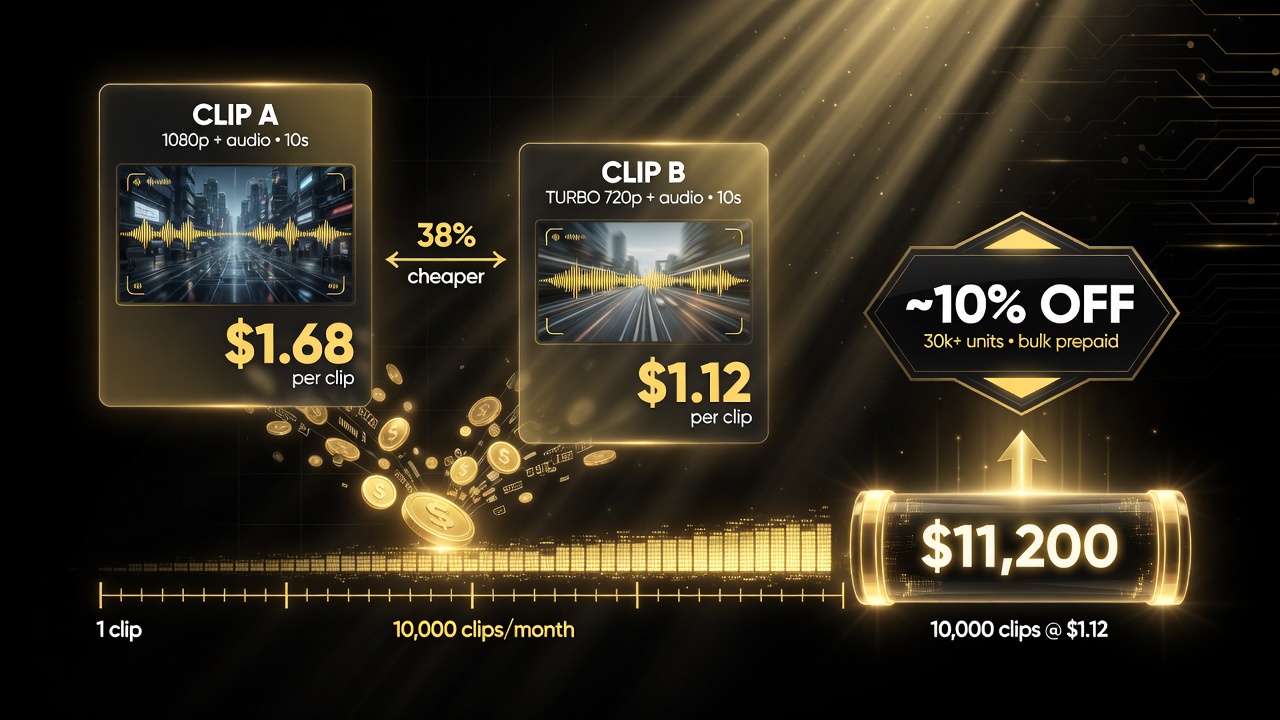
Model per-clip cost before you ship: a 10-second 1080p clip with audio runs about $1.68; the same clip on Turbo 720p with audio runs about $1.12.
Designing for the Concurrency Ceiling
Kling API 3.0 limits concurrent video jobs to roughly 20 per account. For a solo developer generating a few clips at a time, that’s a non-issue. For a platform that serves many users or a batch pipeline that wants to generate a thousand videos overnight, it’s a hard constraint you must engineer around.
The standard pattern is a queue. You take the influx of generation requests, put them in a queue with a sensible priority order, and have a worker pool that consumes jobs up to the concurrency limit. Requests beyond that wait their turn. This keeps you under the ceiling, gives you predictable throughput, and makes it easy to add retries and dead-letter handling when a job fails. If you ignore the ceiling and fire hundreds of parallel requests, you’ll get throttled or rejected — and you’ll discover the limit at exactly the worst moment, right before a launch.
For most teams, a queue plus a small worker pool is the right architecture. You don’t need to overbuild; you need a buffer between the world and the concurrency limit so demand spikes don’t break your pipeline.
What “API 3.0” Actually Buys You Over the App
Beyond pricing and concurrency, the 3.0 API generation is built for integration. It supports the same text-to-video and image-to-video workflows as the app, plus controllable motion and subject consistency that matter when you’re generating a coherent series rather than one-off clips.
Because it’s an API, everything is composable: you can couple Kling generation to your storage, your CMS, your editing stack, or your delivery network. Runway has been pushing this same orchestration idea with its Media Router and API — the industry is converging on the insight that AI video is most valuable when it lives inside a pipeline, not in a standalone tool.
A Simple Kling API Integration Pattern
If you’re ready to wire this up, here’s a minimal, sensible architecture that respects the pricing and concurrency realities above:
- Route requests into a queue. Every generation request — from a webhook, a scheduled job, or a user action — lands in a queue so you never burst past the concurrency ceiling.
- Run a bounded worker pool. A small set of workers pulls from the queue and calls the Kling API, staying at or under the concurrent-job limit.
- Store outputs by job ID. Correlate each returned video to the request that created it so you can deliver, retry, or report cleanly.
- Track spend per request. Log the units consumed for every job and roll it up daily so your actuals match your per-second cost model — no surprise bills.
- Handle the 180-day expiry. Monitor your prepaid balance and purchase cadence; don’t buy far ahead of real usage.
That pattern is deliberately boring. The boring part — queueing, bounded concurrency, spend tracking — is what separates a stable AI video product from a demo that stalls under load or bleeds money.
When the Kling API Is the Right Call
The Kling API makes sense when you need volume, automation, or integration. Concrete examples: a marketing agency generating branded clips for dozens of clients on a schedule; a social tool that turns blog posts into short videos automatically; an e-commerce app that produces product videos from a catalog; or an internal training pipeline that renders explainer clips from scripts.
It makes less sense if you generate a handful of videos a month by hand — the app is cheaper and simpler for that. It also warrants caution if your volumes are low and spiky, because prepaid packages with a 180-day expiry can penalize you for idle balance.
How the API Stacks Up Against the Consumer Tier
If you’ve used Kling 3.0 Turbo in the consumer app, the model behind the API is the same family — you get that same strong motion quality. What the API changes is control and cost structure. The app hides compute and bills in a subscription or simple per-generation credit; the API exposes units, per-second pricing, and concurrency, and gives you full programmatic control to put video generation inside your own product.
That’s the real mental shift: the API turns AI video from a creative tool into an infrastructure cost you can model, budget, and automate. It’s worth noting Kuaishou has the capital and roadmap ambition to keep pushing this — the company raised billions in new funding, a sign it intends to be a long-term player in the AI video race.
Final Honest Take
Kling API 3.0 is a serious developer-grade video API with a transparent, planable pricing model. The units system and per-second rates are genuinely useful — they let you compute real unit economics before you commit. The two traps are the 180-day prepaid expiry and the ~20-job concurrency ceiling, both of which are manageable if you design for them up front.
If you’re building something that needs AI video at volume, inside a pipeline, this is one of the better foundation choices available today. Build the queue, model the cost per clip, respect the expiry window — and you have a video engine that fits your product instead of a demo that doesn’t scale.
Frequently Asked Questions
What is the Kling API 3.0?
Kling API 3.0 is Kuaishou’s programmatic service for generating AI video using the Kling model family. Developers send requests for text-to-video or image-to-video generation and receive video output, paying for compute measured in units.
How much does the Kling API cost per video?
Cost depends on model, resolution, audio, and clip length (per-second pricing, list $0.084–$0.42/s across tiers). One unit equals $0.14 at list. A 10-second 1080p clip with audio costs roughly $1.68; the same clip on Turbo 720p with audio costs about $1.12.
How does Kling API unit pricing work?
Generation is billed in units, where one unit = $0.14 list. You buy units in prepaid packages valid for 180 days (no rollover), with volume discounts around 10% at larger package sizes (tens of thousands of units).
Are there concurrency limits on the Kling API?
Yes. Accounts are limited to roughly 20 concurrent video generation jobs. To handle higher volume, queue requests and consume them within the concurrency limit rather than firing parallel requests.
Is the Kling API cheaper than the Kling app?
For low-volume, manual generation the app is simpler and often cheaper. The API’s per-second pricing and bulk discounts make it cost-effective for high-volume, automated, or integrated workflows where you can model per-clip unit economics.
Can I use the Kling API for text-to-video and image-to-video?
Yes. The API supports both text-to-video and image-to-video generation, plus controllable motion and subject-consistency features useful for generating coherent series of clips programmatically.

About Barak Schurr
Barak Schurr is a serial entrepreneur who built and exited a major ticketing platform before turning his attention to AI and content. He runs three AI-focused research sites and writes about the tools, workflows, and strategies that let solo creators build real channels — without a crew, a studio, or a Hollywood budget.
Email: [email protected]
More AI Video Resources