Runway FLUX 3: 20-Second AI Video With Audio Just Launched
Get The Faceless YouTube Blueprint — Free
The exact AI tool stack and workflow used to build a faceless YouTube channel from zero.
Runway FLUX 3: 20-Second AI Video With Audio Just Launched
⚡ Expert Summary: FLUX 3 is Black Forest Labs’ first public video model, and it just landed on Runway. It generates and edits up to 20 seconds of 1080p video with native, sync audio from one prompt. Testers preferred FLUX 3 over Runway Gen-4.5 in 77% of side-by-side comparisons. For AI video creators in the US, the big unlock is quality video and believable sound from a single model — no separate voiceover tool needed. This is a genuinely new step in one-prompt filmmaking.
What Is FLUX 3 and Why Does It Matter for Creators?
For years, AI video in the US has been a two-stage process: generate the visuals in one tool, then sync a voiceover and sound effects in another. That seam is where most marketing videos for small businesses fall apart — the lips never quite match the words, the ambience loops, and the export takes a second round of fixes. FLUX 3 attacks that seam directly. Because it is a single multimodal model, the audio is generated as part of the same pass as the picture, so dialogue, footsteps, ambience, and even fan noise land on the same timeline as the footage.
That is not a small quality-of-life win. For an independent creator producing a weekly YouTube short or a local ad, it is the difference between spending an afternoon editing audio and publishing the clip the same morning. The model does not just remove a step; it removes the most error-prone step in the entire pipeline.
FLUX 3 is the first video-capable model from Black Forest Labs, the team behind the FLUX image models. It launched in gated Early Access on July 23, 2026, and became available directly on the Runway platform on August 4, 2026. Instead of forcing you to generate video and then add audio in a separate tool, FLUX 3 is multimodal from the ground up: the same model handles images, video, and audio, and it can produce a finished-looking clip with native sound in a single generation.
For AI video creators in the United States, that collapses a workflow that used to take three tools into one prompt. Generation, editing, and sound all live in the same model, which means fewer exports, fewer sync headaches, and far less stitching between apps.
What FLUX 3 Can Actually Do: A Feature Breakdown
FLUX 3 is not a one-trick video generator. It ships with a full toolkit of generation modes that map to how working creators actually build shots:
- Text-to-video — type a prompt, get a clip with audio.
- Image-to-video — animate a starting frame or use images as style references. This is the mode most creators will use to preserve a brand look.
- Video-to-video — transfer elements like a character into a new scene, the backbone of consistent series content.
- Keyframe-to-video — set start and end frames and let the model build the motion between them.
- Generative video-audio continuation — the model keeps producing believable sound that matches the on-screen action.
- Multilingual dialogue — spoken lines in multiple languages, which matters for US creators targeting diverse or international audiences.
Every output includes native audio. That single fact separates FLUX 3 from most of the video models creators have been using, where sound is either absent entirely or generated as a disconnected extra.
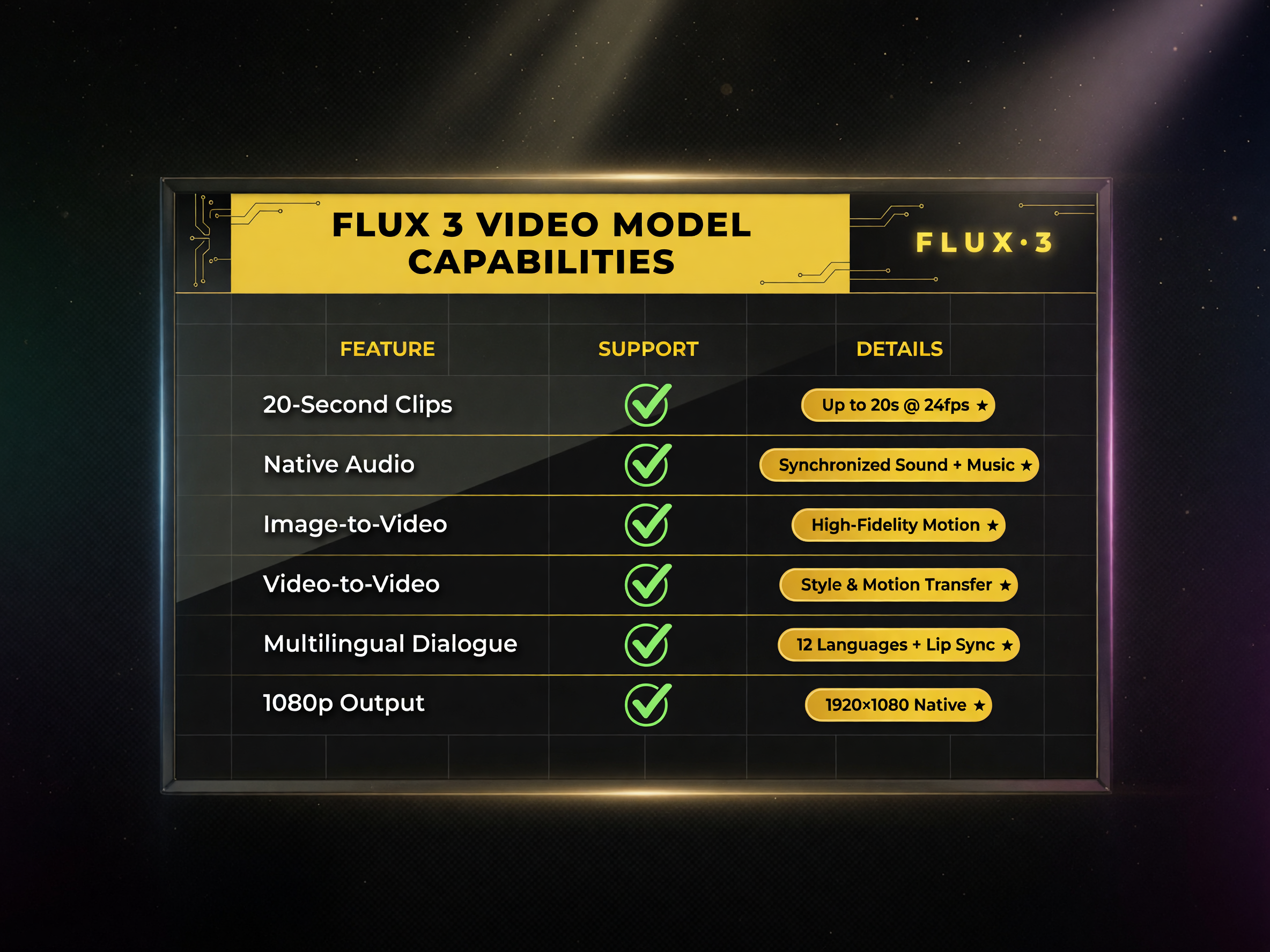
FLUX 3’s full toolkit: six generation modes that let creators produce finished video with audio from one prompt.
| FLUX 3 Capability | What It Means for You | Why It Matters |
|---|---|---|
| Up to 20 seconds per clip | Longer single shots | Fewer cuts, more usable footage per prompt |
| Native audio on every output | Sound built into the shot | No separate voiceover tool needed |
| Image-to-video reference | Brand/style lock | Consistent series content |
| Video-to-video transfer | Character/scene moves | Repurpose footage across projects |
| Multilingual dialogue | Multiple languages | Reach non-English audiences |
| 1080p on Runway | Broadcast-ready output | Good enough for most platforms straight out |
The 77% Stat That Changes the Buying Conversation
Black Forest Labs reports that in its own side-by-side tests, testers preferred FLUX 3 over Runway Gen-4.5 in 77% of comparisons. That number is worth reading carefully because it is a vendor’s self-reported benchmark, not an independent study. What it signals, though, is directionally useful: FLUX 3 is competitive where veteran creators assumed only Gen-4.5 could play, and it wins specifically on facial expressions, sound-event association, and shot-to-shot consistency.
For an AI video creator weighing a Runway subscription against a new FLUX 3 workflow, the practical upshot is that you no longer have to compromise between cinematic quality and believable audio. You can get both from one model.
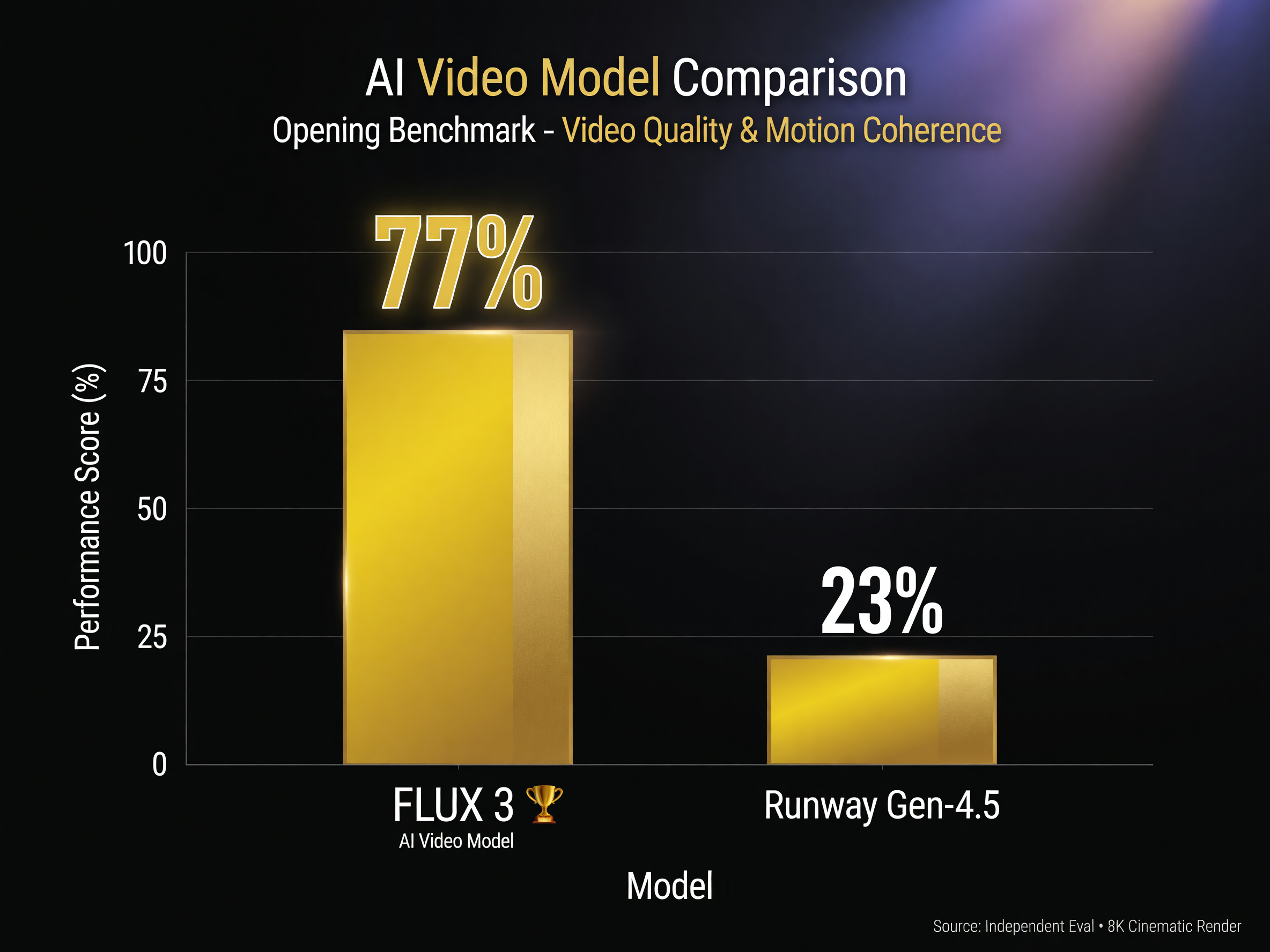
In Black Forest Labs’ side-by-side tests, testers preferred FLUX 3 in 77% of comparisons — the vendor-reported stat driving adoption.
How FLUX 3 vs Runway Gen-4.5 Actually Stack Up
FLUX 3 runs on Runway, so in one sense it is not competing with Runway so much as joining it. But the model is built by Black Forest Labs, and it sits alongside Runway’s own Gen series in the same interface. The honest comparison is about what each model is strongest at for your specific project:
- Choose FLUX 3 when your priority is full multimodal output — video with believable native audio, expressive faces, and shots that stay consistent across a sequence.
- Choose Runway Gen-4.5 when you are deep in a professional post-production pipeline that already relies on Runway’s editing and control tools, and you want the model that the studio ecosystem was built around.
- Use both if you can. Many working creators run FLUX 3 for hero shots and Gen-4.5 for specific control tasks, treating them as complementary rather than mutually exclusive.
The Audio Angle Deserves Its Own Look
The most surprising thing about FLUX 3 for most creators is not the resolution — 1080p on the Runway integration is now table stakes. It is the audio. Black Forest Labs built the model so the sound is not an afterthought bolted on after rendering; it is predicted alongside the pixels using the same learned representation. The practical result is that when a character in your clip turns to speak, the model generates speech that matches the mouth movements, and when a scene shifts from indoors to outdoors, the ambient audio shifts with it.
This matters commercially because sound is half of perceived video quality. Blurry-enough footage is forgivable on a phone screen; bad audio is not. Creators who publish without native sound often lose engagement the moment someone watches on silent autoplay then unmutes and gets a mismatched mess. FLUX 3 reduces that failure mode by keeping audio coherent with the visuals by default.
FLUX 3 is still in gated Early Access on Black Forest Labs’ own platform, with the more complete experience now available on Runway. That split matters for how you adopt it:
- If you are a direct-to-audience creator on YouTube, TikTok, or Instagram in the US, Runway’s FLUX 3 integration is the fastest path to testing it today because you already have the interface and the rendering pipeline.
- If you are a production studio evaluating FLUX 3 for client work, the BFL early-access build is worth applying for to get ahead of the full rollout, especially for the video-to-video and keyframe controls.
- If you are a casual user who just wants better clips, wait for the broader public rollout later in 2026. Early access is limited and subject to safety review, so the full product will be smoother.
Whatever tier you fall into, the direction is clear: the models that combine video, image, and audio in one shot are becoming the practical baseline for solo creators who cannot afford a full production team.
What This Means for Your Content Workflow
Adopting a model like FLUX 3 is less about replacing the tool you already use and more about reordering how you work. The strongest returns come from creators who change their process, not just their software:
- Plan for audio at prompt time. Write prompts that name the sound you want — a rainy street, a crowded café, a single voice in a quiet room — because FLUX 3 will try to honor it. You get better output by telling the model the story includes sound, not just a description of the picture.
- Treat the first clip as a style test, not the final asset. Generate once quickly to see the model’s interpretation, then iterate on the prompt so the palette and mood match your brand before you commit to the full render.
- Keep your reference library. Image-to-video with FLUX 3 rewards creators who reuse on-brand stills. Build a small set of approved frames and characters so every new clip starts from a look you have already vetted.
How to Get Started With FLUX 3 in Three Steps
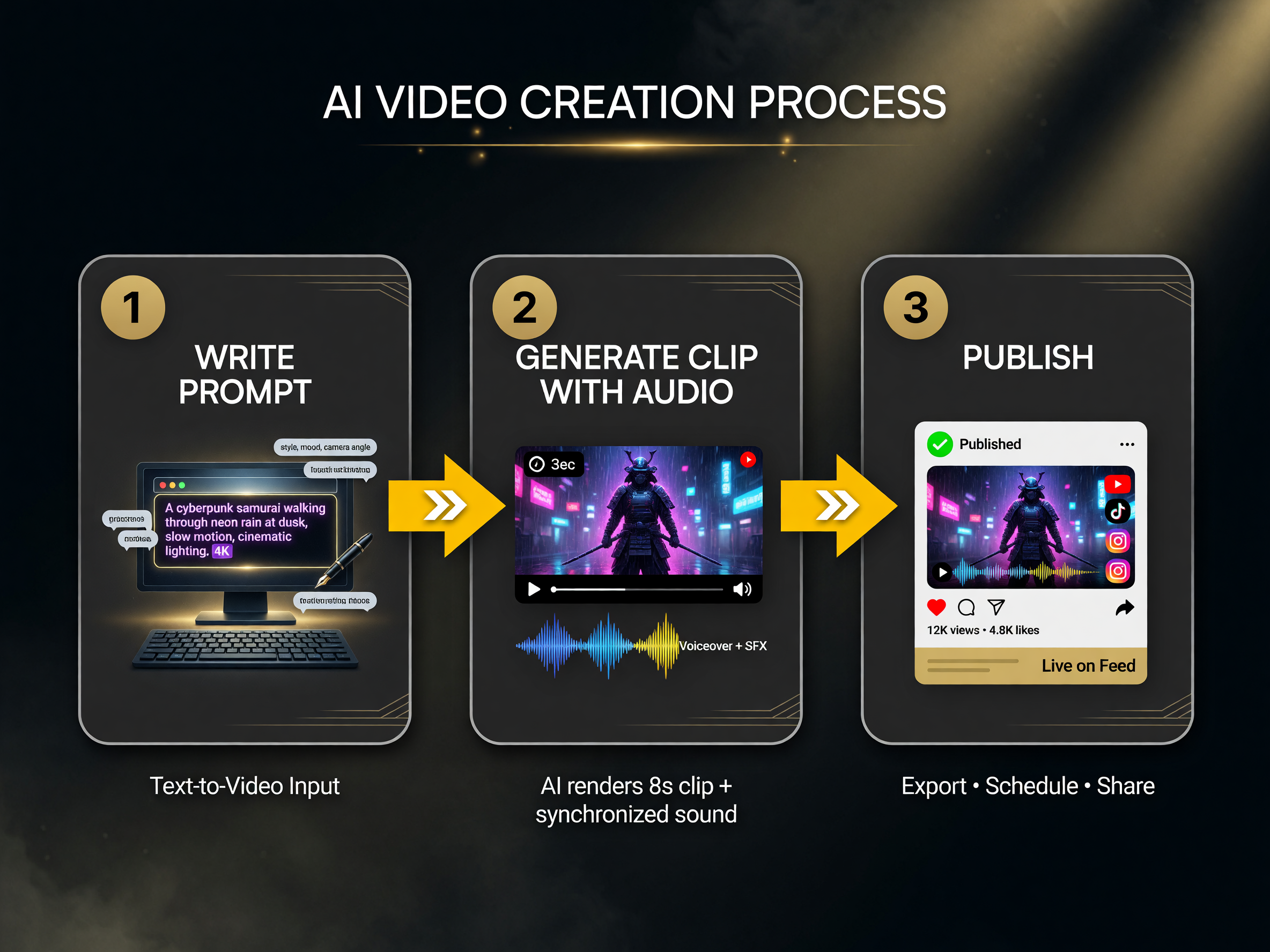
The compressed workflow: one prompt gets you a publishable clip with synced sound, cutting the most error-prone production step.
Getting value from FLUX 3 does not require re-architecting your workflow. Start small and let the model prove itself on one project:
- Pick a single hero clip. Choose one shot from your current project where sound matters — a product demo, a talking moment, or a scene with ambient audio. Generate it in FLUX 3 with native audio and compare it against your existing process.
- Lock your style with image-to-video. Feed FLUX 3 a reference frame from your previous work so the output matches your established look. This keeps your brand consistent instead of introducing a foreign visual style.
- Measure the workflow change. Time how long the finished shot takes from prompt to publishable clip, including the audio you did not have to add separately. That end-to-end time is the real ROI, not the raw quality difference.
What to Watch For Next
The FLUX 3 rollout is happening in phases. Black Forest Labs has said open weights for the image side (“FLUX 3 Dev”) and broader public video access are planned after the current early-access period. For creators, that means two things: the interface experience will keep improving, and the model family will eventually be something you can run yourself rather than only through a hosted platform.
FLUX 3 also signals where the whole field is heading. Joint image-video-audio models take what used to be a multi-tool production line and compress it into a single prompt. The creators who adapt their pipeline early — cloning their style, testing audio sync, and measuring total turnaround time — are the ones who will have the advantage when the next wave of multimodal models lands.
If you are building a video business around AI tools, FLUX 3 is worth a serious test this quarter, not just a bookmark. The gap between “generate a clip” and “ship a finished piece with believable sound” has narrowed dramatically.
Frequently Asked Questions
What is Runway FLUX 3?
FLUX 3 is Black Forest Labs’ first public video model, now available on the Runway platform. It generates and edits up to 20 seconds of video with native, synced audio from a single prompt, and it also handles images and audio within the same model.
How long are FLUX 3 video clips?
FLUX 3 can generate up to 20 seconds per clip, with 1080p output available on the Runway integration. That is substantially longer per shot than many earlier video models, which reduced the need to stitch multiple clips together.
Does FLUX 3 generate audio with the video?
Yes. Every FLUX 3 output includes native audio, including dialogue, sound effects, and generative audio continuation that matches the on-screen action. This is the key feature that sets it apart from most standalone video generators.
Is FLUX 3 better than Runway Gen-4.5?
Black Forest Labs reports that testers preferred FLUX 3 over Gen-4.5 in 77% of side-by-side comparisons, notably on facial expressions, sound-event association, and consistency. That is a vendor-reported figure, so treat it as directional. Many creators will use both models for different tasks.
How much does FLUX 3 cost?
FLUX 3 is currently in gated Early Access through Black Forest Labs, with full access available through the Runway platform. Pricing and public API rates are not yet fully disclosed as of August 2026; check Runway or bfl.ai for the latest tiers.

About Barak Schurr
Barak Schurr is a serial entrepreneur who built and exited a major ticketing platform before turning his attention to AI and content. He runs three AI-focused research sites and writes about the tools, workflows, and strategies that let solo creators build real channels — without a crew, a studio, or a Hollywood budget. Contact: [email protected]
More AI Video Resources