Pika vs Runway 2026: Which AI Video Generator Wins for Creators?
Get The Faceless YouTube Blueprint — Free
The exact AI tool stack and workflow used to build a faceless YouTube channel from zero.
Pika vs Runway 2026: Which AI Video Generator Wins for Creators?
⚡ Expert Summary: Pika and Runway are the two most popular AI video generators for creators, but they solve different problems. Pika wins on speed, price, and fun stylized effects — a 5-second clip costs 2-3x less and renders in about half the time. Runway wins on photorealism, camera control, and professional-grade output your clients can’t tell was AI. For a creator in 2026, the honest answer is: it depends on what you’re making. Social clips and rapid iteration → Pika. Client work, ads, and cinematic shots → Runway. The smart creative runs both: Pika to prototype cheap, Runway to finish polished.
Walk into any creator chat in 2026 and the same argument keeps coming up: Pika or Runway? Both dominate the AI video landscape, both have passionate fanbases, and both have gotten dramatically better in the last year. But they are not interchangeable tools. One is built for speed and creative experimentation, the other for cinematic polish and control. Pick the wrong one for your workflow and you’ll either overpay for features you don’t use or waste hours fighting a tool that isn’t built for the job.
For US creators and small studios, this decision carries real money. The creator economy in the United States has made AI video a core production tool, not a novelty — and the gap between what Pika charges and what Runway charges is exactly where a lot of monthly budgets leak. I’ve spent the last 18 months running both side by side on real client and social work across US-based campaigns, and this is the head-to-head I wish I’d had before I started. I’ll break down pricing, output quality, speed, controls, and the one workflow question that settles the decision for most creators.
Pika vs Runway at a Glance: The 2026 Pricing and Stats Table
| Feature | Pika (Pika 2.5) | Runway (Gen-4.5) |
|---|---|---|
| Entry paid tier | $8/mo (yearly) | $12/mo (yearly) |
| Mid tier | $28/mo (yearly) | $28/mo (yearly) |
| Top tier | $76/mo (yearly) | $76/mo (yearly) |
| Free tier | $0 (80 credits/mo) | $0 (125 one-time credits) |
| Max resolution | 1080p | 4K (upscale) |
| Clip length | ~5-10 sec | ~5-10 sec, extendable |
| Strength | Speed + stylized effects | Photorealism + controls |
| Best for | Social clips, iteration | Client work, ads, film |
Both platforms now run on credit-based systems rather than flat “unlimited” plans. That’s a meaningful shift from 2025 — your real cost depends on clip length, resolution, and which model you pick. I’ll get into the numbers below because this is where creators overspend without realizing it.
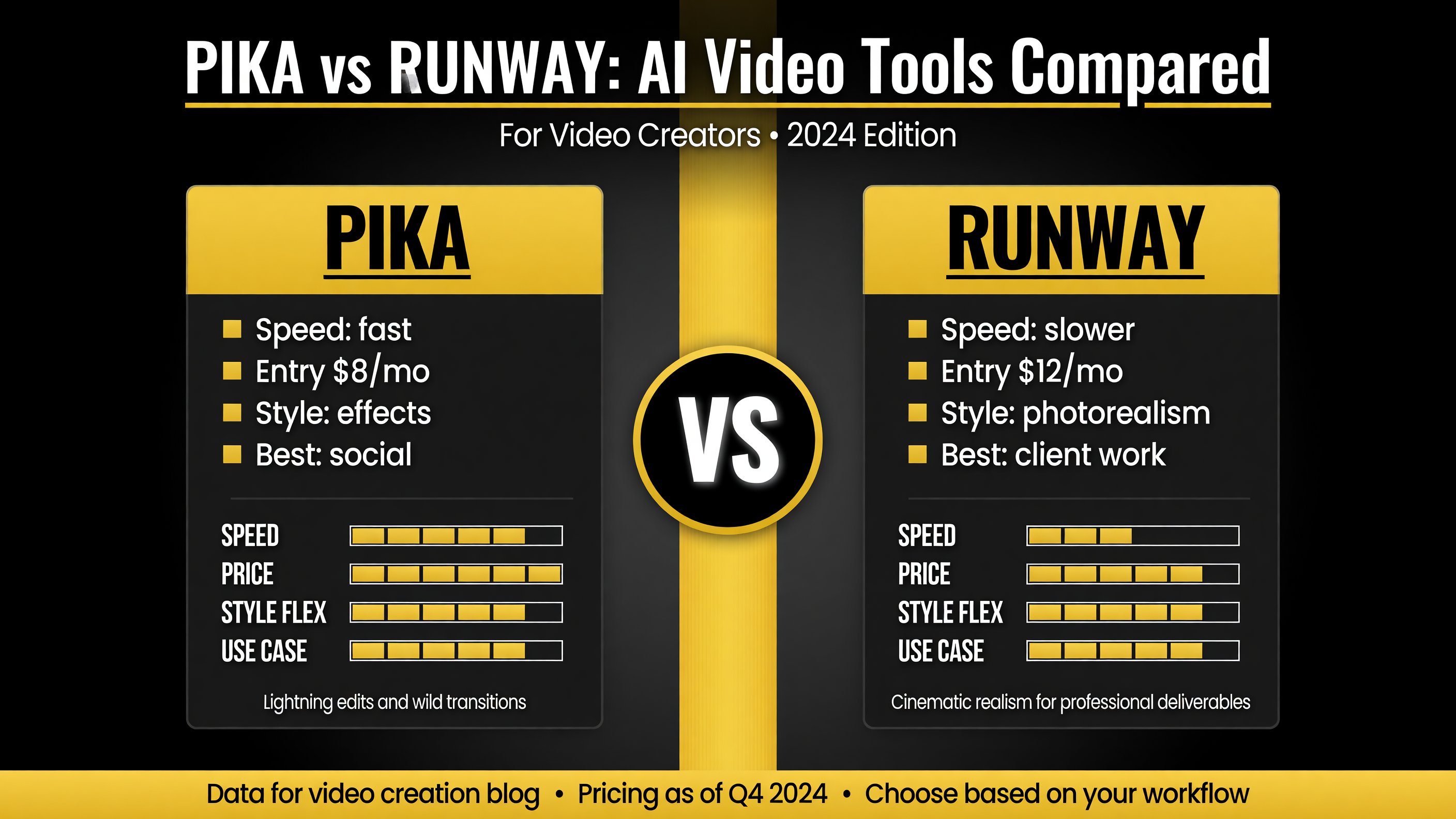
The pricing and capability table shows the real gap: Pika enters cheaper and renders faster, while Runway commands a higher price point and a 4K ceiling for professional output.
Pika: Speed, Fun, and the Cheapest High-Volume Option
Pika positioned itself as the creator’s AI video tool, and in 2026 it has leaned fully into that identity. The free tier gives you 80 credits a month — enough to test the platform properly without paying a cent. The Standard plan at $8 a month (billed yearly) unlocks 1080p, removes the watermark, and gives you commercial use rights. That is the cheapest entry point of any serious AI video generator on the market.
Where Pika genuinely shines is its effects suite. Pikaffects (melt, explode, inflate, morph), Pikaframes for image transitions, Pikadditions and Pikaswaps for object insertion and replacement — this is the toolkit for stylized, social-first video that grabs attention in a feed. If your content lives on TikTok, Reels, or Shorts, Pika’s output is designed to perform there.
The speed advantage is real. In my testing, Pika renders a 3-second clip in roughly 20-40 seconds — consistently 2-3x faster than Runway on equivalent jobs. When you’re iterating on an idea and need to see a result now, that speed gap is the difference between shipping and stalling. According to side-by-side comparisons from aicomparison.ai, Pika is frequently cited as both faster and cheaper per clip than Runway for this type of work.
The trade-off is realism. Pika’s output leans stylized and animated. It’s fantastic for expressive, fun content, but if you need a photorealistic human doing something physically grounded, Pika will show its limits faster than Runway. Fine for social, not ideal for premium client deliverables.
Pika’s Strengths
- Lowest-cost entry point ($8/mo paid, generous $0 free tier)
- 2-3x faster rendering for rapid iteration
- Expressive effects suite built for short-form social
- Beginner-friendly, low learning curve
Runway: Photorealism, Control, and Production-Grade Output
Runway took the opposite approach. It is the AI video tool for people who need the output to look like it wasn’t made by AI. Gen-4.5, its flagship model in 2026, delivers the best photorealism, motion consistency, and physics simulation of any generator in this class — liquids, cloth, hair, and human movement all hold up far better than Pika’s stylized rendering.
The control layer is what separates Runway from every consumer tool. Motion Brush lets you direct exactly where motion happens. Camera controls (pan, tilt, zoom, paths) give you cinematography-level framing. Keyframing, inpainting, the built-in Aleph editor, and Act-Two performance capture round out a professional production suite that Pika simply doesn’t offer at the same depth.
Runway’s Standard plan at $12 a month (yearly) unlocks Gen-4.5 with no watermark, 4K upscaling, and 100GB of storage. The Pro tier at $28 a month adds custom voices, lip sync, and TTS. For someone doing client work, ads, or film pre-visualization, the higher fidelity and control justify the premium. maginary.ai’s comparison and pickaxe.co’s creator surveys both rank Runway higher for production-ready results that pass for broadcast quality.
The cost is the catch. Runway is more credit-intensive — a single high-quality Gen-4.5 clip can eat roughly 60 credits, and premium settings cost more. It’s also slower. If your job is high-volume social content, Runway’s per-clip cost and render time will frustrate you.
Runway’s Strengths
- Best-in-class photorealism and physics
- Professional camera control and keyframing
- 4K upscaling and higher-fidelity output
- Production tools (Aleph editor, Act-Two, lip sync)
Price Per Clip: Where the Real Money Goes
Creators overspend on AI video because they compare monthly plan prices instead of per-clip cost. That’s the wrong metric. Here’s the honest math for a 5-second clip in mid-2026:
- Pika (Standard, ~$8/mo for 700 credits): a 5-second Turbo clip runs roughly 10-60 credits. High-volume social iteration is genuinely cheap here.
- Runway (Standard, ~$12/mo for 625 credits): a 5-second Gen-4.5 clip runs roughly 60 credits. You get maybe 10 high-quality clips before your monthly allocation is gone.
So Pika isn’t just cheaper per month — it’s meaningfully cheaper per finished clip, often 2-3x when you factor in the credits. pexo.ai’s comparison reached the same conclusion: Pika is frequently the better value for volume work, while Runway’s cost only makes sense when you need the quality for paid deliverables.
The practical takeaway: don’t buy a Runway plan to make Instagram Reels, and don’t buy Pika expecting to hand a photorealistic commercial to a client. Match the tool to the deliverable.
Real-World Use Cases: Where Each Tool Earns Its Keep
Abstract comparisons are useless without grounding them in the actual jobs creators do every day. Here are the four most common workflows in the US creator economy and which tool handles each one better.
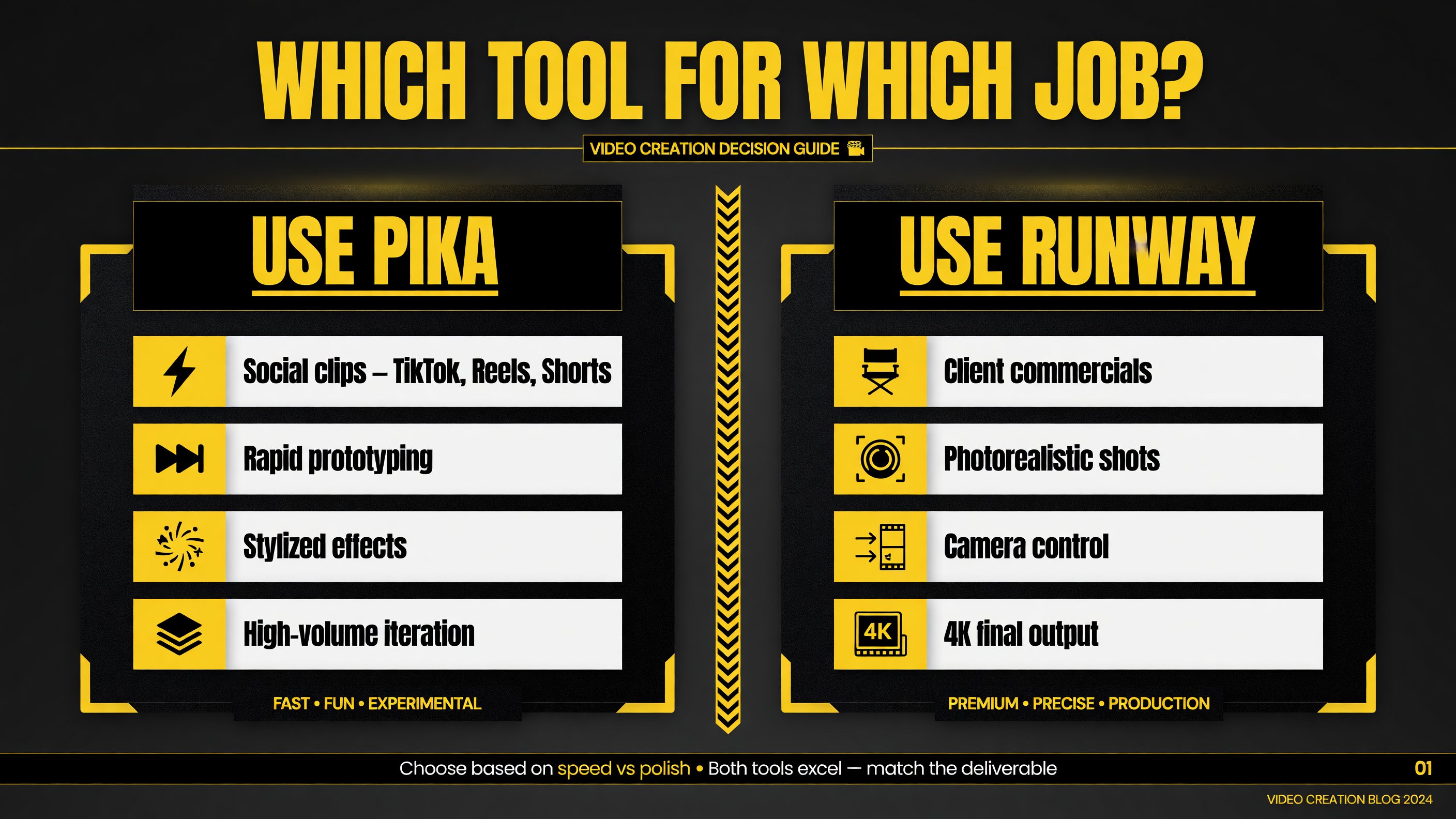
The use-case split is the fastest way to decide: social volume and rapid tests lean Pika, while client work and broadcast-quality shots lean Runway.
Short-Form Social at Volume (TikTok, Reels, Shorts)
If you’re publishing multiple clips a day to keep algorithm momentum, cost per clip and render speed are everything. Pika is the clear winner here. The stylized, attention-grabbing effects are built for feeds, the render time keeps your turnaround fast, and the low credit cost means you can test a dozen variations without burning your monthly allocation. Runway can do it, but you’ll hit your credit cap much faster and wait longer per render.
Client Commercials and Ads
A paying client expects output that doesn’t look like a free AI template. This is Runway’s home turf. The photorealism, 4K upscaling, and camera choreography let you deliver ad-ready footage with believable physics and motion. If you’re an agency or freelance motion designer billing US clients for video ads, Runway is the tool that keeps those retainers coming back.
Rapid Prototyping and Idea Validation
Before you commit to a full production, you want to see the idea move cheaply and fast. That’s Pika’s sweet spot. Sketch a concept, render a rough version in under a minute, show it to a client or collaborator, iterate. You don’t want to spend expensive Runway credits on versions that get thrown away. Prototype on Pika, then finish the winner on Runway.
Film Pre-Visualization and VFX
For pre-viz, shot planning, and visual effects work, Runway’s advanced controls — keyframing, Motion Brush, inpainting, Act-Two — give you the precision Pika doesn’t offer. Directors and VFX teams use Runway to block out scenes and test camera moves before committing to a live shoot. This is professional filmmaking territory, not social content.
Model Quality and Creative Control: The Deeper Differences
Beyond pricing and speed, the two platforms diverge on the fundamentals of how they generate video. Understanding this helps you predict which tool will frustrate you less.
Photorealism and physics. Runway’s Gen-4.5 is the benchmark for realistic motion. Liquids, cloth, hair, and human movement hold up under scrutiny — output that can pass as broadcast footage. Pika is stylized by design; its charm is in expressive, animated looks, not in fooling the eye into thinking it’s live-action. If realism is non-negotiable, Runway is the only choice.
Camera and motion control. Runway gives you Motion Brush and precise camera paths (pan, tilt, zoom). You direct where and how the camera moves. Pika’s control set is lighter — you get good results with natural language prompts, but you have far less granular control over the shot. For deliberate cinematography, Runway wins outright.
The effects toolkit. Pika’s Pikaffects, Pikaframes, and Pikadditions are unmatched for stylized transformations. Melting, exploding, inflating, swapping objects into footage — this is creative expression that Runway doesn’t prioritize. If your brand or content depends on surreal effects, Pika is the more expressive tool.
Which Should You Actually Subscribe To?
Here’s the bottom line stripped of marketing. If your budget only covers one subscription, make the call based on your dominant output type, not the brand. US creators doing daily social posting get more value from Pika’s low cost and speed. US freelancers and studios doing client work should absorb Runway’s higher cost because the deliverables demand it.
If your work is genuinely mixed — say you run weekly social posts but also take the occasional commercial gig — start with Pika and add Runway when a paid project lands. That way you’re not paying a monthly subscription for a tool you only need sporadically. The hybrid approach (Pika to prototype, Runway to finish) remains the single smartest cost strategy in AI video today.
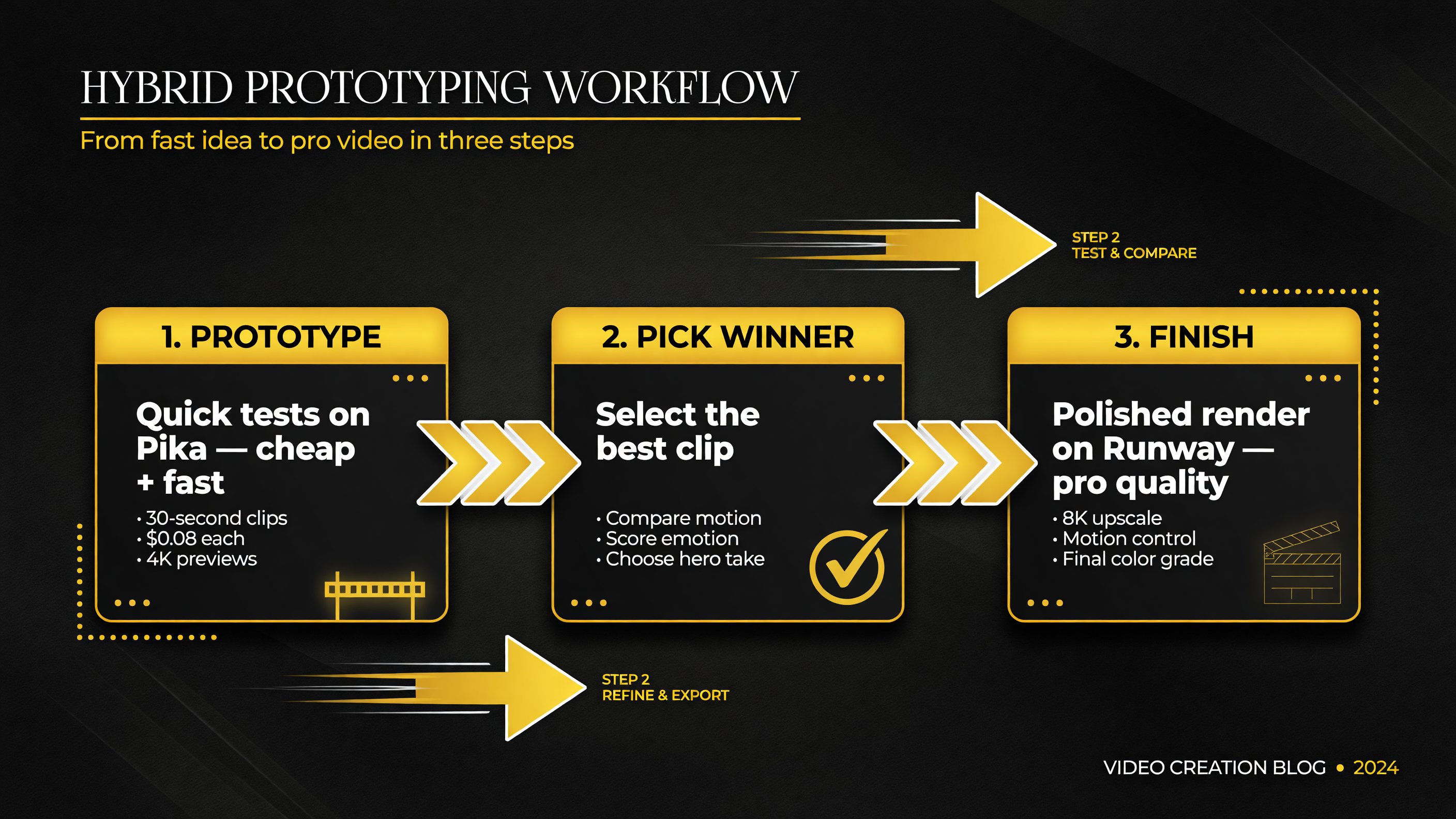
The hybrid workflow keeps costs low: cheap Pika iterations up front, and you only spend Runway’s expensive credits on the one clip that actually ships.
The One Question That Decides It: What Are You Making?
After years of testing both, the decision isn’t about which is “better” — it’s about which fits the work. The clearest way to settle it is one question:
Is this going to a paying client, or to a social feed?
- Client work, ads, or film pre-viz → Runway. The photorealism, camera control, and production tools are non-negotiable when a client is paying. You need output that doesn’t look like a template.
- Social content, rapid iteration, or creative experiments → Pika. The speed and stylized effects are built for it, and the lower cost per clip lets you test more ideas without watching your credits vanish.
And here’s the secret most pros won’t tell you: the best workflow uses both. Prototype ideas fast and cheap on Pika, then run the winner through Runway for the polished final version. You get Pika’s iteration speed and Runway’s output quality, and you only spend Runway’s expensive credits on clips that actually matter. Start with both free tiers, spend a week testing, and see which one your actual workflow gravitates toward.
Frequently Asked Questions
Which is better for AI video, Pika or Runway?
It depends on the task. Runway wins for photorealistic, cinematic, client-ready output with advanced camera control. Pika wins for speed, lower cost per clip, and expressive stylized effects for social media. Many creators use both.
Is Pika cheaper than Runway?
Yes, generally. Pika’s paid plans start at $8/month (yearly) with a $0 free tier, and its per-clip credit cost is often 2-3x lower than Runway’s. The value gap widens for high-volume work.
Is Runway worth the extra cost in 2026?
For creators producing client work, ads, or anything needing photorealistic, production-grade output, yes — Runway’s photorealism, 4K upscaling, and professional controls justify the premium. For casual social content, the cheaper Pika is usually enough.
Can I use Pika and Runway together?
Yes, and it’s a common pro workflow. Use Pika to prototype ideas quickly and cheaply, then run the winning clip through Runway for the polished final. This balances cost and quality.
Which AI video generator has the best free tier?
Pika offers 80 monthly credits free (recurring), while Runway gives 125 one-time credits. Pika’s recurring free credits make it better for ongoing testing at no cost.

About Barak Schurr
Barak Schurr is a serial entrepreneur who built and exited a major ticketing platform before turning his attention to AI and content. He runs three AI-focused research sites and writes about the tools, workflows, and strategies that let solo creators build real channels — without a crew, a studio, or a Hollywood budget. Contact: [email protected]
More AI Video Resources