Pippit AI Review 2026: Turn Any Link, Image, or Website Into Short-Form Video in Minutes
Get The Faceless YouTube Blueprint — Free
The exact AI tool stack and workflow used to build a faceless YouTube channel from zero.
Pippit AI Review 2026: Turn Any Link, Image, or Website Into Short-Form Video in Minutes
⚡ Expert Summary: Pippit is an AI-powered creative tool that turns content — text, links, images, and entire websites — into short-form and marketing-ready videos, with no heavy production required. Built for creators, marketers, and small businesses that need to move fast, it uses a chat-style “Video Agent” to convert a product page, script, or image into a polished clip with captions, voiceovers, music, and effects baked in. This review breaks down exactly how Pippit works, what it costs, who it’s genuinely useful for, and where it falls short — so you can decide if it belongs in your AI video stack.
What Pippit Actually Does
Pippit sits in a fast-growing category: tools that remove the gap between having content and having a video. Instead of writing a script, storyboarding, generating footage, editing, and adding captions yourself, you hand Pippit a source — a product link, a website, an image, a block of text, or even a reference video — and it produces a finished short-form clip.
The core of the product is the Video Agent, a chat-style interface. You type a detailed prompt, paste a product or website link, upload an image or file, and pick your settings: aspect ratio (9:16 for shorts or Reels, 3:4 for feeds), language, duration, and style. Pippit pulls the content, generates the footage through AI models, and layers on captions, voiceover, transitions, and music. You can chat back and forth to refine the result instead of redoing it from scratch.
That “paste a link, get a video” flow is the headline feature. For a small business with an existing product page or an e-commerce listing, it collapses what used to be a multi-hour production into a single prompt.
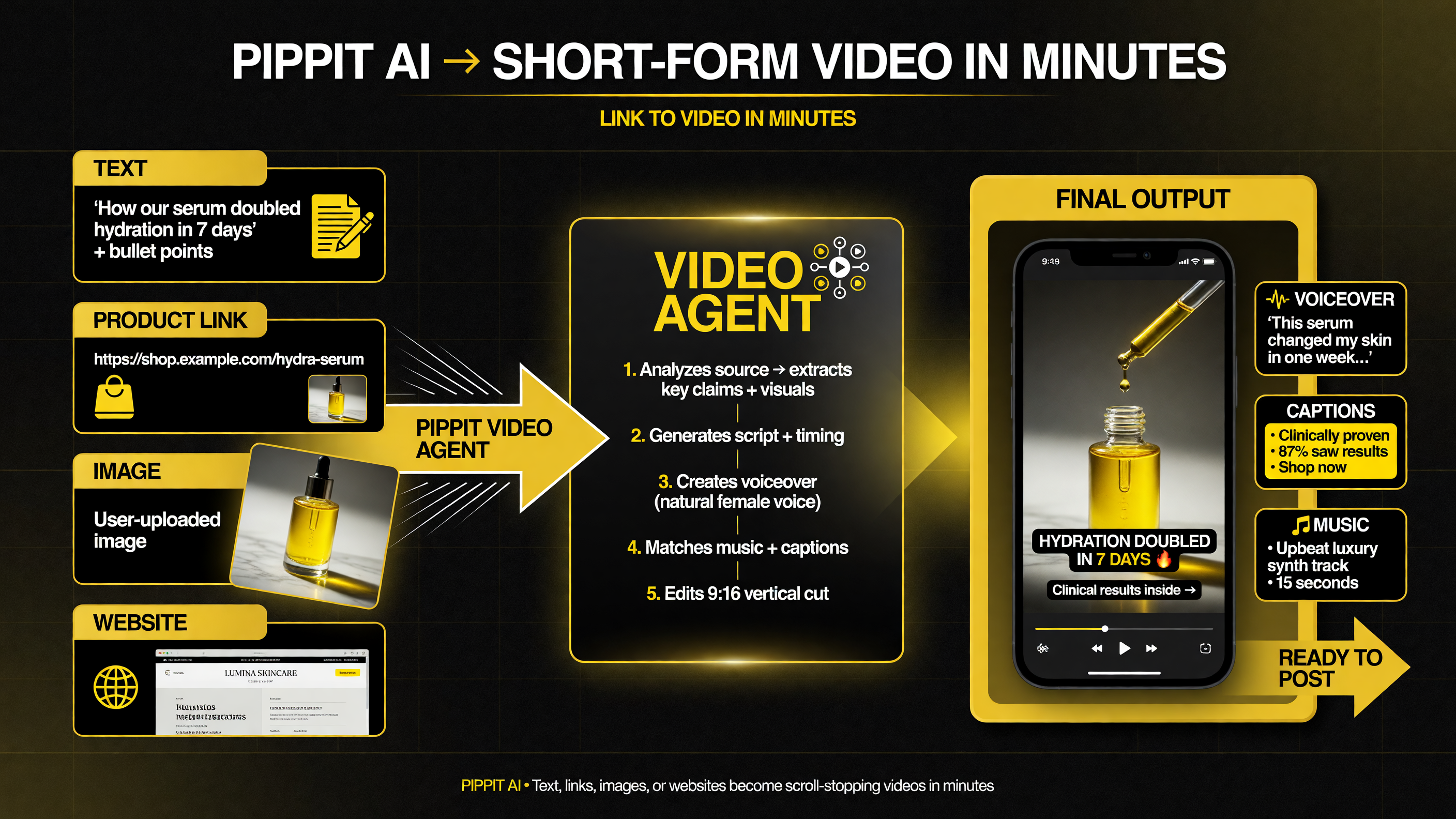
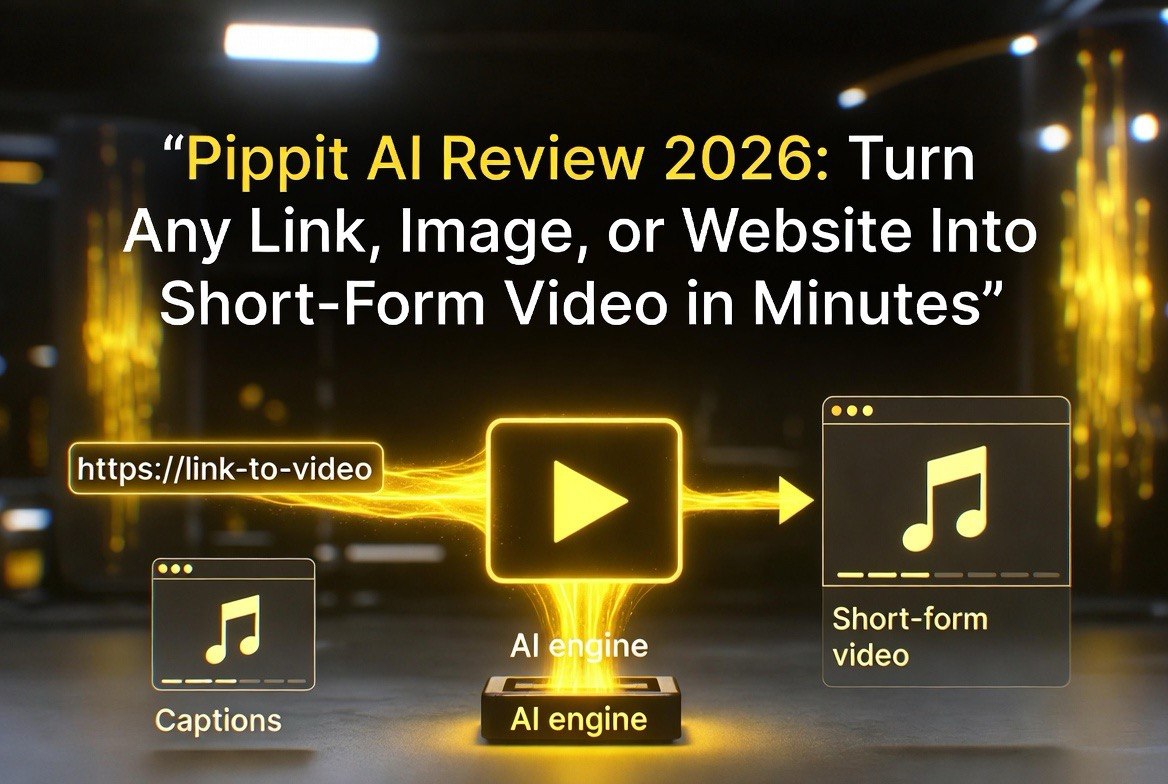
Pippit collapses four types of source content — text, product links, images, and websites — into a publish-ready short in a single prompt.
Who Pippit Is Built For
Pippit’s design target is clear from the start: creators, marketers, and small businesses who need volume and speed more than cinematic control. It is not aimed at filmmakers — it is aimed at people who need a steady stream of social clips, product videos, and ad creatives without hiring an editor or learning advanced software.
The strongest fit is e-commerce and TikTok Shop sellers. Pippit is part of the CapCut ecosystem and leans into social selling: product demos, talking photos, avatar videos, and direct scheduling to social platforms with TikTok Shop link support. If your business sells physical products and your marketing runs on short video, that is exactly the workflow Pippit automates.
It also suits solo creators who repurpose existing written content — blog posts, scripts, link curations — into short videos across TikTok, Reels, and Shorts. The barrier to entry is low enough that a non-technical user can ship a usable clip in the same sitting.
Inputs: Text, Links, Images, Websites, and Media
The versatility comes from the range of source material Pippit accepts. That matters, because most creators start from something they already have rather than a blank page.
- Text and scripts: Paste a paragraph, bullet points, or a full script and Pippit turns it into a narrated, captioned short.
- Product links and websites: Drop in a URL and Pippit auto-detects the content — product name, description, pricing, images — and builds a promo video around it. This is the killer feature for e-commerce.
- Images: Upload a photo and Pippit animates it into a video with motion and effects (image-to-video), or turns it into a talking photo / avatar video.
- Media and references: Upload a file or reference video to match style or remix existing footage into something new.
Being able to point a tool at an existing asset instead of describing everything from scratch is what separates Pippit from a generic AI video generator. The link-to-video and image-to-video paths are the ones that save the most hours.
Output: Polished, Marketing-Ready Shorts
Pippit’s output is aimed at being publish-ready rather than raw. Finished clips come with captions, voiceovers, music, transitions, and effects already layered in — the elements that normally take a creator the longest. Multilingual voiceovers and avatar support let you localize without recording new audio.
Beyond the Video Agent, Pippit bundles an image studio (text-to-image, product posters, background removal, AI shadows, batch editing), an avatar and talking-photo generator that works in 30+ languages, and a natural-language video and image editor for smart-crop, upscale, and targeted changes. Commercial assets and templates cover the “I need something on brand, fast” case.
The batch and scheduling features close the loop: generate multiple videos and auto-publish or schedule them to social accounts. For a business that needs a daily clip, that removes the manual upload step entirely.
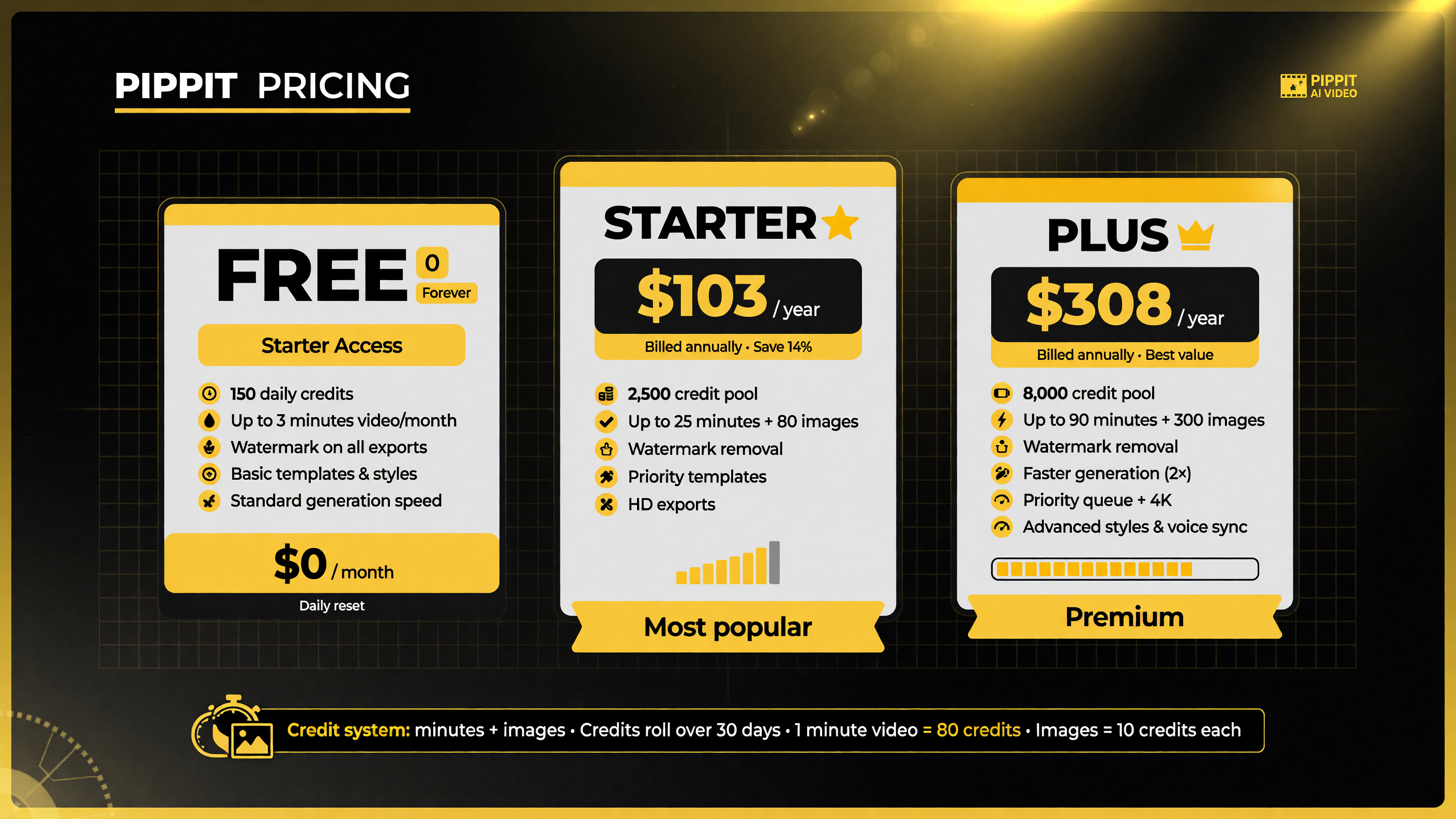
Pippit’s credit system is what you actually pay for — minutes and images — with a real free tier for testing before you commit.
How Much Pippit Costs
Pippit runs on a credit system, and credits equate to video minutes and image generations. There is a genuine free tier with daily credits — no card required — plus paid plans that add speed, advanced models, watermark removal, and higher volume.
- Free: Daily credits for the Video Agent and Image Agent, talking photos, viral remixing, and basic features. Enough to test the workflow, with watermark and usage limits.
- Starter: Around $103/year billed annually (roughly $120-equivalent monthly options), with a credit pool each month, faster generation, advanced models, and watermark removal.
- Plus: Around $308/year, a larger monthly credit pool, and faster unlocks for heavier publishing schedules.
- Pro: The highest tiers, scaled up to substantial monthly credit volumes for teams and high-output creators.
The practical takeaway: for a light user, the free tier is a real way to evaluate the tool; for anyone publishing regularly, a paid plan removes the watermark and unlocks the volume and speed that make the workflow worthwhile.
Where Pippit Shines
Pippit is at its best in three specific situations, and knowing them helps you buy it for the right reason.
Speed on existing content. The link-to-video and image-to-video flows are genuinely fast. If you have product pages, listings, or blog posts, you can turn them into promos without scripting or storyboarding. For marketers juggling multiple products, that’s the difference between posting daily and posting weekly.
No-production small teams. A two-person business doesn’t have a video editor. Pippit’s captions, voiceovers, and effects being automatic means the output is presentable without any additional skill. The learning curve is a chat window, not a timeline.
Social selling and TikTok Shop. The scheduling, analytics, and shop-link integrations are built around actually converting video views into sales — not just accumulating views. That commercial focus is rare in AI video tools, most of which optimize for cinema rather than checkout.
Where Pippit Falls Short
Be honest about the trade-offs before committing. Pippit optimizes for speed and volume, which means it is not the tool for fine creative control.
Less directional control. Because the AI makes a lot of choices (shots, pacing, effects), the result can feel templated. If you need a very specific look — a particular camera move, a precise pacing, a custom brand treatment — you will fight the AI rather than direct it. The chat-based refinement helps, but you are still working within what the model produces.
Quality ceiling on complex projects. For cinematic, narrative, or brand-filmed content, a tool like Pippit hits a ceiling. The automatic polish is great for social shorts but won’t replace a deliberate production workflow on high-stakes creative.
Credit and pricing structure. The credit system takes some mental math, and heavier use pushes you up the tiers quickly. If you only need a handful of videos a month, make sure the free or Starter tier actually covers your volume before you pay for more than you use.
Ecosystem lock-in. Being part of the CapCut/ByteDance ecosystem means the tool is most valuable if your output lives on the platforms it integrates with best. If your distribution is elsewhere, some of the scheduling and shop features matter less to you.
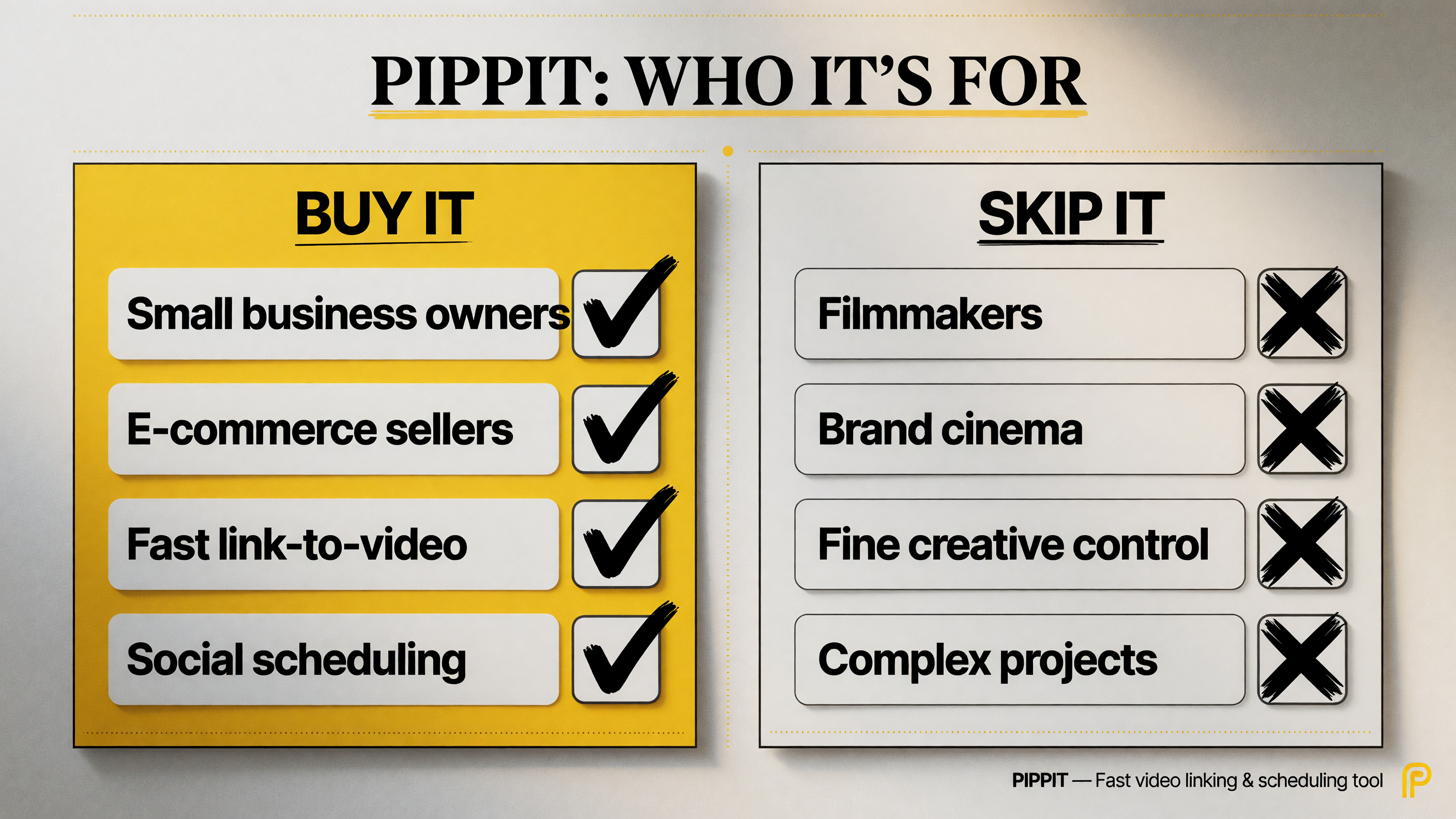
Pippit is a speed tool for marketing teams, not a cinematic tool for filmmakers — matching the tool to the job is what saves you both time and money.
Who Should Buy Pippit — and Who Shouldn’t
Buy it if you are a small business owner, e-commerce seller, or marketer who needs a steady stream of short-form product and social videos and wants to generate them from content you already have. The link-to-video flow, automatic captions and voiceover, and social-scheduling integrations make it a strong fit for high-volume, fast-turnaround marketing.
Skip it if you are a filmmaker or brand creating cinematic, heavily art-directed content with a clear creative vision. Pippit’s automatic approach will feel limiting, and you’ll be better served by a tool that gives you directional control over shots, motion, and pacing — even if it takes longer.
The honest framing: Pippit is not trying to be the best AI video generator on a pure quality axis. It is trying to be the fastest way from “content I already have” to “a video I can publish,” and for that specific job it is very effective.
How to Use Pippit: A Step-by-Step Walkthrough
Pippit is simple enough that the fastest way to judge it is to run one real project through the Video Agent. Here is the flow you will follow, from first signup to a publishable clip.
- Sign up and check the free credits. Create an account at pippit.ai with no card. Start a session and note your daily credit allowance so you know what you can test for free.
- Choose your source material. Open the Video Agent and decide what you are starting from — a product link, a website URL, an image, or a few lines of text. Having the source ready means the first generation is fast.
- Paste the source and set your format. Drop in the link, image, or text, then pick the aspect ratio (9:16 for Reels, TikTok, and Shorts), language, duration, and a style direction. The more specific you are, the closer the first pass will be.
- Generate and review. Run the agent and watch the clip. Check whether the captions, voiceover, timing, and product focus match what you wanted. Expect to iterate — the chat refinement is where Pippit does its best work.
- Refine by chatting. Rather than starting over, message the agent with adjustments: “tighten the first three seconds,” “use a calmer voiceover,” “lead with the price.” The conversational loop replaces manual edits.
- Polish and brand it. If the video needs a logo, specific colors, or a final caption pass, use the image studio and editor to layer on the finishing touches before export.
- Schedule or export. Publish directly to a connected social account with the scheduling tool, or download the file and post it yourself. For TikTok Shop, the product-link integration can carry through to the post.
Run that once with a real product or post and you will know within an hour whether Pippit’s trade-off — less fine control in exchange for much faster output — is worth it for your workflow.
The Bottom Line on Pippit
Pippit earns its place in the AI video conversation by removing production friction for people who don’t have time for it. If you have product pages, links, scripts, or images and you need short-form video for social or ads, the “paste a link, get a video” workflow can cut hours out of every post and let a small team publish like a bigger one.
It is not a replacement for cinematic control, and the credit system rewards planning your usage. But for creators, marketers, and small businesses whose bottleneck is speed and volume, Pippit is a genuinely practical answer to a real problem.
Start with the free tier, test the Video Agent on one product link, and see whether the output clears your quality bar. If it does, this may be the tool that finally makes short-form video something you can ship every day instead of dread.
FAQ
What is Pippit AI?
Pippit is an AI-powered creative tool that turns text, links, images, and websites into short-form and marketing-ready videos. It uses a chat-style Video Agent to generate polished clips with captions, voiceovers, music, and effects, and it is part of the CapCut ecosystem.
How much does Pippit cost?
Pippit has a free tier with daily credits and no card required. Paid plans start around $103/year for Starter with a monthly credit pool, roughly $308/year for Plus, and scale up for Pro tiers and teams. Credits equate to video minutes and image generations.
Can Pippit turn a product link into a video?
Yes. You can paste a product link or website URL into the Video Agent, and Pippit auto-detects the content — name, description, pricing, and images — to build a promo video around it. This link-to-video flow is one of its main strengths for e-commerce and marketing.
Who is Pippit best for?
Pippit is best for creators, marketers, and small businesses — especially e-commerce and TikTok Shop sellers — who need fast, high-volume short-form videos without heavy production. It is less suited to filmmakers who need fine directional control over cinematic content.
Is Pippit watermark-free on the free plan?
No. The free tier is usable for testing but typically includes a watermark and usage limits. Removing the watermark and unlocking faster generation and advanced models requires one of the paid plans.

About Barak Schurr
Barak Schurr is a serial entrepreneur who built and exited a major ticketing platform before turning his attention to AI and content. He runs three AI-focused research sites and writes about the tools, workflows, and strategies that let solo creators build real channels — without a crew, a studio, or a Hollywood budget. Contact: [email protected]
More AI Video Resources