How to Scale a Faceless YouTube Channel With AI in 2026
Get The Faceless YouTube Blueprint — Free
The exact AI tool stack and workflow used to build a faceless YouTube channel from zero.
How to Scale a Faceless YouTube Channel With AI in 2026
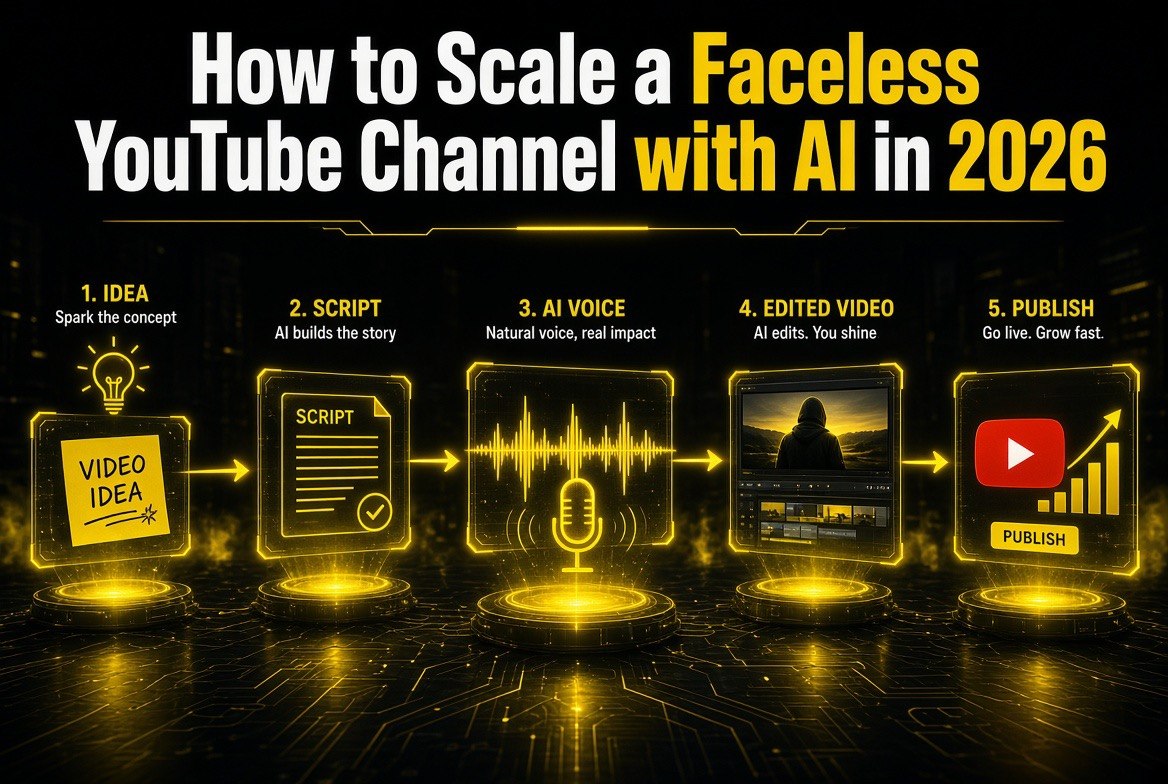
⚡ Expert Summary: You don’t need a camera, a studio, or a crew to build a profitable YouTube channel. This guide walks through a proven 6-step system for scaling a faceless channel with AI — scripting, voiceover, visuals, and editing — including realistic 2026 monetization numbers, a free-vs-paid tool stack, and the five mistakes that sink most channels. By the end, you’ll have a complete repeatable workflow you can launch this weekend.
You don’t need to show your face to build a YouTube channel that makes money. Last year, hundreds of American creators quietly built six-figure faceless channels using AI tools to script, voice, edit, and upload — with zero camera time and a fraction of the crew a traditional studio requires. In this guide, I’ll walk you through the exact, step-by-step system I’ve seen work for faceless channels in 2026: the tools, the workflow, the monetization math, and the mistakes that sink 90% of new channels.
Why Faceless YouTube Is Growing Faster Than Ever in 2026
The economics changed. In 2025, AI video and voice tools crossed a quality bar where the average viewer can no longer tell a well-produced faceless channel from a studio one. Combined with YouTube’s push to fund short-form and long-form creators equally through its Partner Program, the barrier to entry fell hard. A solo creator in the United States can now run a channel that would have required three employees and a $50,000 studio just two years ago.
Here’s the core opportunity: faceless channels decouple content production from your schedule and your appearance. You never record; you never edit b-roll by hand; you never sit in front of a camera. Instead, you work as a director — approving scripts, voiceovers, and edits that AI assembles for you. You scale by publishing consistently, and the tools let you do it without burning out.
This matters most for the solo creator who is the target audience for everything on this site. If you’re a one-person operation — a side-hustler with a full-time job, a freelancer between clients, a small-business owner too busy to film — the faceless model is the difference between “someday I’ll start a channel” and actually launching this weekend. You can validate an idea with a single video and know within a month whether the niche has legs, all without buying a camera or clearing time to be on camera.
| Factor | Traditional Studio Channel | Faceless AI Channel |
|---|---|---|
| Upfront equipment cost | $3,000+ (camera, lights, mics, set) | $0–$60 (AI tool subscriptions) |
| Time per 10-min video | 6–10 hours (shoot + edit) | 1.5–3 hours (direct + approve) |
| On-camera requirement | Yes, always | None |
| Scale ceiling | Bounded by your hours | Multiple uploads daily feasible |
| Audience trust factor | High (face = authority) | Medium (needs strong voice + value) |
The Tool Stack That Makes It Possible
Before we get to the step-by-step workflow, here’s the stack you’ll actually need. You don’t have to buy everything at once, but these are the categories that matter.
| Job | What It Does | Example Tools (2026) |
|---|---|---|
| Scripting | Turns a topic into a hook-driven script with retention | Claude, ChatGPT, Gemini |
| Voiceover | Reads the script in a human-sounding voice | ElevenLabs, Descript |
| Video generation | Creates b-roll, stock-style visuals, or AI clips | Runway, Luma, Klap, Shotstack |
| Editing | Assembles clips, captions, and pacing automatically | Descript, CapCut, ChatCut |
| Upload & scheduling | Posts on schedule, manages metadata | TubeBuddy, VidIQ, hootsuite |
Start with just two subscriptions: one AI scripting tool (you likely already pay for one) and one voiceover tool. Use free video generation and editing tiers until you’ve validated the niche pulls views. Nothing kills a faceless channel faster than overspending on tools before you’ve earned your first $100 from AdSense.
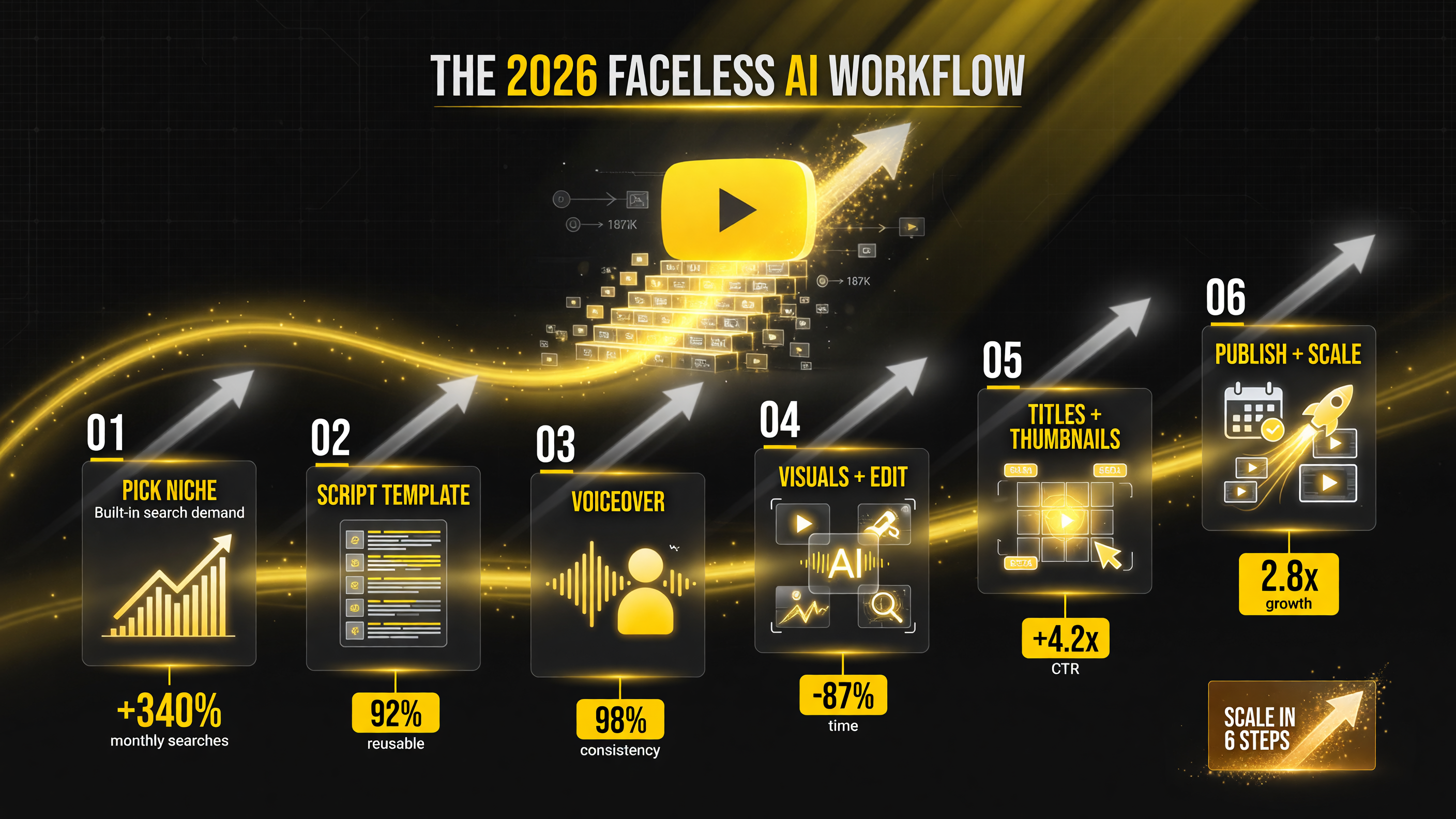
How to Scale a Faceless YouTube Channel With AI: The 6-Step System
Here is the workflow I recommend, refined from what’s actually working for faceless channels in the United States in 2026. Follow these steps in order and you’ll avoid the trap most new creators fall into — spending weeks perfecting one video instead of shipping a consistent streak.
Step 1: Pick a niche with built-in search demand
Your niche is the single biggest determinant of success. The worst niches are overcrowded celebrity/gossip lanes with zero shelf life. The best are evergreen, how-to, and money-adjacent topics: personal finance, productivity, software tutorials, AI tool reviews, “do it yourself” home improvement, and health/fitness tips. Verify demand with YouTube’s autocomplete and TubeBuddy’s keyword tool — you want topics with steady search volume, not one-time news spikes.
Step 2: Build a repeatable script template
Consistency beats brilliance. Create one script structure and reuse it: a 15-second hook that promises a specific outcome, a 3-point or 3-step body, and a clear call-to-action at the end. Feed this template into your AI scripting tool with your niche and let it draft, then edit for accuracy and voice. You are the editor and fact-checker — never publish AI output unedited, because nothing kills credibility (and YouTube’s monetization) faster than a script with invented facts.
Step 3: Generate a consistent voiceover voice
Pick one AI voice and stick with it — brand recognition comes from a signature voice. ElevenLabs and Descript both let you clone a consistent voice profile so every video sounds like the same creator. Warm, conversational delivery outperforms monotone AI reads in retention by a wide margin in 2026 tests.
Step 4: Automate the visuals and editing
Use tools like Klap or Shotstack to turn long scripts into short clips, or generate b-roll with Runway and Luma for longer how-to videos. Add captions automatically — captions boost retention and make videos watchable on mute, which is how a huge share of US mobile traffic watches. The goal is a finished video in under two hours of your time.
Here’s the exact visual workflow I recommend. For a long-form how-to video, start by generating 5–10 seconds of b-roll per key point using an AI video generator, then let a captioning and editing tool like Descript or CapCut assemble it around your voiceover. If you’re doing Shorts, feed your long script into a clip tool and let it pick the most engaging 20–60 second segments — tools in this space analyze retention and surface the strongest moments automatically.
The editing rule that separates pros from amateurs: slice your video every 3–5 seconds visually. Fast pacing holds attention on faceless channels because viewers get bored faster when there’s no talking head. AI tools make this slicing nearly free — you approve the cuts instead of building them frame by frame, which is exactly where the time savings come from.
Step 5: Optimize titles, thumbnails, and metadata with AI
Thumbnails are your #1 growth lever on faceless channels because you have no “face” to sell. Generate A/B testable thumbnail concepts with AI image tools, then use TubeBuddy or VidIQ to optimize titles and descriptions for search. Make sure your title matches what people actually search — the single most common mistake is a clever title nobody searches for.
Step 6: Publish on a consistent cadence and double down on winners
Ship 3 videos a week minimum for the first 90 days. Watch your analytics and double down on the topics and formats that get the best CTR and retention. Faceless channels grow on compounding: each video feeds the algorithm with watch-time data that helps your next video find its audience. Consistency over three months beats a viral spike every time.
Track four numbers in YouTube Studio, not vanity metrics: click-through rate (CTR) on your thumbnails, average view duration, returning-viewer percentage, and revenue per 1,000 views (RPM). A CTR under 3% means your thumbnails or titles are the problem. Average view duration under 40% means your hooks or pacing are losing people early. Returning-viewer percentage tells you if you’re building an audience or just renting traffic. RPM tells you if your niche actually pays.
When a video outperforms, don’t just celebrate — reverse-engineer it. Look at what the winning title promised, which thumbnail won, and where retention stayed strong. Then make 2–3 more videos in that exact lane. This compounding is why consistent weekly publishers consistently outgrow one-hit viral channels.
The Monetization Math: What Faceless Channels Actually Earn
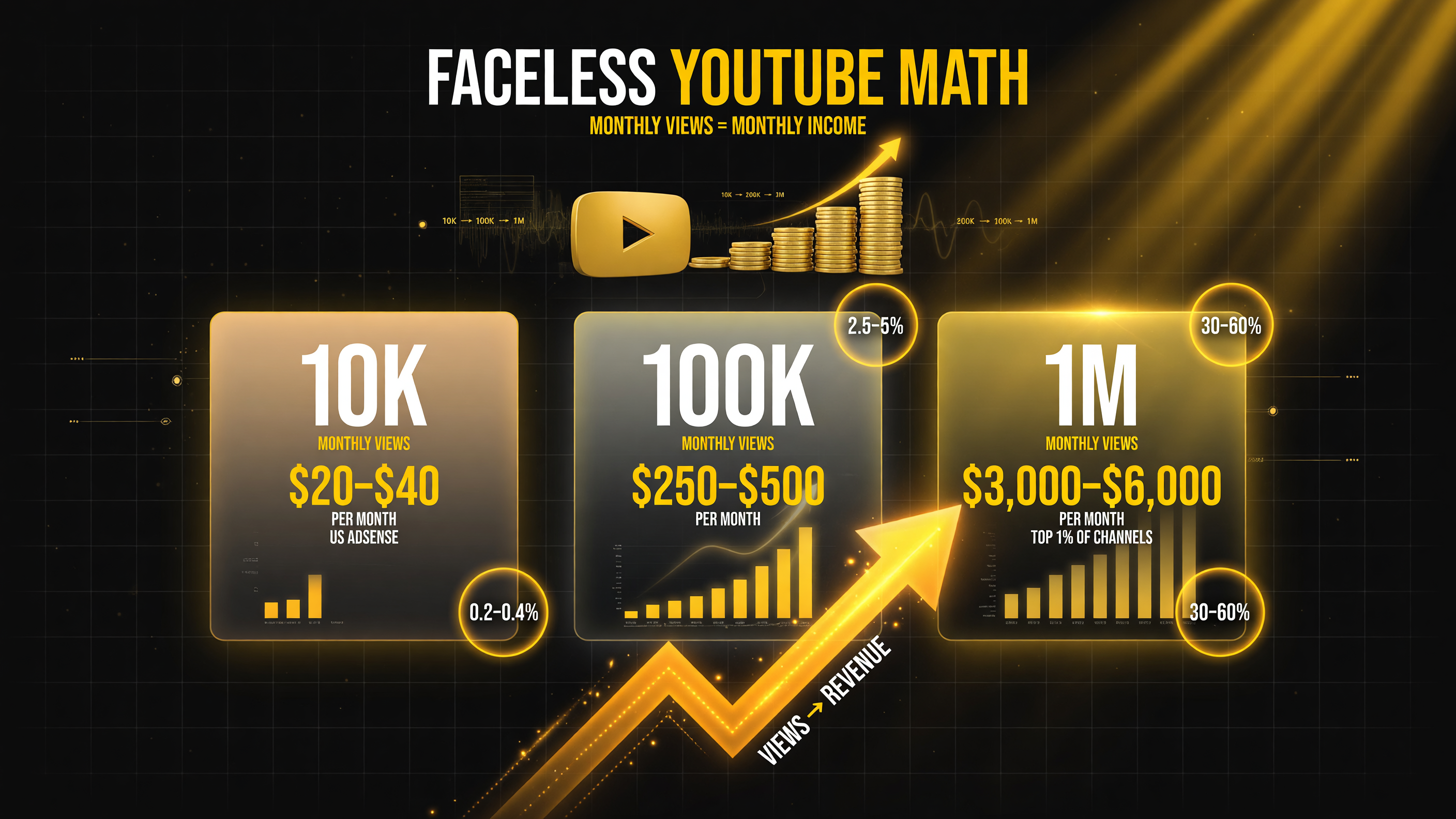
Let’s be honest about the numbers. Most faceless channels do NOT earn six figures in the first year. Here’s realistic 2026 monetization based on US AdSense RPM rates and what creators report.
| Monthly Views | Est. AdSense/Month (US Views) | Month Needed to Get There |
|---|---|---|
| 10,000 | $20–$40 | ~3 months (3 videos/wk) |
| 100,000 | $250–$500 | ~6–9 months |
| 1,000,000 | $3,000–$6,000 | 12+ months (top 1%) |
Your RPM depends heavily on niche — finance, software, and “how to make money” niches command higher RPMs in the United States than entertainment or gaming. For a more complete breakdown of where creators scale revenue, and to see how the major AI video generators compare, check out our guide on the best AI video tools.
Free vs. Paid: The Minimum Viable Tool Stack
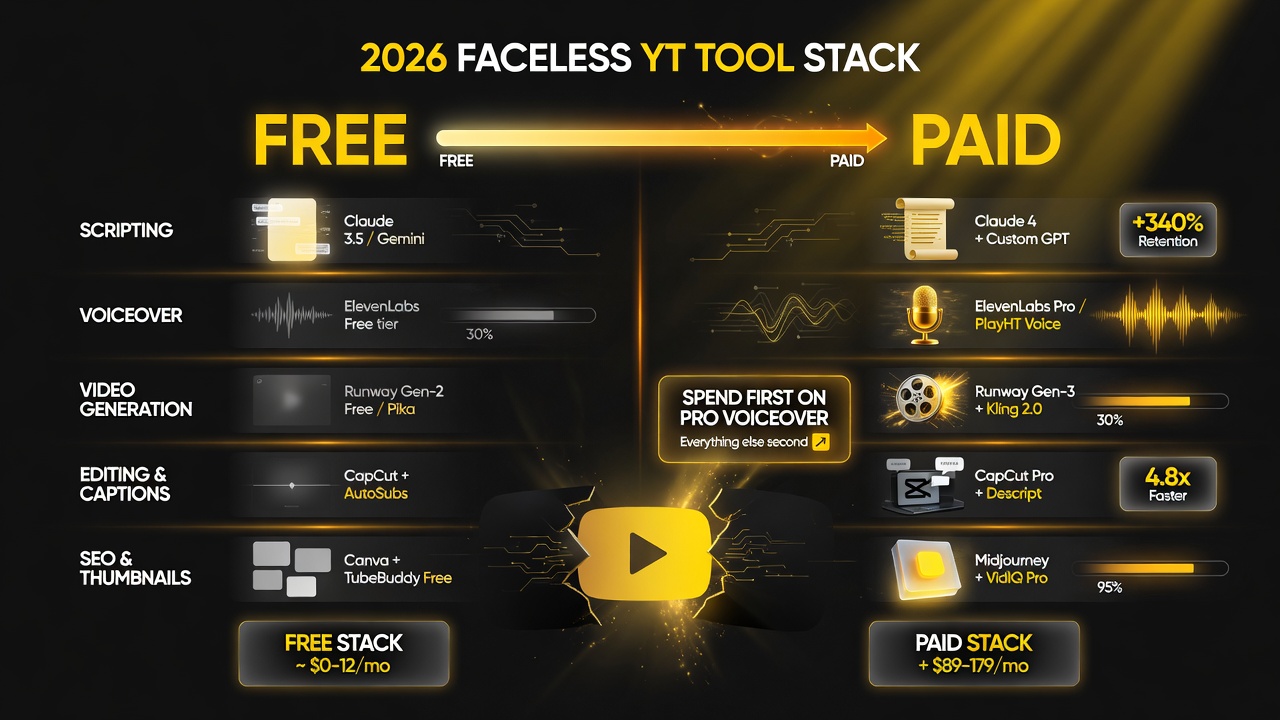
One of the biggest decisions new creators face is how much to spend on tools before they’ve earned anything. Here’s an honest breakdown of what you can get free versus what’s worth paying for, based on the 2026 tool landscape.
| Tool Category | Free Tier (Start Here) | Worth Paying For When |
|---|---|---|
| Scripting | Free chat tiers of Claude, ChatGPT, Gemini | You need longer, niche-specific drafts at scale |
| Voiceover | Limited minutes on trial tiers | First paid tool — a consistent pro voice is non-negotiable |
| Video generation | Watermarked or credit-limited free tiers (Runway, Luma, Klap) | You’ve validated a niche and need clean, commercial-reuse output |
| Editing & captions | CapCut free, Descript free tier | You want AI transcript editing and auto-pacing at volume |
| SEO & thumbnails | TubeBuddy and VidIQ free tiers | Once you’re publishing consistently, keyword data pays for itself |
The pragmatic rule: spend on your voiceover voice first, everything else second. A bad or inconsistent AI voice is the fastest way to kill a faceless channel’s credibility. Once that’s locked, stay on free tiers until your analytics show a video actually landing.
The 5 Mistakes That Sink Faceless Channels
If you avoid these five, you’re already ahead of most competitors.
- 1. Publishing AI slop unedited. YouTube’s monetization review and viewer drop-off both punish low-quality, obviously-AI content. Always fact-check scripts and refine the edit.
- 2. Chasing niches with no staying power. Trending celebrity news dies in a week. Evergreen builds a library that compounds.
- 3. Ignoring thumbnails. On faceless channels, the thumbnail is your entire first impression. Home it — test 2–3 variants per video early on.
- 4. Quitting before 90 days. The algorithm rewards consistency. Most channels that get monetized published steadily for 3–6 months first.
- 5. Scaling paid tools too early. Wait until you have proof of demand before upgrading past free tiers.
FAQ: Faceless YouTube Channels With AI
Do I need YouTube’s Partner Program to monetize a faceless channel?
Yes — to earn from AdSense you need 1,000 subscribers and 4,000 valid public watch hours (or 1,000 subscribers plus 10 million valid Shorts views in 90 days). Reaching these tiers is the first milestone for every faceless channel.
Is YouTube okay with AI-generated content on faceless channels?
Yes, if it’s original and follows YouTube’s disclosure rules. Since 2024, YouTube requires creators to disclose realistic AI-generated or altered content when it could be mistaken for real events. Fully AI-generated creative content like voiceovers and AI visuals is allowed and monetizable when it’s original and you don’t mislead viewers.
What’s the fastest way to grow a faceless channel in 2026?
Pick one evergreen niche, publish 3 videos a week consistently, optimize titles and thumbnails for search, and double down on the formats your analytics show are winning. Consistency compounds faster than one-off viral bets.
How much money do I need to start a faceless channel?
Under $100. You need one AI scripting tool (you may already have it), one AI voiceover subscription (~$5–$20/month), and free video generation and editing tiers. Upgrade only after you validate the niche.
Can one person realistically run a faceless channel with AI?
Yes. A solo US creator can produce a polished video in about two hours with the AI stack above — script, voice, visuals, edit, and upload. The bottleneck becomes niche quality and consistency, not production capacity.

About Barak Schurr
Barak Schurr is a serial entrepreneur who built and exited a major ticketing platform before turning his attention to AI and content. He runs three AI-focused research sites and writes about the tools, workflows, and strategies that let solo creators build real channels — without a crew, a studio, or a Hollywood budget.
Email: [email protected]
More Resources for Creators