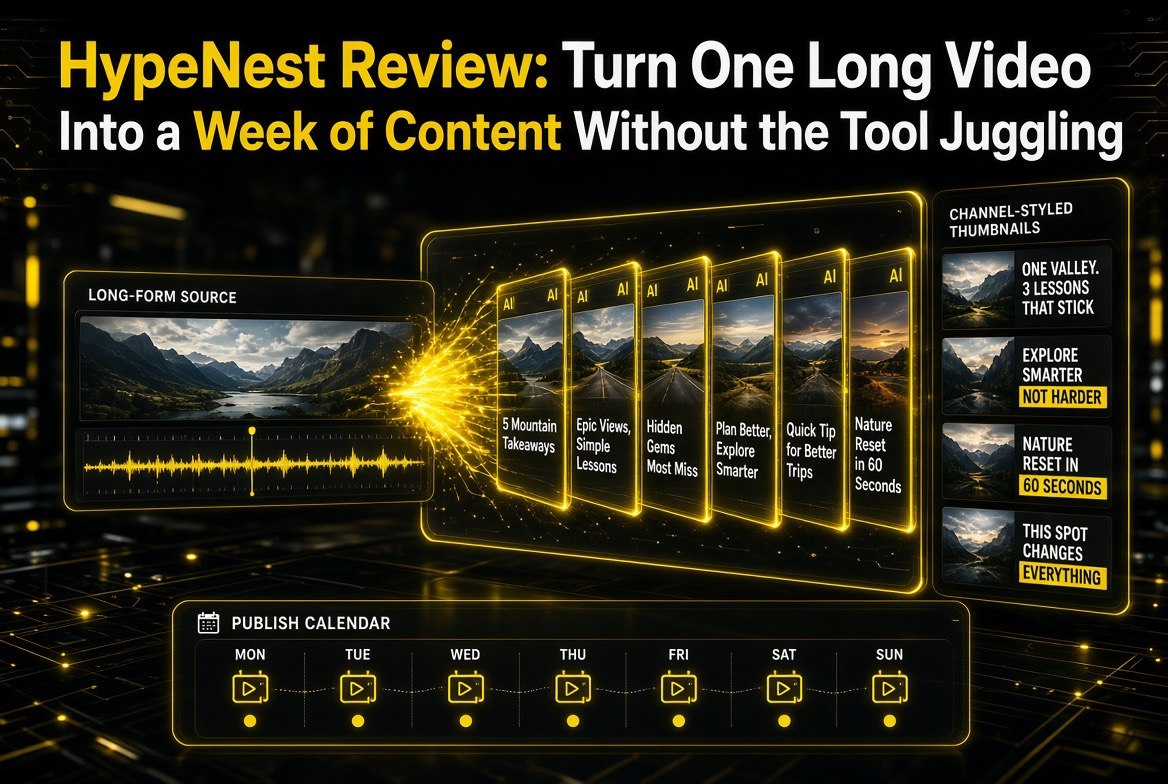
HypeNest Review: Turn One Long Video Into a Week of Content Without the Tool Juggling
Get The Faceless YouTube Blueprint — Free
The exact AI tool stack and workflow used to build a faceless YouTube channel from zero.
HypeNest Review: Turning One Long Video Into a Week of Content Without the Tool Juggling
⚡ Expert Summary: HypeNest is an AI video repurposing and publishing platform for YouTube creators who already make long-form content. It turns one long video into multiple Shorts and TikToks — and then keeps going where most clip tools stop. It also writes the SEO metadata, generates AI thumbnails matched to your channel, recommends optimal posting times, and publishes or schedules everything from a single dashboard. Freemium pricing starts around $15 a month. For a solo creator repurposing long videos, the appeal is replacing a pile of separate tools with one workflow — with real nuance about where a dedicated clip tool still wins.
Here is a pattern that will feel familiar if you make any kind of long-form video. You spend the week producing one solid YouTube video — the research, the edit, the thumbnail, the upload. You know that long video contains several moments that would work as Shorts and pull in new viewers. And yet, when Friday comes, nothing gets clipped. The moments sit inside the long video, undiscovered, because the job of finding them, cutting them, captioning them, writing new titles, and making fresh thumbnails for each one is more hours you do not have.
Software already tried to solve half of this. Tools like OpusClip and Klap are excellent at pulling clips out of long videos. But clipping is only a fraction of the repurposing job — you still have to caption, title, thumbnail, and schedule each clip somewhere. HypeNest attacks the whole chain at once, which is what makes it interesting for a solo creator.
This review covers what HypeNest actually does, how it differs from the clip-only tools you already know, and where it genuinely helps — as well as the trade-offs you should weigh before you subscribe.
What HypeNest Actually Does
HypeNest is an all-in-one repurposing and publishing platform aimed at YouTube creators, podcasters, and course creators. Instead of only extracting clips, it treats repurposing as a full pipeline: pull the clips, package them for vertical platforms, generate all the surrounding assets a real channel needs, and get them scheduled and published.
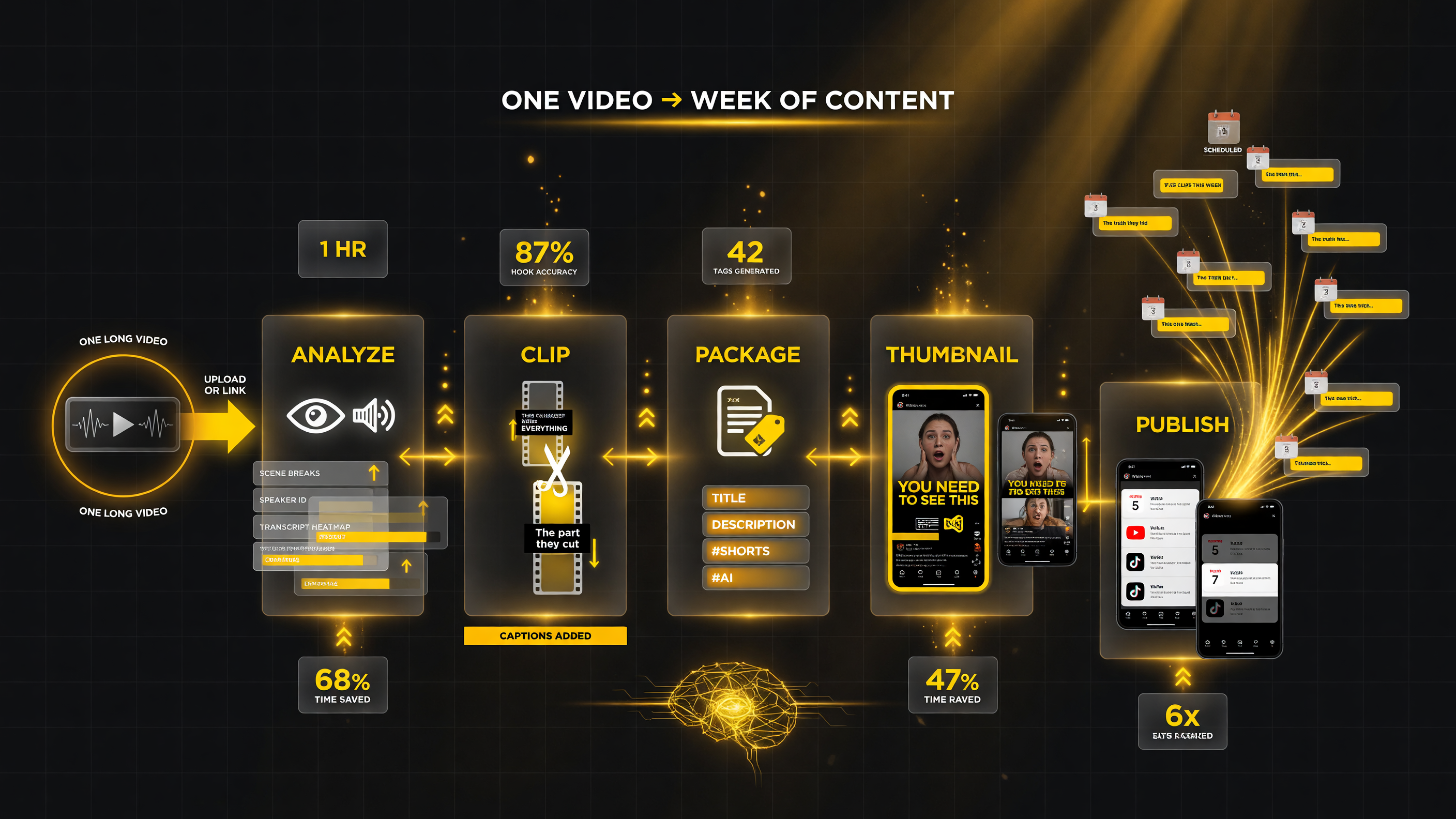
HypeNest treats repurposing as one pipeline, not a pile of separate jobs: analyze, clip, package, thumbnail, then publish on schedule. One long upload in, a week of vertical content out.
Here is the workflow in plain terms.
| Stage | What HypeNest Handles | Why It Matters for You |
|---|---|---|
| Analyze | Scene detection, speaker identification, transcript review | More accurate hook and clip picks |
| Clip | Extracts multiple standalone vertical clips with hooks and captions | Finds the moments you would miss by eye |
| Package | Writes titles, descriptions, tags, hashtags for each clip | Saves the SEO work on every single short |
| Thumbnail | Creates AI thumbnail options styled to your channel | No more blank-canvas thumbnail dread |
| Publish | Recommends timing and schedules to YouTube and TikTok | Turns clips into an actual posting pipeline |
You upload a long video — or paste a link — and the AI analyzes it using scene detection, speaker identification, and the transcript to find moments that can stand on their own. It then produces several vertical clips, typically five or more, optimized for Shorts and TikTok with embedded captions and hooks. From there it writes each clip’s metadata and drafts thumbnail options in the style of your channel, then offers to schedule and publish the whole set to your connected channels.
Finding the Right Moment Is Smarter Than It Sounds
The quality bar of any repurposing tool lives in how it chooses clips, and this is where HypeNest earns its keep. A raw “cut every forty seconds” approach produces unusable clips. HypeNest instead looks for self-contained, story-shaped moments — places where a speaker makes a complete point, tells a contained anecdote, or drops a hook-worthy line. It uses the transcript and speaker turns, not just scene cuts, to decide where one genuinely shareable thought begins and ends. That is the difference between a video that feels like a chopped-up lecture and one that feels like a short made on purpose.
For a solo creator, good moment detection is the difference between using the tool and abandoning it. If every clip needs heavy re-cutting, the 20 minutes you were supposed to save becomes two hours of cleanup, and you go back to not repurposing at all. When a repurposing tool finds clips that are close to publish-ready, the whole “turn one video into a week of content” idea actually holds up.
The Feature That Separates It From a Plain Clip Tool
The most genuinely useful thing about HypeNest is that it does not stop at the clip. Anyone who has repurposed by hand knows the painful truth: the raw cut is maybe a quarter of the job. Each Short still needs a punchy title, relevant tags and hashtags, a thumbnail people will actually tap, and a sensible posting schedule. If you skip those, the clip underperforms — so most solo creators end up making five tiny pieces of marketing collateral for every one video they release. That is the real tax of repurposing, and it is exactly what HypeNest automates.
Combined with a smart calendar that suggests optimal posting times drawn from your channel’s audience behavior, this turns repurposing from a one-off chore into a repeatable pipeline. Set it up once and a single long-form upload can feed a week’s worth of scheduled, properly-packaged vertical content across both YouTube and TikTok. For a creator whose bottleneck is not ideas but hours, that consolidation is the actual product.
The consistency angle deserves emphasis, because it compounds quietly. When every Short you release carries the same visual language, the same caption treatment, and titles that look like they came from one channel rather than five random tools, viewers start to recognize the feed before they even see your handle. That recognition is a small but real trust signal, and it is exactly the kind of thing that is brutal to manufacture by hand because it depends on you doing the same tedious steps perfectly, every single time. A platform that packages every clip through one set of channel-matched defaults gives you brand consistency almost for free — which is a benefit that a raw clip extractor, no matter how good its cuts are, structurally cannot provide.
HypeNest Versus the Clip-Only Tools
Solo creators will reasonably ask how HypeNest compares to the clip extraction tools they already know. The honest answer is that they are not quite the same job, and the right choice depends on your bottleneck.
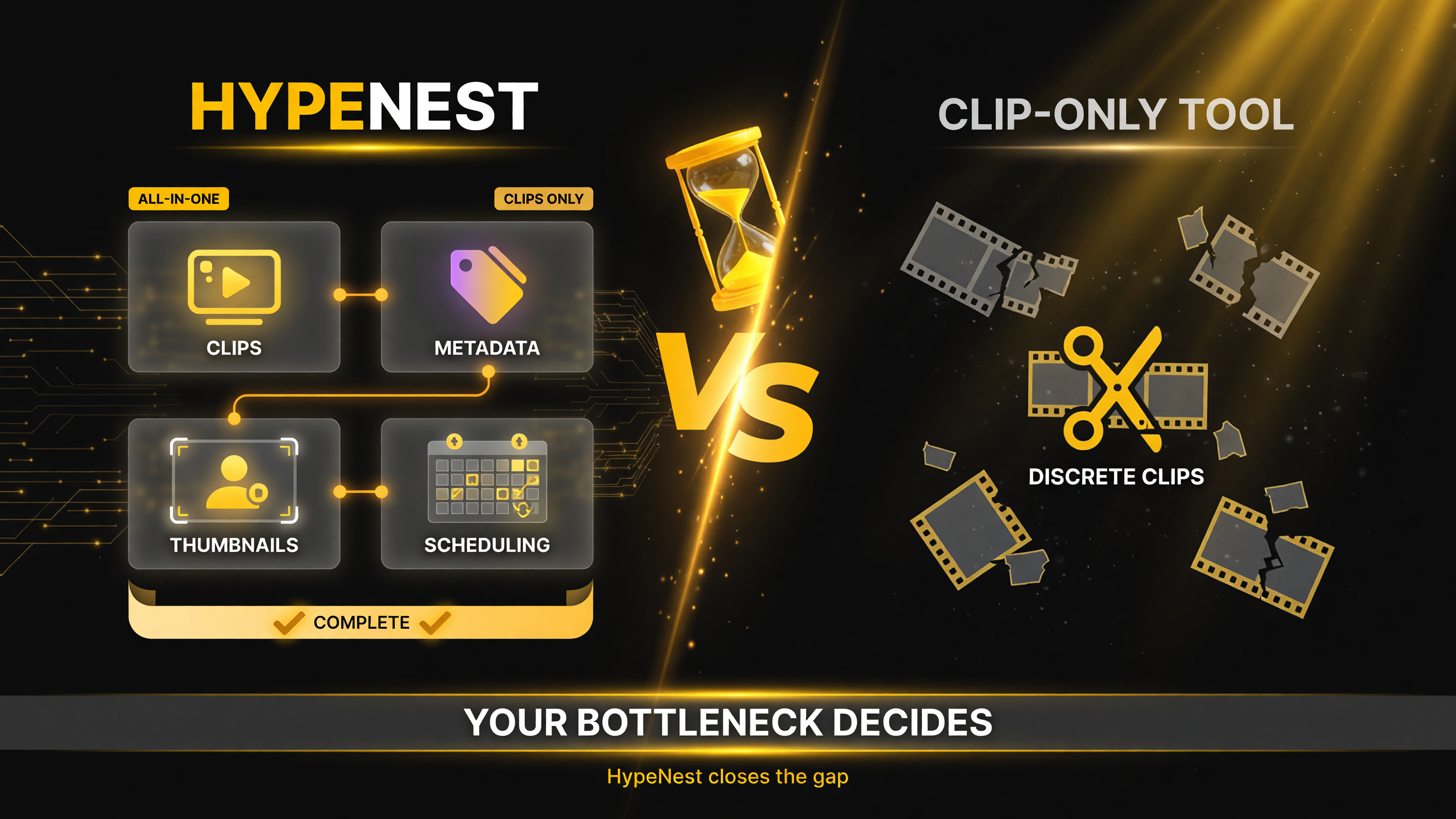
A genuine side-by-side: HypeNest closes the whole packaging-and-publishing gap, while a clip-only tool leaves the metadata, thumbnails, and scheduling tail to you. Your bottleneck decides which is the better buy.
| Factor | HypeNest (all-in-one) | Clip-only tool (e.g. OpusClip) |
|---|---|---|
| Core output | Clips plus titles, tags, thumbnails, scheduling | Refined video clips |
| Metadata & SEO | Automated for the main video and every clip | Usually minimal; you write it yourself |
| Thumbnails | AI options styled to your channel | Typically none |
| Publishing | Smart-calendar schedule to YouTube & TikTok | Manual upload elsewhere |
| Best fit | Solo creator wants one end-to-end workflow | Focused clip quality you polish elsewhere |
If your pain is purely that you want the sharpest possible clips and you already have a comfortable workflow for everything after, a dedicated clip tool is a fine, cheaper choice. If your pain is the whole trailing tail of metadata, thumbnails, and scheduling — which is where most solo creators actually bleed time — HypeNest’s all-in-one model is built specifically to close that gap. The vendor frames it as shaving hours of manual work down to a short review session per video, and for the packaging-and-publishing half of the job, that claim holds up better than it does for the creative half.
The Honest Trade-Offs
HypeNest is still a newer tool, and the maturity shows in a few predictable places. AI-generated titles and thumbnails can occasionally land slightly off, so you should expect to review and occasionally tweak what it proposes rather than posting everything untouched. The output is only as strong as the source material, and clips pulled from a weak or wandering video will inherit that weakness no matter how smart the detection is.
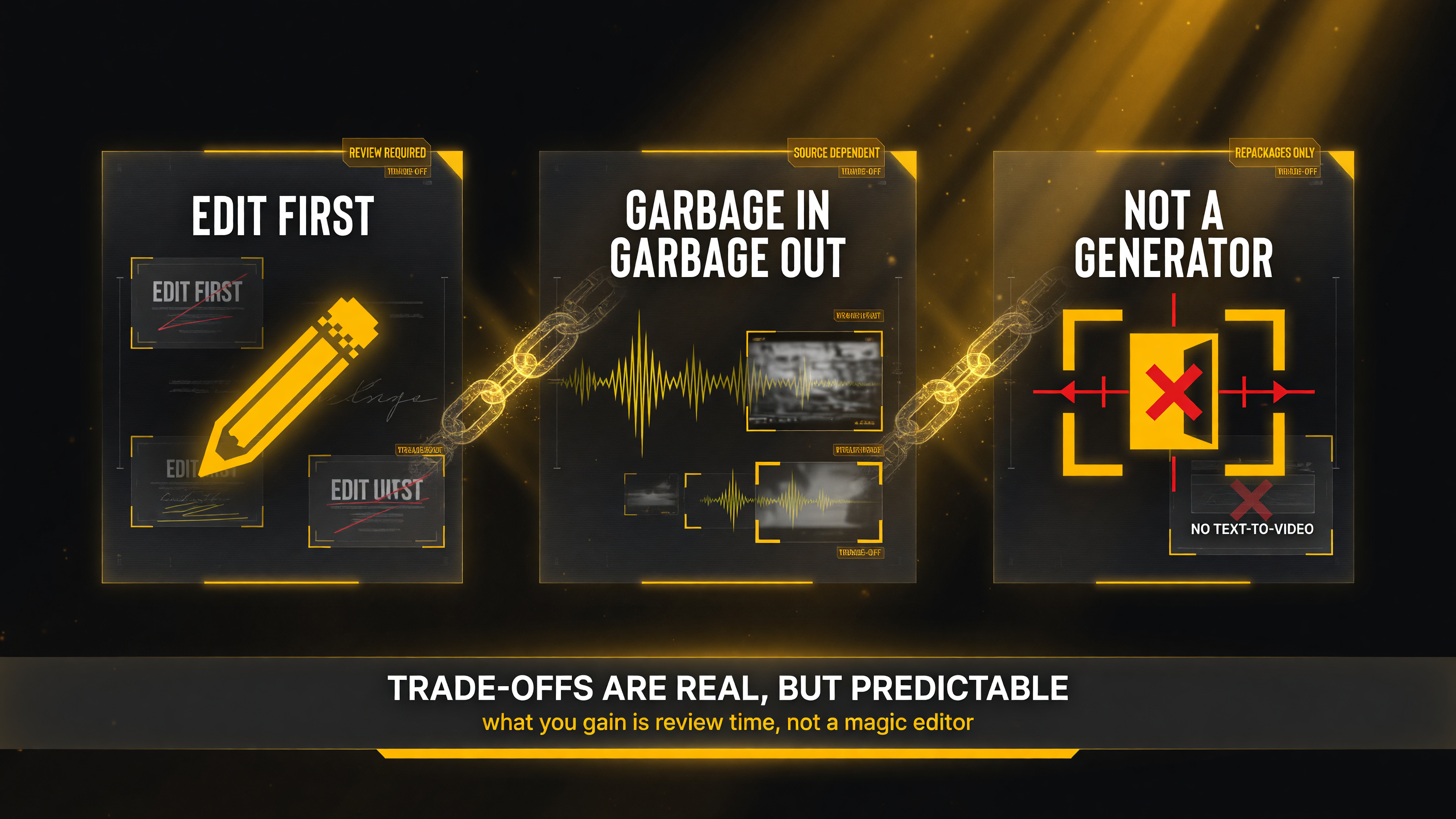
HypeNest’s limits are real but predictable: review what it proposes, feed it strong source material, and remember it repackages your existing video — it is not a text-to-video generator and not a full editing suite.
There is also a scope boundary worth naming clearly. HypeNest repurposes and packages existing long-form video; it does not generate original content from scratch or replace your full editing suite. If what you need is to create faceless videos from a text prompt, this is the wrong tool. And because it prices by credits that cover processing — clip generation, thumbnails, and similar — heavy regular use means watching your credit consumption against the plan you choose, especially if you publish on multiple channels at high volume.
How to Evaluate HypeNest for Your Channel
Before you pay, run your own test rather than trusting anyone’s review, including this one. Take one of your better long-form videos — the kind you already suspect contains several strong moments — and put it through the free tier. Judge the result on three specific things: whether the clips it chose are genuinely standalone and shareable, whether the generated titles and thumbnails would make you stop scrolling if you were a stranger, and how much manual fixing you needed before you would actually post them.
Then weigh that against the true alternative: what would it realistically cost you to clip, caption, title, thumbnail, and schedule that same set of Shorts yourself? If the free-test output needs only light cleanup and the time saving is real against your own workflow, the subscription pays for itself quickly. If you find yourself heavily reworking most of what it produces, the automation is not actually automating your job yet, and you should hold off.
The Bottom Line for Solo Creators
HypeNest is a practical, well-focused answer to the real problem of repurposing for a solo creator: not clip extraction alone, but the whole pipeline of turning long-form into publish-ready vertical content. It finds the standalone moments, packages each clip with the metadata and thumbnails a real channel needs, and schedules it all to YouTube and TikTok from one place — turning a single upload into a week’s worth of content without juggling five separate tools.
Its greatest strength is consolidation, so it shines most for the creator whose time leaks away in the packaging-and-publishing tail rather than in clipping. Review what it generates, keep your expectations calibrated for a newer tool, and run a free-tier test on your actual video before you commit. For the solo operator who produces long-form and has been losing the repurposing battle for months, a workflow like this can quietly turn an abandoned side-hustle into a steady, low-effort source of new reach.
Frequently Asked Questions
What is HypeNest?
HypeNest is an AI video repurposing and publishing platform for YouTube creators, podcasters, and course creators. It turns a long-form video into multiple Shorts and TikToks and packages each clip with SEO metadata, AI thumbnails, and smart-scheduled publishing to YouTube and TikTok from one dashboard.
How is HypeNest different from OpusClip or Klap?
Clip-only tools focus on extracting refined video clips and leave the rest to you. HypeNest does the whole pipeline: it clips, then writes titles, descriptions, tags, and hashtags, generates channel-styled thumbnails, and schedules publishing. HypeNest is the stronger default when metadata, thumbnails, and publishing are your bottleneck.
Does HypeNest work from any long video or only YouTube?
You can upload a long video file directly or paste a YouTube link. HypeNest analyzes it, extracts the clips, packages them, and publishes or schedules to both YouTube and TikTok from a single dashboard.
How much does HypeNest cost?
HypeNest is freemium. Paid plans start at roughly $15 a month for a starter tier (around 600 credits) and step up to a higher-tier plan around $27 a month with larger limits, with annual discounts available. Credits cover processing such as clip generation and thumbnails.
Does HypeNest generate original videos from scratch?
No. HypeNest repurposes and packages existing long-form video into short-form clips. It is not a tool for generating original faceless videos from a text prompt, nor does it replace a full editing suite.
Is HypeNest worth it for a solo creator?
It is worth testing if you repurpose long-form content and your bottleneck is the packaging-and-publishing work after clipping. Run a free-tier test on your own video and compare the manual effort to do the same job yourself before subscribing.

Written by
Barak Schurr
Barak Schurr is a serial entrepreneur who built and exited a major ticketing platform before turning his attention to AI and content. He runs three AI-focused research sites and writes about the tools, workflows, and strategies that let solo creators build real channels — without a crew, a studio, or a Hollywood budget. [email protected]
More AI Video Resources