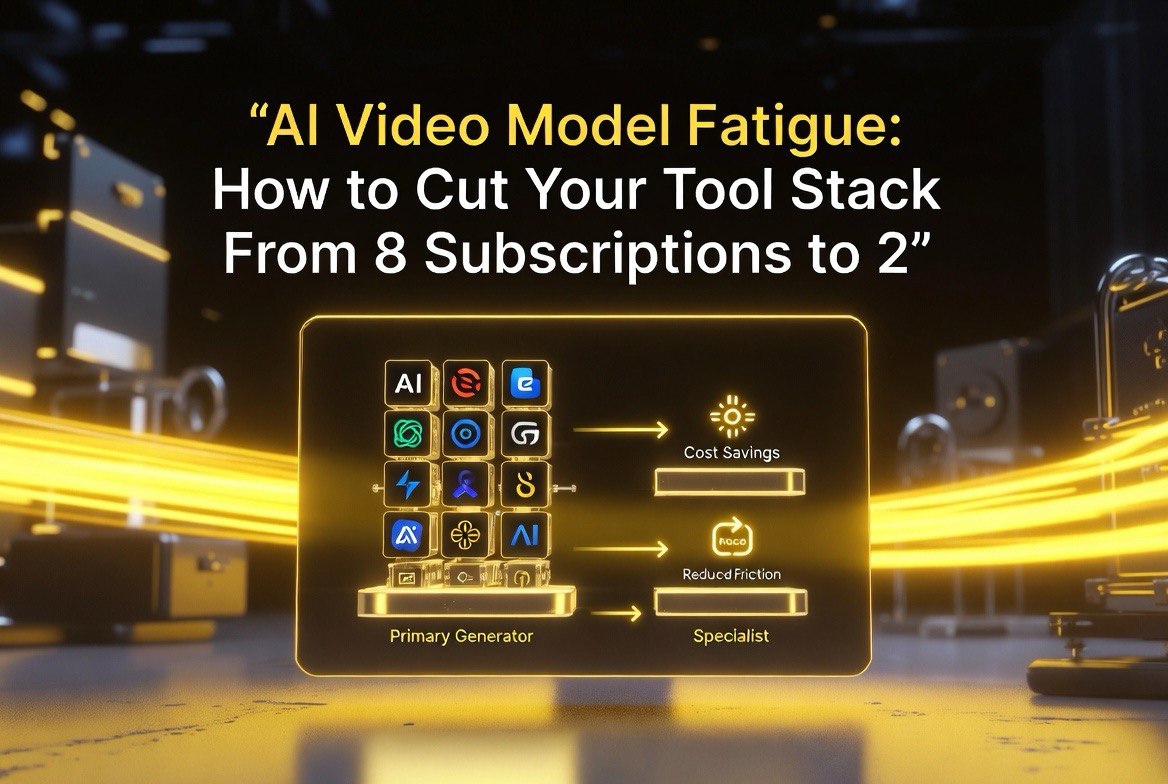
AI Video Model Fatigue: How to Cut Your Tool Stack From 8 Subscriptions to 2
Get The Faceless YouTube Blueprint — Free
The exact AI tool stack and workflow used to build a faceless YouTube channel from zero.
AI Video Model Fatigue: How to Cut Your Tool Stack From 8 Subscriptions to 2
⚡ Expert Summary: AI video is releasing on a treadmill — Seedance, Kling, MiniMax, Runway, Pika, and more each drop a new version every few weeks, and creators are being pushed into juggling five, six, even eight paid subscriptions at once. That’s model fatigue: paying for overlapping tools, learning redundant interfaces, and burning budget on capabilities you already own. This guide shows you how to map the actual capabilities of every model you pay for, cut the duplicates, and consolidate to the two or three platforms that genuinely cover your workflow — without giving up quality.
Why “Just Add Another Model” Is Costing You Money
If you’ve been creating AI video for more than a few months, you’ve watched the pattern: a new model launches, the demo clips look incredible, you grab a subscription to test it, and three weeks later the next one arrives that does the same thing slightly better. The result is a tool stack that nobody can justify and everyone is paying for.
The spend adds up faster than it looks. A creator on three generators at a mid-tier plan is out $60 to $90 a month before they’ve paid for editing, voice, or upscaling. And the real cost isn’t just the bill — it’s the time lost re-learning interfaces, re-prompting for different syntaxes, and re-exporting assets to make one platform talk to another. Every extra model in your stack multiplies friction, not capability.
What “Model Fatigue” Actually Is in AI Video
Model fatigue is the point where a creator can’t tell whether a new launch is genuinely better than what they already have, because the releases move faster than anyone can test them. It shows up as subscription paralysis — paying for everything because you’re afraid of missing out — and as rendering indecision: standing at three model tabs, unable to commit to one, because none clearly wins on every axis.
It’s a real, measurable problem, not just a feeling. When an entire category releases major updates within weeks of each other, the practical differences between “best in class” models narrow to a handful of specific tasks. Failing to identify which tasks each model genuinely owns is what keeps a dozen subscriptions alive instead of two.
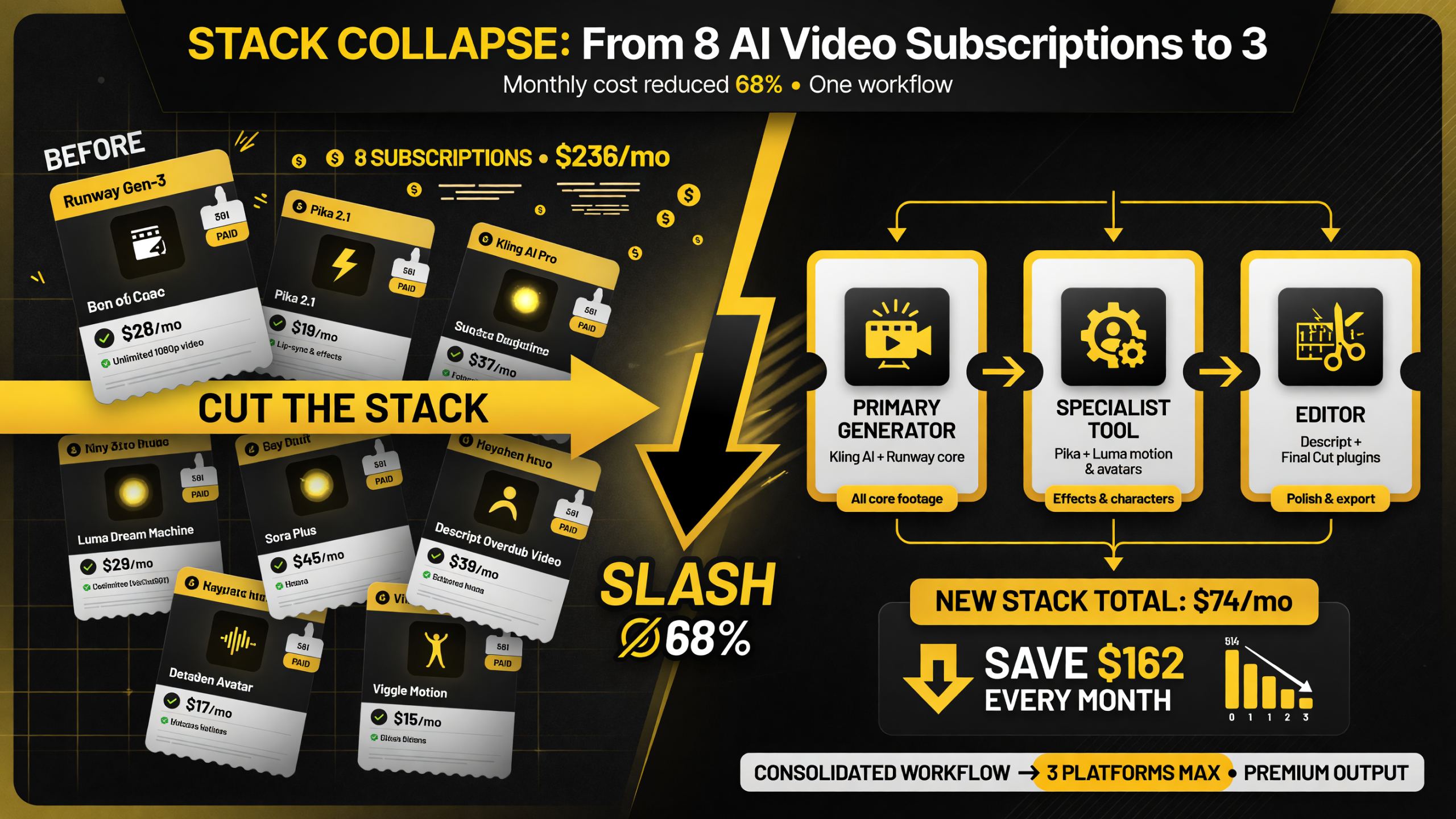
Consolidating from an eight-subscription sprawl to a three-slot pipeline is where the real cost and friction savings live — one primary generator, one specialist, one editor.
Step 1: Map Every Model’s Actual Strengths
Before you cut anything, write down every paid tool you touch in a month and the one job you actually use it for. Be honest and specific. “I use it for video” is not an answer — “I use Seedance when I need realistic human motion” and “I use Kling when I need fast, cheap test renders” are answers.
Then assign each model a primary strength and a secondary strength, and look for overlap. In 2026, the realistic-motion crown sits with a small set of models, the speed-and-cost tier belongs to another, and the editing-integrating platforms are a third group. If two tools share the same primary strength, one of them is surplus — keep the one that wins on quality or on price, drop the one that wins on neither.
Step 2: Find the Duplicates and Kill Them
This is where the real savings hide. Most creators pay for at least two models that are interchangeable for their most common job. The fix is brutal but simple: for each pair of tools with the same primary strength, keep one and cancel the other for a trial month.
Do the same for secondary overlap. If your editor now does AI motion and your generator now does editing, you’ve got a single platform covering two jobs you were paying two platforms for. Consolidating to one tool that spans your whole pipeline often cuts both the cost and the friction at once — several all-in-one platforms now cover generation, editing, voice, and subtitles in one subscription.
Step 3: Grade Remaining Models on One Metric Each
Once the stack is down to the serious candidates, force yourself to score every remaining model on exactly one axis: the job you kept it for. If you kept two motion models, grade both purely on realistic human movement and cut the loser. If the tie is close, break it on price-per-minute or on render speed — whichever is the axis that actually gates your output.
The discipline matters because it stops the “this one is better at everything” trap. No model wins every test. Grading each tool on a single, specific job makes the cut obvious and lets you defend the decision later when a new shiny model launches.
Step 4: Build a Two-to-Three Platform Pipeline
After the cuts, the goal is a stack you can explain in one sentence, built around a primary generator, a specialist tool, and an editor. The primary carries your everyday workload at a reasonable price. The specialist covers the one thing your primary can’t — stylization, lip-sync, or speed. The editor holds the whole pipeline together with the features your generator lacks.
That structure covers a creator’s real needs without sprawl. It also resists model fatigue: when a new model launches, you test it against your three slots instead of your eight subscriptions. A new tool earns a place only by beating an incumbent in a slot — not by adding a ninth tab to your browser.
Step 5: Set a Monthly “New Model Test” Budget
Model fatigue doesn’t end the day you clean house — it comes back the moment a demo blows up your feed. So put a guardrail in place: one paid trial per month, one free trial on top, and a rule that any trial either replaces an incumbent within two weeks or gets canceled.
That single rule keeps you current without re-accumulating a stack. You still see every important launch, you still test the ones that genuinely look different, but you can’t quietly drift back into paying for seven platforms “just in case.” The budget makes testing a deliberate act instead of an impulse.
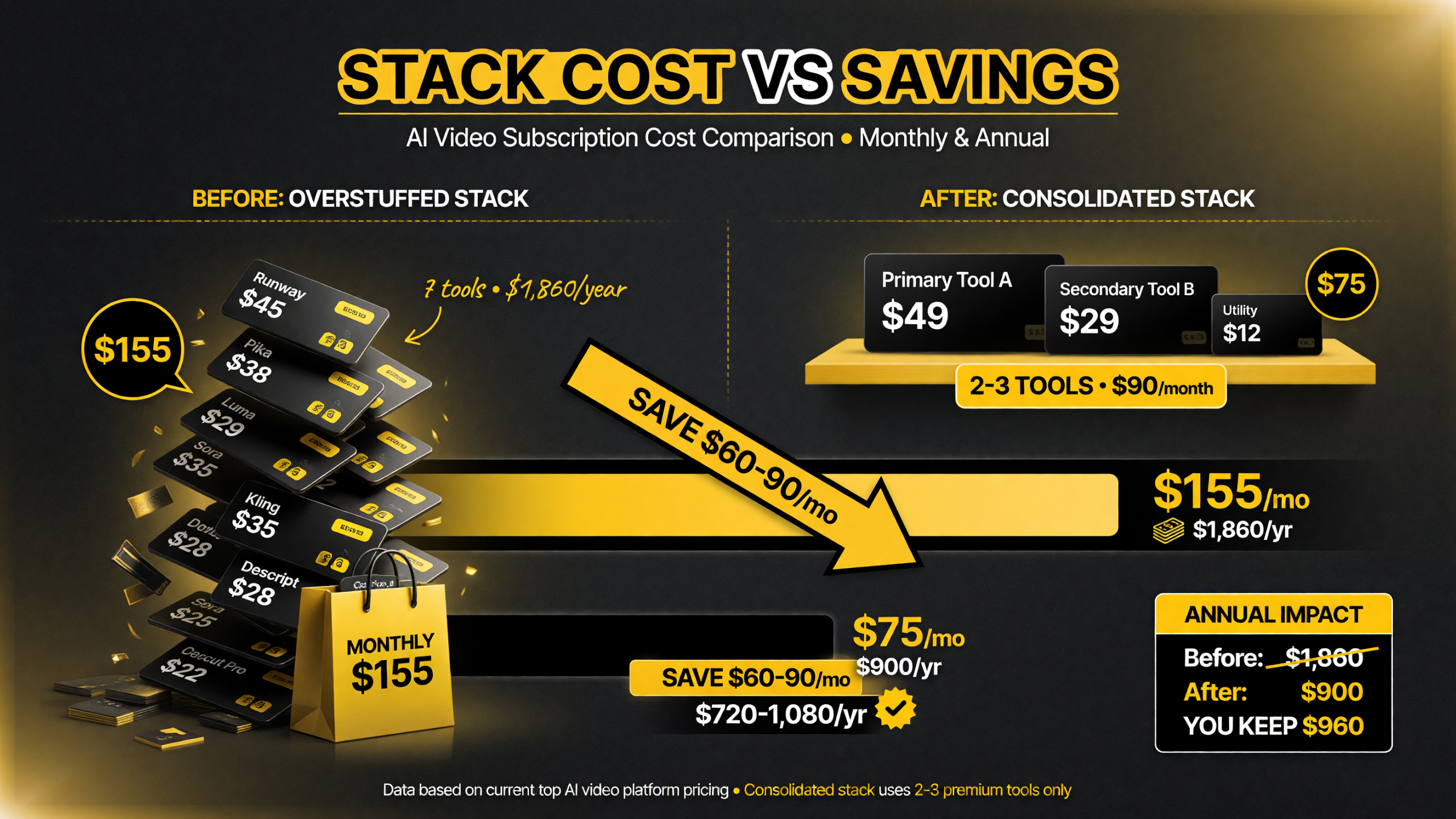
An overstuffed stack quietly runs past $150 a month; cutting the genuinely redundant tools returns $60 to $90 a month — $720 to $1,080 a year — without losing output quality.
Real Numbers: What an Overstuffed Stack Costs You
Put a dollar figure on model fatigue and it stops feeling abstract. Consider a creator paying for three generators, an editor, a voice tool, and an upscaler. At typical mid-tier pricing that’s roughly $40, $35, and $30 a month for the generators, $25 for the editor, $15 for voice, and $10 for the upscaler — about $155 a month, or $1,860 a year, spent on software alone.
Now be honest about overlap. If two of those three generators produce the same kind of footage, you’re paying $35 a month for a duplicate you use half as often. Cutting one saves $420 a year. If the editor already does the upscaling, another subscription is pure redundancy — $120 more gone. Small cuts compound: dropping the clearly redundant pieces in a realistic stack routinely frees up $60 to $90 a month, which is $720 to $1,080 a year back in your pocket, before you even count the time saved from re-learning interfaces.
And the time cost is real too. Every extra platform means a separate login, a separate prompt syntax, and a separate export workflow. Consolidating from six tools to three doesn’t just cut cost by a third — it cuts the number of handoffs in your pipeline, which is where most rendering delays and frustration actually come from.
What the 2026 Model Landscape Actually Requires
In 2026 the practical AI video landscape splits into three needs, not ten tools: realistic generation, fast/cheap iteration, and pipeline integration. Most of the current generation of new models — the 30-second 4K crowd, the fast turbo tiers, and the all-in-one platforms — map onto one of those three.
Understanding that is the antidote to fatigue. You don’t need to follow every launch; you need to know which slot each launch could occupy. When a new realistic-motion model ships, you compare it to your current motion pick. When a cheap turbo tier appears, you weigh it against your iteration tool. Everything else is noise, and it’s fine to ignore it.
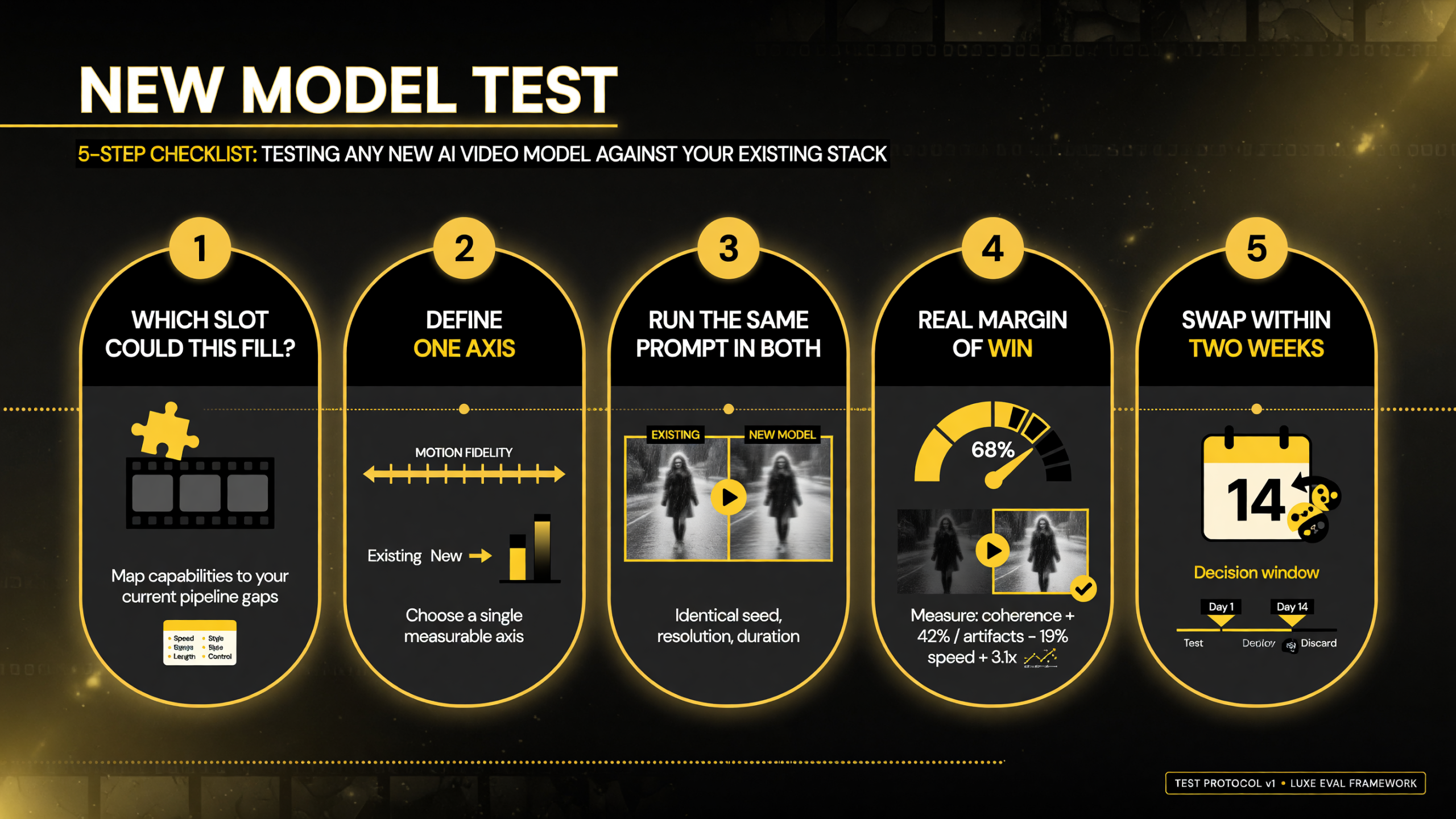
Run every tempting launch through the same five-step test and most of them clear the first gate — “which of my slots does this fill?” — before they ever cost you a subscription.
A Quick Template for Testing Any New Model Against Your Stack
Model fatigue dissolves the moment you have a repeatable way to judge a new tool. Use this template every time a launch looks tempting, and you’ll stop impulse-buying nine platforms and start making one deliberate decision per month.
- Which of my three slots could this fill? If the answer is “none,” stop here — no matter how good the demo looks, a tool that doesn’t beat an incumbent in a slot is just a new subscription.
- What’s the single axis I care about? Define one metric — realistic motion, render speed, price per minute, lip-sync quality — and commit to judging only that. You can’t compare a new model on everything it does; you can only fairly compare it on the one job you’d actually use it for.
- Run the same prompt in both. Test the new model against your current pick using the identical script and settings, side by side. A demo clip built by the vendor tells you nothing; the same prompt tells you everything.
- Does it beat the incumbent by a real margin? “Slightly better in good lighting” isn’t a reason to switch. Require a clear, repeatable win on your axis, not a marginal polish that disappears on your real footage.
- Can I swap it in within two weeks? If it wins, migrate one live project and confirm the workflow holds before you cancel anything. If it doesn’t lock in cleanly, you keep your current tool and move on.
Run that sequence on every candidate and you’ll discover two things: most launches don’t clear the first step, and the ones that do deserve the slot they’re taking. The template turns the treadmill from an anxiety source into a routine — one trial, one decision, one month at a time.
The Bottom Line: Fewer Tools, Faster You
Model fatigue is a budget leak and a time trap, but it’s reversible. Map your actual usage, cut the duplicates, grade the survivors on one metric each, consolidate to two or three platforms, and cap how many new models you’re willing to test in a month.
The creators who publish consistently aren’t the ones with the biggest stack — they’re the ones who know exactly which two tools produce their output and have stopped shopping. Consolidation isn’t a compromise on quality; it’s how you take a crowded market and turn it back into a workflow that gets you to publish.
Stop paying for tools you can’t name a job for. Cut the stack. Keep the two or three that earn their subscription, and let the model treadmill run without dragging you along.
FAQ
What is AI video model fatigue?
It’s the point where creators can’t tell whether a new AI video model is genuinely better than what they already use, because releases arrive faster than anyone can test them. It leads to subscription paralysis (paying for everything out of fear of missing out) and overlapping tool stacks that cost money and slow workflows down.
How many AI video subscriptions do I actually need?
Most creators only need two to three: a primary generator for everyday work, a specialist tool for the one thing the primary can’t do well, and an editor to hold the pipeline together. Anything beyond that is usually overlap on capabilities you already own.
How do I decide which AI video model to keep?
Score each model on exactly one axis — the specific job you keep it for, like realistic human motion or render speed — and cut the loser when two tools share the same primary strength. No model wins every test, so grading each on a single job makes the cut obvious.
How do I keep up with new AI video models without re-accumulating a stack?
Set a monthly budget: one paid trial and one free trial, with a rule that any trial replaces an incumbent within two weeks or gets canceled. This keeps you current on genuinely important launches without drifting back into paying for seven platforms at once.

About Barak Schurr
Barak Schurr is a serial entrepreneur who built and exited a major ticketing platform before turning his attention to AI and content. He runs three AI-focused research sites and writes about the tools, workflows, and strategies that let solo creators build real channels — without a crew, a studio, or a Hollywood budget. Contact: [email protected]
More AI Video Resources