World Labs Atlas: Turn a Few Images Into a Minute of Interactive Video
Get The Faceless YouTube Blueprint — Free
The exact AI tool stack and workflow used to build a faceless YouTube channel from zero.
World Labs Atlas: Turn a Few Images Into a Minute of Interactive Video
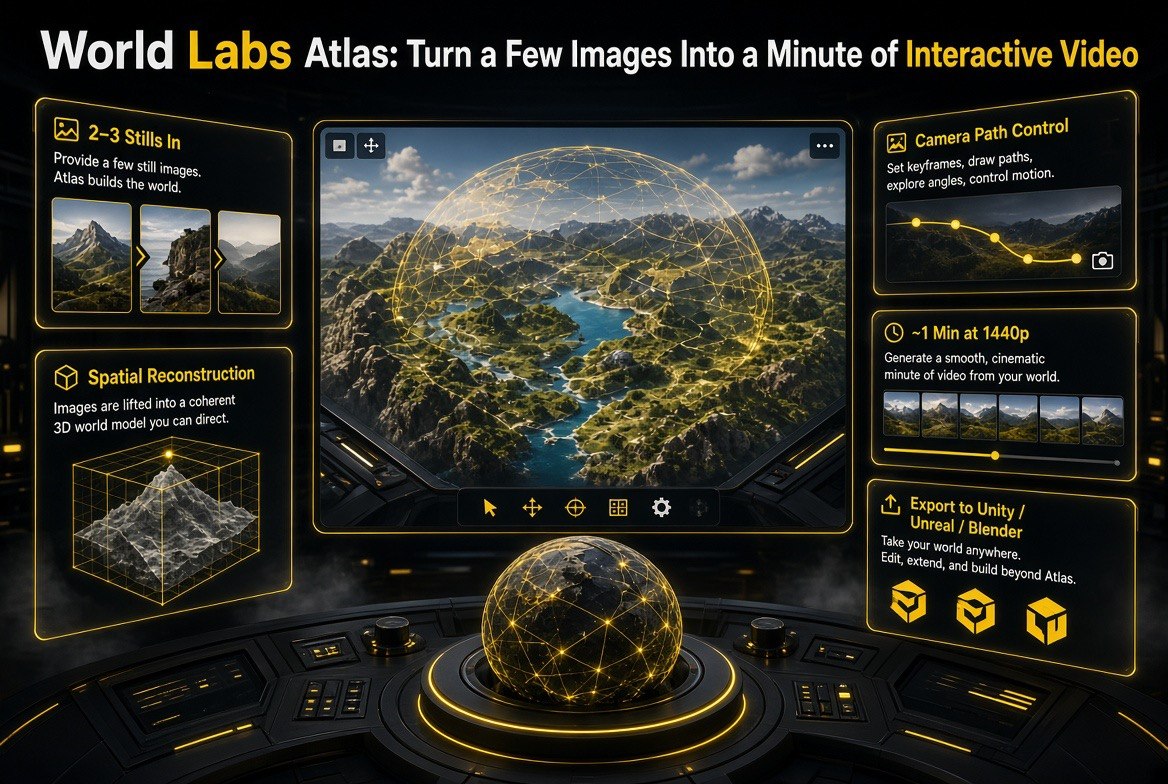
⚡ Expert Summary: World Labs Atlas is an omni-world-model that turns two or three reference images into up to about a minute of interactive, high-resolution (1440p) video that follows exact camera paths you control. Rather than generating a one-shot clip like Veo or Runway, Atlas reconstructs a spatial scene you can move through — with camera control, bullet-time motion, and even 3D scene export to Unity, Unreal, or Blender. For creators, that is the difference between prompting a clip and actually directing a virtual scene.
For the past two years, AI video has worked roughly the same way: you type a prompt, the model renders a clip, and whatever the model decides is what you get. It is powerful, but it is also a one-way street. You cannot move the camera to a better angle after the fact. You cannot push in on a detail the model got right. You cannot decide, after rendering, that the shot should have started from the left. The output is the output.
World Labs Atlas — released on September 1, 2026 by the generative world-model company World Labs — is built on a fundamentally different idea. Instead of generating a fixed clip, it builds what the company calls a world model: a spatial, interactive scene it reconstructs from a handful of reference images. You can then move through that scene along real camera paths, produce up to roughly a minute of 1440p video, and even export the reconstructed 3D geometry into the tools video professionals already use. This review breaks down what Atlas actually does, how it differs from the generative video you already know, and where it fits in a creator’s workflow.
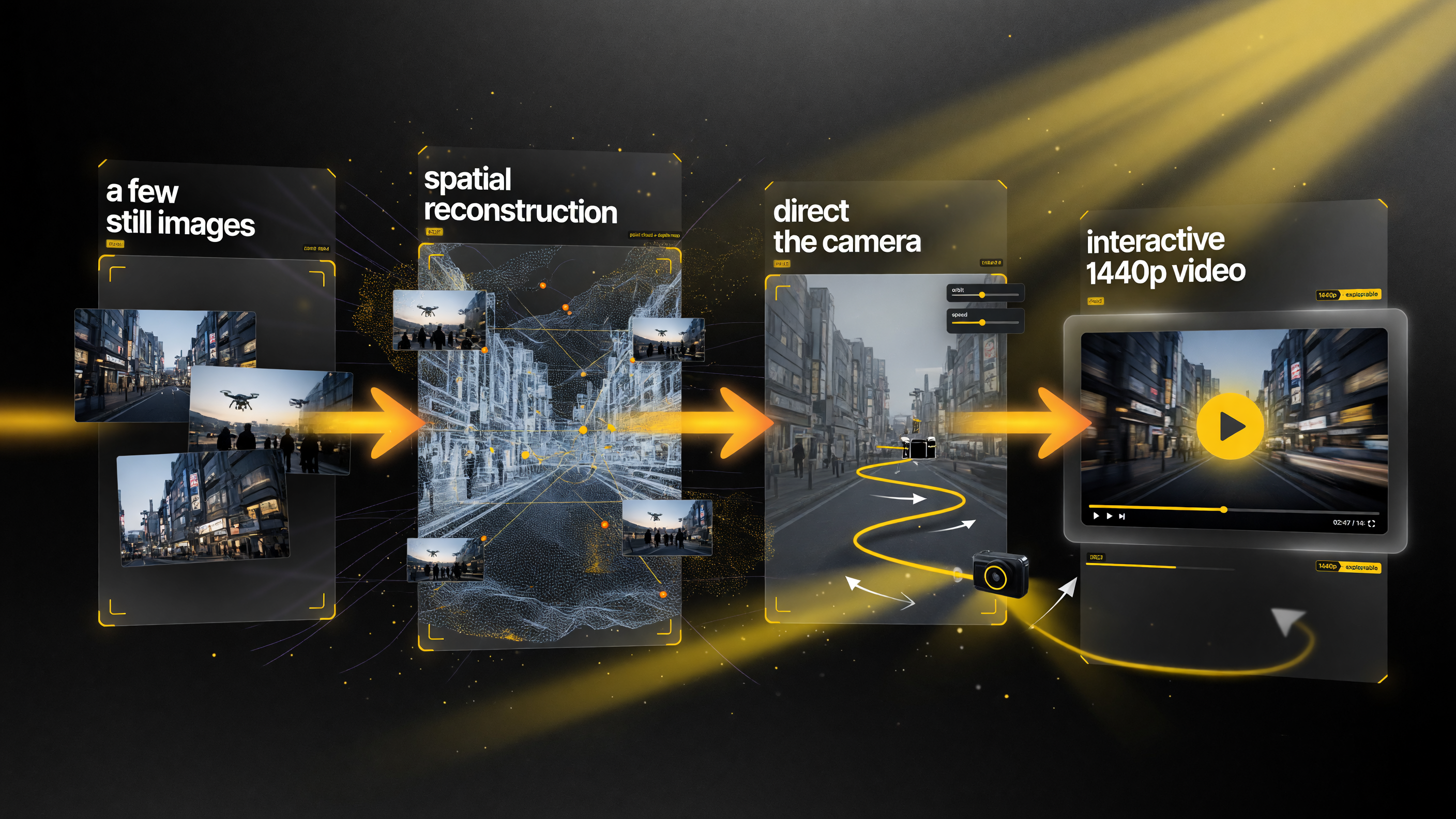
The Atlas pipeline — a few still images become a reconstructed scene you can move a camera through, ending in interactive 1440p video instead of a single locked clip.
What Is World Labs Atlas?
World Labs was founded by Fei-Fei Li, one of the most recognizable names in AI and computer vision, with the explicit goal of building “world models” — AI systems that understand not just pixels but the spatial structure and behavior of a scene. Atlas is the company’s flagship output: an omni-world-model that takes a small set of still images and reconstructs them into an interactive 3D-consistent scene you can navigate.
The practical result for a creator is video you can actually direct. Atlas does not hand you a finished clip and walk away. It gives you a world model with a controllable camera, so you can choose the path, the pacing, and the motion. Outputs run up to about a minute at up to 1440p resolution, and the reconstruction of the scene’s spatial layout is what enables the camera to move in ways that look physically coherent rather than warped.
The technology is significant enough that it reads as a category leap, not an incremental update. World Labs has described the model family as being able to reconstruct environments from limited visual input and let users explore them — a capability that sits between static image generation and full generative video, and in several ways ahead of both.
How Atlas Is Different From Veo, Runway, and Seedance
If you have used Google Veo, Runway, or Seedance, you already know the current standard for generative video: describe a scene, and the model produces a clip consistent with your prompt. Atlas shares some of that DNA, but its architecture and output philosophy are different in ways that matter for how you use it.
| Factor | Veo / Runway / Seedance | World Labs Atlas |
|---|---|---|
| Core approach | Prompt-to-clip video generation | Reconstruct a scene, then direct a camera through it |
| How you control it | You describe, model decides the shot | You plot exact camera paths and motion |
| Camera freedom | Limited; locked to the generation | Full path control; bullet-time and spatial moves |
| Output ceiling | Single generated clip | ~1 min at 1440p, plus 3D export |
The short version: creative tools like Veo and Runway are excellent at “make me a clip of X.” Atlas is a different beast — it is for when you want to control the space and the movement, not just describe the outcome. That makes it a complement to generative video rather than simply a replacement for it.
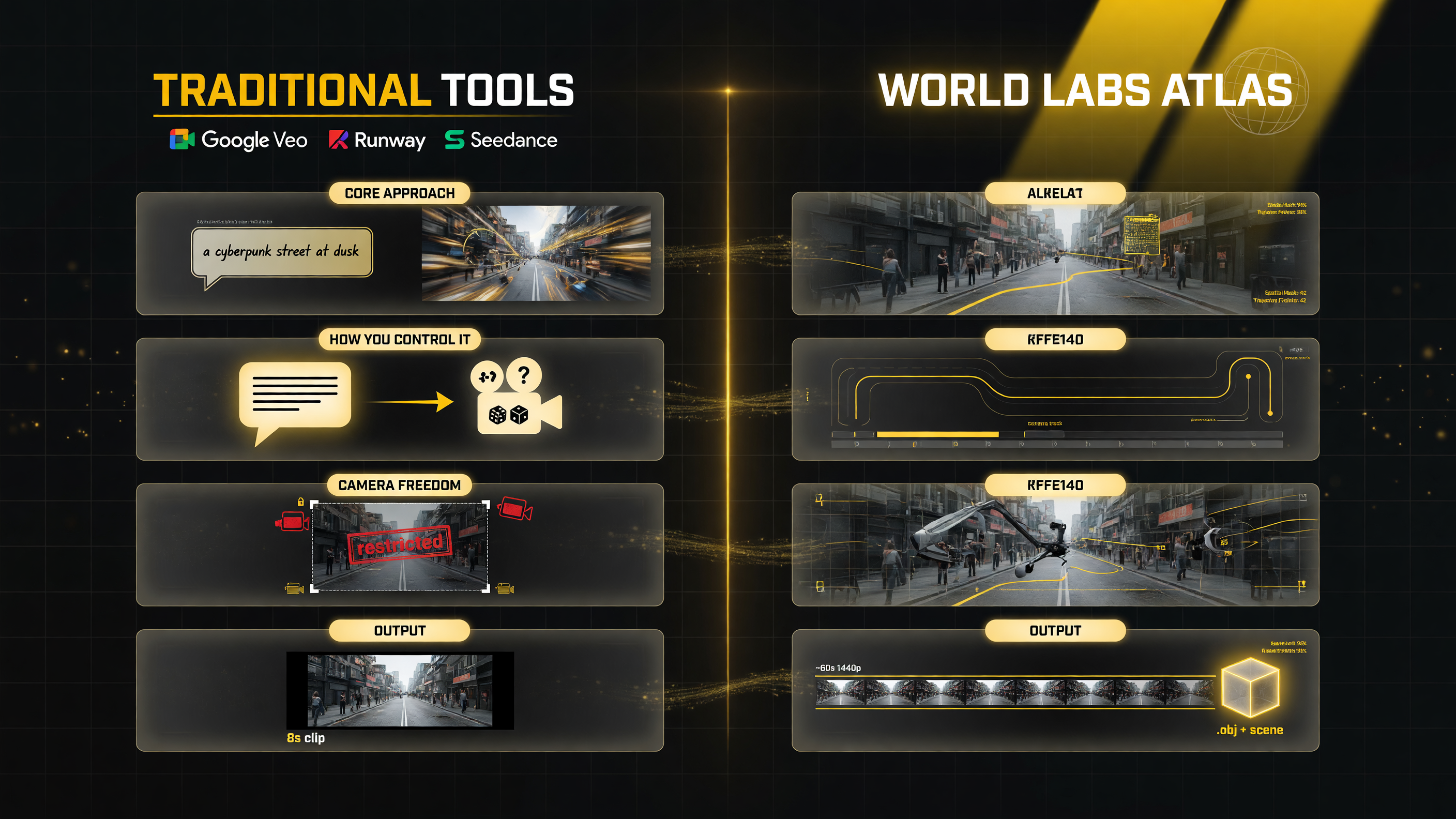
The core difference: tools like Veo and Runway are prompt-to-clip, while Atlas reconstructs a scene and lets you direct a camera through it — control of the space and movement, not just a description of the outcome.
Camera Paths and Spatial Reconstruction
The feature that most clearly separates Atlas from its peers is its treatment of the camera as an instrument you direct rather than an artifact you accept. Because Atlas reconstructs the spatial layout of a scene from the reference images, it knows where surfaces, objects, and depth live. That spatial understanding is what lets the camera glide along a path, sweep around a subject, or perform a bullet-time-style rotation without the scene collapsing into visual distortion.
For a creator the implication is subtle but enormous: you can plan a shot the way you would with a physical camera. You decide the starting position, the movement, and where you want the viewer to land. The model honors that path because it has a coherent sense of the space to move through. That is the difference between watching a video and feeling like you directed it.
Inputs can be as few as two or three still images of the same subject or scene. Atlas reconstructs the subject in enough spatial detail to support navigation, which is markedly less demanding than the footage libraries traditional photogrammetry and 3D reconstruction have historically required.
3D Export for Real Production Workflows
For creators working at a more technical level, Atlas’s ability to export the reconstructed scene as 3D geometry is where the tool moves from a novelty into a production utility. The model can hand off its spatial reconstruction into the standard 3D tools — Unity, Unreal Engine, and Blender — meaning you are not trapped inside a closed video generator.
This export path opens real use cases for serious makers. A camera operator can scout a virtual environment and plan an angle before booking a location. A video course creator can build a reusable set. A product filmmaker can generate interactive views of a product to drop into an editor. Because the output lands in tools you already use, Atlas stops being a standalone toy and starts acting like a bridge between generative AI and conventional production pipelines.
It is worth being realistic about maturity: world-model reconstruction is an early and fast-moving field, and the quality of the 3D export will vary with the complexity of the source scene. But the direction — generated scenes that plug into the tools professionals already live in — is exactly where this category needs to go.
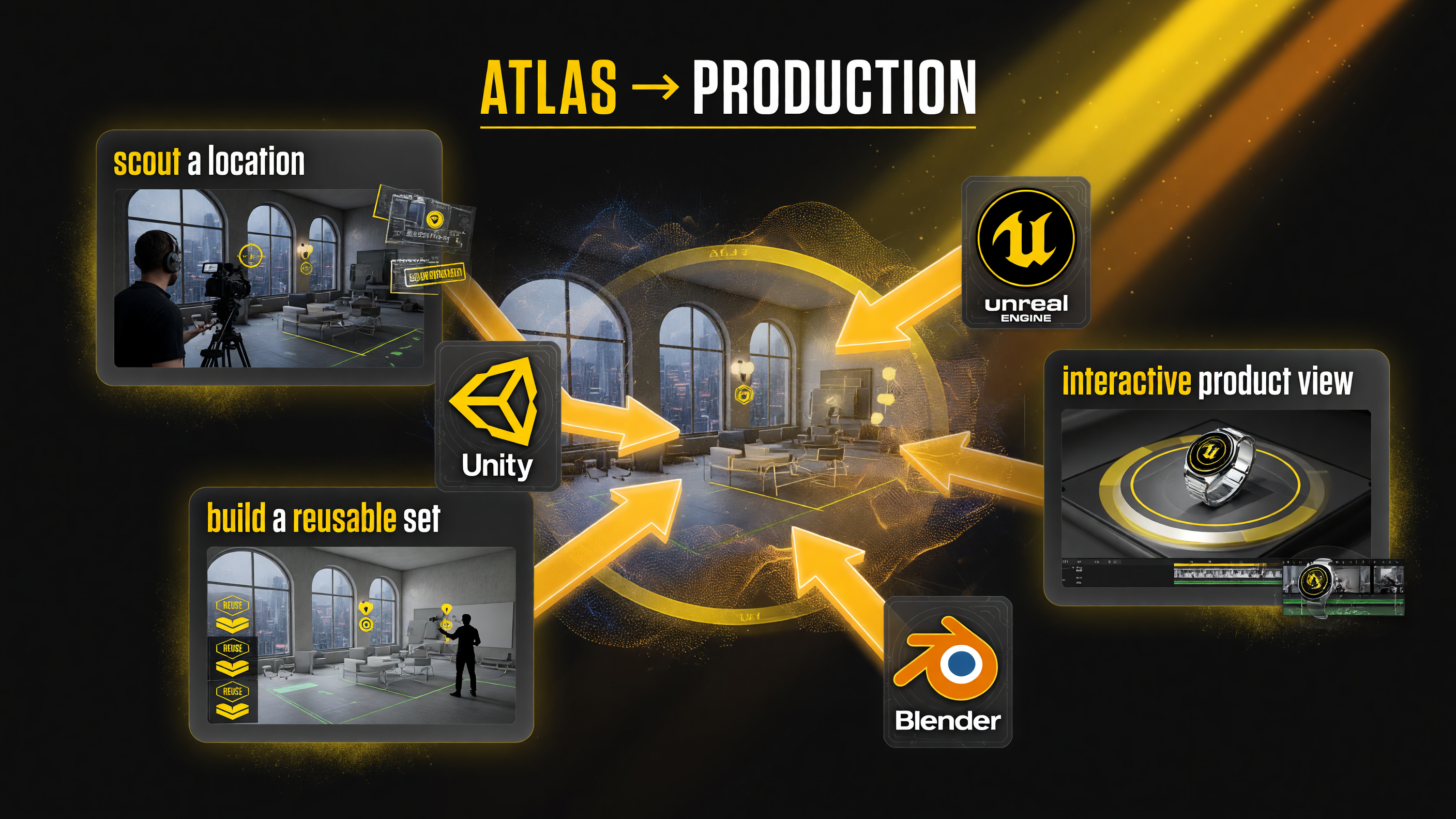
Atlas sends its reconstructed scene into the tools pros already use — Unity, Unreal Engine, and Blender — turning a world model into a production utility.
Where Atlas Fits in a Creator’s Toolbox
Few creators will replace their current video workflow with Atlas alone. The more useful framing is understanding the specific jobs it is best suited for — and the ones where it is not the right tool.
| Use Case | Best Fit | Why |
|---|---|---|
| Shot planning & previsualization | High | Plan camera paths before shooting |
| Product & set visualization | High | Reusable interactive views from stills |
| Fast narrative clips from prompts | Use Veo/Runway instead | Prompt-to-clip is faster for one-off scenes |
| Heavy 3D game/environment builds | Emerging | Export is promising but early |
The strongest early use cases for a solo creator are previsualization and interactive product work — jobs where the ability to move a camera through a reconstructed space saves real time and money. For pure prompt-driven storytelling, the generative video tools remain the faster path. Most advanced creators will keep both in rotation.
Practical Considerations Before You Jump In
As with any model in a fast-moving category, a few practical realities are worth stating plainly before you build a workflow around Atlas.
Reference quality drives output quality. Atlas reconstructs a scene from your input images, so the better your sources — consistent lighting, stable subject, clear spatial cues — the more coherent the reconstruction. Garbage input produces garbage navigation. Start with clean, consistent stills.
Compute and rendering time matter. Producing interactive 1440p video and 3D exports is not free. Plan for meaningful generation time and budget accordingly rather than expecting instant turnaround on heavy scenes.
Understand the file handoff. Before committing to the 3D export path for a paid client, verify that the output imports cleanly into your target engine or editor and holds up under your actual render requirements. Export is powerful but it is not yet a drop-in replacement for hand-built geometry in every case.
Final Verdict
World Labs Atlas represents the most interesting shift in AI video since text-to-video went mainstream: moving from generating clips to reconstructing scenes you can direct. The ability to control real camera paths, produce up to a minute of 1440p interactive video from just a few images, and export the result into Unity, Unreal, and Blender is a genuinely new capability rather than an incremental refresh of Veo-style generation.
For creators, Atlas is not yet a replacement for your existing tools — it is an addition that is strongest at shot planning, previsualization, and interactive product work, and weakest when you simply want a fast narrative clip from a text prompt. If you make video and have ever wished you could move the camera after the scene was generated, this is the first tool built around exactly that wish. It is worth testing with clean reference imagery as soon as you can get access, because this is the direction the whole category is heading.
Frequently Asked Questions
What is World Labs Atlas?
World Labs Atlas is an omni-world-model that reconstructs a spatial scene from two or three reference images and lets you navigate it with controlled camera paths, producing up to roughly a minute of interactive 1440p video. It was released September 1, 2026.
How is Atlas different from Veo and Runway?
Veo and Runway generate a finished clip from a text prompt. Atlas reconstructs a scene you can move through, offering real camera-path control and 3D export rather than a one-shot, fixed clip.
Can I export Atlas scenes to 3D software?
Yes. Atlas can export its reconstructed scene to Unity, Unreal Engine, and Blender, letting you use the generated environments and camera work in standard production pipelines.
Do I need a lot of images to use Atlas?
No. Atlas works from as few as two or three still reference images of the same subject or scene and reconstructs enough spatial detail to support camera navigation.
Who is World Labs Atlas best for?
It is strongest for shot planning, previsualization, and interactive product work. For fast prompt-to-clip narrative, tools like Veo and Runway remain the quicker option.

About Barak Schurr
Barak Schurr is a serial entrepreneur who built and exited a major ticketing platform before turning his attention to AI and content. He runs three AI-focused research sites and writes about the tools, workflows, and strategies that let solo creators build real channels — without a crew, a studio, or a Hollywood budget.
Email: [email protected]
More AI Video Resources