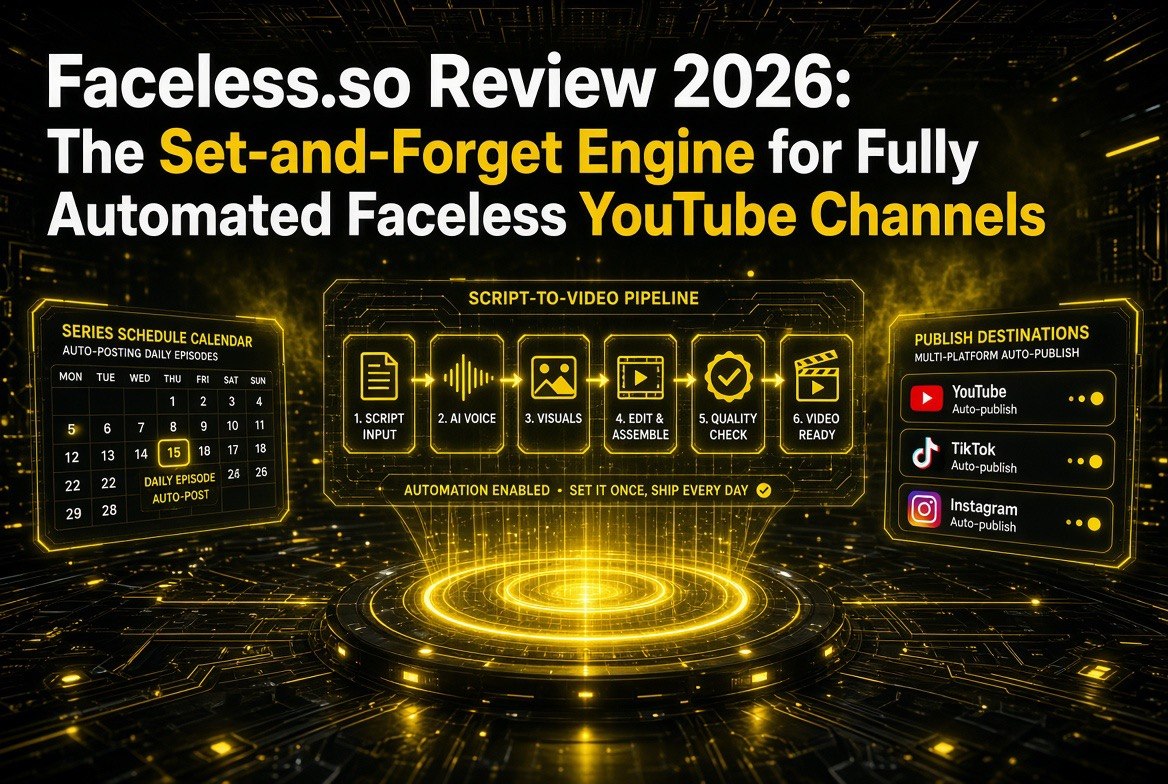
Faceless.so Review 2026: The Set-and-Forget Engine for Fully Automated Faceless YouTube Channels
Get The Faceless YouTube Blueprint — Free
The exact AI tool stack and workflow used to build a faceless YouTube channel from zero.
Faceless.so Review 2026: The Set-and-Forget Engine for Fully Automated Faceless YouTube Channels
⚡ Expert Summary: Faceless.so is an AI platform built to do the thing most faceless content tools only promise: generate a video AND post it to your channels without you touching the publish button. You feed it a script, a prompt, a Reddit post, a blog post, or even a tweet, and it produces a finished video — visuals, voiceover, captions, music, the works — then auto-publishes or schedules it to YouTube, TikTok, Instagram, X, Facebook, LinkedIn, and Threads in one flow. Its headline feature is the “Series” engine, which turns a niche into a set-and-forget channel by generating and posting on a recurring schedule once you define the topic, voice, style, and cadence. Pricing runs roughly $24 to $99 a month billed annually, structured as monthly credits where a basic video costs about 20 credits, and the core differentiator versus export-only generators (like the Magic Hour-style all-in-one suites) is that Faceless.so actually runs the distribution too. This review covers how the full pipeline works, the credit math in plain numbers, who should treat Faceless.so as the backbone of a real channel, and the honest limitations you need to know before you hand it the keys to your upload schedule.
There is a quiet gap in the faceless-content space that most tools politely ignore. Plenty of AI platforms will generate you a great-looking video. Very few will actually put it on YouTube for you, on a schedule, week after week, while you sleep. Creating faceless content is only half the job — posting consistently is the other half, and consistency is what actually grows a channel. A tool that makes you beautiful videos but still has you manually exporting, opening YouTube Studio, writing a title, picking a thumbnail, and clicking publish every single day has not really automated the hard part.
Faceless.so is built to close that gap. It is an AI platform that not only generates faceless videos from prompts, scripts, Reddit stories, blog posts, or tweets, but also schedules and auto-publishes them to YouTube, TikTok, Instagram, X, Facebook, LinkedIn, and Threads straight out of one workflow. The marquee feature is an “automated series” engine that runs an entire channel on autopilot: you define a niche or topic, pick a voice and visual style, set your posting cadence, and Faceless.so generates and publishes episodes on schedule from then on. For a solo creator who wants a real, compounding channel without living inside editing software, that is a fundamentally different value proposition from a generation-only tool — and it is the difference worth understanding before you subscribe.
This review is written for the solo creator and small operator who wants a hands-off faceless channel that actually posts. I cover what Faceless.so does end to end, how the Series automation works, the pricing and credit math in real numbers, how it compares to the generation-only suites, who it is genuinely for, and the honest downsides you should weigh before handing a single channel account to the platform.
What Faceless.so Actually Does
Faceless.so is an end-to-end faceless video machine. It combines content sourcing, scriptwriting, visual generation, voiceover, captioning, music, and publishing into one automated pipeline. The difference from most rivals is not any single tool in that chain — it is that the chain runs to completion, including the final upload.
You can feed it a finished script, or you can give it a source it turns into a script for you. Paste a Reddit post URL, a blog article, a tweet, or just a niche and topic, and Faceless.so handles the writing. From there it generates per-scene AI visuals, synchronizes a text-to-speech voiceover from a library of over fifty voices (with cloning support), layers in cinematic captions and background music, adds effects, zooms, and transitions — then renders a final video ready for a platform.
The output is native and clean: no watermarks on paid plans, unlimited exports, full commercial rights, and 100% content ownership. Multilingual support is included, and you can caption existing footage or audio you already have if you want to repurpose material rather than generate from scratch.
How the Pipeline Works — Step by Step
The full workflow is what separates Faceless.so from the exporters, so it is worth walking through precisely. It runs in six logical stages.
Step one: content input. You provide a finished script, a prompt, or a source URL — a Reddit post, a blog article, or a tweet. The platform can also draw from predefined content sources like facts-and-stories collections if you want ideas seeded for you.
Step two: configuration. Choose which of the fifty-plus voiceover options fits, or clone your own voice. Pick a visual style, a video model, a target duration, music, and caption theme. Some users apply a negative prompt or brand kit to keep outputs on-message.
Step three: generation. The system builds the video scene by scene — visuals, synchronized voiceover, captions — asynchronously, and reports status when it is done. Credits are deducted at this creation step; the later rendering and publishing do not cost credits.
Step four: video-model choice. This is where the credit math happens, and it matters. Faceless.so offers three generation tiers: the base Storyboard model (static AI scenes with motion effects, ~20 credits), Motion Lite (animated transitions, ~50 credits), and Motion Pro (cinematic AI motion video, ~100 credits). A heavier model costs more per video, so your monthly volume estimates depend entirely on which tier you lean on.
Step five: render. Once generation completes, the final MP4 is rendered and assembled with all elements. This step is free and does not consume credits.
Step six: publish. This is the differentiator. You can post immediately or schedule weeks ahead to connected platforms, or you can roll the video into a Series and let it go automatically.
The Series Engine — The Real Reason to Consider It
The automated Series engine is Faceless.so’s defining feature, and it is the part most comparable tools do not have. A Series is essentially a channel on autopilot. You set up a niche or recurring topic, choose the voice, visual style, episode length, and — critically — the posting cadence and target time, and the system begins generating episodes on schedule.

Faceless.so Series engine — set the niche, voice, cadence and time, and episodes generate and post themselves on schedule.
The first episode generates immediately when you create the Series, and from there it keeps producing and posting at your chosen rhythm — daily, a few times a week, whatever fits your plan. Because the publishing is native and scheduled, you are not babysitting uploads; the channel compounds on its own cycle.
Series automation requires an active subscription, which is a fair gate — the feature is genuinely resource-hungry and is the platform’s core premium draw. But for a creator who wants, say, a daily facts channel and does not want to open editing software seven days a week, this turns the entire operation into a configuration exercise rather than a production treadmill.
Multi-Platform Publishing and Integrations
Beyond YouTube, Faceless.so is built for distribution reach. Native auto-publishing covers YouTube, TikTok, Instagram, X, Facebook, LinkedIn, and Threads, all connected once via OAuth. You can push a single rendered video across multiple platforms without re-exporting per site, schedule ahead, or leave rolling publication to a Series.
For builders and power users, there is more under the hood than the consumer dashboard suggests. Integrations include Zapier, Make, and Google Drive for custom pipelines, plus an API, a CLI, and an MCP server that lets automation agents create videos, manage Series, or publish programmatically. The platform even ships extra tools like AI thumbnail variants and UGC-style or fake-text-conversation video generators. That depth means a creator can graduate from clicking around a dashboard to running a genuinely programmatic channel without switching tools.
Pricing and the Credit Math
Faceless.so is subscription-based with monthly credits that translate into video output. On the base Storyboard model, a monthly credit allocation on the entry plan covers a meaningful volume of uploads, and the headline “videos per plan” figures assume that lowest-cost model — higher-motion models cost more and reduce your total count per month.
Annual billing saves roughly 20% across tiers, and month-to-month options with easy upgrades, downgrades, and cancellation exist. The current plans look like this.
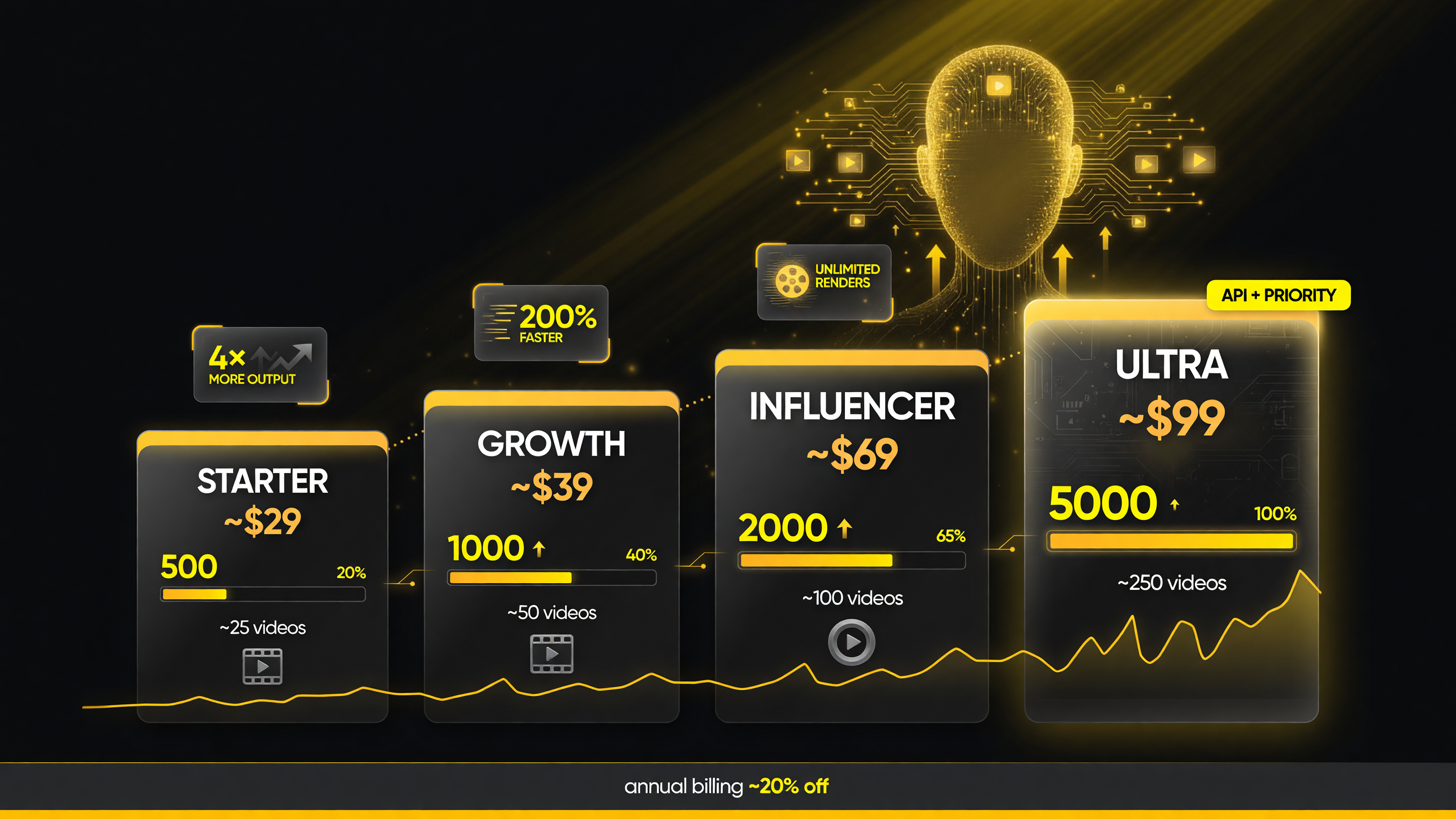
Faceless.so tiers scale from ~500 to ~5,000 credits a month — the higher plans buy volume and API + priority support.
| Plan | Monthly Price | Yearly Price | Credits / Month | ~Videos (Storyboard) |
|---|---|---|---|---|
| Starter | ~$29 | ~$24/mo | 500 credits | ~25 videos (3 members) |
| Growth | ~$39 | ~$32/mo | 1,000 credits | ~50 videos (5 members) |
| Influencer | ~$69 | ~$57/mo | 2,000 credits | ~100 videos (7 members) |
| Ultra | ~$99–166 | ~$82/mo ($990/yr) | 5,000 credits | ~250 videos, API + priority (10 members) |
Two things are worth flagging before you do the arithmetic. First, the per-plan “video” counts assume the base Storyboard model; if you want the animated Motion Lite or cinematic Motion Pro look, each video costs 50 or 100 credits respectively, which cuts your monthly volume accordingly. Budget against the model you will actually use, not the headline. Second, there is no permanent free tier — most signups start with a trial or a free first video rather than an ongoing free plan, so treat the purchase as a tools decision, not a test drive.
How Faceless.so Compares to Generation-Only Tools
Because Faceless.so sits alongside the generation-only all-in-one suites, the useful way to evaluate it is not “which is better” but “which layer of the job are you trying to fill.” The two categories complement each other more than they compete. Here is the honest comparison.
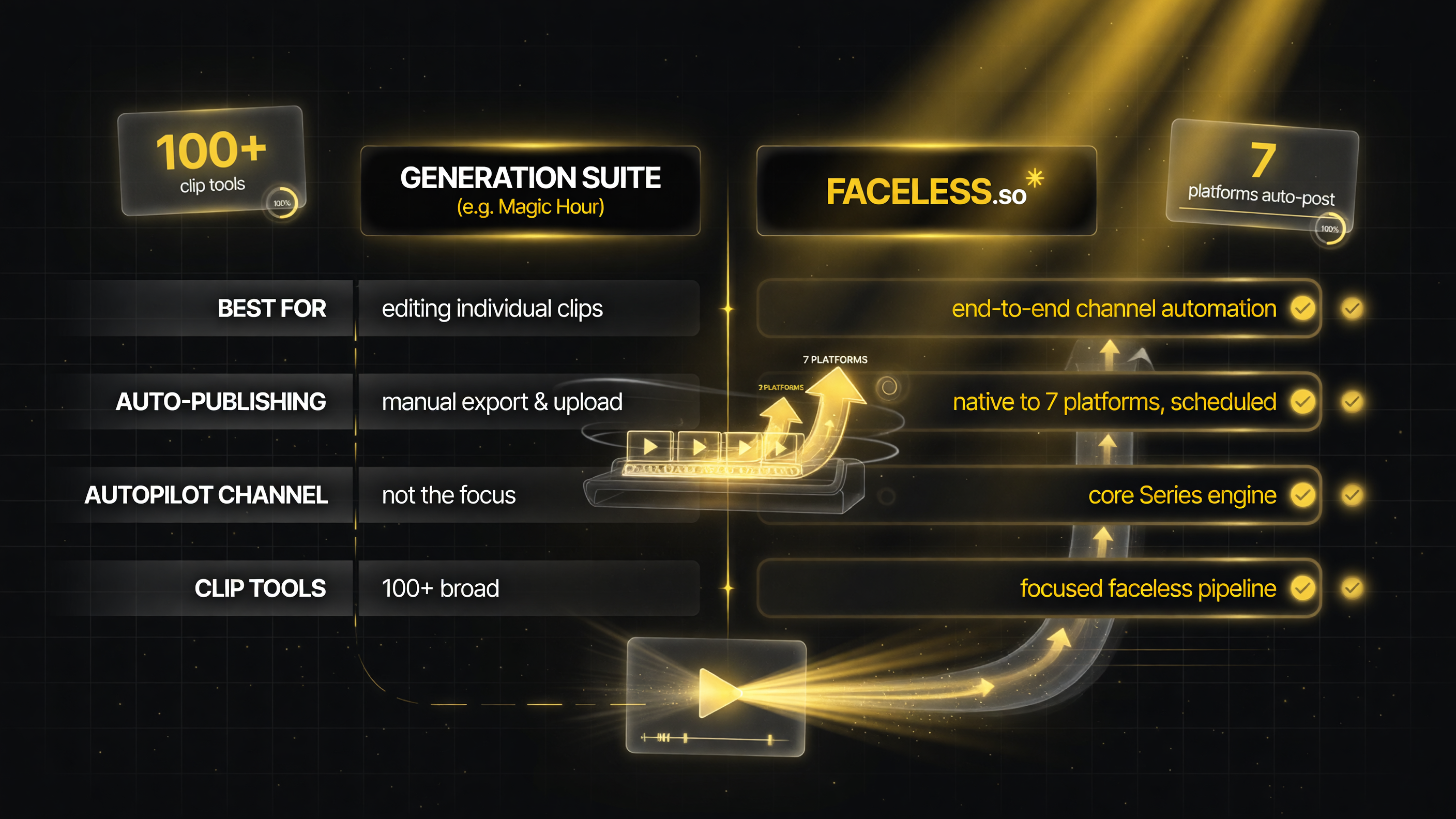
Generation suites are best for editing individual clips; Faceless.so wins where the goal is a whole channel that publishes itself.
| Factor | Generation Suite (e.g. Magic Hour) | Faceless.so |
|---|---|---|
| Best at | Creating/editing individual clips across many tools | End-to-end channel automation incl. publishing |
| Auto-publishing | No — you export and upload manually | Yes — native to 7 platforms, scheduled/Series |
| Whole-category run on autopilot | Not the focus | Core feature (Series engine) |
| Breadth of clip tools | Very broad (100+ tools, multiple models) | Focused on the faceless pipeline |
| Best fit | Creator who hand-tunes and manually posts short-form | Creator who wants a channel that runs on its own |
The practical takeaway: if you enjoy (or need) hands-on control over every clip and will manually publish anyway, a generation suite gives you more creative surface. If your goal is a channel that produces and posts on a schedule with minimal daily effort — the actual definition of faceless automation — Faceless.so is the tool doing the job most tools only gesture at.
Who Faceless.so Is Genuinely For
The honest fit for Faceless.so is narrower and sharper than “anyone making AI video.” It is purpose-built for a specific mode of operation, and it shines when that mode matches your goal.
Creators running low-touch niche channels. If you want a facts, stories, history-mystery, or motivation channel and your edge is volume plus consistency rather than hand-crafted visuals, Faceless.so is close to ideal. The Series engine removes the entire daily production-and-posting chore, which is what actually kills solo channel momentum.
Solo operators and micro-teams who value time over pixels. If you would rather own five decent videos posted on schedule than obsess over one perfect frame, the platform’s speed — first renders reported around a minute for simple videos — and its no-watermark, full-commercial-rights output make it an efficient use of your hours.
Creators who want to test multiple niches. Because you can spin up a Series per niche and let each run its cycle, it is a practical way to run several low-effort experiments at once and double down on whichever channel’s metrics respond. You are not locked into a single content bet.
Honest Limitations — Where It Falls Short
No tool deserves a blind recommendation, and Faceless.so has real caveats that matter depending on how you intend to use it.
The videos look automated. This is the unavoidable tradeoff of an autopilot pipeline. Output is solid and platform-ready for the volume-driven faceless niche, but it will not match the bespoke quality of a creator who hand-directs each scene in a broad generation suite. If your differentiator is visual craft, Faceless.so is the wrong tool for the visual layer.
Credit burn scales with the model you actually want. The appealing “X videos per month” figures assume the cheapest Storyboard model. Once you want the animated or cinematic tiers, per-video cost triples or quintuples, and your honest monthly volume drops accordingly. Under-budgeting here is the most common reason newcomers feel the plan is stingy.
No permanent free tier. There is no ongoing free plan to lean on. Most signups begin with a trial or a free first video, after which you are paying. That is a reasonable model for a tool that funds real rendering and posting, but it means you should be confident in the workflow before you commit to a recurring bill.
You are trusting it with your accounts. Auto-publishing means Faceless.so holds OAuth access to your YouTube and social channels. That is a real decision to make consciously: you are delegating part of your platform presence to third-party software, and a sensible operator connects only the accounts and channels they are genuinely ready to automate, and reviews the publishing settings carefully before enabling a rolling Series.
Content-quality responsibility stays with you. Because the tool can source from Reddit and generate rapidly at scale, it is easy to flood a channel with low-value or duplicate content if you set a Series to run unattended without quality checks. The tool is a distribution engine, not a judgment filter. Channels that succeed on autopilot are usually still directed by a human who periodically audits topic selection and performance.
The Bottom Line — Who Should Buy Faceless.so?
Faceless.so is one of the more genuinely useful tools in the faceless space because it solves the problem most competitors sidestep: it does not just make videos, it posts them. For a solo creator who wants a consistent, compounding niche channel without living inside an editor and without manually uploading every day, the Series automation and native multi-platform publishing are a real, rare capability, and the roughly $24-to-$32-a-month entry point on annual billing is reasonable for what it removes from your weekly routine.
It is not the tool for someone whose edge is bespoke visual quality, and there is no permanent free plan to test-drive it forever. But if your goal is a hands-off faceless channel that reliably posts on schedule, Faceless.so earns serious consideration — and the smart move is to start on the entry plan, connect only one account, and let a single Series prove the workflow before you scale it across your whole content operation.
Frequently Asked Questions
What is Faceless.so?
Faceless.so is an AI platform that generates faceless videos and auto-publishes or schedules them to platforms like YouTube, TikTok, Instagram, X, Facebook, LinkedIn, and Threads. It handles scripting, visuals, voiceovers, captions, and music, and its “Series” engine can run a channel on a recurring schedule automatically.
How does the Faceless.so Series engine work?
A Series automates a channel: you define a niche or topic, voice, visual style, and posting cadence, and Faceless.so generates and publishes episodes on schedule, starting the first one immediately. It continues producing and posting at your chosen rhythm on an active subscription.
How much does Faceless.so cost?
Faceless.so plans run roughly $29 monthly ($24 billed yearly) for Starter at 500 credits (~25 basic videos), ~$39/$32 for Growth (1,000 credits), ~$69/$57 for Influencer (2,000 credits), and ~$99–166/$82 for Ultra (5,000 credits plus API). Annual billing saves about 20%; there is no permanent free tier.
How many videos can Faceless.so make per month?
Plan credit allocations produce roughly 25 to 250 videos per month on the base Storyboard model (~20 credits each). Higher-motion models cost more — Motion Lite ~50 and Motion Pro ~100 credits per video — which reduces your monthly count if you use them.
Does Faceless.so auto-publish or just generate?
Faceless.so both generates and auto-publishes. It connects natively to seven platforms via OAuth for one-click publishing and weeks-ahead scheduling, and its Series engine can post to a recurring schedule automatically.
Is Faceless.so better than a generation-only AI video tool?
They serve different layers. A generation-only suite gives you broader clip-editing control if you manually publish; Faceless.so is better if your goal is an end-to-end channel that produces and posts on its own, since it handles distribution and scheduled automation most exporters do not.

About Barak Schurr
Barak Schurr is a serial entrepreneur who built and exited a major ticketing platform before turning his attention to AI and content. He runs three AI-focused research sites and writes about the tools, workflows, and strategies that let solo creators build real channels — without a crew, a studio, or a Hollywood budget.
Email: [email protected]
More AI Video Resources