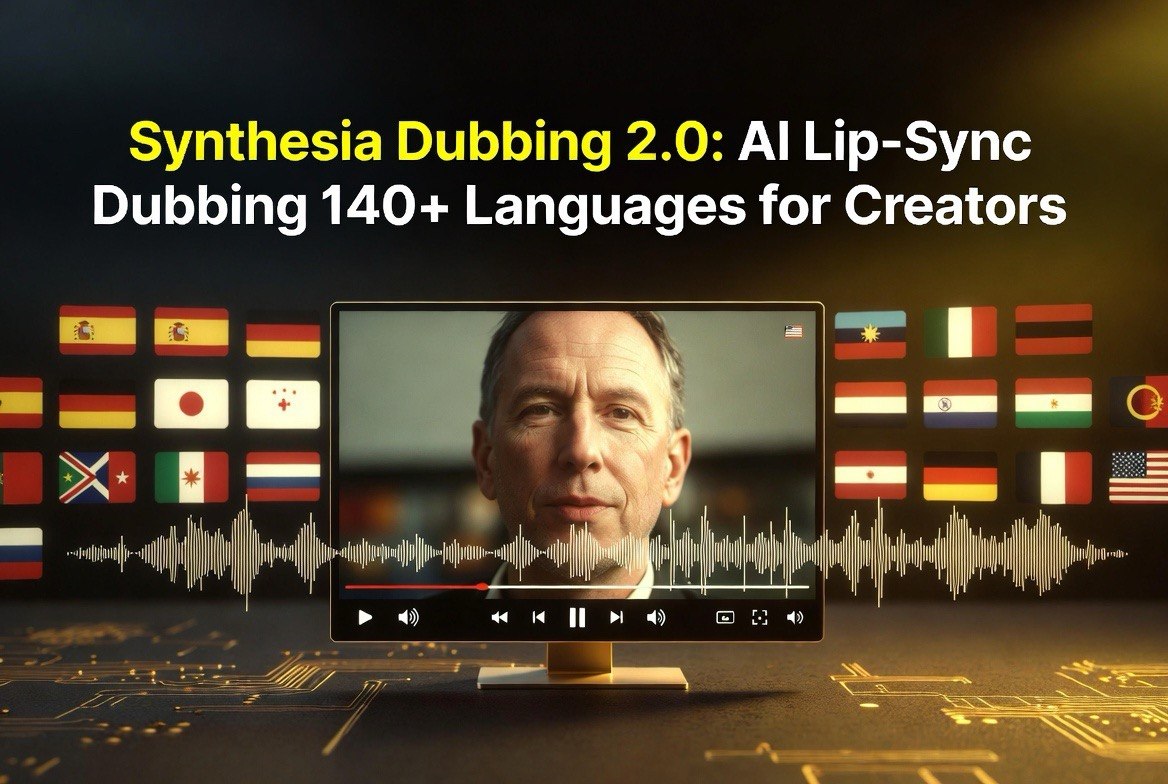
Synthesia Dubbing 2.0: AI Lip-Sync Dubbing 140+ Languages for Creators
Get The Faceless YouTube Blueprint — Free
The exact AI tool stack and workflow used to build a faceless YouTube channel from zero.
Synthesia Dubbing 2.0: AI Lip-Sync Dubbing 140+ Languages for Creators
⚡ Expert Summary: Synthesia Dubbing 2.0 is the upgraded AI dubbing engine inside the Synthesia video platform, and the 2.0 release is the first version that makes dubbed video genuinely watchable for professional creators. It preserves the original speaker’s voice, tone, and emotion across 140+ languages and dialects while delivering state-of-the-art lip-sync — even on side angles, fast cuts, and multi-speaker scenes. For a creator or small business shipping content to international audiences, this review breaks down exactly how it works, what it costs, and whether the upgrade is worth switching off subtitles-only for.
Here is the honest problem most creators hit when they try to go global: they produce a great video in English, then the only way to reach Spanish, German, or Japanese viewers is a subtitle track they know most people will ignore. Dubbing solves the attention problem, but until recently, AI dubbing sounded robotic and the lips never matched — so it looked cheap and hurt trust with the exact audience you were trying to win.
Synthesia Dubbing 2.0 changes that calculus. It launched in mid-July 2026 with a promotional window of free minutes through August 15, and the headline features — voice preservation, multi-speaker cloning, advanced lip-sync, and a multilingual player — are aimed squarely at creators and businesses that want one video to travel everywhere without re-shooting.
Why Dubbing 2.0 Is Different From the Old Synthesia Dubbing
First-generation AI dubbing tools translated the words but flattened the performance. A passionate sales pitch came out as a monotone reading of the script, and the mouth movement lagged behind the audio, which is exactly what makes native viewers dismiss a video as fake. Synthesia Dubbing 2.0 attacks both problems at once.
The new model keeps the original speaker’s voice identity — tone, cadence, and emotional emphasis transfer to the target language instead of being replaced by a generic AI voice. When a video has multiple people talking, the system clones each speaker separately and assigns the right voice to the right person. The lip-sync model is the big step forward: it handles complex scenes like side profiles, occluded faces, dynamic close-ups, and quick cuts, which are the exact situations where older lip-sync tools visibly fell apart.
The result is a dubbed video that feels native rather than translated. That matters for retention: viewers stop watching when something feels off, and a robotic dub is a drop-off machine. More natural dubbing keeps engagement high because the audience forgets they are watching a translation at all.
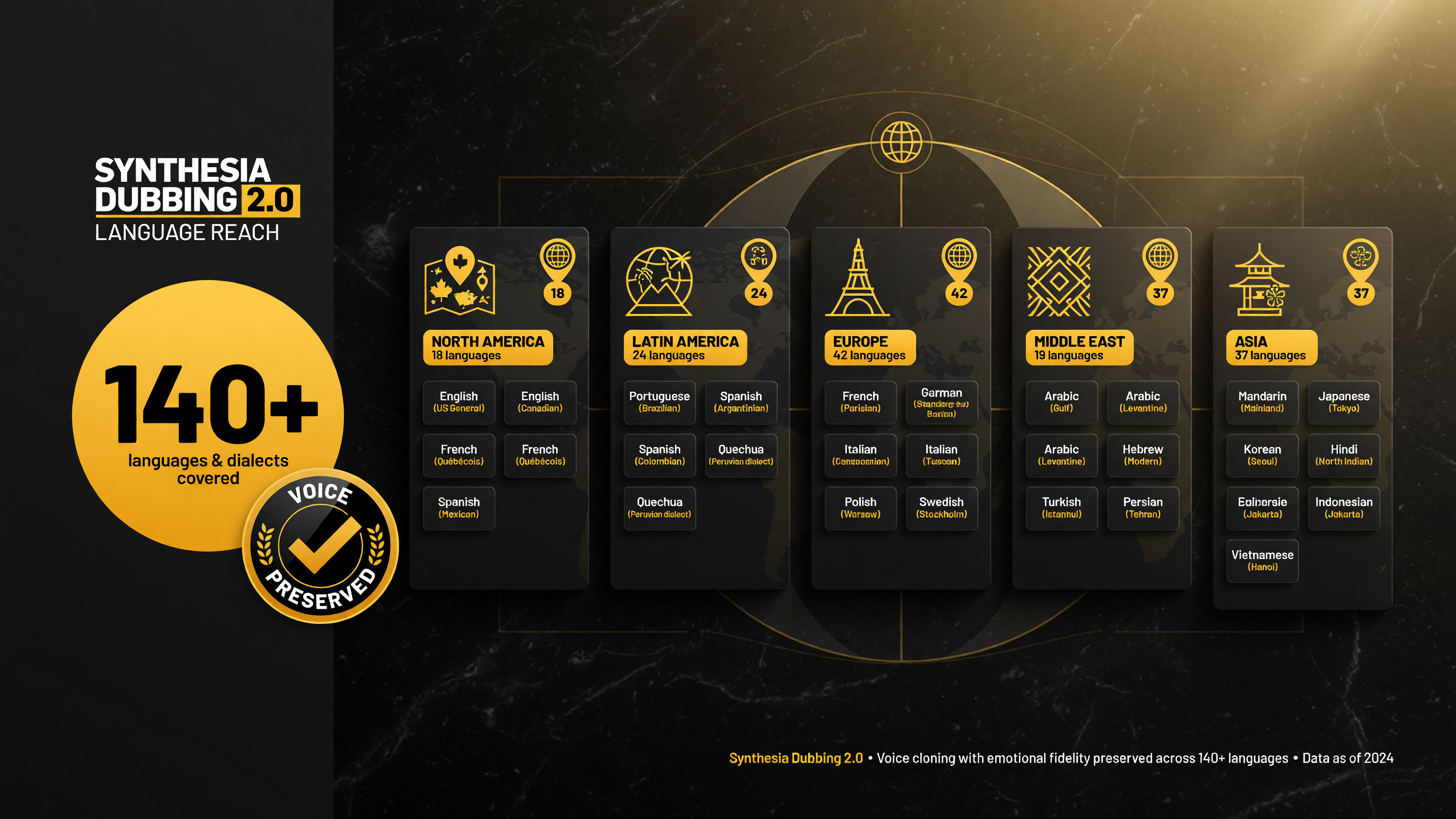
Dubbing 2.0 covers 140+ languages and dialects — including the regional variants (British vs American English, LatAm vs Castilian Spanish) that matter most to real audiences. One upload, many language versions.
What Synthesia Dubbing 2.0 Actually Does, Step by Step
The workflow is designed to be a few clicks, not a production pipeline:
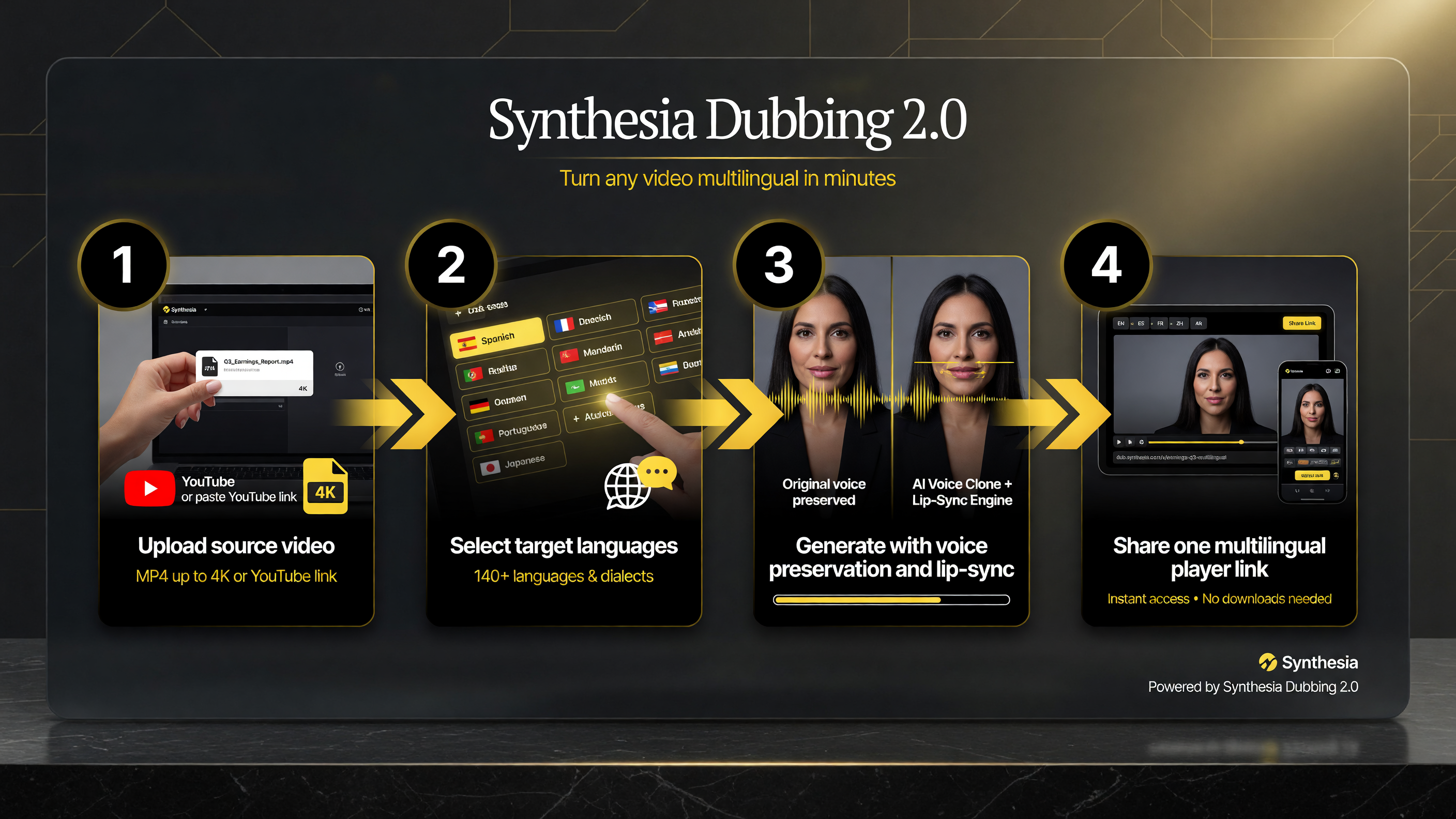
The whole dubbing flow is four steps: upload the source, pick target languages, generate with voice preservation and lip-sync, then share one multilingual player link.
Step 1: Upload Your Source Video
You can upload an MP4, MOV, or WebM file up to 4K, or simply paste a YouTube link. Synthesia auto-detects the source language, so you do not need to tell it what language the video is in.
Step 2: Select Your Target Languages
Pick one target language or several — the platform supports 140+ languages and regional dialects, including British versus American English and Latin American versus Castilian Spanish, and it handles right-to-left scripts. You can generate multiple language versions from a single upload rather than re-dubbing each time.
Step 3: Generate and Fine-Tune
Hit generate and the video is dubbed with voice preservation and lip-sync. From there you can edit the transcript in either the source or target language, apply a glossary to lock in consistent terminology and pronunciations, and regenerate iterations at no extra cost. Subtitles are auto-generated and can be toggled on or off.
Step 4: Share a Multilingual Player Link
Instead of hosting five files, you share one link and viewers automatically see the video in their preferred language, with the option to switch. This is a practical win for marketing teams and course creators who want a single asset serving every region.
Voice Preservation: The Feature That Matters Most
The single biggest reason to consider Dubbing 2.0 over a cheap AI voice tool is voice preservation. When your Spanish-speaking audience hears the same confident tone and pacing as your English original, the video builds the same trust. A cloned voice that keeps emotional delivery is what separates a premium brand asset from an automated translation.
The multi-speaker handling is where most competitors stumble. A customer testimonial video with three people talking is the hardest case for dubbing software because each speaker needs a consistent cloned voice that matches their on-screen moments. Synthesia handles that by cloning each speaker separately and routing dialogue to the right voice — so an interview or panel discussion stays coherent, or at least as coherent as this rapidly improving category gets.
For creators this matters on practical ROI: a testimonial library, a webinar replay, or a founder-led explainer can all be dubbed once and distributed across every market where your product sells. The time saved versus recording localized versions with real studio talent is substantial, especially at the pace small teams need.
Synthesia Dubbing 2.0 Pricing: What It Costs
Dubbing is not sold as a standalone line item; it runs on Synthesia’s credit-and-minute billing, so dubbing minutes draw from your plan. There is no separate public per-minute dubbing rate broken out, which makes cost comparison harder — but the structure is clear enough to plan around.
| Plan | Typical Monthly Price | What You Get |
|---|---|---|
| Free / trial | $0 | First minute free; launch promo of 15 free dubbing minutes per day (~450 total) through Aug 15, 2026 |
| Starter | ~$19–29/mo (annual) | ~10 video minutes per month base; watermark present |
| Creator | ~$64–89/mo | ~30 minutes per month; more languages and controls; watermark removal |
| Enterprise | Custom | Bulk + API dubbing, SSO, higher usage, dedicated support |
Read that table honestly: dubbing is not a free feature, and heavy dubbing volume will consume your monthly minutes fast. If you plan to dub regularly, the Creator tier with watermark removal is where the math starts to make sense — but test the free promotional minutes first to see whether the output quality justifies the spend for your specific content.
Who Should Use Synthesia Dubbing 2.0
The tool is genuinely useful for a specific set of people, and overkill for others. You are a strong fit if you are a course creator, marketer, sales-enablement team, or business communicating to international customers or employees. A single founder recording one long-form content piece and dubbing it into your biggest export markets gets more value than someone dubbing a handful of short social clips.
You should probably skip it if you only need subtitles, or if you produce a small volume of content in a single language. Subtitles are free and universally supported; dubbing is an investment in attention and reach that pays off when localization is a real growth lever for your brand.
Real Use Cases for Dubbing 2.0 in 2026
The strongest use cases cluster around content that already has production value and needs to travel. A course creator who records a ten-part training series once can have every module dubbed into the languages their students actually speak, which removes the biggest reason international students bounce: watching a lesson in a language they half-understand. The same logic applies to internal onboarding and compliance training at companies with distributed workforces — one consistent, natural-sounding training video with the original trainer’s voice reaches every region without re-shooting a single scene.
Marketing teams get a different kind of win. Hero product videos, launch explainers, and founder-led pitches that perform well in English can be tested across export markets without committing to full localized production. Instead of paying for voice talent and studio time in five languages, you dub the original and watch engagement data tell you which markets are worth a deeper investment. That test-driven approach is exactly how lean teams justify localization spend: let the cheap experiment surface the high-ROI market, then go deeper there.
Sales-enablement and customer-education content is the third strong fit. A sales demo or help-center explainer that a support team currently records repeatedly in different languages can be standardized, dubbed, and kept consistent. Consistency is quietly valuable here — every viewer sees the same branded, on-message video rather than a patchwork of region-specific recordings that drift in quality and tone over time.
The ROI Math for a Creator or Small Business
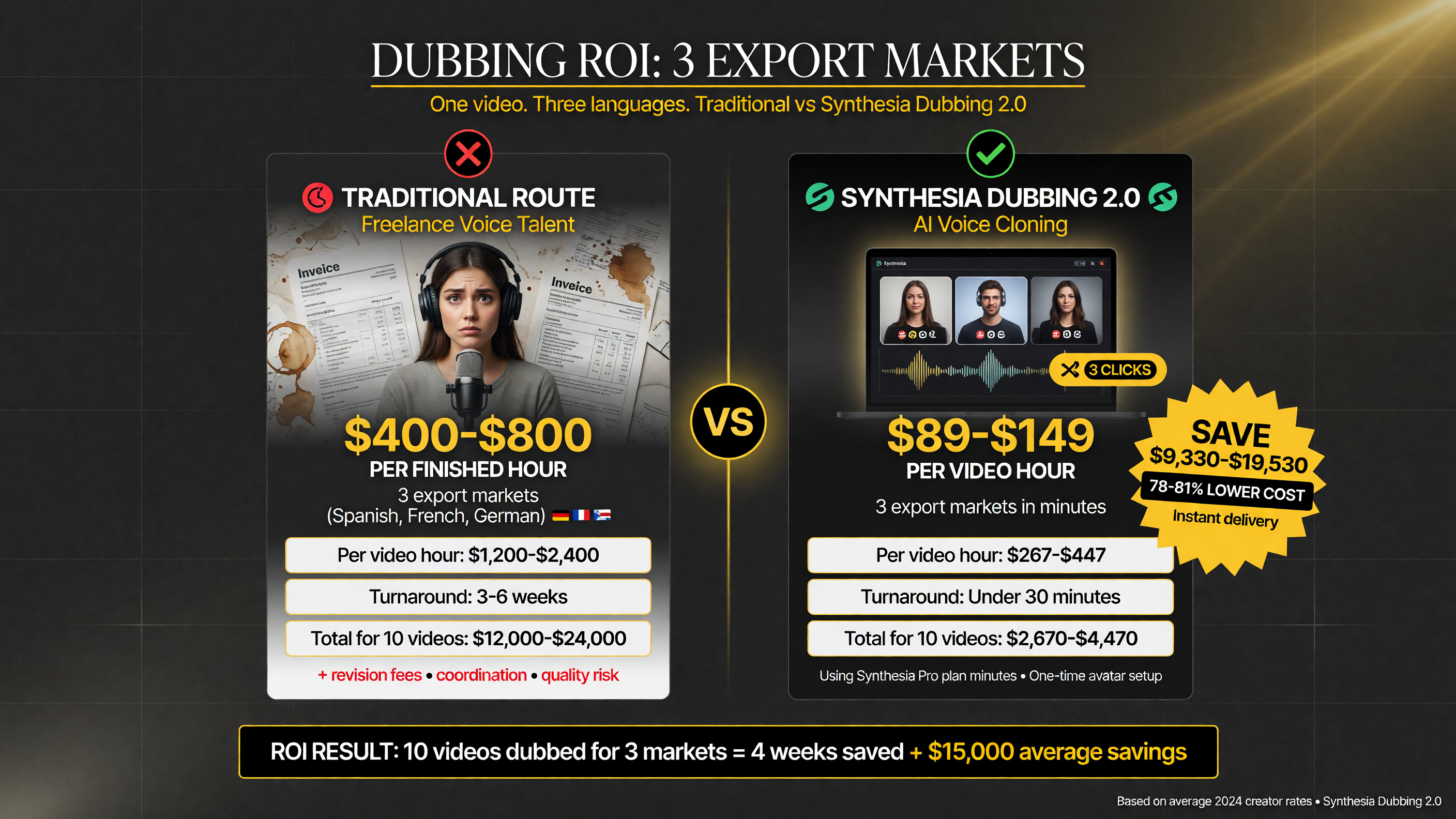
Localizing 3 export markets with traditional voice talent typically costs hundreds per finished hour plus weeks of turnaround. Dubbing 2.0 runs on your plan minutes — a few clicks per video.
Let’s put real numbers around it. A solo course creator who wants to serve three additional export markets has two realistic options. The traditional route is recording three localized versions of each lesson with a freelance voice artist, which means paying for three sessions of studio time, coordinating scheduling, and matching the pacing of the original — a cost that often lands in the hundreds of dollars per hour of finished content and weeks of turnaround.
The Dubbing 2.0 route is a few clicks per video after the initial upload, drawing from the minutes your Synthesia plan already includes. There is no separate creative coordination, no scheduling, and no talent booking; the bottleneck becomes the render, not the production calendar. The trade-off is that you are relying on AI lip-sync and voice preservation rather than a human performance, so quality expectations should be realistic — but for training, explainer, and marketing content, natural AI dubbing is increasingly good enough to ship, and the speed advantage is decisive for teams that publish on a cadence.
That speed advantage compounds. Because you can regenerate iterations at no extra cost and apply glossaries to lock terminology, the first pass does not have to be perfect. You publish, watch the engagement data in each market, and iterate on the transcripts that matter — a workflow that is fundamentally cheaper and faster than booking another studio session every time you want to tweak a phrase.
How Dubbing 2.0 Compares to Just Using Subtitles
This is the decision most creators actually face: invest in AI dubbing or keep shipping subtitled videos. The data-driven case for dubbing is engagement — viewers engage more with content in their own language delivered by a familiar voice than they do with a subtitle track they have to read. For marketing and training content specifically, that higher engagement translates into better completion rates and stronger recall, which is why enterprise teams keep investing in it.
Subtitles remain cheaper and faster and are the right call in many scenarios, especially for short social clips or content where the original voice is already charismatic enough to carry the message. But for hero assets, course libraries, and customer-facing training, the natural voice-preserving dub from Dubbing 2.0 is the upgrade that makes localized content feel like a real product rather than an afterthought.
FAQ
Is Synthesia Dubbing 2.0 free?
There is a free tier where the first minute of dubbing is free, plus a launch promotion giving 15 free dubbing minutes per day (up to ~450 total) from mid-July through August 15, 2026. After that, dubbing consumes minutes from a paid Synthesia plan.
How many languages does Synthesia Dubbing 2.0 support?
It supports 140+ languages and dialects, including regional variants like British versus American English and Latin American versus Castilian Spanish, plus right-to-left scripts. You can generate multiple language versions from a single upload.
Does Synthesia Dubbing 2.0 keep my voice or use a generic AI voice?
It preserves the original speaker’s voice, tone, emotion, cadence, and delivery. In multi-speaker videos, it clones each speaker separately so the right voice matches the right person.
What video formats can I upload for dubbing?
You can upload MP4, MOV, or WebM files up to 4K resolution, or paste a YouTube link. The source language is auto-detected.
Is Synthesia Dubbing 2.0 good for lip-sync?
Yes — the 2.0 release introduced a state-of-the-art lip-sync model that handles complex scenes like side angles, occlusions, dynamic close-ups, fast cuts, and multi-speaker content.
Looking for a faster, cheaper way to repurpose one video into many clips without dubbing at all? Read our Vizard AI review to see how auto-clipping compares for social-first creators.
Disclosure: This article reflects Synthesia Dubbing 2.0 as of August 2026. Pricing and features change; verify current details on Synthesia’s pricing page before committing.

About Barak Schurr
Barak Schurr is a serial entrepreneur who built and exited a major ticketing platform before turning his attention to AI and content. He runs three AI-focused research sites and writes about the tools, workflows, and strategies that let solo creators build real channels — without a crew, a studio, or a Hollywood budget. Contact: [email protected]
More AI Video Resources